Claude Control
The control panel for Claude Code, right in your editor sidebar.
Watch every live session and its subagent tree, get told the moment one needs you, find the config that is broken without saying so, read your token and cache analytics, and edit models, permissions, MCP servers, skills and hooks without opening a single JSON file.



no telemetry · no third parties · VS Code + Cursor · macOS · Windows · Linux
Plan usage, live in your status bar

Your session (5h) and weekly (7d) usage, each with its own gauge and color — green → amber → red as you consume. Auto-refreshes every 60s; click it to open the panel.
Why Claude Control
Claude Code tells you almost nothing about itself. Sessions run in terminals you cannot see; a hook whose script you deleted fails in silence; a settings.json with a trailing comma is ignored whole; a skill defined twice quietly loses to the other copy; and the token accounting for every turn sits on your disk unread.
Claude Control reads all of it — from ~/.claude and your project's .claude/ — and puts it in one panel. Nothing leaves your machine.
- It watches. Every session on the machine, what each one is doing right now, and which one is stuck waiting for an answer.
- It acts. Resume, inspect or stop a session. Flip plugins. Install hooks. Move a leaked API key out of a config file.
- It checks. The failures Claude Code never reports, found before they cost you an afternoon.
- It stays out of the way. Native look that adapts to your theme, with a precise, instrument-panel aesthetic.
Features
📡 Live — every session, everywhere
The tab that makes the rest make sense. Claude Code keeps a registry of running sessions, so this is not a guess:
- Every session on the machine, grouped by project, with the open one first — including sessions in terminals outside your editor.
- What it's doing this second — "editing
main.js", "running npm test", "delegating to a subagent" — with its live to-do list and progress.
- The subagent tree, nested by real parentage, each agent showing its type, task, tokens and whether it is still running.
- "Waiting for you" — a session blocked on a question is highlighted, flagged on the tab and in the status bar, and can raise a notification. It is the one thing you genuinely cannot see from another window.
- Actions: resume in a terminal at the right directory, open the transcript, open the folder, or stop a stuck session.
📊 Metrics — where your plan actually goes
- Session (5h) and weekly (7d) usage, the same numbers as
/usage, with a trend sparkline.
- Burn rate: how fast the window is filling and when it runs out — or that it resets before it can.
- Tokens by day, project and model, counted from your own transcripts.
- Which tools it reached for, and how often they failed — a tool erroring one
call in ten is a broken setup nothing else tells you about.
- When you actually work — a 24-hour histogram of your turns.
- Cache efficiency — the share of each prompt replayed from cache rather than re-sent. It is the number that decides what a long session costs, and nothing else surfaces it.
- No monetary estimate, on purpose: prices change, and a stale table would print confident wrong numbers.
🔎 Prompt search — everything you have ever asked
Claude Code records every prompt you send, across every project. Claude Control: Search prompt history searches all of it — ranked by where the term falls, whole-word hits and recency — then resumes that session, copies the prompt, or opens its transcript. Every other search in this ecosystem stops at one conversation.
🩺 Doctor — the failures nothing reports
- Secrets in plain text across
settings.json, ~/.claude.json, project settings and .mcp.json — masked, with one click to move them to a ${VAR} reference (file backed up, export line copied to your clipboard).
- Broken hooks — a script that is missing or not executable, ignoring the ones deliberately guarded with
[ -x … ].
- Invalid JSON, which makes Claude Code discard an entire config file without a word.
- MCP servers that need to sign in again, and skills/agents/commands shadowed by a duplicate name.
- Disk usage per cache directory, with guarded cleanup and an archive that moves old transcripts aside rather than deleting them.
|
|
| 🧠 Claude Code |
Set the model, reasoning effort and startup permission mode; edit the allow / ask / deny rules and environment variables, validated before they're written. |
| ⚡ Hooks |
Every 2.x event, plus a library of six ready-made hooks — protect secret files, keep writes inside the project, format after each edit, audit shell commands, run tests before finishing, log session starts — installed as real scripts you can read and edit. |
| 🧩 Plugins |
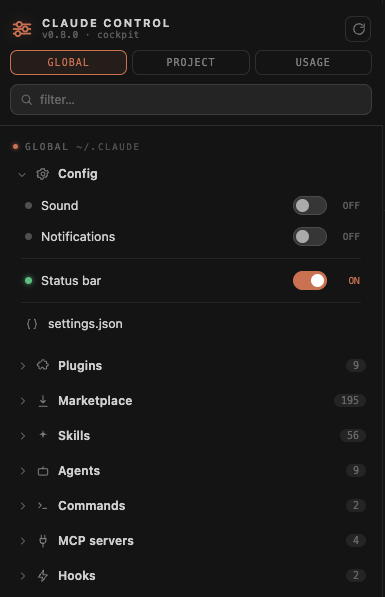
Enable/disable with a switch and install new ones from your marketplace. Written safely, with a backup. |
| ✨ Skills · Agents · Commands |
Browse everything from your plugins and your own, see which plugin each came from, and scaffold new ones with current frontmatter. |
| 🔌 MCP servers |
See every configured server (from both settings.json and ~/.claude.json) and add popular ones from a curated list. |
| 🔔 Notifications |
Toggle Claude Code sound and desktop notifications — and install the hooks in one click if you don't have them. |
| 📁 Project scope |
CLAUDE.md, project settings.json, commands/, skills/, agents/ and .mcp.json for the open folder. |
Compatibility
- Editors: Visual Studio Code and Cursor (any VS Code 1.75+ compatible editor).
- Platforms: macOS, Windows and Linux. Paths are resolved per-OS; everything reads from your local
~/.claude and workspace.
- Language: the UI defaults to English, with Portuguese (pt-br) auto-selected when your editor's display language is Portuguese.
Install
Cursor — open Extensions, search for "Claude Control", and install. (Cursor uses the Open VSX registry, where this extension is published.) Or grab it from the Open VSX page.
VS Code — not on the VS Code Marketplace yet. Download the latest claude-control.vsix from Releases, then run "Extensions: Install from VSIX…".
Then reload the window and click the sliders icon in the Activity Bar.
Privacy
Claude Control runs on your machine and has no telemetry and no third parties.
It makes exactly two network requests, both to Anthropic, both switchable off:
- The plan-usage gauge reads the existing local Claude Code token (from
~/.claude/.credentials.json or the macOS Keychain) and calls Anthropic's own usage API — exactly what /usage already does. Results are cached in a temporary file shared with Claude Code's own statusline, so we rarely call it at all. The token is never logged, stored, or sent anywhere else. Off via claudeControl.planUsage.enabled.
- The status banner fetches the public status page (
status.claude.com) every five minutes to tell you when Claude Code or the API is degraded. It is an anonymous GET: no token, no cookie, no query string, no identifying header — the same request your browser makes when you open that page, carrying nothing about you or your machine. Off via claudeControl.status.enabled, and then it is never requested at all.
Neither is telemetry: nothing is ever reported about you, to us or to anyone. We have no server.
Everything else — sessions, subagents, metrics, health checks — is computed by reading your local files. Transcripts are never uploaded and never leave the machine, and the Doctor's secret scanner only ever displays a masked value (pk_4••••552G); the full credential is written nowhere except back into your own config or your clipboard, and only when you ask for it.
Requirements
Claude Code installed, with its configuration in ~/.claude. The panel reads whatever is there; nothing else to set up.
Good to know
- Most config changes — plugins, model, effort, permissions, hooks — take effect when you restart your Claude Code session (the panel reminds you). A
.bak backup is written before every change.
- Sound / notification toggles rely on hook scripts installed from here, because those are what read the on/off flags. If yours came from somewhere else the panel says so in Doctor rather than showing switches that do nothing.
- The live usage gauge uses the same Claude.ai login token that powers
/usage. If you authenticate only with an API key the gauge stays empty — everything else still works.
- Live sessions need Claude Code 2.1 or newer — that is when the session registry arrived. Everything else works on older versions.
- Stopping a session sends SIGTERM, so Claude Code flushes its transcript and cleans up. Anything it had not yet written is lost — hence the confirmation.
- The first Metrics load parses your transcripts once (about a second for ~100 sessions); after that results are cached per file and only what changed is re-read.
Contributing
See CONTRIBUTING.md. It's a small, no-build plain-JS extension: npm install, then press F5 to launch an Extension Development Host. npm test runs the unit tests and npm run lint the linter.
The data layer lives in src/ — one focused module per concern (registry, session, agents, metrics, doctor, config, hooklib, actions), all pure enough to test without VS Code. The webview is four plain scripts in media/, loaded in order: icons → ui → views → main.
License
MIT © Lucas do Nordeste
| |

