MoLaView
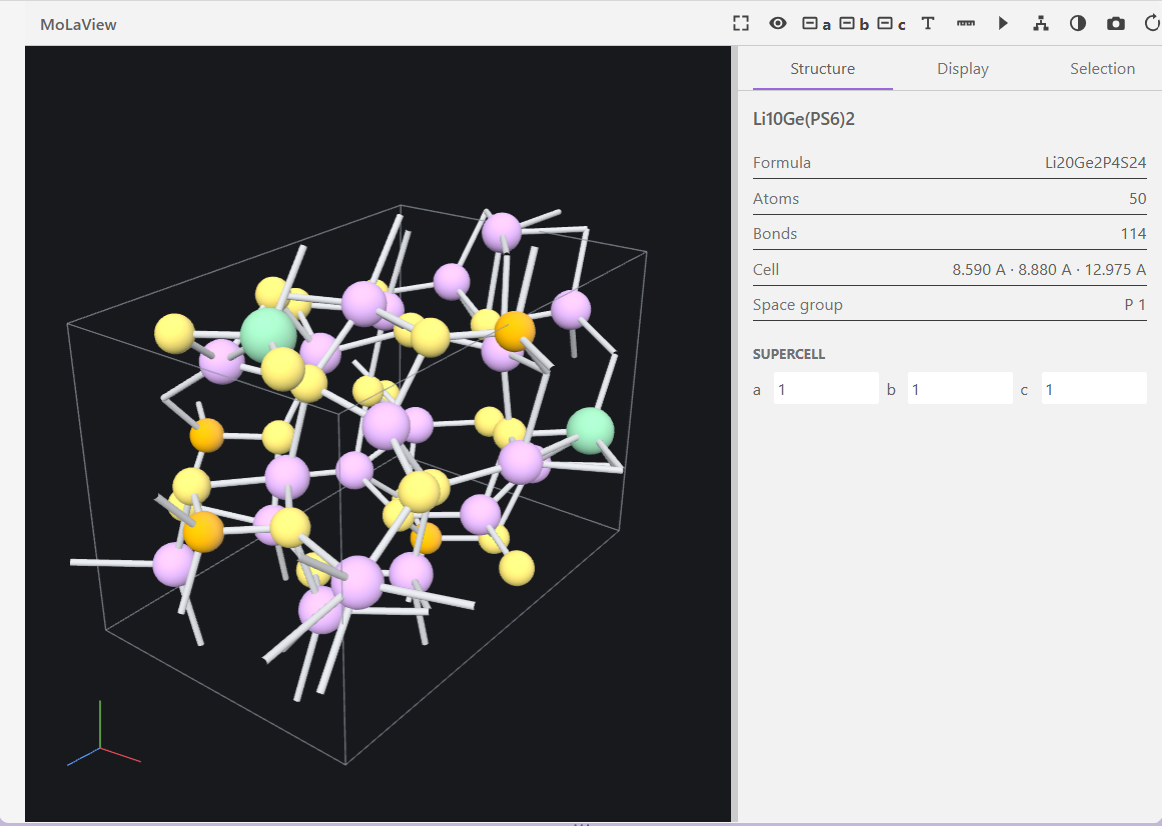
Open molecular and crystal structure files directly in a Visual Studio Code editor tab and inspect them in interactive 3D.
Built for local and Remote SSH materials workflows: no Python environment, no external application, no server, and no network access. The extension installs no runtime dependencies - the one bundled third-party component, the GIF encoder, is compiled into the webview script - and the whole package is about 60 KB.
Features
- 3D structure view with ball-and-stick, sticks, and space-filling representations
- Crystal support including unit cells, lattice-axis alignment, and on-the-fly supercell expansion
- Trajectories with play, pause, step, scrub, and loop controls, at 1-50 fps
- Measurements for distance, angle, and dihedral between picked atoms
- Inspectors for composition, lattice details, metadata, element visibility, and bond-detection tolerance
- PNG export of the current view, and animated GIF export of a whole trajectory
- Perspective and orthographic projection, atom labels, and a light/dark canvas toggle
Install
Search for MoLaView in the Extensions view (Ctrl+Shift+X), or install from the
command line:
code --install-extension ltlinh.molaview
Then open any supported structure file and it renders in the viewer.
Build from source
git clone https://github.com/linhlathuy/molaview
cd molaview/
npm install
npm run build
npx @vscode/vsce package
code --install-extension molaview-1.1.0.vsix
See the install guide for the full walkthrough, including
Remote SSH notes.
Test the viewer with the structures and trajectories in test_structures.
Repository Layout
src/        extension host code
webview/    viewer UI and WebGL renderer
playwright/ end-to-end tests
config/     esbuild and Playwright configuration
docs/       install guide, notices
Build and test from the project root:
npm run build      # bundle into dist/
npm run typecheck  # tsc --noEmit
npm run test:e2e   # Playwright end-to-end tests
npm run verify     # all three
Supported Files
- CIF, including cell parameters and common symmetry-operation loops
- VASP
POSCAR, CONTCAR, and .vasp, including suffixed names such as POSCAR_1
- VASP
XDATCAR trajectories
- XYZ and extXYZ, including multiple frames and
Lattice metadata
- PDB and ENT, including multiple
MODEL records and CONECT bonds
- V2000 MOL and SDF, including multiple SDF records
- ASE ULM
.traj
Supported files open in the viewer by default. Use Reopen Editor With... > Text Editor or Molecular Viewer: Reopen as Text to inspect the source.
ASE trajectories expose every frame by default. Frames are read on demand, so a long
trajectory opens immediately and only the frames you visit are decoded.
Set molaview.trajectory.maxFrames to a positive number to cap how many frames are
loaded; the viewer then spreads that many evenly across the trajectory, always keeping
the first and last frame. The playback label shows Frame 250/2500 when every frame is
loaded, and Sample 3/11 - Frame 250/2500 when a cap is active. Reopen the file after
changing the setting.
Controls
- Left drag rotates, right drag pans, and the wheel zooms.
- The top toolbar fits the structure, changes projection, aligns along lattice axes, toggles labels, selects distance/angle/dihedral measurement modes, changes the canvas background, saves a PNG, exports an animated GIF, and resets the viewer.
- GIF export walks the whole trajectory at the current camera angle and display settings, using the selected playback speed as the frame delay. Progress is shown while it runs and can be cancelled. Exports are limited to 600 frames; use
molaview.trajectory.maxFrames to sample a longer run down first.
- The Structure inspector shows composition, lattice details, metadata, and supercell controls.
- The Display inspector changes representation, sizes, visible geometry, element visibility, and inferred-bond tolerance.
- The Selection inspector shows picked atoms and completed measurements.
- Multi-frame files display play, pause, step, scrub, speed, frame, and loop controls. Playback runs at 1, 2, 5, 10, 20, 30, or 50 fps.
Offline and Remote Use
All parsers, WebGL rendering code, styles, and icons are bundled in the VSIX. The extension does not make network requests or launch external programs. In Remote SSH sessions, file parsing runs in the remote workspace extension host and the interactive editor is rendered by the local VS Code client.
Current Scope
MoLaView is a read-only atomic-structure viewer. It does not display volumetric density, edit atoms, export modified structure files, parse V3000 MOL records, or read obsolete pickle-based ASE trajectories. CIF support targets the common structural subset and reports unsupported or malformed variants instead of guessing coordinates.
VESTA Reference Boundary
VESTA informed the workflow and terminology only. This extension does not contain, modify, call, or redistribute VESTA code, binaries, configuration, or artwork. VESTA remains a separate copyrighted application by Koichi Momma and Fujio Izumi.

