FireArm Emulator
Write, assemble, run and debug ARM assembly programs in VS Code. FireArm Emulator emulates the
SSPARCSS ARM7TDMI system used in FER's computer architecture courses. Programs give the same
results as the original SSPARCSS simulator: the same .e files and error messages, and the
same registers, memory, peripheral behaviour and timing, clock for clock.
Version 0.1. ARM only; RV32I / FRISC comes later.
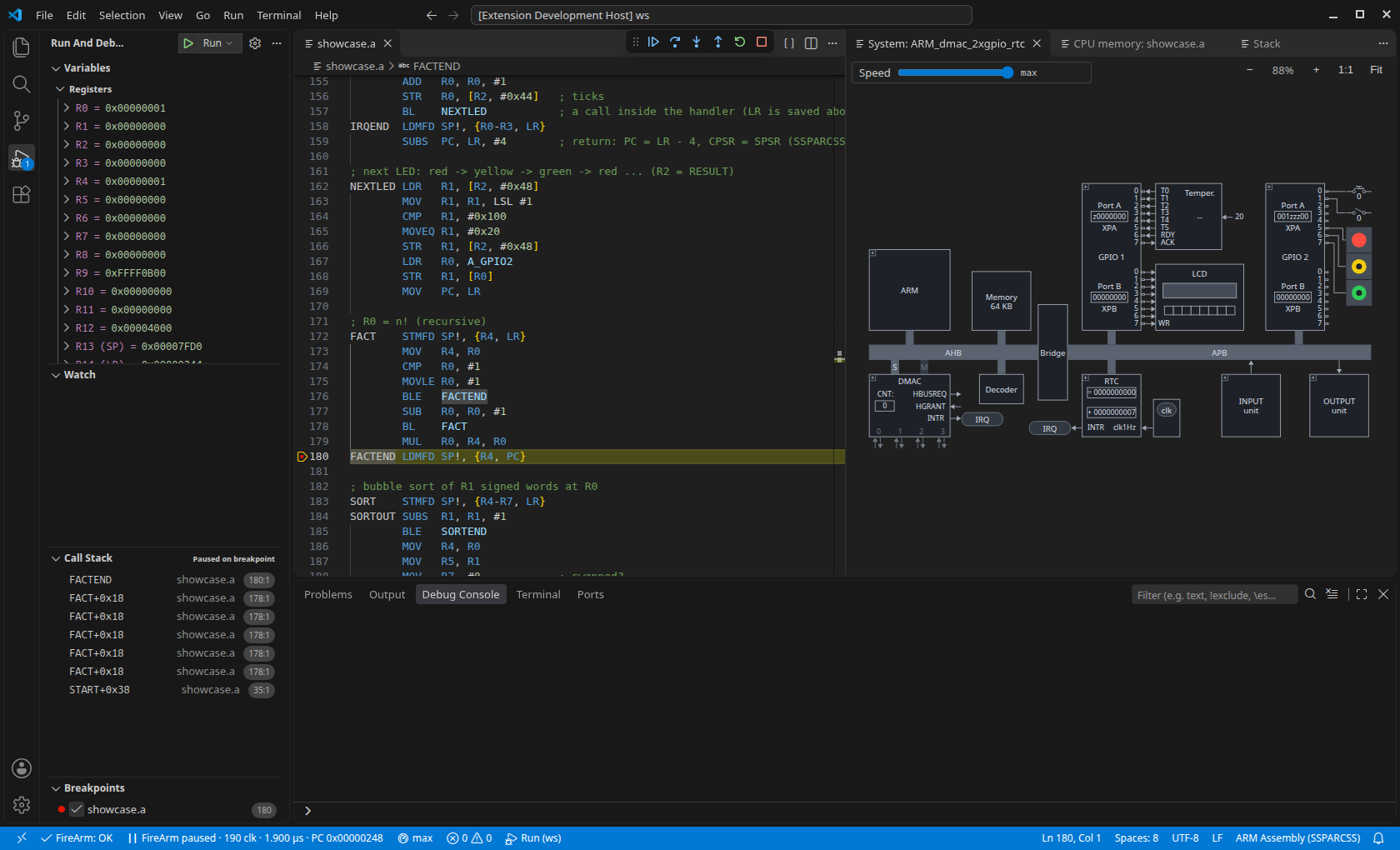
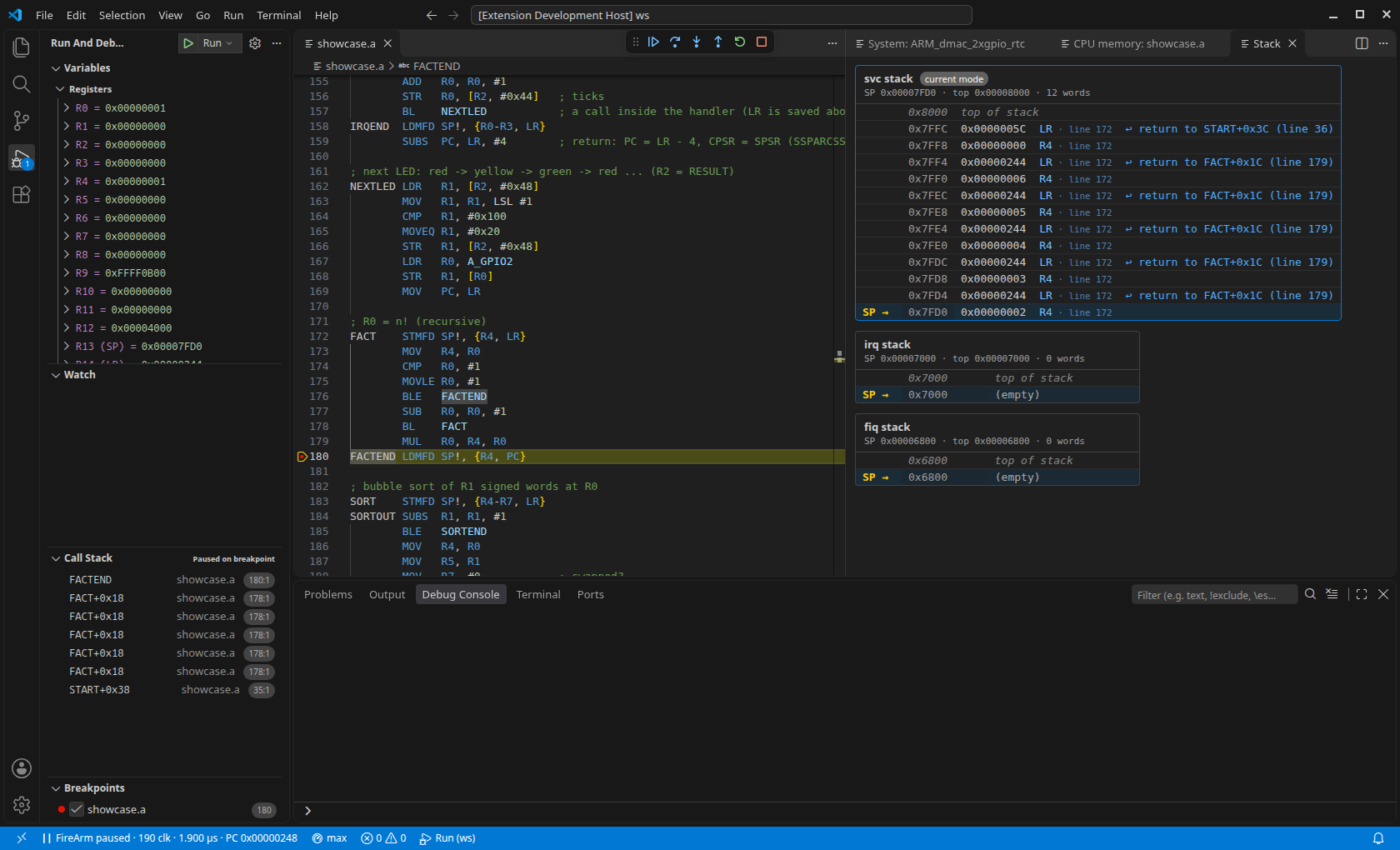
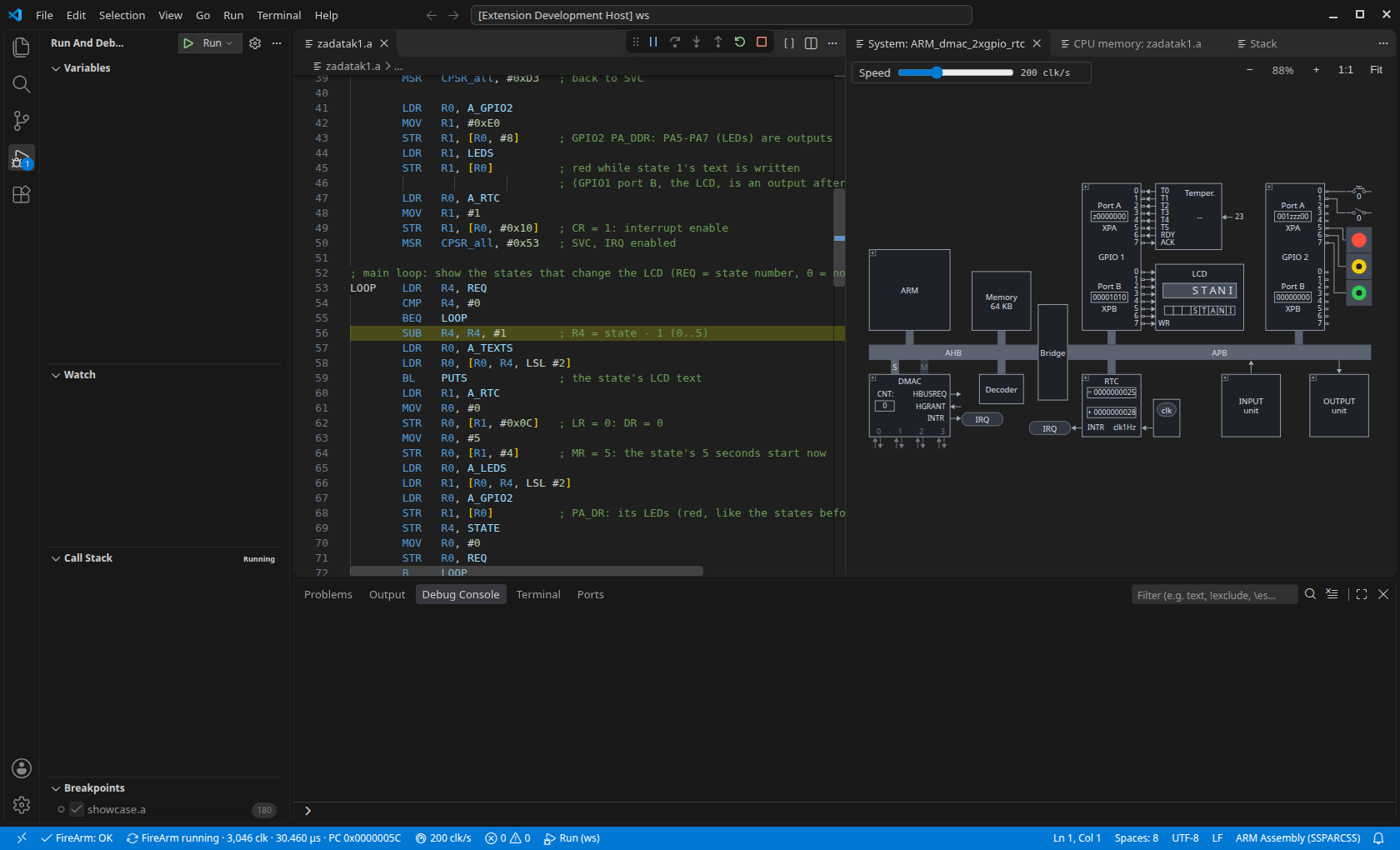
Features
Editor
- Syntax highlighting, snippets (program skeleton with the exception vectors), hover help for
instructions and labels, go to label definition.
- Errors and warnings while you type, with the reference assembler's exact messages.
.e file written next to the .a file on save (firearm.writeEFile), or with
FireArm: Assemble (F7).
Running and debugging (VS Code's debugger)
- F5 or the ▶ button runs the active
.a file. No launch.json needed.
- Breakpoints, including conditional ones (
R0 == 7), hit counts (5, >= 5, % 3) and logpoints
(i={R0} sum={R1}), instruction breakpoints in the disassembly view, and data breakpoints that
stop when a register or a memory word changes.
- Continue, pause, step, step over (a whole
BL call), step out (of a call or an interrupt
handler), restart (re-assembles the file).
- Variables: R0–R15, CPSR and SPSR with their flags and mode, the banked registers of every
mode, all labels with the word, halfword and byte stored there, clocks and simulated time. Every
value can be edited. Expand a register to see it as unsigned, two's complement, one's complement,
sign-magnitude and binary.
- Call stack from
BL calls and IRQ/FIQ entries. Watch and the Debug Console take
expressions: registers, flags, labels, [address], arithmetic, comparisons.
- A processor error (unaligned access, undefined instruction, ...) stops at the failing line with
the reference simulator's message.
System view, memory view, stack view (tabs beside the code)
- The SSPARCSS ARM system diagram, live: LEDs, the LCD and its buffer, GPIO pins, RTC, DMAC, I/O
units. Click the push and toggle buttons, set the temperature, feed the INPUT unit, switch the
RTC and DMAC interrupts between IRQ and FIQ. Click a component (e.g. the CPU) to open its
registers; panels can be moved and resized.
- Speed slider: from 1 clock per second to full speed, changeable while the program runs.
At low speeds the editor follows the executing line.
- Memory view of the 64 KiB memory with source annotations, PC/SP markers and editing.
- Stack view: one stack per processor mode, which register each slot was pushed from, and
where each return address leads.
Getting started
After installing, the Get started with FireArm Emulator walkthrough opens (also under
Help: Welcome → Walkthroughs).
- Run FireArm: Open Examples (Command Palette, or the walkthrough's button). It copies the
example programs into a
firearm-examples folder you choose, with an index, and opens it.
- Open an
.a file and press F5. The system, memory and stack views open beside it.
- Set breakpoints by clicking left of the line numbers; use the debug toolbar to step.
Examples: leds.a (buttons and LEDs), lcd_hello.a, temperature.a, rtc_irq.a (RTC
interrupts), dma_copy.a, and two larger programs that use the
whole system: showcase.a (recursion, stacks, sorting, LCD, DMA, RTC, IRQ/FIQ) and
fiq_showcase.a (everything about FIQ: set sel_2 to FIQ before running it).
examples/labs/ has typical lab tasks: array statistics, string functions, 64-bit arithmetic and
division, parameters on the stack with recursion, and an LED counter driven by RTC interrupts.
examples/lab2/zadatak1.a solves Lab 2 of Arhitektura računala 1R (2022): a traffic light for cars
(LEDs) and pedestrians (LCD) timed by RTC interrupts.
Settings
| Setting |
Default |
|
firearm.simulationSpeed |
100 |
Simulated clocks per second; 0 = as fast as possible |
firearm.viewLayout |
tabs |
tabs: the views share one editor group; sideBySide: one column each |
firearm.assembleOnSave |
true |
Assemble on save |
firearm.writeEFile |
true |
Write the .e file when assembling on save |
firearm.memoryCodeLens |
true |
"Show in memory" above labels |
firearm.openMemoryWithSystemView |
true |
Open the memory view with the system view |
firearm.cpu.reproduceKnownBugs |
false |
Reproduce the bugs FER lists as known SSPARCSS bugs (see below) |
firearm.modelsPath |
|
Folder with the SSPARCSS COMDEL models, if you want the diagram drawn from them |
firearm.systemFile |
arm/ARM_dmac_2xgpio_rtc.system |
System shown in the system view (with modelsPath) |
Differences from SSPARCSS
Same as SSPARCSS, on purpose. The simulator reproduces the original's measured behaviour,
including where it differs from a real ARM7TDMI (for example: the carry of rotated immediates,
LSL by R0, STR PC storing address + 4, STM/LDM with the base in the list, unaligned word
access halting, SWI ending the program). The full list is in src/arm/cpu/arm7.ts (D01–D14).
The assembler accepts exactly what SSPARCSS accepts; for example, LDM … ^ is not supported.
Fixed: bugs FER lists as known SSPARCSS bugs.
MOVS Rd, Rm without a shift sets N and Z correctly (SSPARCSS leaves them stale; its workaround
was MOV + TST Rd, Rd).- The register preview shows sign-magnitude values of negative numbers correctly.
Set firearm.cpu.reproduceKnownBugs to get the original behaviour back.
Designed differently (no effect on programs).
- Every run goes through VS Code's debugger; the views are VS Code tabs.
- The IRQ/FIQ selectors can be clicked at any time and are remembered. As in SSPARCSS, the
routing never changes during a run: a change takes effect from the next run.
- Speed control, stack view, data and conditional breakpoints, disassembly: SSPARCSS has none of
these.
- No crashes, hangs or blocking pop-ups: errors are reported in the editor and the Debug Console.
How it is tested
Every part is compared with FER's original tools, run headless under Wine:
- Assembler: 376 programs, byte-identical
.e files and identical messages.
- CPU: 169 programs, identical registers (all banks), memory and time.
- Peripherals and interrupts: 95 programs, identical results and timing.
- Whole programs:
showcase.a, fiq_showcase.a, lcd_hello.a, dma_copy.a and the lab tasks
match the original simulator in every register, memory byte and the exact time.
- Plus about 900 unit tests (
npm test) for the debugger, views and tools.
Reporting bugs
Found a bug, or a program that behaves differently than in SSPARCSS? Report it in the
issue tracker (also from
VS Code: Help: Report Issue…, then choose FireArm Emulator). Please include the .a program
and what you expected. Questions are welcome in the Marketplace Q & A.
Development
npm install
npm run build        # extension, webviews, system diagram (dist/)
npm test             # all tests
npm run typecheck
npm run package      # .vsix
Press F5 in this repository to start an Extension Development Host. The reference tools and the
golden corpus are described in test/golden/README.md and test/sim/arm/README.md; the plan is
in docs/ROADMAP.md and the progress in tasks.md.
Licensing
FireArm Emulator is an independent project, not made or endorsed by FER. SSPARCSS, its programs,
models and course material belong to FER; this extension does not include the SSPARCSS programs or
model files. The system diagram is generated at build time from the display descriptions in the
SSPARCSS models (dist/scenes/).
| |

