kumihimo for VS Code
Write AV signal flow diagrams (系統図) as text, and see them as you type.
kumihimo.love-rox.cc · the language
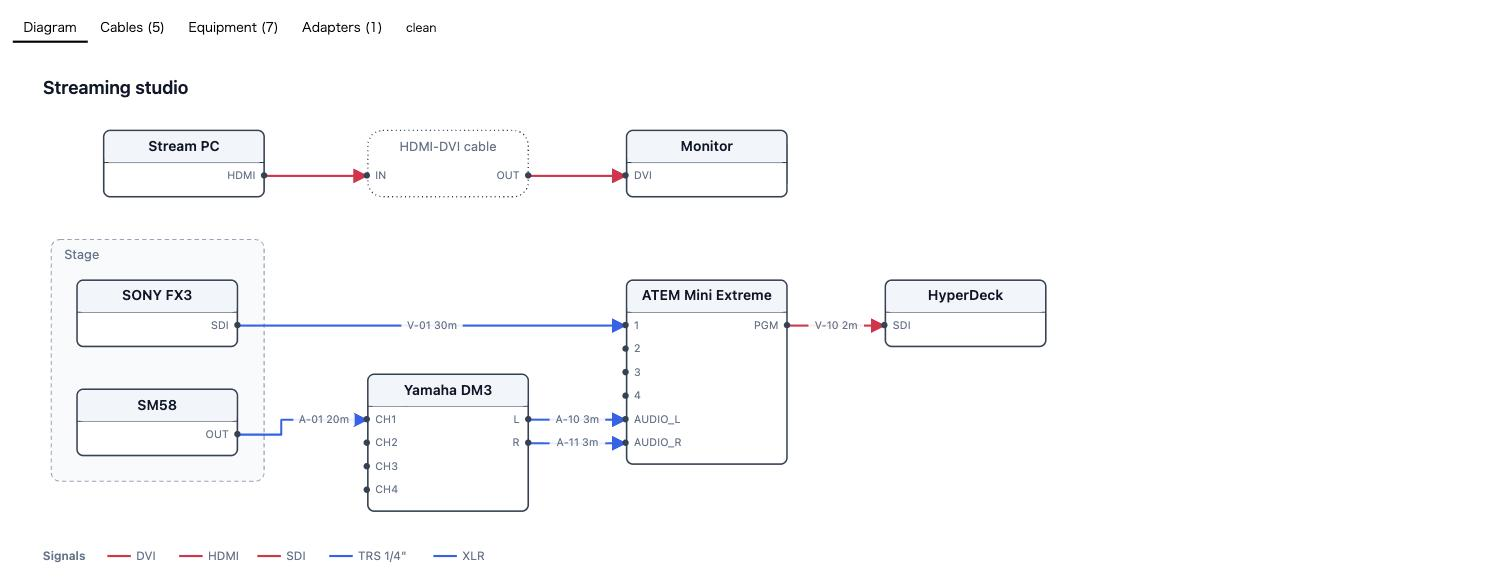
device cam "SONY FX3"  as camera   { out SDI : sdi }
device sw  "ATEM Mini" as switcher { in 1..4 : sdi  out PGM : sdi }
device rec "HyperDeck" as recorder { in SDI : sdi }

cam.SDI -> sw.1    : sdi 30m "V-01" [color=blue]
sw.PGM  -> rec.SDI : sdi 2m  "V-10"
What it does
Diagnostics as you type. Not only syntax. The connections are judged on whether they
can physically work, and every verdict carries its reason.
warning [signal-mismatch]  ext.CAT → netsw.1
  HDBaseT uses Cat cable and RJ45 but is not Ethernet. It does not go into a switch
That cable seats perfectly and carries nothing. So do dmx↔xlr, rca↔spdif,
genlock↔sdi and the rest — the faults worth catching are the ones a drawing tool
cannot see.
Live preview. ⌘K V / Ctrl+K V, or the button in the editor title bar. It redraws
as you type and follows your colour theme, unless the source names a theme itself.
The same panel carries the schedules the job actually travels with — cables, equipment and
adapters — from the same functions the CLI exports, so the drawing and the packing list
cannot disagree.

Onto paper. kumihimo: Print the diagram and schedules lays the drawing and every
non-empty schedule out for A4 landscape and opens it in your browser, where Save as PDF
lives in the print dialog. Each schedule starts its own sheet — the person holding the
cable list is not the person holding the equipment list.
Export the diagram as SVG and as PNG write the drawing on its own — the PNG at twice
its size, on white rather than transparent, because a drawing dropped into a dark document
with a transparent background loses every black line in it.
Export the schedules as Markdown gives you the tables in the format they get pasted into
more often than any other.
The drawing is compiled from a file that arrived with somebody else's repository, so the
preview puts it in an <img> rather than an inline <svg>: a browser refuses to run
script in an image, which removes the whole class rather than filtering it. The page's one
script — the canvas the PNG needs — runs under a CSP nonce and never touches the SVG as
markup.
Completions, read from the compiler itself. Signal types after : and |, device kinds
after as, jacket colours inside [color=, themes and directions in a diagram block.
Every name offered is one the compiler accepts, because both read the same list — and the
connectors are shown beside each type, which is how trs (1/4") and trs35 (3.5mm) are
told apart at the point of choosing.
Diagrams in your Markdown. A ```kumihimo block in any .md file is coloured like a
.khm file and suggests the same names — the signal types, the device kinds, the themes —
and is drawn in
VS Code's built-in Markdown preview, with the schedules folded up underneath and any
faults listed beside it. ```khm opens one too. A note that documents a rig shows the rig.
The drawing follows the preview's light or dark, and a diagram { theme: … } inside the
block still wins — a diagram that names its own look is saying something about that diagram.
The built-in preview specifically. Markdown Preview Enhanced is a separate renderer
and does not read the contribution this uses, so a block stays a code block there and says
nothing about why. If it has taken over ⇧⌘V, open the built-in one from the palette with
Markdown: Open Preview. A diagram can also be produced from a fence by running the
command-line tool — see the CLI.
Syntax highlighting and the usual bracket and comment handling for .khm.
Format Document. ⇧⌥F, or format on save. Indents by nesting, normalises spacing, and
lines the columns up down a run of ports or connections — a rack list is read by scanning a
column, and columns drift the moment anybody edits a name. Turn the alignment off with
kumihimo.format.align if you would rather have clean diffs.
In your language. The extension follows VS Code's display language, and so do the
compiler's own sentences — a panel labelled in one language listing faults in another is
worse than either language alone. English and Japanese are carried; anything else gets
English.
Settings
| Setting |
Default |
|
kumihimo.preview.theme |
auto |
auto follows the editor. light dark mono blueprint force one. A diagram { theme: … } in the source wins over both. |
kumihimo.diagnostics.enabled |
true |
Report while editing. |
kumihimo.diagnostics.delay |
250 |
Milliseconds after typing stops. |
kumihimo.preview.delay |
600 |
Milliseconds after typing stops before the preview redraws. Slower than the diagnostics delay on purpose: redrawing a whole diagram costs more than checking one line. |
Notes
The preview shows the diagram as an image rather than as inline markup. An SVG in an
<img> cannot run script, and the file being compiled arrived with somebody else's
repository — that removes the risk rather than filtering it.
The extension ships as a single bundled file. See THIRD-PARTY-NOTICES.txt for what is
inside it; elkjs in particular is EPL-2.0.
License
MIT © SASAGAWA Kiyoshi

