Qwen Commit
AI-powered commit message generator for VS Code using Qwen CLI.
⚠️ This project is no longer maintained. The original Opencode provider changed its pricing plans and discontinued the free tier.
An equivalent extension is now available using the open provider Opencode at https://github.com/darqus/open-commit-pub
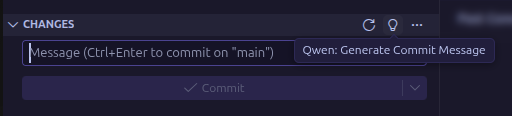
Features
- 🤖 AI-Generated Commit Messages - Automatically generates commit messages based on your code changes using Qwen AI
- 📝 Conventional Commits - Follows industry-standard Conventional Commits specification
- 🎯 Smart Integration - Seamlessly integrates with VS Code's Source Control panel
- 🌍 Multi-language Support - Available in English and Russian
- ⚡ Fast & Efficient - Uses local Qwen CLI for quick generation
- 🛑 Cancellable - Stop generation at any time
Requirements
- Qwen CLI must be installed and available in your system PATH
- Git repository initialized in your workspace
Installation
From VS Code Marketplace
- Open VS Code
- Go to Extensions (Ctrl+Shift+X)
- Search for "Qwen Commit"
- Click Install
From VSIX
- Download the latest
.vsix file from releases
- Open VS Code
- Go to Extensions (Ctrl+Shift+X)
- Click "..." menu → "Install from VSIX..."
- Select the downloaded file
Install Qwen CLI
See installation instructions at Qwen CLI repository.
Development
Prerequisites
- Node.js 18+ and npm/yarn
- VS Code
Setup
# Clone the repository
git clone https://github.com/darqus/qwen-commit-pub.git
cd qwen-commit-pub

# Install dependencies
npm install
# or
yarn install
Build
# Compile TypeScript
npm run compile
# or
yarn compile

# Watch mode for development
npm run watch
# or
yarn watch
Package
# Create VSIX package
npm run package
# or
yarn package
Install Locally
# Build and install in one command
npm run build-and-install
# or
yarn build-and-install

# Or manually install the VSIX (version will be substituted automatically)
code --install-extension qwen-commit-$(node -p "require('./package.json').version").vsix
Update Dependencies
# Update all dependencies
npm update
# or
yarn upgrade

# Check for outdated packages
npm outdated
# or
yarn outdated
Usage
Generate Commit Message
- Make changes to your code
- Open Source Control panel (Ctrl+Shift+G)
- Click the Qwen icon in the Changes section
- Wait for AI to generate the commit message
- Review and commit
Keyboard Shortcuts
- Generate commit message: Click Qwen icon in Source Control
- Stop generation: Click stop icon during generation
Generated messages follow Conventional Commits:
<type>(<scope>): <subject>

<body>
Types:
feat - New featurefix - Bug fixdocs - Documentationstyle - Code style changesrefactor - Code refactoringperf - Performance improvementstest - Testschore - Maintenance tasksci - CI/CD changesbuild - Build system changes
Example:
feat(auth): add JWT token validation

Implement JWT token validation middleware to secure API endpoints.
Includes token expiration check and signature verification.
Configuration
Currently, the extension works out of the box with Qwen CLI. Future versions will include customizable settings.
Troubleshooting
"Qwen CLI not found"
Make sure Qwen CLI is installed and available in your PATH:
qwen --version
"No changes to commit"
Make sure you have uncommitted changes in your Git repository.
"Git extension not found"
Ensure VS Code's built-in Git extension is enabled.
Contributing
Contributions are welcome! Please feel free to submit a Pull Request.
License
MIT
Credits
Powered by Qwen AI by Alibaba Cloud.

