LocalMask — Secret Prompt Builder
100% local. Nothing leaves your machine.
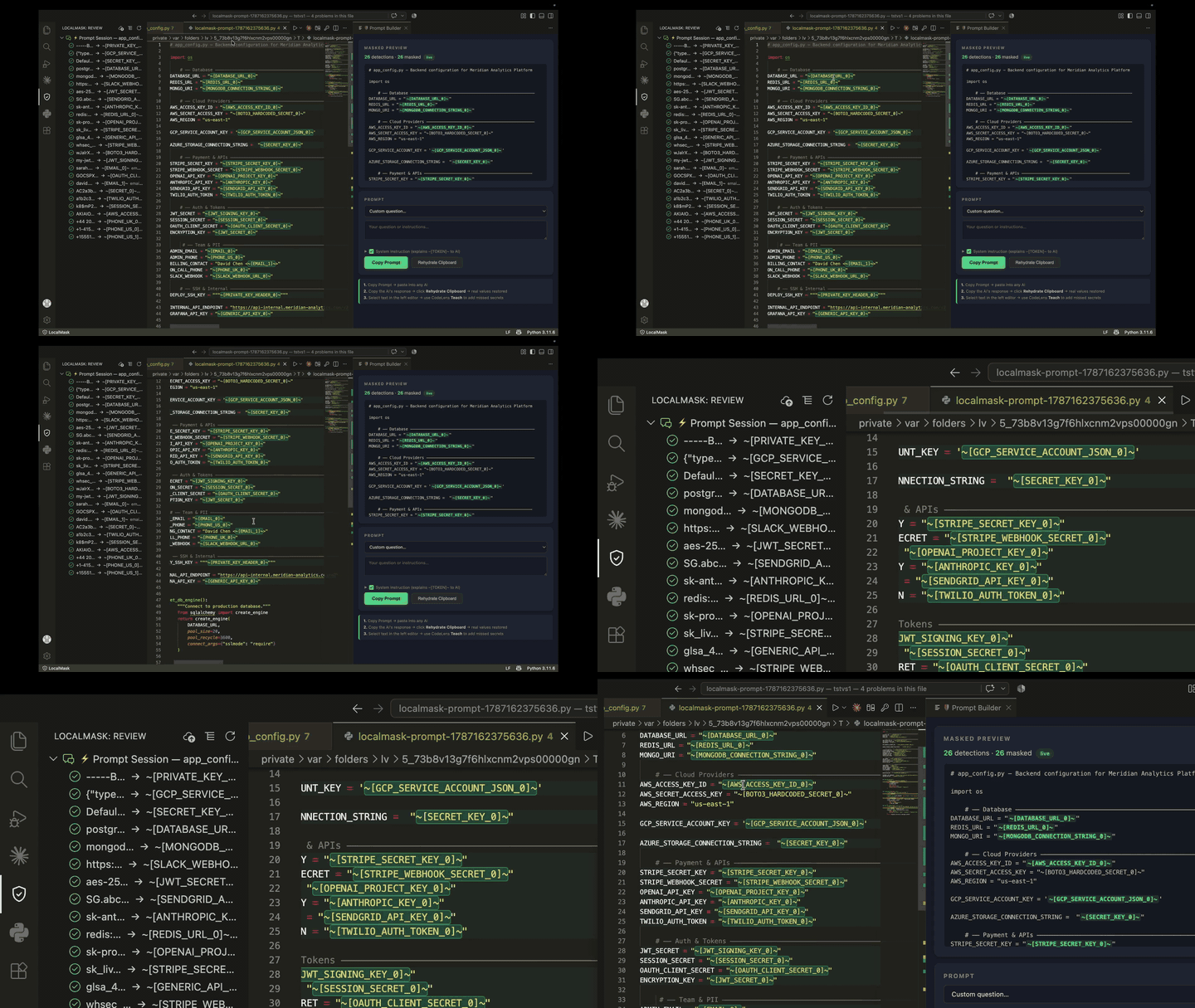
LocalMask scans your repo, replaces every secret and piece of PII with an opaque token (~[API_KEY_0]~, ~[PASSWORD_1]~), and lets you send the masked code safely to any AI — Claude, ChatGPT, Copilot, Cursor, Gemini, anything.
The real values stay on your machine. The AI only ever sees placeholders.
Demo
▶ Watch the full demo (1:50)
How it works
Your repo  →  LocalMask scans  →  secrets replaced with ~[TOKEN]~  →  AI reads safe code
                                                                          ↓
Your files  ←  real values restored  ←  Rehydrate  ←  AI writes back ~[TOKEN]~
- Scan — LocalMask finds API keys, passwords, connection strings, tokens, PII
- Review — approve (mask it) or reject (false positive) each finding
- Publish — push a fully masked copy of your repo to GitHub
- Send — paste the masked repo URL or inline content into any AI
- Rehydrate — AI's response comes back with
~[TOKEN]~ intact; LocalMask swaps real values back locally
Quick start
1. Install the CLI (one time)
macOS / Linux — open the VS Code terminal and run:
python3 -m venv ~/.localmask/venv
~/.localmask/venv/bin/pip install localmask
printf '#!/bin/bash\n~/.localmask/venv/bin/localmask "$@"\n' > ~/.localmask/localmask
chmod +x ~/.localmask/localmask
Windows — open PowerShell and run:
python -m venv $env:USERPROFILE\.localmask\venv
$env:USERPROFILE\.localmask\venv\Scripts\pip install localmask
Then reload VS Code.
2. Scan your repo
Click the 🛡 shield in the status bar → Scan.
LocalMask walks your repo and finds every secret. The badge updates: 14 findings · ⏳ 3 to review.
3. Review findings
Open the Review sidebar (shield icon in the Activity Bar). Every finding is listed by file. Click to jump to the line, then:
- ✓ Approve — mask it (the AI will see
~[TOKEN]~)
- ✗ Reject — false positive, keep readable
- Teach — select any text you want masked → right-click → Mark selection as secret
4. Send to AI with Prompt Builder
Press Cmd+Alt+M (Mac) or Ctrl+Alt+M (Windows/Linux) — or click the shield → Prompt Builder.
The panel lets you:
- See every masked secret before sending
- Write your task/question
- Publish a masked copy of your repo to a private GitHub repo
- Copy the prompt (with masked repo URL or inline content) ready to paste into any AI
Connect your AI to GitHub — in ChatGPT, Claude, or Cursor, connect the GitHub integration/plugin so the AI can read the masked repo directly and push changes to a new branch.
5. Rehydrate the AI's response
When the AI writes code back with ~[TOKEN]~ placeholders, use Pull & Rehydrate in the Prompt Builder panel — or run LocalMask: Rehydrate AI Response from Clipboard from the Command Palette. Real values are restored locally, the AI never sees them.
Features
The main entry point. Click it to:
- Scan the repo
- Open Prompt Builder
- Approve all findings at once
- Install the git commit hook (auto-sync on every commit)
🔑 Key toggle (Cmd+Alt+K)
Flip any open file between the real view and the masked view — what the AI actually sees. Reflects approve/reject decisions instantly.
Prompt Builder (Cmd+Alt+M)
A full panel for the scan → approve → publish → send → rehydrate workflow:
- Shows all masked secrets
- Publishes to a masked GitHub repo (public or private)
- Generates a ready-to-paste prompt with branch instructions for the AI
- Pull & Rehydrate: fetches the AI's branch and restores real values
Tree view of every finding. Group by file or by token type. Approve/reject per detection or per file. Click any item to jump to the exact line.
Inline highlights (opt-in)
Detected lines are tinted by state:
- Yellow — pending review
- Green — approved (will be masked)
- Gray — rejected (kept readable)
Enable in settings: localmask.inlineHighlights
Teach
Select any text you missed → right-click → Mark selection as secret. LocalMask teaches itself locally — the value goes over stdin, never argv, never any AI.
Compare (Cmd+Alt+M side-by-side)
Diff view: real file on the left, masked version on the right.
Publish masked mirror
Push a fully masked copy of your repo to GitHub. The masked repo is safe to share publicly — it contains zero real secrets. Use it as the source for AI context.
Keyboard shortcuts
| Action |
Mac |
Windows / Linux |
| Toggle masked / real view |
Cmd+Alt+K |
Ctrl+Alt+K |
| Open Prompt Builder |
Cmd+Alt+M |
Ctrl+Alt+M |
Settings
| Setting |
Default |
Description |
localmask.cliPath |
~/.localmask/localmask |
Path to the LocalMask CLI |
localmask.maxInlineTokens |
32000 |
Max tokens for inline paste mode (Claude: 200k, GPT-4: 128k, Gemini: 1M) |
localmask.maskedRepoUrl |
(empty) |
URL of your masked GitHub repo — set automatically when you publish |
localmask.inlineHighlights |
false |
Highlight detected lines in the editor |
localmask.showEditorMenu |
false |
Show the 🛡 right-click menu in the editor |
localmask.syncOnSave |
false |
Re-sync masked store after every file save |
localmask.showReviewSidebar |
false |
Show the Review tree in the Activity Bar |
localmask.teachTypes |
[] |
Custom token types for Teach (e.g. CUSTOMER_ID, IBAN) |
Privacy guarantee
- No network calls — the CLI runs 100% locally over stdio
- No telemetry — nothing is sent anywhere
- Secrets never leave your machine — the AI only sees
~[TOKEN]~ placeholders
- Teach stays local — taught values go over stdin, never in command-line args or logs
Requirements
- VS Code 1.85+
- Python 3.8+ (for the CLI)
- macOS, Linux, or Windows
License
Free for personal and open-source use.
This software is licensed under MIT + Commons Clause. You may use, modify, and distribute it freely for personal projects and open-source work. Commercial use — including selling, hosting, or reselling a product or service built on this software — requires a commercial license.
For commercial licensing: hello@localmaskpro.com
Links

