Claude Gate
Review every file Claude Code touches — accept or revert with one click.
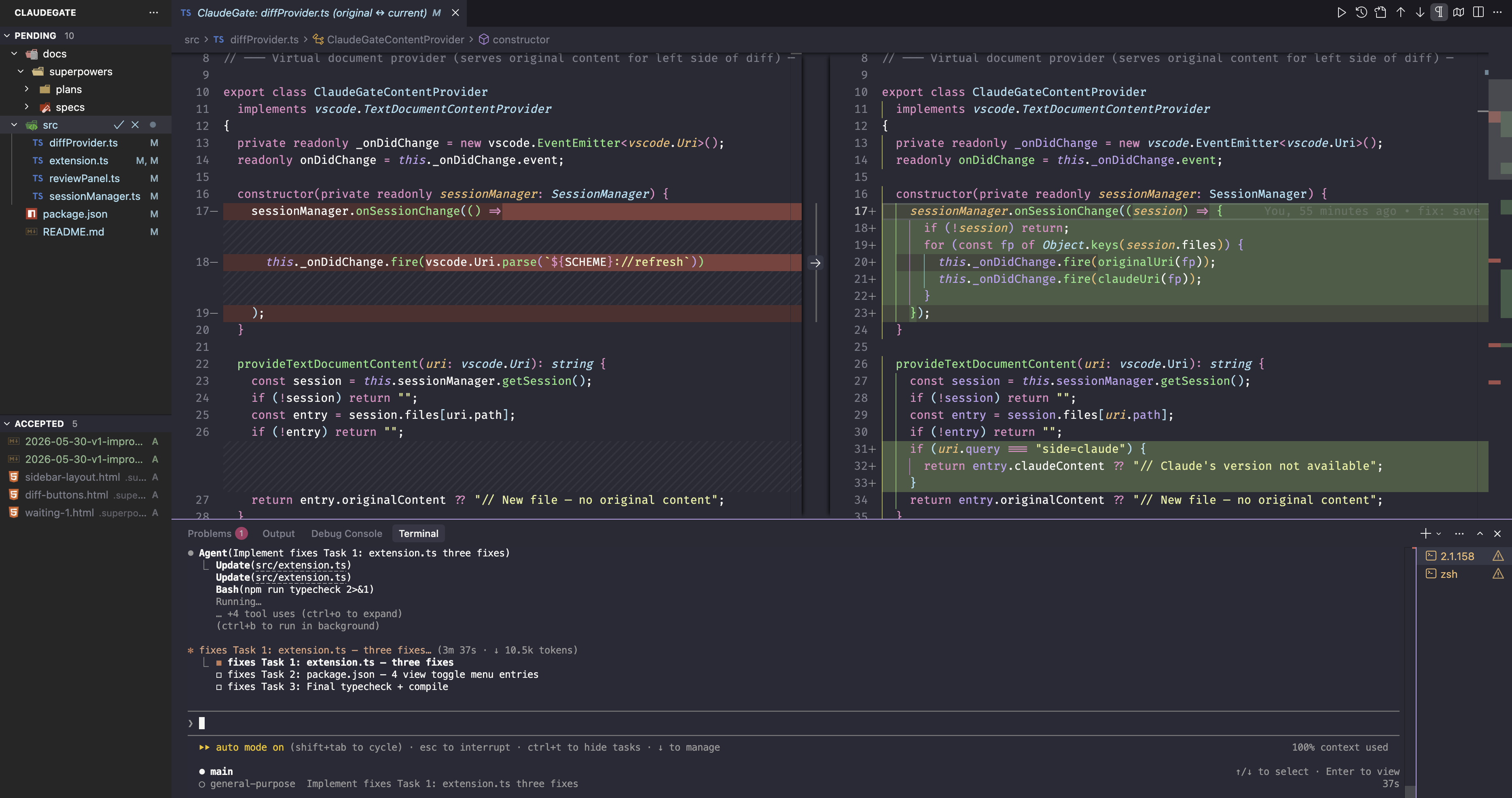
Stop flying blind when Claude modifies your codebase. Claude Gate captures every file change before it happens and surfaces each one as a structured diff — the same accept/reject workflow as Cursor's native AI review, but for Claude Code running in any terminal.
Note: the PreToolUse hook captures all Claude Code edits — both the terminal CLI (claude command) and the in-editor VS Code/Cursor extension run the same hook. An optional filesystem watcher (off by default) exists only as a fallback for non-Claude agents like Cursor Composer or Codex.
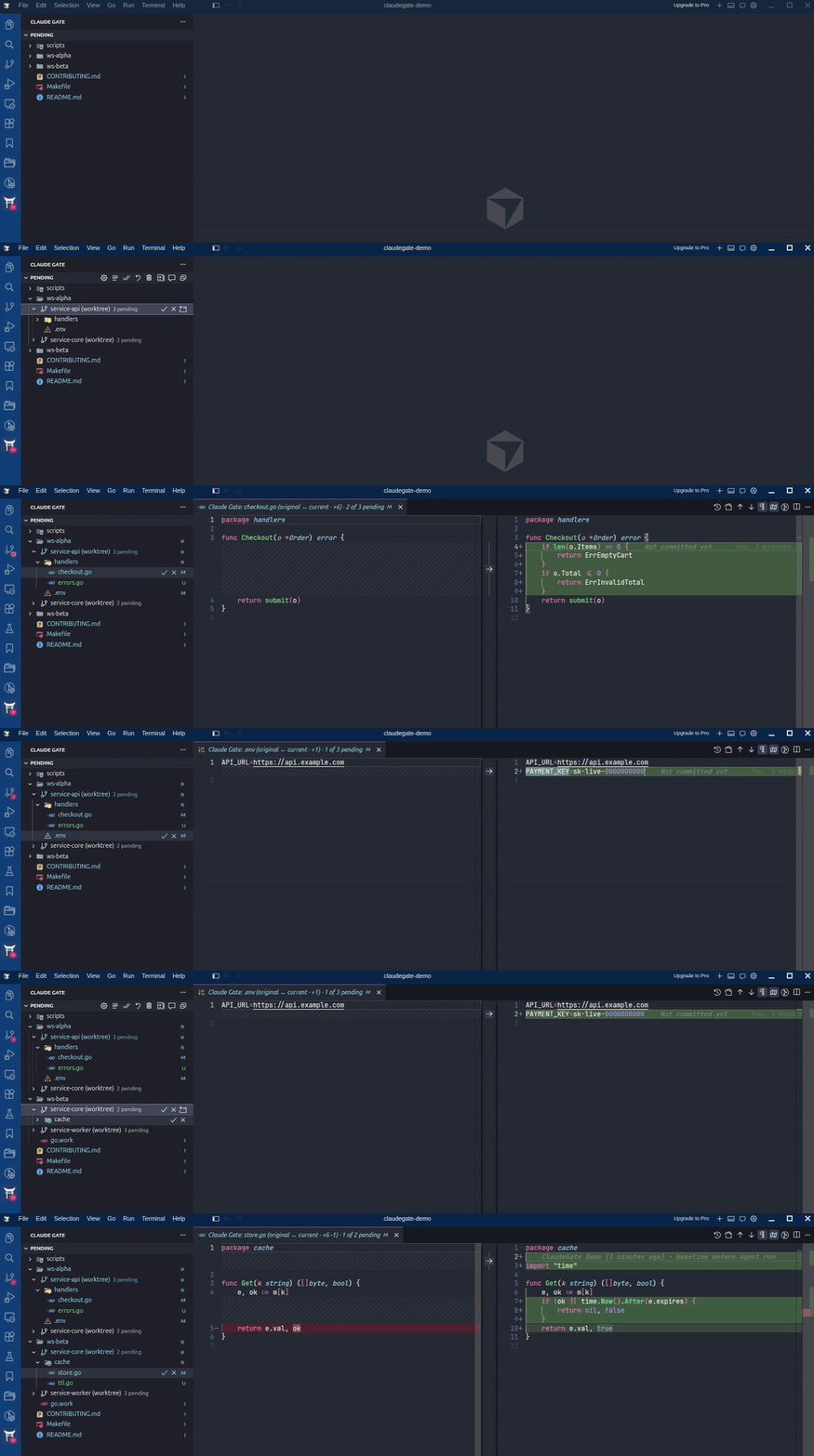
Your agents edited 12 files across 4 git worktrees. Here they all are, in one panel, reviewable one keystroke at a time — grouped by worktree, attributed to the session that made each change.
Screenshots
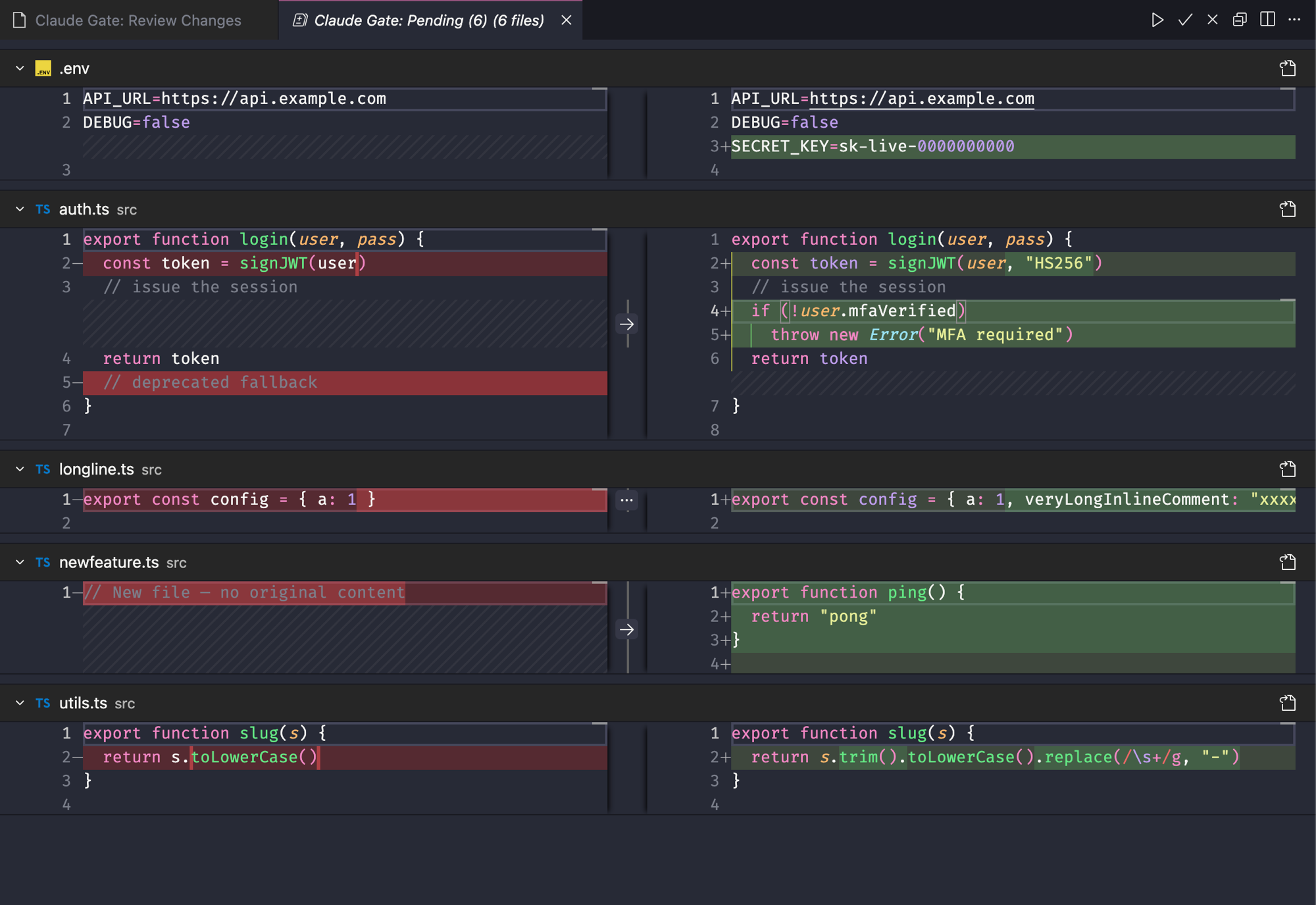
Review All Pending — every pending change in one native multi-file diff (full syntax highlighting, word-level diffs). Click into a file, then ✓/✗ in the title bar or Cmd+Enter / Cmd+Backspace:
Quick Start
Three steps, no manual config:
1. Install
Install Claude Gate from the VS Code / Cursor Extensions panel.
2. Setup the hook
Open the Command Palette (Cmd+Shift+P / Ctrl+Shift+P) and run:
Claude Gate: Setup Hook
This installs a PreToolUse hook into Claude Code that automatically snapshots files before Claude writes them.
3. Run Claude Code normally
Use claude in your terminal as usual. When Claude modifies files, Claude Gate shows a pending count badge in the sidebar — click any file to review the diff.
The Review Flow
- The Claude Gate icon in the Activity Bar shows three panels: Pending, Accepted, and Rejected
- Click any pending file to open VS Code's native diff editor — original on the left, Claude's version on the right
- ✓ Accept and ✕ Reject buttons appear in the editor title bar — one click, done
- Accepted files move to the Accepted panel; rejected files are restored to their original content
- Review All Pending — click the multi-file diff button in the Pending panel title bar (or run
Claude Gate: Review All Pending) to open every pending change in one scrollable multi-diff tab.
The Panels
- Pending — Files with a real unreviewed change awaiting your decision. Once a file is accepted or rejected, it is removed from Pending. If you later re-edit an already-approved file, a new Pending entry appears with the fresh change.
- Accepted — A persistent log of every file you approved. Each entry shows the diff you accepted (original → approved version). Reversible via Revert to Pending (inline button or right-click); reverting moves the file back to Pending with the frozen original baseline.
- Rejected — Stores the latest rejected change per file. If you reject a file, discard the proposed change, then Claude edits it again, the newer edit replaces the stored rejection. Re-apply a rejected change via the Re-apply link or right-click menu, which restores the proposed content to the file and moves it back to Pending.
- History — appears once you've cleared a session. Clear Session archives the review log to
~/.claudegate/history/; browse past sessions here (view-only), open any record as a before→after diff, delete one archive or clear them all. Turn archiving off with claudegate.history.enabled.
Reviewing with the keyboard
With a ClaudeGate diff focused, press Cmd+Enter to accept or Cmd+Backspace to reject the file; ClaudeGate then opens the next pending diff automatically (disable via claudegate.autoAdvance). Right-click any file row for Open File, Reveal in Explorer, Copy Path, and (with the Claude Context extension) Add to Claude Chat.
Not seeing changes captured?
- Using Claude Code (terminal or in-editor)? Make sure the hook is installed — run
Claude Gate: Setup Hook. That covers all Claude Code edits.
- Using a non-Claude agent (Cursor Composer, Codex) or still nothing showing? Enable the filesystem watcher: set
claudegate.fileWatcher.enabled to true (or click Enable file watcher in the empty panel / the Settings pane).
Features
- Automatic session tracking — hooks fire before every Claude file write; no manual start/stop
- Pending / Accepted / Rejected panels plus a Settings pane — per-panel collapse and view toggle, with settings (watcher, exclude patterns, hook status) managed right in the sidebar
- Keyboard review —
Cmd+Enter accept / Cmd+Backspace reject the focused diff, then auto-advance to the next pending file
- Change counts —
+A -B line counts in the diff tab title and pending-row tooltips
- Exclude patterns —
claudegate.exclude globs (or a folder name) hide generated files from review, non-destructively
- Group by session — optionally group the panels by the Claude session that made each change, for parallel sessions in one workspace
- Row file actions — right-click for Open File, Reveal in Explorer, Copy Path, and Add to Claude Chat
- Accept/Reject in the editor title bar — ✓/✗ buttons appear on any pending file's diff or editor tab, so you can decide without leaving the code
- Folder-level actions — accept or reject an entire directory at once (tree view mode)
- Undo your decisions — re-apply Claude's changes from the Rejected panel; un-accept files back to Pending
- Workspace-aware filtering — files modified outside the current workspace (e.g.
~/.claude/settings.json) are hidden from the review panel
- Pending count badge on the sidebar panel header
- Session history archived to
~/.claudegate/history/
How It Works
Claude Code (terminal CLI)   Claude Code (in-editor ext)      Non-Claude agents
         │                            │                       (Cursor, Codex)
         └──────── PreToolUse hook ───┘                             │
              hook.py snapshots the original            DocumentTracker (opt-in,
                          │                              off by default) FS watch
                          │                                         │
                          └──────────────────┬──────────────────────┘
                                             ▼
                          ~/.claudegate/sessions/<workspace>.json
                                             │
                                    Claude Gate review panels
The PreToolUse hook is the authoritative capture path for all Claude Code — both the terminal CLI and the in-editor extension (both run the same hook). The filesystem watcher is an optional fallback for non-Claude agents (Cursor Composer, Codex) and is off by default.
The hook captures a file's original content once per session — subsequent Claude writes to the same file don't overwrite the snapshot, so you always diff against the true before-state.
Extension Settings
| Setting |
Default |
Description |
claudegate.fileWatcher.enabled |
false |
Claude Code edits (terminal and in-editor) are captured by the PreToolUse hook, so this is off by default. Enable it only if you use a non-Claude agent (Cursor Composer, Codex) — the watcher can't attribute edits and may surface manual/formatter/git changes as false items. |
claudegate.exclude |
sensible defaults (lock files, minified, maps, node_modules) |
Glob patterns (shaped like VS Code's search.exclude) whose matching files are hidden from review. Matching files are skipped by the watcher and hidden from the panel, counts, and badges even if the CLI hook captured them — nothing is deleted. Use **/-prefixed globs to match at any depth, or name a folder to exclude everything inside it. Ship with editable defaults; deactivate any with "<glob>": false. |
claudegate.protected |
secrets defaults |
Glob patterns for sensitive files (.env, keys, credentials). Matching files aren't hidden — they're flagged and sorted to the top of review so their changes get scrutiny. Edit/deactivate like claudegate.exclude. |
claudegate.groupBySession |
false |
Group the review panels by the Claude Code session that produced each change — helpful when several sessions run in one workspace. Toggle it from the Settings pane too. Re-run Setup Hook so the hook records session ids. |
Example settings.json:
{
  // Terminal-CLI user: rely on the hook only.
  "claudegate.fileWatcher.enabled": false,
  // Hide generated files and whole folders from review.
  "claudegate.exclude": {
    "**/dist/**": true,
    "**/*.min.js": true,
    ".superpowers": true
  }
}
You can manage these from the Settings pane in the Claude Gate sidebar — toggle the file watcher, add/remove exclude patterns, and check hook status without editing settings.json by hand.
Requirements
| Requirement |
Notes |
| VS Code 1.85+ or Cursor |
|
| Claude Code |
Terminal CLI or VS Code/Cursor GUI extension |
| Python 3.7+ |
Pre-installed on macOS and most Linux distros |
Windows: Native Windows is supported. Python must be on your PATH (python or python3). WSL is not required.
Updating the Hook
After updating the extension, re-run Claude Gate: Setup Hook to install the latest hook script.
Contributing & Issues
Found a bug or have a feature request? Open an issue on GitHub.
License
MIT — see LICENSE

