Codex Finish Shout
English | 简体中文
English
A local Windows extension for VS Code that monitors Codex projects and agent activity, confirms project-wide completion, and plays offline music. Includes English/Chinese UI, light/dark themes, a playback queue, and three bundled melodies.
Promotion · Discover more AI tools · ToolAI
Explore AI tools, models, and open-source projects for coding, writing, and creative work.
Visit www.toolai.io →
Install the preview
- Download the Windows x64
.vsix from GitHub Releases.
- In VS Code, open Extensions → … → Install from VSIX….
- Run Codex Finish Shout: Initialize Backend. This installs the bundled PowerShell backend and backs up and updates Codex
notify and lifecycle Hook settings.
- Use Complete Security Authorization to trust the lifecycle Hook in Codex, then reload VS Code.
- Run a Codex task. When all project activity settles for the default 10-second window, the reminder plays.
The VSIX includes the player, backend, and music. Users do not need source code, Node.js, music downloads, or a separate player. Playback and speech use Windows components.
Support: trusted local Windows x64 VS Code workspaces. The manifest declares VS Code 1.90 or later; see validation status for tested environments. Requires Codex with compatible user-level completion notifications and lifecycle Hooks. Other operating systems, remote SSH/WSL/container execution, and browser VS Code are not supported in this preview. Initialization alone does not establish compatibility with a particular Codex version.
Music and monitoring
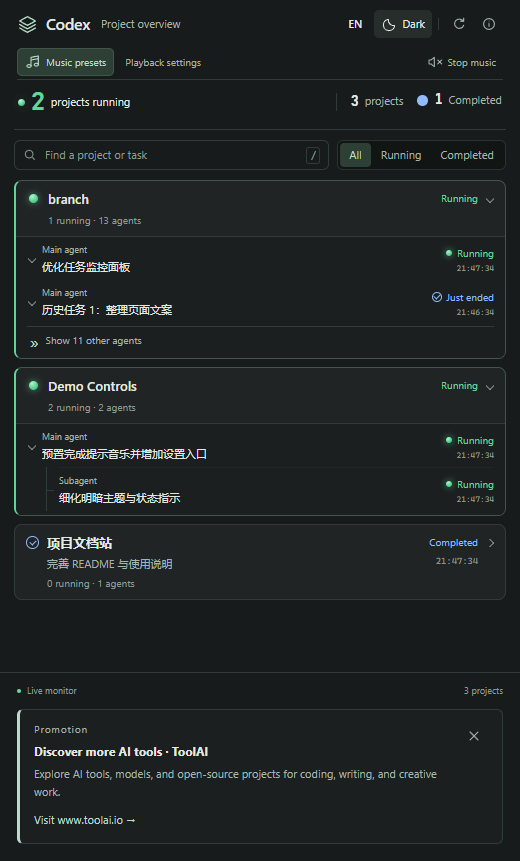
Run Open Project Monitor to see active projects and individual agent tasks. Search, filters and expandable history help keep current work visible. Use the overview controls to switch English/Chinese and light/dark themes.
| Built-in cue |
ID |
Duration |
| Soft chime |
soft-chime |
2.4 s |
| Bright finish |
bright-finish |
2.2 s |
| Gentle rise |
gentle-rise |
3.2 s |
Music presets selects a cue or a local MP3/WAV/WMA/M4A/AAC file (codec availability applies). Playback settings offers once, loop, or a duration. Volume, announcements and quiet hours remain configurable. Ctrl+Alt+M stops music and the queue; Ctrl+Alt+P opens playback settings. MIDI sources are included; playback uses MP3.
Built-in choices use builtin:<id> so upgrades do not depend on old extension directories. Personal files stay local. Optional serial hardware is disabled for new installations; existing hardware settings are retained. See hardware documentation.
Upgrade, repair and uninstall
- Migrating from
local-developer.codex-finish-shout-controls: disable/uninstall the old extension and reload before enabling this version. Publisher changes create a new identity; existing codexFinishShout.* settings and backend preferences remain usable.
- After updating the extension, run Repair / Update Backend. It preserves preferences, backs up existing files, serializes concurrent installs and restores changed files after installation failure.
- Check Backend Status displays installation and observed Hook readiness. Conflicting
notify settings are reported rather than overwritten.
- Before removing the extension, run Uninstall Backend. It removes owned registrations and runtime files, restores a saved notification handler when applicable, and keeps preferences/backups. Removing the VSIX alone does not clean user-level Hooks.
- Default data root:
%USERPROFILE%\.codex, or CODEX_HOME when configured. Runtime: codex-finish-shout; settings: codex-finish-shout.json; status: codex-finish-shout-state.
The overview has a Promotion footer linking to ToolAI. Close it once to hide it across reloads and upgrades. Re-enable with codexFinishShout.promotion.showToolAI. Language follows the overview. No remote advertising scripts, click tracking or automatic browser popups are added; the site opens only when clicked.
Monitoring reads local Codex state and may read conversation records to display task titles. This extension does not upload task data. Redact private prompts, paths and settings before reporting issues. See Privacy / 隐私说明.
Develop and publish
Build/test tools: Node.js 24 and Windows PowerShell 5.1.
npm ci
npm test
npm run test:backend
npm run package
npm run test:package
Press F5 for isolated development, then run npm run dev:simulate in another terminal. Development data lives in .dev/; real Hook testing uses a separate Windows test account. See the bilingual development guide and publishing guide.
0.11.x is a preview; 0.12.0 is reserved for the first validated integrated stable release. Feature branches merge into main. CI tests/packages changes, and v* tags publish GitHub preview releases. Marketplace uploads use the exact same VSIX. A GitHub release does not imply Marketplace availability.
License and support
Code: MIT. Original music: redistribution terms. Hardware dependencies keep their own licenses. This independent project is not an official OpenAI or Microsoft extension.
Report a bug · Changelog
简体中文
面向 Windows 本机 VS Code 的 Codex 项目监控和完成音乐扩展。汇总项目与 Agent 活动,在项目整体完成后播放离线提示音乐;支持中英文、深浅主题、播放队列及三首内置旋律。
推广 · 发现更多 AI 工具 · ToolAI
探索 AI 工具、模型与开源项目,为编程、写作和创作寻找合适的工具。
访问 www.toolai.io →
安装预览版
- 在 GitHub Releases 下载 Windows x64
.vsix。
- 打开 VS Code 扩展视图,选择 … → 从 VSIX 安装…。
- 在命令面板执行 Codex Finish Shout: 初始化后端。扩展将安装包内的 PowerShell 后端,并备份、更新 Codex 的
notify 与生命周期 Hook 配置。
- 执行 完成安全授权,在 Codex 中信任生命周期 Hook,然后重新加载 VS Code。
- 提交 Codex 任务。项目内全部活动结束并经过默认 10 秒确认窗口后,播放完成提醒。
VSIX 已包含播放器、后端和音乐,使用时不需要下载源码、安装 Node.js、下载音乐或另装播放器。声音和语音功能使用 Windows 自带组件。
**支持范围:**受信任的 Windows x64 本机工作区。清单声明 VS Code 1.90 及以上,实际测试范围见验证记录。需要 Codex 支持兼容的用户级完成通知与生命周期 Hook。此预览版暂不支持其他操作系统、远程 SSH、WSL、容器执行及网页版 VS Code。Hook 能力随 Codex 版本变化,初始化成功不代表事件兼容性已验证。
音乐与项目监控
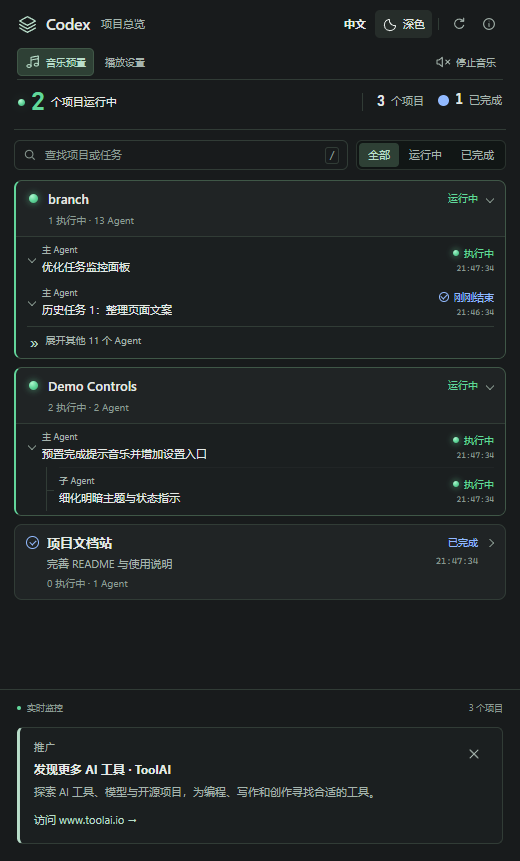
执行 打开项目总览 查看活动项目、主 Agent 和子 Agent;可搜索任务、筛选状态、展开历史。界面支持英文/中文和深色/浅色。
| 内置音乐 |
标识 |
时长 |
| 轻柔风铃 |
soft-chime |
2.4 秒 |
| 明亮完成 |
bright-finish |
2.2 秒 |
| 舒缓上扬 |
gentle-rise |
3.2 秒 |
通过 音乐预置 选择内置旋律或个人本地 MP3/WAV/WMA/M4A/AAC 文件,具体格式受 Windows 编解码器支持情况影响。播放设置 支持播放一次、循环或指定秒数,并保留音量、语音播报和免打扰设置。Ctrl+Alt+M 停止当前音乐和队列,Ctrl+Alt+P 打开播放设置。随包 MIDI 用于旋律源文件,实际播放使用 MP3。
内置曲目以 builtin:<id> 保存,不依赖旧版本扩展安装路径。个人歌曲仅保留在本机。全新安装默认关闭可选串口硬件功能,升级保留原有配置;详见硬件说明。
升级、修复与卸载
- 从
local-developer.codex-finish-shout-controls 迁移时,先禁用或卸载旧扩展并重新加载窗口,再启用新版。发布者变更会形成新扩展身份,现有 codexFinishShout.* 设置和后端偏好可继续使用。
- 更新扩展后执行 修复/更新后端。安装会备份已有文件、保留个人偏好,并通过锁避免多窗口重复安装;安装失败恢复已修改文件。
- 执行 检查后端状态 查看安装及 Hook 实际运行证据。已有其他
notify 配置发生冲突时会报告问题,不会静默覆盖。
- 卸载扩展前先执行 卸载后端,清理本插件注册项及运行文件,在适用时恢复之前保存的通知处理器,保留设置和备份。只卸载 VSIX 不会自动清理用户级 Hook。
- 默认数据根目录为
%USERPROFILE%\.codex,设置 CODEX_HOME 时使用对应目录。运行文件为 codex-finish-shout,设置文件为 codex-finish-shout.json,状态目录为 codex-finish-shout-state。
项目总览底部显示标注“推广”的 ToolAI 入口,可关闭,重启和升级后仍保持隐藏;通过 codexFinishShout.promotion.showToolAI 重新开启。推广文案跟随界面语言。扩展不加载远程广告脚本,仅在点击时打开网站,不添加点击采集、自动弹窗或声音广告。
监控在本地读取 Codex 状态,并可能读取本地会话记录以展示任务标题。本扩展不上传任务数据。公开反馈问题时,请移除私人提示词、路径和配置内容。详见隐私说明。
开发与发布
构建测试使用 Node.js 24 和 Windows PowerShell 5.1。
npm ci
npm test
npm run test:backend
npm run package
npm run test:package
在仓库中按 F5 启动隔离开发窗口,并在另一个终端执行 npm run dev:simulate 创建模拟项目。开发配置和快照保存在 .dev/,真实 Hook 联调使用独立 Windows 测试账户。详见双语开发指南及发布指南。
0.11.x 为预览版本,首个通过完整验证的一体化正式版计划为 0.12.0。功能分支合并到 main;CI 测试并打包每次变更,v* 标签生成 GitHub 预发布。商店使用同一份 VSIX。GitHub 已发布不代表商店已上架。
许可与反馈
代码使用 MIT;原创音乐附带独立分发许可。硬件第三方依赖保留各自许可。本项目为独立开发,不是 OpenAI 或 Microsoft 官方扩展。
反馈问题 · 更新日志

