Brief
訂閱額度:使用 Brief 原生 /quota 查詢 Codex 與 Grok 的額度和重置時間。
A personal take on Prime Agent in VS Code. One workspace, parallel sessions, and chat that fits the way you code.
English | 繁體中文
Brief is an independent fork of sirouk/prime-agent-vscode, powered by Prime Agent. It is built around my daily workflow and preferences—not an attempt to define the right interface for everyone.
The current release is ready for my everyday use. Some UI edges remain, and improvements follow real use rather than a promise of a perfectly polished experience.
Community project. Brief is not published by, endorsed by, or affiliated with Prime Intellect. Prime Agent provides the runtime; Brief provides the VS Code interface.
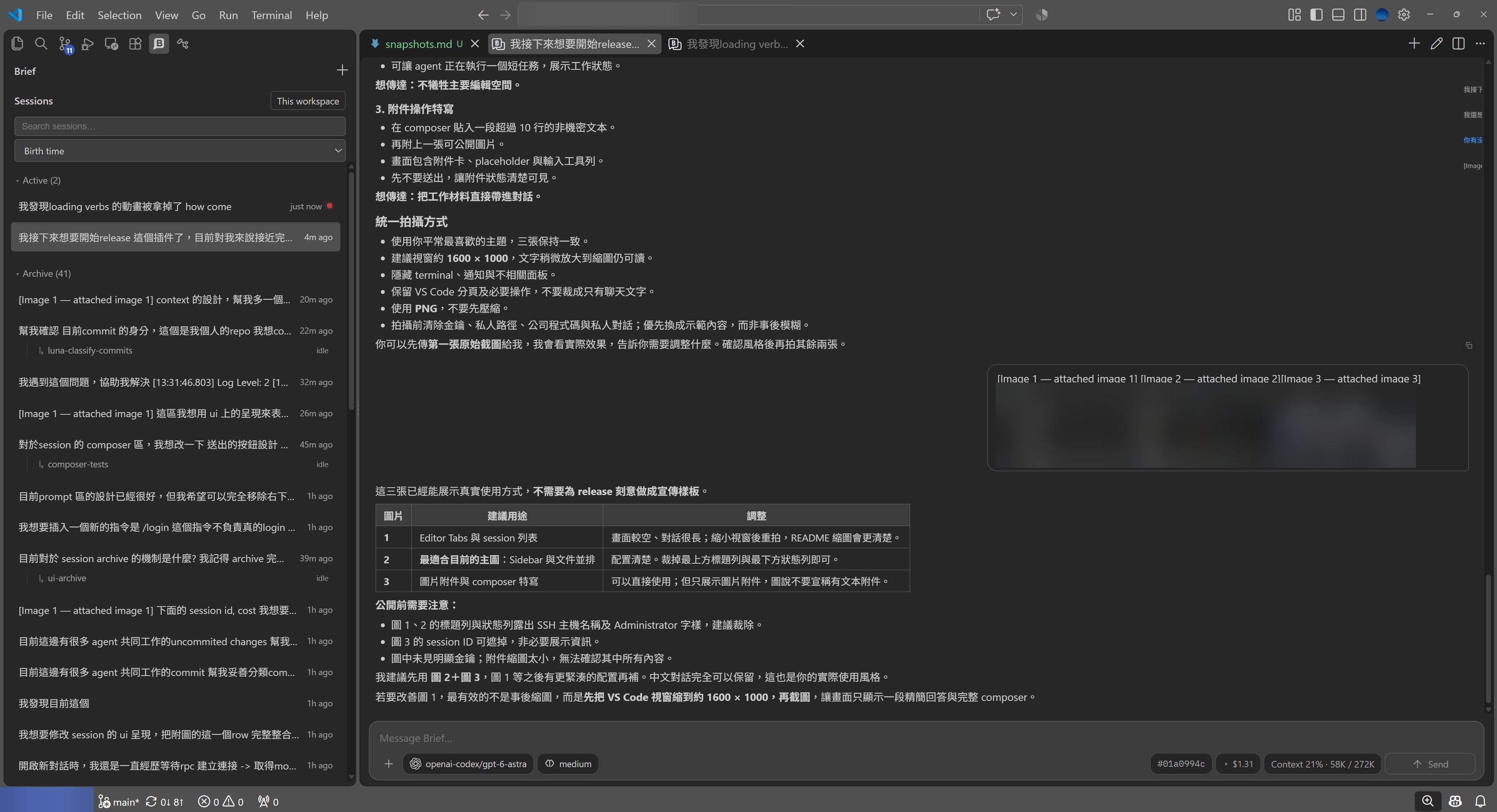
Editor Tabs: browse and sort sessions, keep conversations alongside file tabs, and follow activity and the conversation outline.
Appearance
Configure brief.fontSize (pixels) to adjust chat text size. Use Brief: Increase Font Size and Brief: Decrease Font Size for one-pixel changes. Use Brief: Select Markdown Theme to choose the current VS Code theme, Prime current theme, or an available built-in, user, or project Prime theme. The selection updates brief.markdownTheme and brief.primeTheme immediately. You can also set these settings manually: prime-current follows the theme in Prime Agent settings, while prime uses brief.primeTheme (a theme name/path). The default vscode-vanilla preserves the original inherited Markdown styling. vscode maps headings, emphasis, code, quotes, and list markers to live VS Code theme color variables; this is not editor syntax-token highlighting. Links and code/quote backgrounds use VS Code colors in both modes. Brief reads built-in themes and user/project theme files only; package themes, themes settings arrays, and command-line session overrides are not resolved. If a theme cannot be loaded, its missing colors fall back to inherited text. Reopen Brief after changing Prime Agent theme files.
Features I love
I develop Brief out of love for code and Prime Agent. These are the details that make me happy to use it every day:
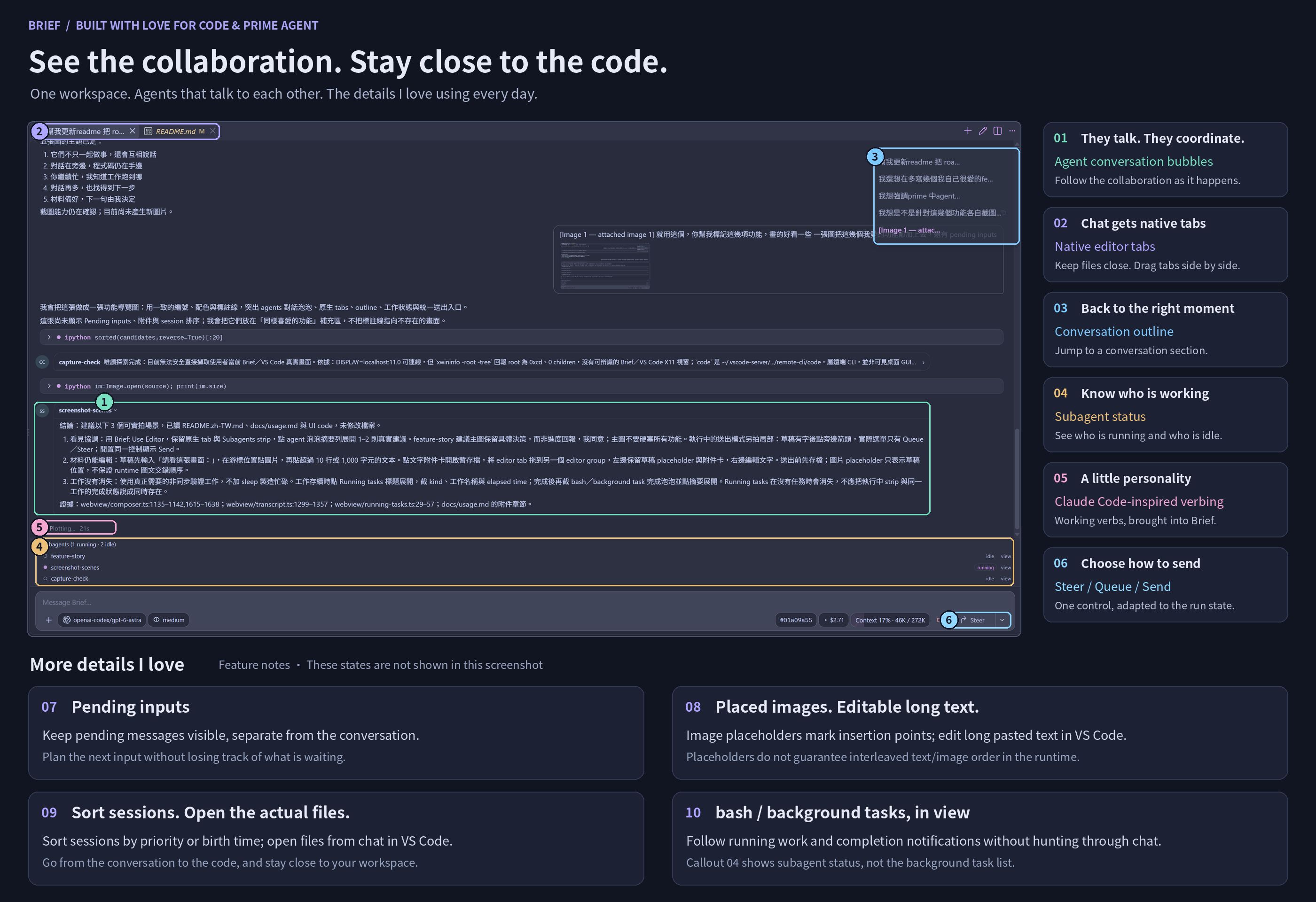
The numbers below match the image. 01–06 highlight visible UI; 07–10 are feature notes for states or actions not shown in this screenshot.
- Conversation bubbles between agents. Prime Agent lets agents talk to each other to coordinate their work. I love showing those exchanges as conversation bubbles in Brief, with each agent's avatar and name: collaboration becomes something I can follow, not just parallel activity behind the scenes.
- Native tabs, side by side in VS Code. Conversations get native editor tabs alongside files. You can drag them into separate editor groups to work beside code or other conversations. This feels incredibly comfortable. The screenshot shows the tabs, not a split layout.
- A conversation outline on the right. Jump back to the part of a session I want without scrolling through everything.
- Subagent status at a glance. The Subagents list shows who is running and who is idle, with links to their views. This is agent activity, not the
bash or background task list described in 10.
- A little “verbing,” borrowed from Claude Code. I couldn't resist bringing those working-status verbs into Brief. Here, “Plotting…” appears with elapsed time.
- One button for steer, queue, and send. While the agent runs, the control offers Steer or Queue; when idle, the same control shows Send. The screenshot shows Steer, not all three options open at once.
- Pending inputs stay visible. Pending messages appear separately from the conversation, so I can see what is waiting rather than lose it among replies. This list is not visible in the screenshot.
- Attachments have a place in the draft. Images get placeholders where I insert them, and long pasted text can be opened and edited in VS Code before sending. Image placeholders show placement in the composer; they do not guarantee interleaved text/image order in the runtime. The screenshot contains a previously sent image, not draft placeholders or the text-editing workflow.
- Sort sessions and open the actual files. Session History offers Priority and Birth time sorting. Files linked in the conversation can open directly in VS Code. These help me decide what to look at next and stay close to the code, not just the agent's description. The sorting menu and file-opening action are not shown here.
- Notifications and status management for
bash and background tasks. Something I had long wanted while using Prime Agent: a clearer view of work that is still running and work that has finished. Running tasks and completion notifications are separate from Subagents; the Running tasks list disappears when there are no active tasks. These task states are not shown in this screenshot.
What you can do
Use Sidebar to keep the editor area for code, or Editor Tabs to give each conversation its own native VS Code tab. Drag tabs into separate editor groups to work beside code or compare conversations.
Run Brief: Use Sidebar or Brief: Use Editor to move the current session and remember the workspace preference. New sessions open in Editor Tabs by default. Moving a session does not stop its agent.
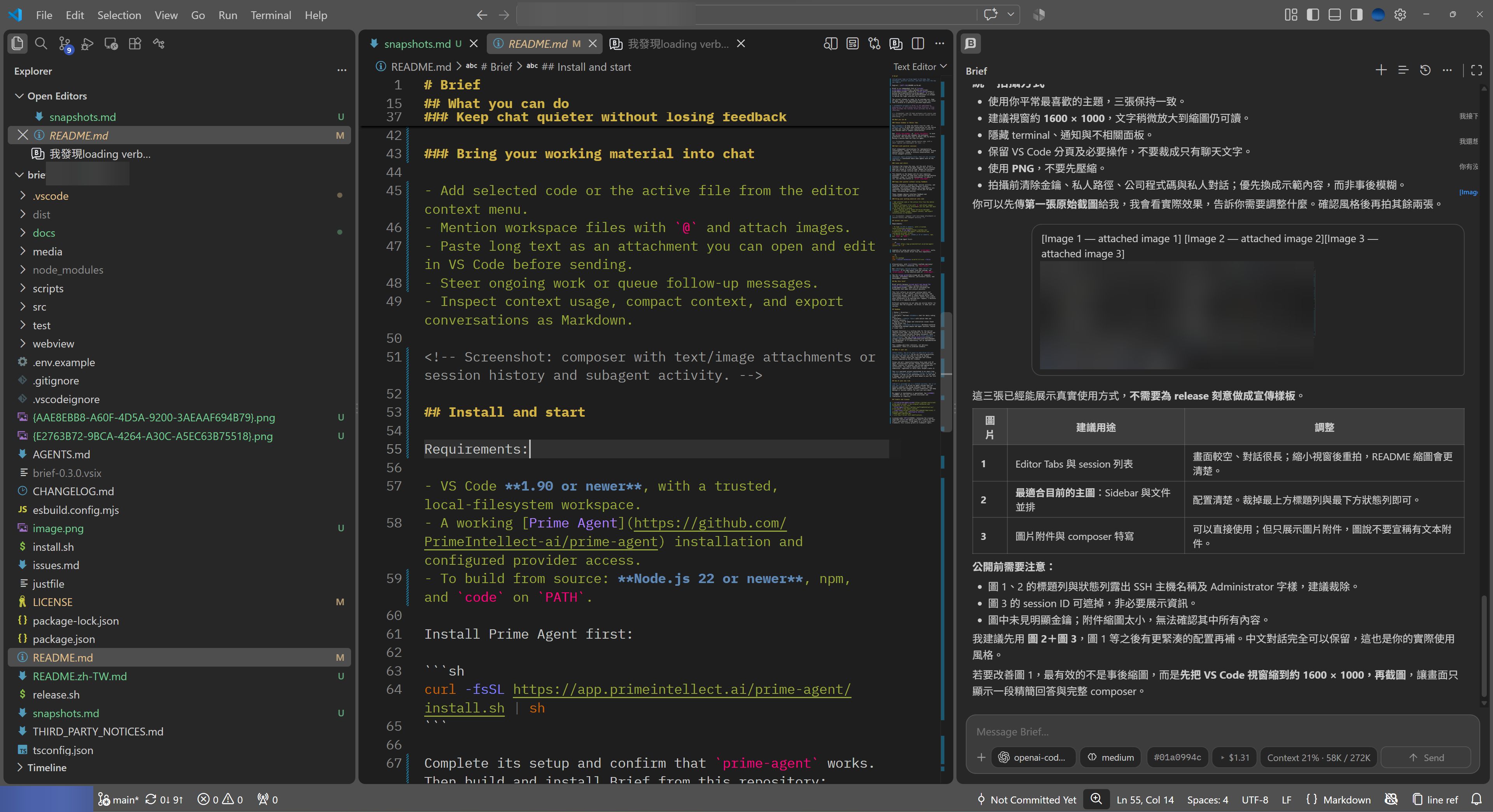
Sidebar: Explorer, your file, and chat in one window. This example places Brief in the Secondary Side Bar.
Work with parallel sessions
Start independent conversations for implementation, investigation, review, or tests in one workspace. Browse session history, rename or archive conversations, and follow subagent activity.
Sessions share workspace files; they are not isolated checkouts. Coordinate edits when agents work on the same files.
Leave and return
Closing a tab closes the view, not the work. Brief's sessions run in the Prime Agent daemon and can continue when you reload or close VS Code. Reopen the workspace and return through restored tabs or session history.
This depends on the daemon and its host remaining available. It does not keep work running through machine shutdown, sleep, or runtime termination. To cancel a run, use the stop button or Brief: Stop Agent.
Keep chat quieter without losing feedback
Working indicators, elapsed time, session activity, and completion notifications make progress visible. Thinking, tool-output streaming, and usage details are separately configurable. Colors follow your VS Code theme, including High Contrast.
These changes improve interface feedback and rendering—not model generation speed.
Bring your working material into chat
- Add selected code or the active file from the editor context menu.
- Mention workspace files with
@ and attach images.
- Paste long text as an attachment you can open and edit in VS Code before sending.
- Steer ongoing work or queue follow-up messages.
- Inspect context usage, compact context, and export conversations as Markdown.
Install and start
Requirements:
- VS Code 1.90 or newer, with a trusted, local-filesystem workspace.
- A working Prime Agent installation. Provider access can be configured with
/login in Brief.
Install Prime Agent first:
curl -fsSL https://app.primeintellect.ai/prime-agent/install.sh | sh
Complete its setup and confirm that prime-agent works. Then install Brief through VS Code:
- Open GitHub Releases and download the release's
.vsix asset (brief-<version>.vsix). Do not download the source-code archive for installation.
- In VS Code, open Extensions, select … → Install from VSIX…, and choose the downloaded file. You can also run Extensions: Install from VSIX... from the Command Palette.
- Reload VS Code if prompted, open a trusted workspace, and run Brief: New Session.
Enter /login in Brief to select a provider and complete OAuth or enter an API key through VS Code. Providers come from the installed Prime Agent SDK; browser authorization still opens externally. Prime manages credential storage, shared with prime-agent on the same host and configuration directory. With Remote SSH, the SDK runs on the remote extension host. MCP Connections and special setup flows are identified as unsupported rather than sent as chat prompts.
To update, download the newer release's VSIX and repeat the installation. If VS Code cannot find the runtime, set brief.command to the absolute path of prime-agent.
You do not need to clone this repository, install build tools, or run just to use a release. For source builds and customization, see Development and forks. For commands, settings, attachment behavior, and persistence limits, see the usage guide.
Why this fork?
Brief exists because sirouk built and shared the original extension. Thank you for providing the foundation that made this project possible.
This fork reflects my personal working habits and preferences for chat layout, parallel sessions, and interaction design. Some of those choices differ from the original extension's direction. Rather than propose every preference as an upstream pull request, I maintain them here as a separate project.
Different preferences do not make one version better for everyone. Use the original, use Brief, or make your own version.
Deliberate choices and limits
VS Code, because I still want to know my code
Over the past few months, I have barely written a few lines of code by hand. I still want to understand my projects through the file tree and by opening the actual files. Many agentic interfaces do not give me the file browsing and code navigation I want. VS Code, with its Language Server Protocol (LSP) support and familiar editor tools, still feels best to me. Choosing it as Brief's home is deliberate, not incidental.
One workspace, multiple conversations
I chose to keep multiple conversations in one workspace because agents in Prime Agent can talk to each other, not just work in parallel. They can discuss the work, coordinate changes, and keep each other informed without me relaying every message. That is why I feel comfortable letting them work in the same workspace instead of worrying simply because they are working at the same time. I designed their exchanges as conversation bubbles in Brief so I can see that collaboration happen. Communication is not a guarantee against conflicting edits; shared files still need coordination.
What I get in return is a deeper understanding of that workspace. Brief is not built as a control center for simultaneous work across many repositories. For me, spreading work across repositories sharply reduces my sense of control and doubles the mental load. Staying with one workspace is a trade-off I want to make.
A fit for how I work now
Maybe, with more tokens to spend on multi-agent systems, event-driven workflows, and loops, this setup will no longer be what I need. I do not expect it to fit every future workflow. For now, it fits mine very well—and lets me keep developing quickly on top of it.
Roadmap
| Status |
Direction |
| Available |
Refined Sidebar chat for daily coding work. |
| Available |
Editor Tabs with native tabs and parallel sessions. |
| Ongoing |
Fix UI edges and interaction issues found during actual use. |
| Exploring |
Document Workspace: Markdown-centered collaboration between people and agent sessions, beyond a linear chat. |
Document Workspace is a working name for the earlier “Session Area” idea. The direction is to let people and agents work around editable Markdown documents, with sessions attached to the work. It is not available in this release. See the design discussion for background; it is exploratory, not an implementation specification.
This roadmap describes interests, not delivery commitments. There is no promised schedule.
Slash commands progress
Summary of the slash commands roadmap. Completed means the defined Brief scope is implemented and verified, not full parity with Prime Agent. Verification limits and detailed decisions are recorded in the roadmap; runtime support alone does not mean Brief support.
| Status |
Commands |
Scope or remaining work |
| Completed |
/compact [instructions], /refine, /goal, /autonomous |
Fixed completion entries and existing prompt routing; goal and autonomous action menus. Persistent status panels remain outside this scope. |
| Completed |
/stash, /new, /clear |
Per-session draft stash; new empty session in a new editor tab, preserving the original session. |
| Completed |
/logout |
Provider selection, removal confirmation, stored credential removal, and model-list refresh without starting an agent. |
| Completed |
/name, /rename, /resume |
Rename the current session or open sidebar Session History. |
| Completed |
/fork, /export, /copy |
Fork from a user message into a new tab, export Markdown, or copy the last completed agent reply body. |
| Completed |
/session, /context, /usage |
Local read-only statistics snapshots with explicit scope and missing-value handling. |
| Partial |
/model, /effort, /thinking |
Selection and validation are implemented. Prime still writes global defaults; the intended session-only behavior is blocked by the runtime. |
| Partial |
/login |
VS Code provider login is available; special setup flows and credential-management scope remain under discussion. |
| Partial |
Extensions, prompt templates, /skill:name |
Dynamic completion and prompt routing are available; custom extension UI is not fully supported. |
| To discuss |
/fast, /scoped-models, /import, /clone, /tree, /system-prompt, /btw, /side, /rlm-max-depth, /heartbeat, /heartbeats, /reload, /settings |
Runtime capabilities exist, but Brief integration and interaction design are not decided. |
| To discuss |
/mcp, /share, /logs, /traces, /changelog, /hotkeys, /update, /fullscreen, /quit |
Frontend or command-line integration and Brief-specific behavior need discussion. |
Make it your own
Fork freely. Use an AI agent to make Brief fit your own habits and style. You do not need my permission, and your fork does not need to follow my design direction. Please retain the copyright and license notices required by the MIT license.
Issues and pull requests—including those made with AI agent assistance—are welcome. Please understand what you submit, explain its purpose, and include appropriate verification. You remain responsible for your submission, regardless of which tools helped create it.
This is a personal project maintained in my spare time. Do not expect a timely response, review, or merge. A response or merge is not guaranteed at all. If you need a change, you are welcome to move ahead in your own fork rather than wait for me.
Use at your own risk
Brief is provided “as is,” without warranty. Use it at your own risk. It drives an agent runtime that can execute commands and change workspace files. Review agent actions and changes, protect credentials, and keep backups or version control for work you care about.
No support or maintenance is guaranteed. See LICENSE for the full warranty disclaimer and limitation of liability.
Credits and license
Licensed under MIT, retaining the original copyright notice and adding Lite Chen's notice for this fork's contributions. Prime Agent is a Prime Intellect trademark; this license grants no trademark rights.

