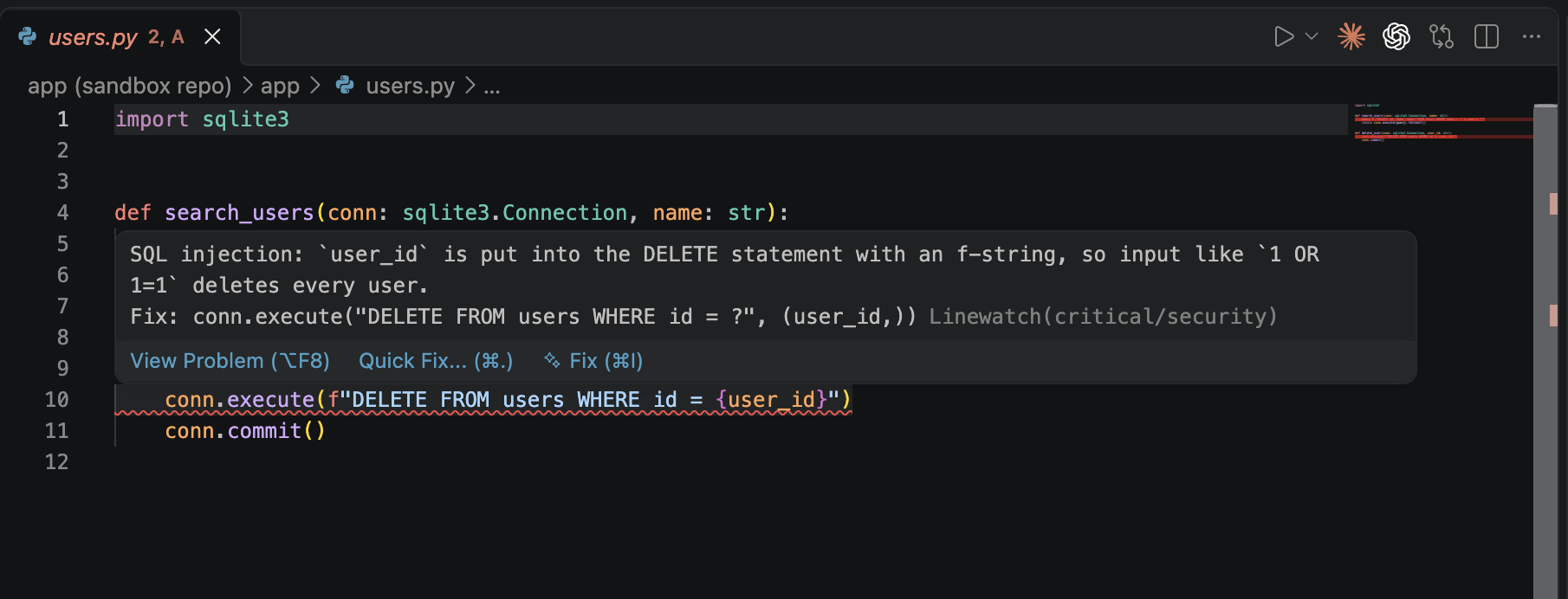
Shows the findings of Linewatch on the lines in your editor. Linewatch is an AI code review that runs in your git hooks: it reviews the lines you changed for security and quality problems, with the model you already use (Claude Code, Codex, Antigravity or a local model), and blocks a commit or push when it finds something serious.
Features
Findings on the lines, like linter warnings: critical as an error, warning as a warning, info as a hint. Hover a marker for the message and the suggested fix.
Problems panel: all findings of the last review, with their file and line.
Live updates: the markers change as soon as a review finishes, from a hook or linewatch review. A review with no findings clears them.
Commits from the Source Control view run the hooks too. When a finding blocks, VS Code shows the git error and the markers appear at the same time.
Requirements
This extension shows what the Linewatch CLI writes; it doesn't review code itself. Set up the CLI in your repo first:
pipx install linewatch-cli
cd your-repo
linewatch init
The CLI is not on PyPI yet. Until then, install it from a clone of the repo: pipx install ./linewatch. See Getting started.
The extension starts in any workspace folder that has .linewatch.yaml or .linewatch/last.sarif.