Test Radar — CI test results in your editor
See which tests failed on your current branch — right in your editor — and click a failure to jump straight to the test. Works with GitHub Actions and CircleCI, and any test runner that produces JUnit XML (Jest, Vitest, Playwright, Detox).
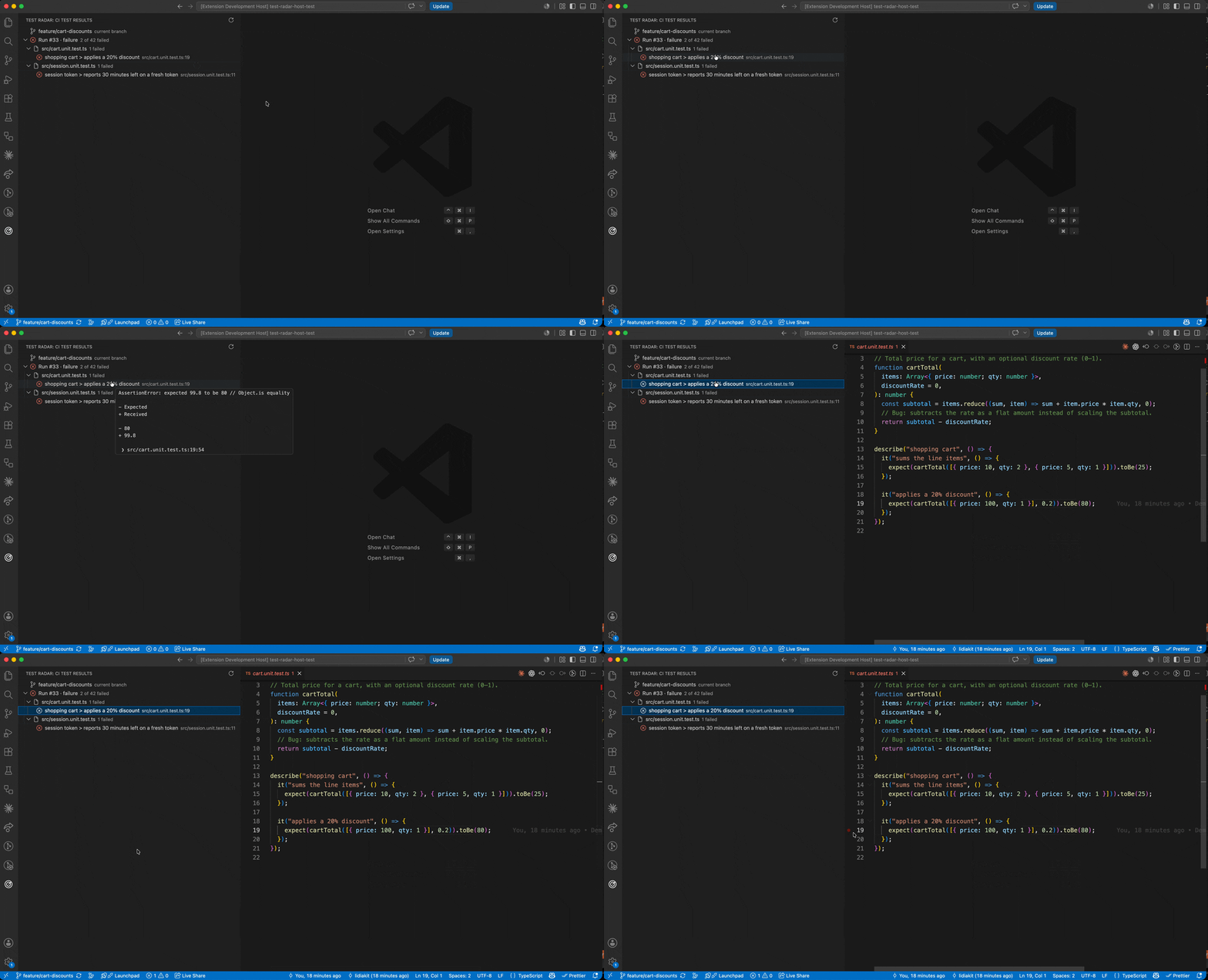
No more flipping to the browser to read CI logs. Test Radar watches the branch you're on, finds its latest CI run, and shows the test results in a sidebar — green when you're good, and a tidy, clickable list of failures when you're not.
Features
- Branch-aware. Automatically tracks your current Git branch and its latest run.
- Two providers. Reads GitHub Actions artifacts or CircleCI test metadata. Auto-detects which to use, or pick one explicitly.
- Real test results, not just pass/fail. Parses the run's JUnit results, so you see individual failing tests.
- Click to jump. Click a failing test to open its file at the exact failing line, parsed from the stack trace.
- Grouped by job and file. On CircleCI, results from every test job in the run are aggregated and grouped by job; within a job (and on GitHub) failures are grouped per file, so a long list stays scannable.
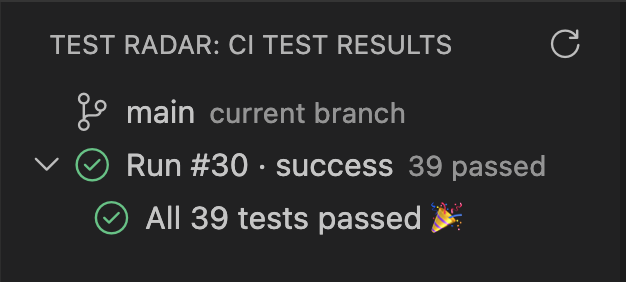
- A friendly green state. When everything passes, you get a clear "All N tests passed 🎉" — not a blank panel.
- Live updates. Auto-refreshes while a run is queued or in progress, plus a manual refresh button.
- One click to the full run. Open the run page (GitHub or CircleCI) in your browser.
Requirements
Test Radar reads results that your CI produces — it doesn't run your tests. Pick the section for your provider.
GitHub Actions
Sign in to GitHub. Run "Test Radar: Sign in to GitHub" from the Command Palette (or click the sign-in row in the view). This uses VS Code's built-in GitHub authentication.
Upload a JUnit report as an artifact named test-results. Your test runner needs to emit a JUnit XML file, and your workflow needs to upload it under exactly that name:
- name: Run tests
  run: npm test            # configured to write a JUnit file, e.g. test-results/junit.xml

- name: Upload test results
  if: always()             # upload even when tests fail
  uses: actions/upload-artifact@v4
  with:
    name: test-results     # Test Radar looks for this exact name
    path: test-results/junit.xml
The if: always() matters — without it, a failing test run skips the upload and Test Radar has nothing to show.
CircleCI
Set your CircleCI token. Run "Test Radar: Set CircleCI token" from the Command Palette and paste a CircleCI personal API token. It's stored in VS Code's Secret Storage — never in your settings.
Store your test results in CircleCI. Add store_test_results to the job that runs your tests, so CircleCI exposes its test metadata:
- run: npm test            # configured to write a JUnit file, e.g. test-results/junit.xml
- store_test_results:
    path: test-results
If a job's test data is too large or store_test_results isn't configured, Test Radar falls back to a JUnit *.xml you've uploaded with store_artifacts.
Select the CircleCI provider. Either let auto-detect pick it (a repo with .circleci/config.yml and no .github/workflows/), or set testRadar.provider to circleci. See settings for the project-slug and job-name options.
Producing JUnit XML
Most runners produce JUnit XML with a small config (the same file works for both providers):
- Vitest —
reporters: ['junit'], outputFile: 'test-results/junit.xml'
- Jest / Detox — the
jest-junit reporter
- Playwright —
reporter: [['junit', { outputFile: 'test-results/junit.xml' }]]
Getting started
- Install the extension and open a project hosted on GitHub or with a CircleCI project.
- Open the Test Radar view from the activity bar (the radar icon).
- Authenticate when prompted — sign in to GitHub, or set your CircleCI token.
- Push a branch with the CI config above. Once a run finishes, its results appear in the view — click any failure to jump to the test.
How it works
For the branch you're on, Test Radar finds the latest run and renders its results — nothing is executed locally and no test code is run.
- GitHub Actions: asks the GitHub API for the latest workflow run, downloads the
test-results artifact ZIP, unzips it in memory, and parses the JUnit XML.
- CircleCI: walks the latest pipeline → its workflows → every test-bearing job, reads each job's test-metadata API (falling back to a JUnit artifact), and merges them into one result grouped by job. The workflow that owns the most-recent test job is shown as "the run."
Extension settings
Test Radar works with zero configuration for GitHub Actions. For CircleCI (or to override auto-detection):
testRadar.provider (auto · github · circleci, default auto) — which provider to read from. auto uses CircleCI when .circleci/config.yml is present and there's no .github/workflows/ directory; otherwise GitHub Actions.testRadar.circleci.projectSlug (default "") — CircleCI project slug (e.g. gh/org/repo). Leave blank to derive it from the Git remote; required for opaque circleci/{org-id}/{project-id} projects.testRadar.circleci.jobName (default "") — pin results to a single job by name. Leave blank to aggregate every test-bearing job in the run (grouped by job).
The CircleCI token is not a setting — it lives only in Secret Storage (set it via the command above).
Known limitations
- The GitHub Actions artifact must be named
test-results and contain a junit.xml.
- For CircleCI, Test Radar aggregates every test-bearing job in a single workflow run; pin to one job with
testRadar.circleci.jobName. Clicking an e2e failure to jump to its file assumes a standard CircleCI checkout path (/root/project or /home/circleci/project).
- Works with the first repository in the window.
License
MIT
| |

