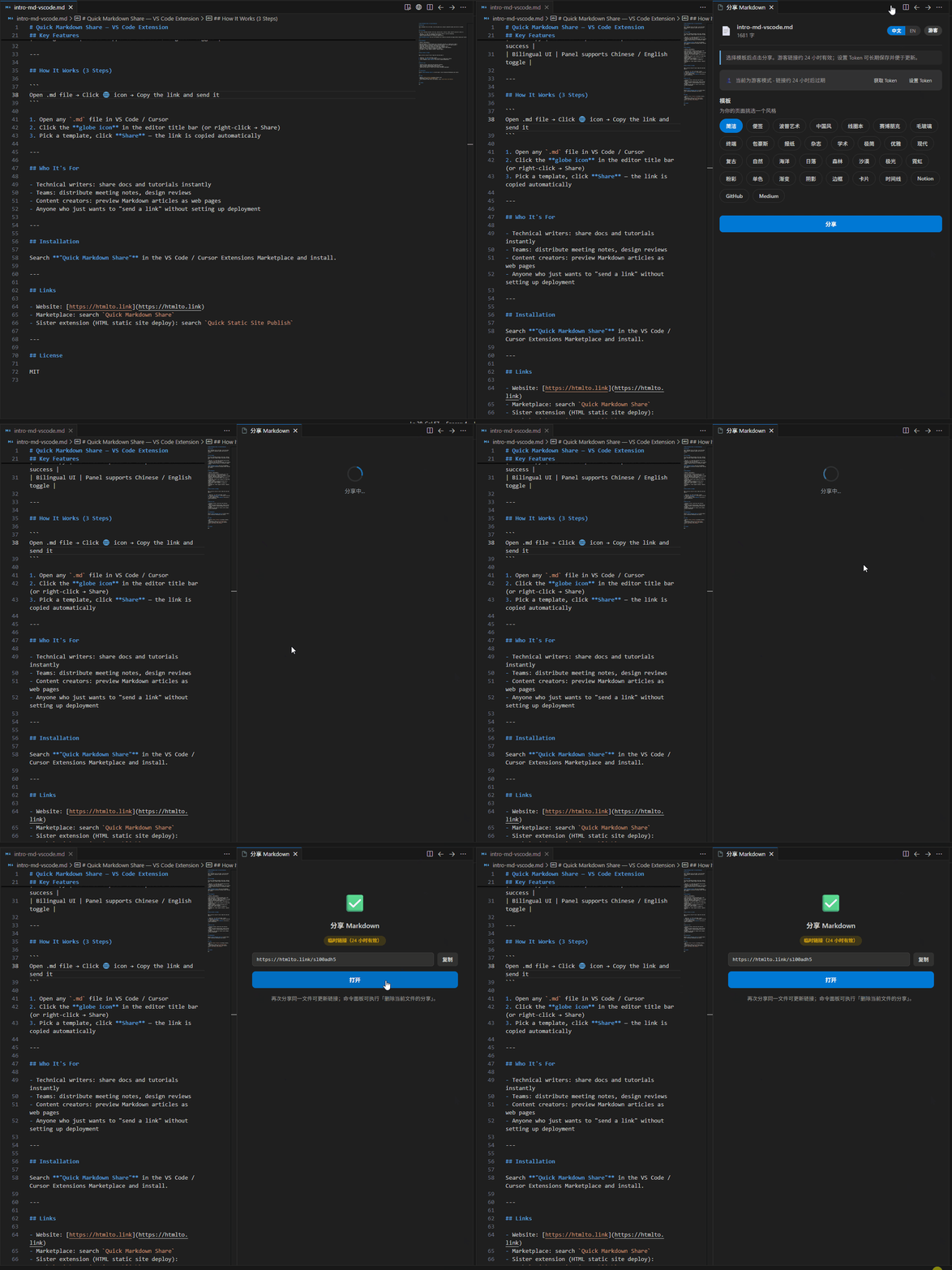
One-click share Markdown as a beautiful web page on htmlto.link. Open any .md and click Share on the title bar; guest links last ~24h, set a Token for longer-lived shares.
Installation
Launch VS Code Quick Open (Ctrl+P), paste the following command, and press enter.
One-click share Markdown as a beautiful web page, hosted by htmlto.link.
Quick Start
Open any .md file
Click the globe icon in the editor title bar, or right-click the file → Share
Pick a template (and theme if available), then click Share
Copy the link and send it to anyone
Demo
Guest vs Token
Mode
Description
Guest (default)
No sign-up. Links expire in about 24 hours.
Token
Register at htmlto.link, copy your Token from Settings. Shares are tied to your account for longer retention and updates.
In the share panel you can see the current mode, Set / Clear Token, or open the settings page.
You can also run Quick Markdown Share: Open Token Settings from the Command Palette.
Commands
Command
Description
Quick Markdown Share: Share
Open the share panel
Quick Markdown Share: Delete Share for Current File
Delete the share for the current file
Quick Markdown Share: Open Token Settings
Set or clear Token (leave empty to clear)
Update & Delete
Update: Share the same file again to update the existing link (the panel shows “Already shared”).
Delete: Command Palette → Delete Share for Current File.
Settings
Setting
Default
Description
htmlToLinkMd.apiBaseUrl
https://htmlto.link
API base URL (usually no change needed)
htmlToLinkMd.defaultTemplate
plain
Default template
htmlToLinkMd.autoCopyUrl
true
Copy link to clipboard on success
htmlToLinkMd.openInBrowser
false
Open link in browser on success
Token is stored in VS Code Secret Storage and is not written to workspace files.
First-run tips
On first activation you get a short toast; the first time you open the share panel there is a 3-step guide. Dismiss once and it won’t show again.
The share panel also has a 中文 / EN switch for the panel UI (independent of this details page).