RedLens Pro — Cost, Performance & Governance for Amazon RedshiftThe paid half of RedLens: cost and performance advice, the Redshift console, AI grounded in your schema, and governance administration. Requires the free RedLens extension. Installation Launch VS Code Quick Open ( Ctrl+P), paste the following command, and press enter.Copied to clipboard |

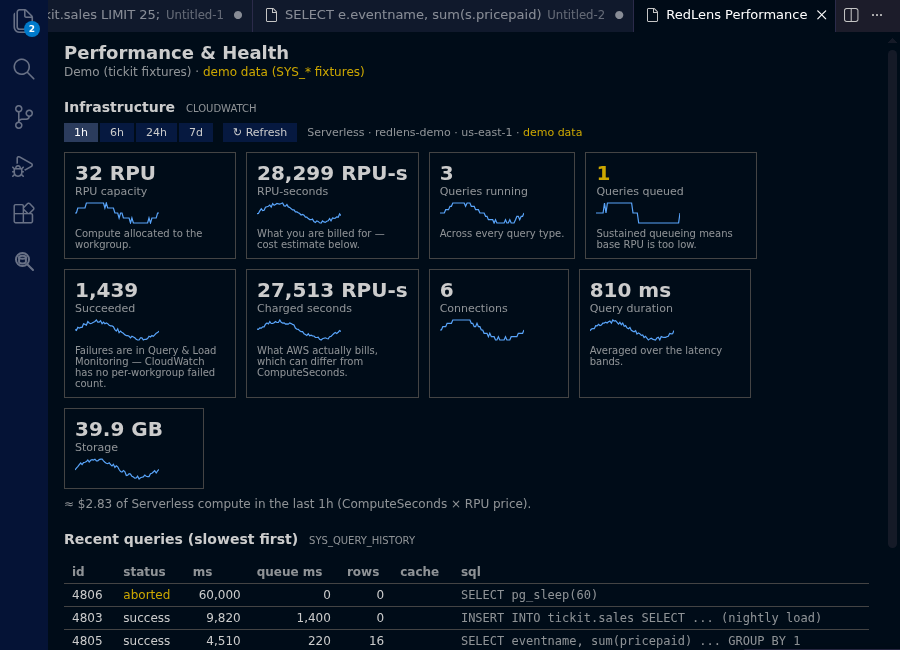
RedLens ProThe paid half of RedLens, the Redshift-native SQL IDE for VS Code. RedLens Pro requires the free RedLens extension. VS Code installs it for you as a dependency. RedLens Pro adds features to that extension — it is not a standalone product and does nothing on its own. Every install starts with 14 days of full Pro. No credit card. No account. No sign-up. When the trial ends the Pro features lock and the free extension keeps working exactly as before. What you getCost and performance adviceCloudWatch infrastructure metrics with the RPU cost of the window you are looking at, distkey/sortkey advice, skew, stale statistics, and AWS's own Advisor recommendations with the SQL it suggests.
Query and load monitoringWLM queueing with the queries that are waiting and for how long, per-query RPU cost, and COPY errors decoded into the file, line, column and reason — instead of an error code you have to go look up.
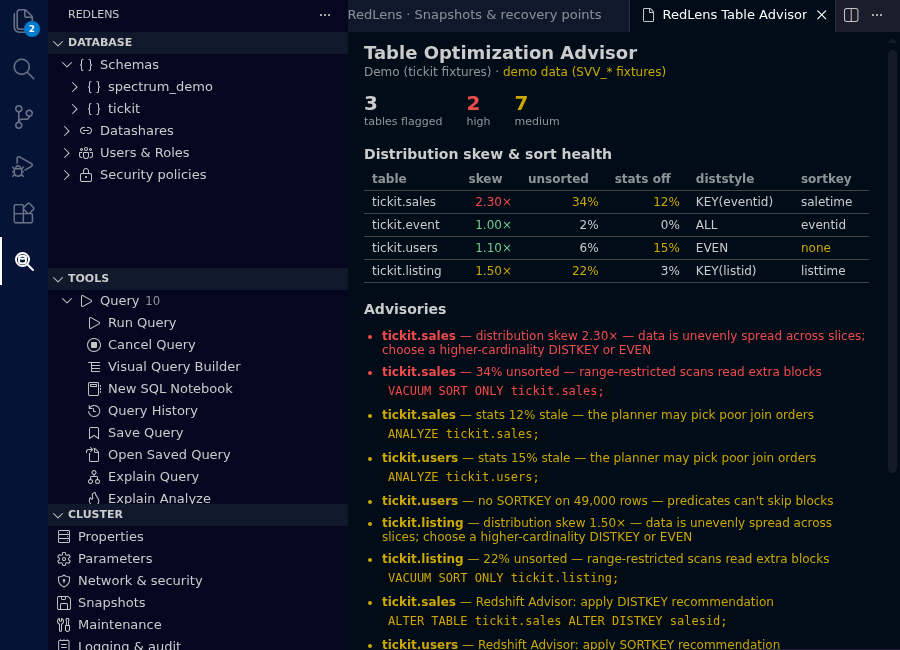
The Table Optimization AdvisorDistribution and sort key advice, skew, unsorted blocks and stale statistics — each with the SQL that fixes it, and AWS Advisor's own recommendations alongside.
The Redshift console, in the sidebarParameters with everything non-default first, network and encryption, snapshots
and retention, maintenance, logging and audit delivery, scheduled actions, usage
limits, events and reservations. Plus the AI grounded in your live schemaNatural language to SQL, plan explanation, query optimisation, error fixing,
table description, and an Governance administrationGenerated user, role and datashare DDL for review, and "why can this person do that" — the transitive role resolution with the exact path that grants each privilege. Migration and pipelinesSchema diff to migration DDL, row-level data diff, guided UNLOAD and COPY, and scheduled queries via EventBridge. What is Pro, and what is already freeThe free extension is a complete daily loop, not a demo. Pro is what saves money, prevents incidents and governs.
Every safety feature is free and always will be — read-only mode, the production safeguard, transaction control and PII-safe masking. Charging for not leaking PII is not a position worth defending.
The free extension is open source under the MIT licence: https://github.com/redlens-io/redlens Price, and what happens if you stop payingLicences are per person, per year:
Refunds: 14 days, no questions asked — on a purchase or on a renewal. Cancelling is a button, in the customer portal, reachable from RedLens: Manage Licence without leaving the editor. No email to us, no notice period, and you keep Pro until the end of the term you paid for. Invoices, payment method, seats and machine activations are there too. If a licence lapses, the Pro features lock and the free extension keeps working exactly as before — your connections, history, saved queries and notebooks are untouched. Free never expires and is never capped. Full pricing and terms: https://lensql.dev/pricing How the key reaches youPurchase happens outside VS Code and outside the Marketplace. Your receipt arrives by email with an Access purchase button; the key is on the page it opens, under Benefit Grants, and in your account at any time. Run RedLens: Manage Licence, choose Enter a licence key and paste it — it is verified offline, on your machine. Your data does not leave your machineRedLens has no server. Your SQL, your results, your schemas, your credentials and your AWS traffic go directly between your machine and your own systems. Licence verification is offline against an Ed25519 public key embedded in the extension, so Pro works inside a private VPC with no internet egress. Full terms: Support
|