Lean 4 Semantic Highlighting
See the role of each name as you read Lean code and proofs. In tree.value, for example, your theme can color tree as a local variable and value as a structure field. Highlighting uses the official Lean 4 extension and updates as you edit.
The extension uses your project's Lean toolchain. Run lean --version in the project folder to see which version is active.
- Tested releases include 4.24.0, 4.25.0, 4.25.1, 4.25.2, 4.26.0, 4.28.0, 4.34.1, and 4.35.0.
- Known incompatible releases include 4.7.0, 4.17.0, and 4.20.0. Other unlisted releases and nightlies may work, depending on their Lean language-server APIs.
If the plugin fails to build, Lean continues with its standard highlighting. In View → Output, select Lean 4 for plugin build errors or Lean 4 Semantic Highlighting for extension startup errors.
What gets highlighted
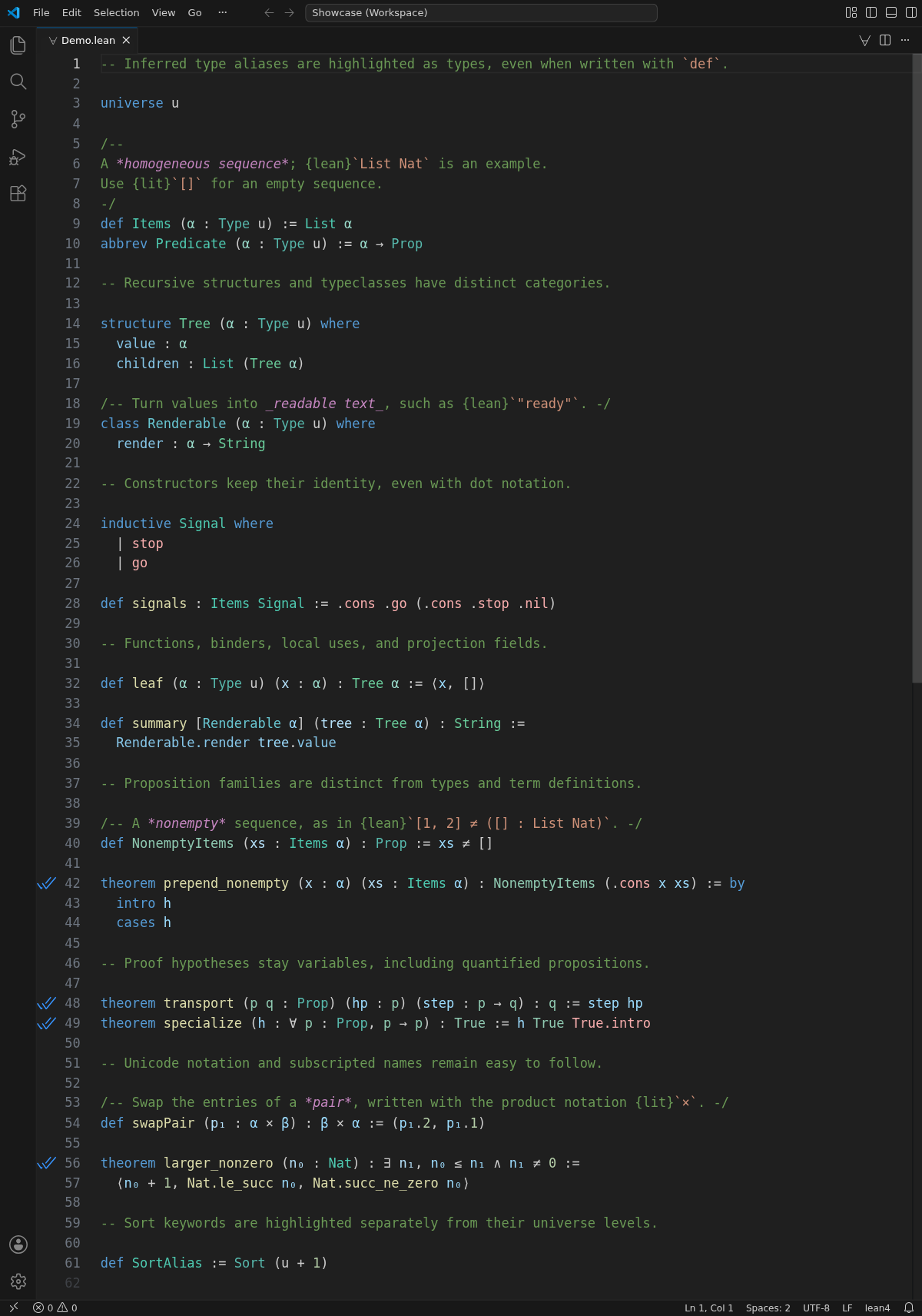
The screenshot uses Dark Modern with the example workspace’s color settings.
- Types and typeclasses. Lean recognizes
Tree as a structure, Renderable as a typeclass, and Items as a type alias even though it was declared with def.
- Constructors and fields. In
.cons .go (.cons .stop .nil), the names keep their constructor highlighting even when the type names are omitted. Field projections such as tree.value have their own color rule.
- Propositions and proofs. A proposition family such as
NonemptyItems has its own category. Local hypotheses such as hp in step hp use the local-variable color.
Colors
Semantic highlighting is enabled by default for Lean files. To give structures, typeclasses, and constructors distinct colors, add these rules to your VS Code settings.
{
  "editor.semanticTokenColorCustomizations": {
    "rules": {
      "struct:lean4": "#6ACD9B",
      "interface:lean4": "#68C5D0",
      "enumMember:lean4": "#F7ADAD"
    }
  }
}
The :lean4 suffix limits a rule to Lean files. Use these token names to customize other categories.
| Entity |
Token |
Type, Sort, Prop |
class |
| Local type parameters |
typeParameter |
| Typeclasses |
interface |
| Structures |
struct |
| Propositions and proposition families |
enum |
| Datatypes, aliases, and type families |
type |
| Constructors |
enumMember |
| Projection fields and functions |
property |
| Term definitions, theorems, axioms, recursors |
function |
| Local term binders |
parameter |
| Local term uses and proof hypotheses |
variable |
License
MIT

