Explore Run NPM
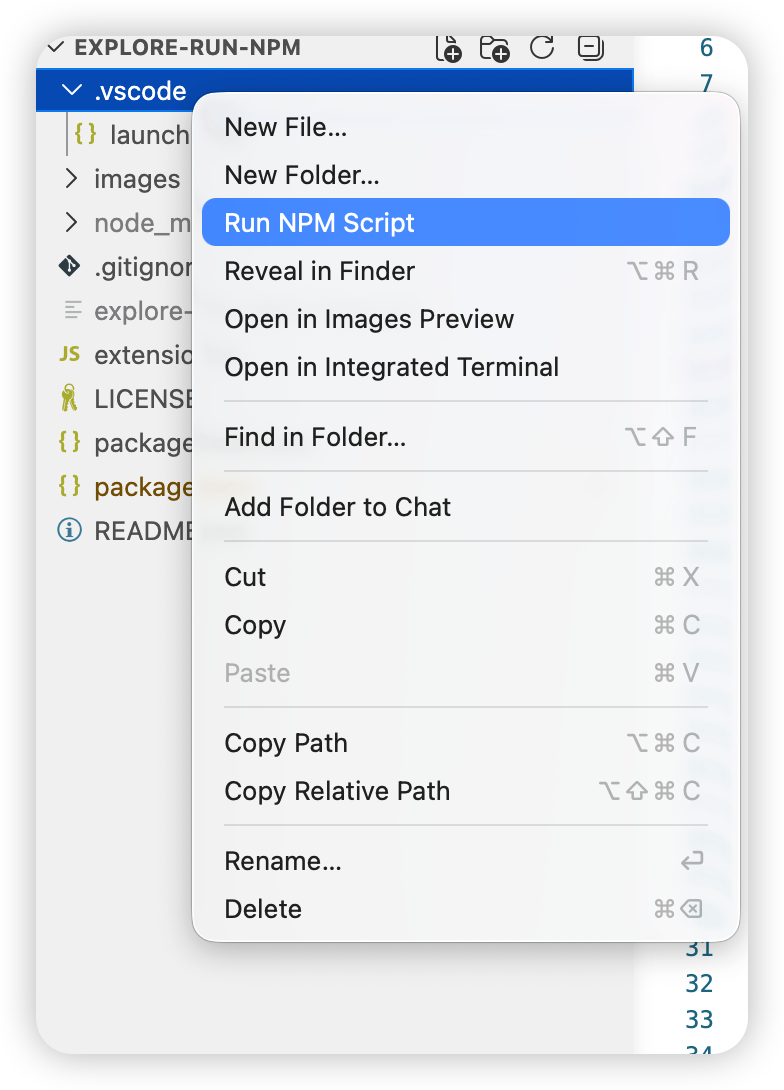
Run npm scripts directly from the VS Code Explorer context menu.
Screenshot
Features
- Right-click a file, folder, or
package.json in the Explorer and choose Run NPM Script.
- Automatically finds the nearest
package.json for the selected item.
- Shows all available npm scripts in a Quick Pick list.
- Runs the selected script in a VS Code terminal with the correct working directory.
- Detects pnpm, Yarn, and Bun projects and lets you choose the package manager while keeping npm available.
- Supports single-folder and multi-root workspaces.
Usage
- Open a project that contains a
package.json.
- Right-click a file, folder, or
package.json in the Explorer.
- Select Run NPM Script.
- Choose the npm script you want to run.
- If another package manager is detected, choose whether to run it with pnpm, Yarn, Bun, or npm.
The extension opens a new terminal and runs:
<package-manager> run <script-name>
Requirements
- VS Code
1.85.0 or newer.
- Node.js and npm available in your environment.
Extension Settings
This extension does not contribute any settings.
Known Issues
- Package manager detection is based on
packageManager in package.json and common lockfiles such as pnpm-lock.yaml, yarn.lock, and bun.lockb.
Release Notes
1.0.0
Initial release.
中文说明
从 VS Code 资源管理器右键菜单直接运行 npm scripts。
功能
- 在资源管理器中右键文件、文件夹或
package.json,选择 Run NPM Script。
- 自动查找与当前选择项最接近的
package.json。
- 通过 Quick Pick 列出所有可用的 npm scripts。
- 在正确的工作目录中打开 VS Code 终端并运行所选脚本。
- 检测到 pnpm、Yarn 或 Bun 项目时,可以选择使用对应包管理器运行,同时保留 npm 选项。
- 支持单文件夹工作区和多根工作区。
使用方法
- 打开包含
package.json 的项目。
- 在资源管理器中右键文件、文件夹或
package.json。
- 选择 Run NPM Script。
- 选择要运行的 npm script。
- 如果检测到其他包管理器,选择使用 pnpm、Yarn、Bun 或 npm 运行。
插件会打开一个新的终端并执行:
<package-manager> run <script-name>
环境要求
- VS Code
1.85.0 或更高版本。
- 当前环境中可用的 Node.js 和 npm。
扩展设置
此扩展暂不提供额外设置项。
已知问题
- 包管理器检测基于
package.json 中的 packageManager 字段,以及 pnpm-lock.yaml、yarn.lock、bun.lockb 等常见 lockfile。
| |

