PraeCode — Hermes Agent for VS Code


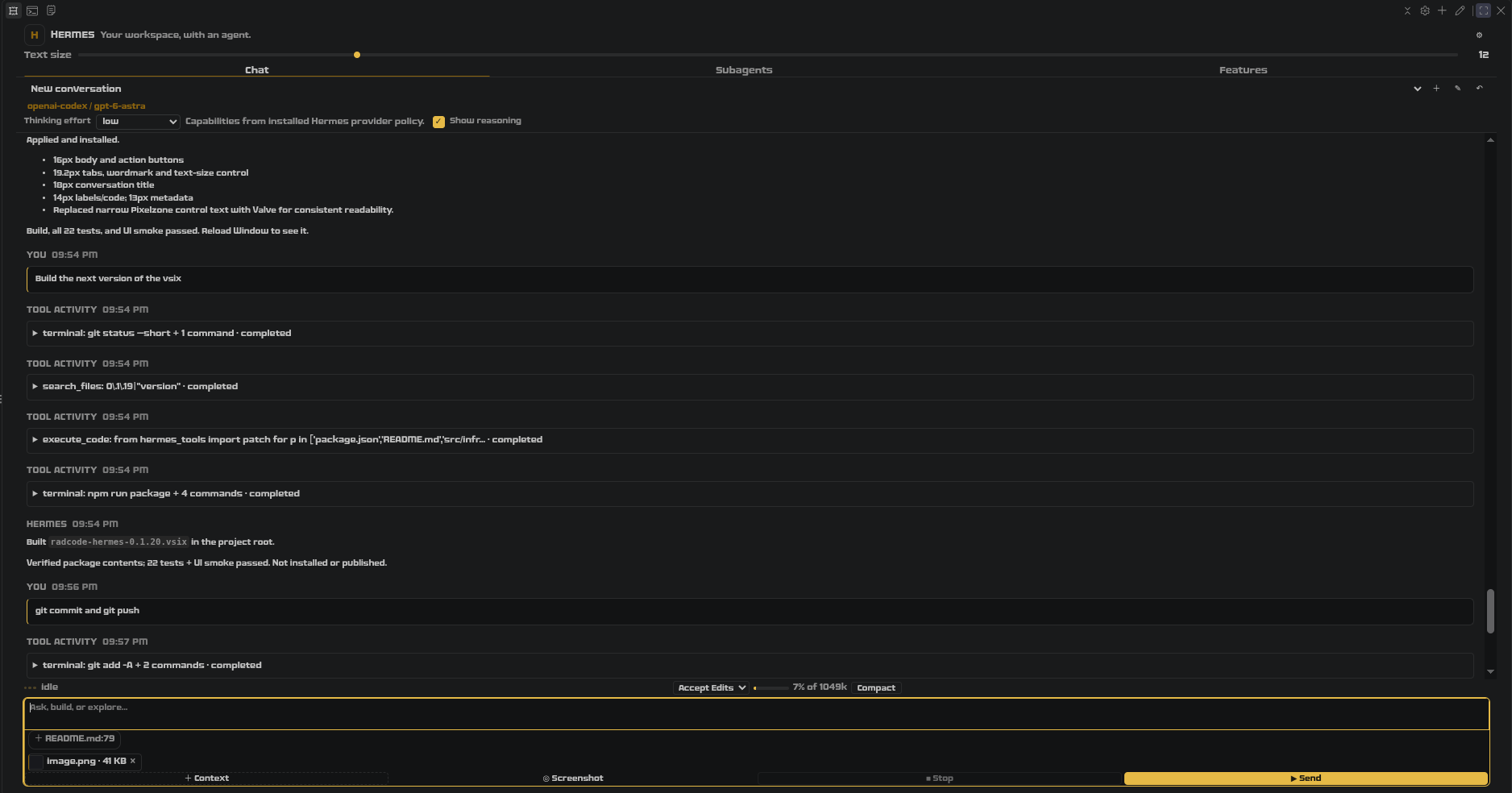
A VSCodium / VS Code extension for Hermes Agent — v0.1.30.
It talks to your existing Hermes installation over ACP (Agent Client Protocol) — no API keys are
stored in VS Code, and no Hermes configuration is modified.
Disclosure: this was vibe-coded
Almost all of this code was written by AI agents — largely by Hermes Agent itself — driven by
natural-language instructions, screenshots and corrections. That is what "vibe-coded" means here:
the author decided what it should do and rejected what was wrong, but did not type most of the
implementation.
What that does and does not imply:
- Verified where it claims to be. Every behavioural claim in this README was exercised against a
real Hermes install, not assumed: 28 unit tests, 44 Python tests for the bridge, a Playwright UI
smoke suite (including the model picker, the resize handle and a profile save), and a live ACP
handshake. Numbers such as the per-model effort ladders were read back
from the provider, and several bugs were found exactly because a claim looked plausible but was not.
- Not audited line by line. No independent security review has been done. The code has not been
read end-to-end by developers or reviewers, and AI-written code has failure modes that tests miss: subtly wrong
edge-case handling, plausible-looking abstractions, and comments that describe intent rather than
behaviour.
- Treat it accordingly. Read the source before granting broad autonomy. This extension can run
terminal commands and edit files through Hermes; if you switch approval to Accept Edits or
Don't Ask, that is your decision, not a vetted one. Do not point it at repositories you cannot
afford to have modified, and keep backups or version control you trust.
- No warranty. MIT licence, provided "as is", without even the implied warranty of
merchantability or fitness for a particular purpose.
If you want a vetted extension, this is not it yet. If you want a working, honest, actively corrected
one, it is — and bug reports are welcome.
Install
From the Marketplace — search for PraeCode Hermes in the Extensions view, or:
code   --install-extension lainiceanuraduc.praecode   # VS Code
codium --install-extension lainiceanuraduc.praecode   # VSCodium
From a VSIX — npm run package, then Extensions → … → Install from VSIX.
From source — npm install && npm run compile, then F5 in the repo to launch an
Extension Development Host.
The extension is a client, not a bundled agent. Nothing works until Hermes is installed and
hermes acp --check prints Hermes ACP check OK; the view still renders and tells you what is
missing.
What's new in 0.1.27
- Your type, your hierarchy. The size slider covers 1–30 (default 10). Prompts, responses and
code are regular weight at exactly that size; buttons, dropdowns, tabs, headings and the model picker
are 1.4×–1.6× larger and bold.
- Conversations are no longer lost on update. Startup merges the saved-session index instead of
overwriting it, every stored conversation appears in the picker, the last one is resumed, and the
list itself is re-read from Hermes'
state.db so a reinstalled extension can recover it.
What's new in 0.1.26
- Sizes rebalanced for the pixel face. Public Pixel advances a full em per character, so the same
pixel size reads much wider than a sans face. The text-size floor is now 13 px (the slider and the
setting no longer go to 10), messages, prompt, model button and actions all sit at that base size,
and the picker's detail values get a column wide enough to read as sentences.
- One centred reading column on wide windows. Text, composer and panels stop at 1000 px instead of
stretching to 1900 px, which is what made rows of buttons look broken rather than large.
- Content-sized controls. Menu tabs hug their labels and the composer actions wrap only when the
row cannot hold them, so "Screenshot" is never clipped or split mid-word.
Previous release: 0.1.25
- Public Pixel throughout the extension: messages, code, controls and profile editors.
- Preserved size, bold and italic variations; removed font-family overrides.
- Two-column composer actions and scrollable tabs keep the wider pixel text usable.
0.1.24
- Model picker modal. The model button opens a dialog with two lists: Favorites (kept by the
extension in VS Code global state) and All models for the selected provider. Star a model to
add it, star it again in Favorites to remove it. The right-hand pane shows the selected model as the
provider describes it — provider name, publishing lab (
owned_by), context window with its
source, and the exact thinking/effort ladder — fetched through the bridge, not read from a table.
A model whose provider publishes nothing says "Unknown" instead of quoting a default.
- Resizable prompt. A grab bar above the textarea: drag it, or focus it and use
↑/↓/Home. The height is clamped to 60% of the window and remembered.
- Features is now your profile, not a brochure.
SOUL.md, memories/USER.md and
memories/MEMORY.md are shown and editable, each with an explicit Save (atomic
temp-file + rename, allowlisted to the profile directory). config.yaml is deliberately not
editable: broken YAML breaks Hermes, broken memory only changes what it remembers.
session/set_model timeouts are no longer retried blindly. The session is re-read; if the
switch landed it is adopted, otherwise the session is marked disconnected with a warning, so a
retry cannot move you to a model you never picked.- Approvals can no longer be denied silently. Approval cards now live above the tab panels (so a
request raised while Subagents/Features is open is visible), posts are queued until the webview is
ready, and every unanswered path — untrusted workspace, no option offered, 120 s expiry — is
reported in the view and in the connection log. Previously a request could expire while nobody saw
it and the tool simply failed.
What works in v0.1
| Area |
Behaviour |
| Chat |
Streaming replies, resumable sessions, cancellation, Markdown (sanitized), tool-call activity, permission prompts. The composer clears on submit and gets the draft back if the host rejects it. Rename a conversation inline (✎ beside the picker, or Hermes: Rename Session): the title is stored on the Hermes session itself (session.mutate rename) and therefore survives a resume |
| Thinking / effort |
Model-aware selector from None / Off to max, populated from Hermes' own provider policy and read back after applying. Every Ollama Cloud model (e.g. deepseek-v4.1-flash:1017) gets none/low/medium/high/max, Mistral-hosted ones none/low/medium/high; the Mistral API has none/high |
| Model |
A picker modal with per-provider All models and a persistent Favorites list (star to add, star again to remove), plus live per-model details: provider, lab, context window and effort ladder. Guarded Hermes model switches surface as approval prompts. "Other…" still accepts a manual provider/model id |
| Prompt |
The composer is resizable from a grab bar above it (drag, or arrow keys) and keeps its height between reloads |
| Subagents |
Named worker presets (provider, model, effort, instructions), isolated sessions per run, parallel-run cap, "Use result" into the main chat |
| Context |
Files attached to a message: the editor you are looking at is offered as a one-click chip, + Context picks more from the workspace, each chip opens or removes the file. The editor host reads the bytes at send time, so you always send the current file; the transcript shows names, not file bodies. Workspace-trust enforcement |
| Appearance |
radcode.accent picks the highlight colour (yellow default, 8 palettes), radcode.fontSize/lineHeight/compact restyle the view. All text uses Public Pixel. Changes apply live |
| Profile |
"Features" tab reads the profile on disk: SOUL.md, memories/USER.md, memories/MEMORY.md, each editable with an explicit Save |
| Diagnostics |
"PraeCode Hermes" output channel with secret redaction |
Bundled font, and why it changed
All extension UI text (including messages, code, controls and profile editors) uses
Public Pixel by GGBotNet, licensed CC0 1.0 (public domain): media/fonts/PublicPixel.ttf, with
provenance in media/fonts/PublicPixel.LICENSE.txt. CC0 permits redistribution inside a published
extension. Bold and italic are synthesized from the bundled regular face; sizes retain the UI hierarchy.
The retired radcode.fontFamily and radcode.fontFamilyCustom settings no longer affect the view.
Native editor UI and dialogs remain controlled by VS Code. Unsupported glyphs use a fallback font.
Until 0.1.22 that face was Valve by Typodermic Fonts, which ships under a Desktop-only EULA.
That agreement forbids embedding the font software in "an app, game, desktop application, plug-in,
extension, mod, or other software", so shipping it inside a VSIX was a licence violation. 0.1.23
removed those .otf files (and the unused Pixelzone face) and switched to Public Pixel; 0.1.24 is
the rename to PraeCode. The 0.1.21 and 0.1.22 builds that contained Valve have been removed from the
Marketplace, so no downloadable package carries it.
Requirements
- Hermes installed and configured (
hermes acp --check must print Hermes ACP check OK).
- VS Code / VSCodium 1.96+.
- A trusted local workspace folder (the extension declares
untrustedWorkspaces: false).
Settings
| Setting |
Default |
Purpose |
radcode.hermesPath |
hermes |
Hermes executable. Auto-detects ~/.local/bin/hermes when left as hermes. |
radcode.hermesHome |
(empty) |
Absolute HERMES_HOME to pin a specific Hermes profile. |
radcode.pythonPath |
(empty) |
Hermes' own Python interpreter for model-aware effort controls. Only needed if hermes --print-runtime-command is unavailable. Never point this at an unrelated system Python. |
radcode.maxParallelAgents |
2 |
How many PraeCode worker sessions may run at once. |
radcode.accent |
yellow |
Highlight colour: yellow, amber, orange, lime, teal, violet, magenta, blue. Drives focus rings, links, active tab, composer and attachment chips. Light editor themes automatically get a darkened text variant. |
radcode.fontSize |
10 |
Reading size in px (1–30). Only prompts, responses and code use it; controls, tabs, headings and the model picker are 1.4–1.6× larger and bold. |
radcode.lineHeight |
0 |
Line-height multiplier; 0 follows the editor. |
radcode.compact |
false |
Tighter spacing for narrow sidebars. |
How thinking/effort works
Hermes defines a wide canonical ladder (none, minimal, low, medium, high, xhigh, max), but each
provider/model accepts a different subset. PraeCode:
- asks the installed Hermes (
bridge/control.py) for the actual supported levels for the active
provider/model (Codex uses per-generation ladders; Anthropic maps levels to thinking budgets);
- shows only those levels in the selector (plus "Profile default");
- applies the change through Hermes' own fenced
reasoning session mutation;
- reads the value back from
session.info and fails loudly if it did not land.
A model whose capabilities are unknown gets an empty list and a note — PraeCode never offers
speculative levels that would 400 at the provider.
Provider compatibility
PraeCode never invents an effort level: it asks Hermes, which owns the per-provider truth. These are
the routes the installed agent actually answers (verified 2026-10-23 against hermes-agent 0.22.3).
| Route |
Ladder offered |
Where it comes from |
mistral (api.mistral.ai) |
per model — four groups, see below |
Probed live, one request per model and level: none,high for Mistral's own reasoning models; low,high,max for the Z.ai GLM routes; the full set for GLM 5.2; no levels at all for models with reasoning disabled. |
ollama-cloud |
none, low, medium, high, max |
Hermes' OLLAMA_CLOUD_EFFORTS; xhigh → max, and none is the only off switch (Cloud defaults to thinking on). |
Ollama on localhost:11434 |
same ladder, think semantics |
The daemon publishes what a model really accepts via /api/show; Hermes clamps to what it can send. |
openrouter |
per model, from OpenRouter's /v1/models reasoning metadata |
Hermes reads the same catalog (hermes_cli.models_reasoning_caps) and clamps at request time. supports_reasoning: false disables the selector; a published supported_efforts list is offered verbatim (minus none when reasoning is mandatory); an unlisted model falls back to the OpenAI-compatible set, which Hermes clamps. |
custom → https://api.openai.com/v1 |
OpenAI per-generation ladder |
codex_supported_efforts: minimal is rejected upstream (clamps to low), max only on the newest generations. |
openai-codex |
per generation |
Hermes' Codex ladder, same helper. |
anthropic |
derived (adaptive / legacy budgets) |
Hermes maps levels onto thinking budgets and drops none where thinking cannot be disabled. |
Mistral-family models are recognised by name on every route, so mistralai/mistral-large-4 on
OpenRouter is judged by OpenRouter's metadata while the same model on api.mistral.ai is held to
none/high. A model Hermes knows nothing about gets an empty list and a note — never a speculative
level that would 400 at the provider. Images follow the same rule: the composer accepts a paste only
when the agent advertises promptCapabilities.image, and Hermes routes the vision request per model.
Mistral effort: one API, four ladders
Mistral is not a single ladder. Probed live on 2026-10-23 against api.mistral.ai — one
max_tokens=1 request per model and level, 30 model ids — it has four distinct behaviours. The table
lives in hermes-plugin/mistral/mistral_ladders.py, and both the selector and the wire read it, so
they cannot disagree.
| Group |
Models |
Accepted reasoning_effort |
| Two-level |
mistral-large-4, mistral-medium-*, mistral-small-*, magistral-*, mistral-vibe-cli-* |
none, high — anything else is HTTP 400 supported values: [high, none] |
| Mandatory |
zai-glm-5, zai-glm-5-3, zai-glm-5-3-flash, zai-glm-latest |
low, high, max — no none: reasoning cannot be switched off |
| Full |
glm-5-2, zai-glm-5-2 |
every level, including minimal / xhigh / max |
| No reasoning |
mistral-large-latest (Large 3!), ministral-*, codestral-*, mistral-code-*, voxtral-small-* |
none — any value, including none, is HTTP 400 reasoning_effort is not enabled for this model |
Two traps worth naming, because both are easy to get wrong from the model name:
mistral-large-latest is Large 3 and has reasoning disabled, while mistral-large-4 is on the
two-level ladder. A mistral-large* prefix rule guesses the wrong answer, so the alias is matched
explicitly before any pattern.- The Z.ai models are served by Mistral, so
zai-glm-5-3 reaches api.mistral.ai even though
its id is not a Mistral model name. The route decides which ladder applies, never the name: a
session reporting provider: custom with the Mistral base URL gets the Mistral table too.
A model id that has never been verified gets no levels and an explanatory note rather than a
guess — on this API a wrong level is a 400 on every turn, not a silent clamp.
For the levels to reach the wire at all, stock Hermes needs the bundled provider profile (it ships no
mistral profile, so reasoning_effort would be stored but never transmitted):
mkdir -p ~/.hermes/plugins/model-providers
cp -r hermes-plugin/mistral ~/.hermes/plugins/model-providers/mistral
# remove that directory to return to stock behaviour
The profile also omits the field entirely for the no-reasoning group: the previous version sent a
hard-coded none/high to every model, which made every turn fail with HTTP 400 on Ministral,
Codestral and Large 3. Ollama Cloud routes need no plugin.
Subagents
Worker presets are extension-local templates saved in VS Code global state. "Run" creates a new
Hermes session, applies provider/model/effort, then sends the preset instructions plus your task.
Workers share the workspace and your Hermes profile (memory, tools, credentials) but not conversation
history. Use separate git worktrees if two workers edit the same files.
These presets are not a replacement for Hermes' native delegate_task / delegation.* config —
they are editor-side orchestration using independent ACP sessions.
Architecture (OOP)
src/
  domain/          Presets, effort ladder, model-catalog grouping and favorites, profile
                   allowlist, attachment/image/limit rules               (no VS Code, no Node)
  application/     SessionController, ConversationSession                 (no VS Code imports)
  infrastructure/  JsonRpcTransport, AcpClient, HermesControl             (Node only)
  presentation/    ChatViewProvider (the webview adapter)
  extension.ts     activate/deactivate only
  extension/       RadCodeExtension (composition root), PermissionBroker, Inputs
                   (attachments + images), Settings, ProfileStore (allowlisted profile
                   read/write), screenshot, media helpers
  webview/         one module per concern: TranscriptView, AgentMenu, ContextAttachments,
                   PastedImages, ApprovalCards, ModelPicker, FeaturesPanel, ComposerResize,
                   appearance, types, main.ts (bootstrap)
bridge/control.py  version-gated Hermes-side helper (catalog, model details, fenced effort,
                   rename, compact)
media/             webview HTML/CSS/icon (CSP-locked, no inline script)
Each layer owns one concern; the webview has no Node, network, filesystem, or credential access.
src/extension/RadCodeExtension.ts is the only file that imports both vscode and the Hermes-facing
services, and the webview's message types are enumerated in one dispatch table rather than a switch.
Testing
npm install
npm run compile       # tsc --noEmit + esbuild
npm test              # unit tests (transport, ACP, presets, sessions, control)
npm run test:python   # Hermes-side helper tests (needs Hermes' Python)
npm run test:ui       # Playwright: rendering, CSP, sanitization, capability select, a11y labels
npm run test:live     # real ACP handshake + session + effort read-back
npm run package       # produces praecode-0.1.30.vsix
The extension-host test (test/extension-host.ts) is run in a real editor:
codium --extensionDevelopmentPath="$PWD" --extensionTestsPath="$PWD/out/extension-host.js" "$PWD"
Known limitations / not in v0.1
- No admin surfaces (MCP editor, cron, kanban, profiles, skills manager). Memory and
SOUL.md are
editable from the Features tab; config.yaml is deliberately not exposed there — edit it with
Hermes' own configuration commands.
- Worker presets are extension-local; they do not write
delegation.* into Hermes config.
- No voice, image-generation, or session-search UI yet (pasted images do work).
- Effort controls depend on a local Hermes runtime; remote-only setups fall back to a disabled
selector with an explanatory note rather than a fake control.
- Only sessions created by this extension in the current workspace are listed for resume.
- Attachments are text-only: binary files are refused rather than sent garbled.
- The file picker searches names (
workspace.findFiles), not file contents.
Security notes
- Commands run with the editor's environment; workspace trust is required.
- Secrets stay in Hermes (
~/.hermes/.env); PraeCode never writes credentials.
- The webview is CSP-locked (
default-src 'none'), renders sanitized Markdown with DOMPurify, and
only sends typed messages to the extension host.
- The webview never holds file contents and cannot choose what is read: it names a path, the host
validates it against the workspace folders and reads it.
- Hermes daemon remains Hermes-owned; the extension attaches as a viewer and disposes its own
subprocess on shutdown.
| |

