Git Graph Zero
A lightweight commit graph for Visual Studio Code. It has no runtime dependencies and a simple UI: the graph, commit details, and a right-click menu.
Beta. This is a preview release (0.x). Features and settings may change. Feedback is welcome.
Git Graph Zero is an unofficial extension, independently implemented and maintained by one person. It is not affiliated with, endorsed by, or derived from the original Git Graph extension. The implementation is clean-room, and no code from that extension is reused.
Features
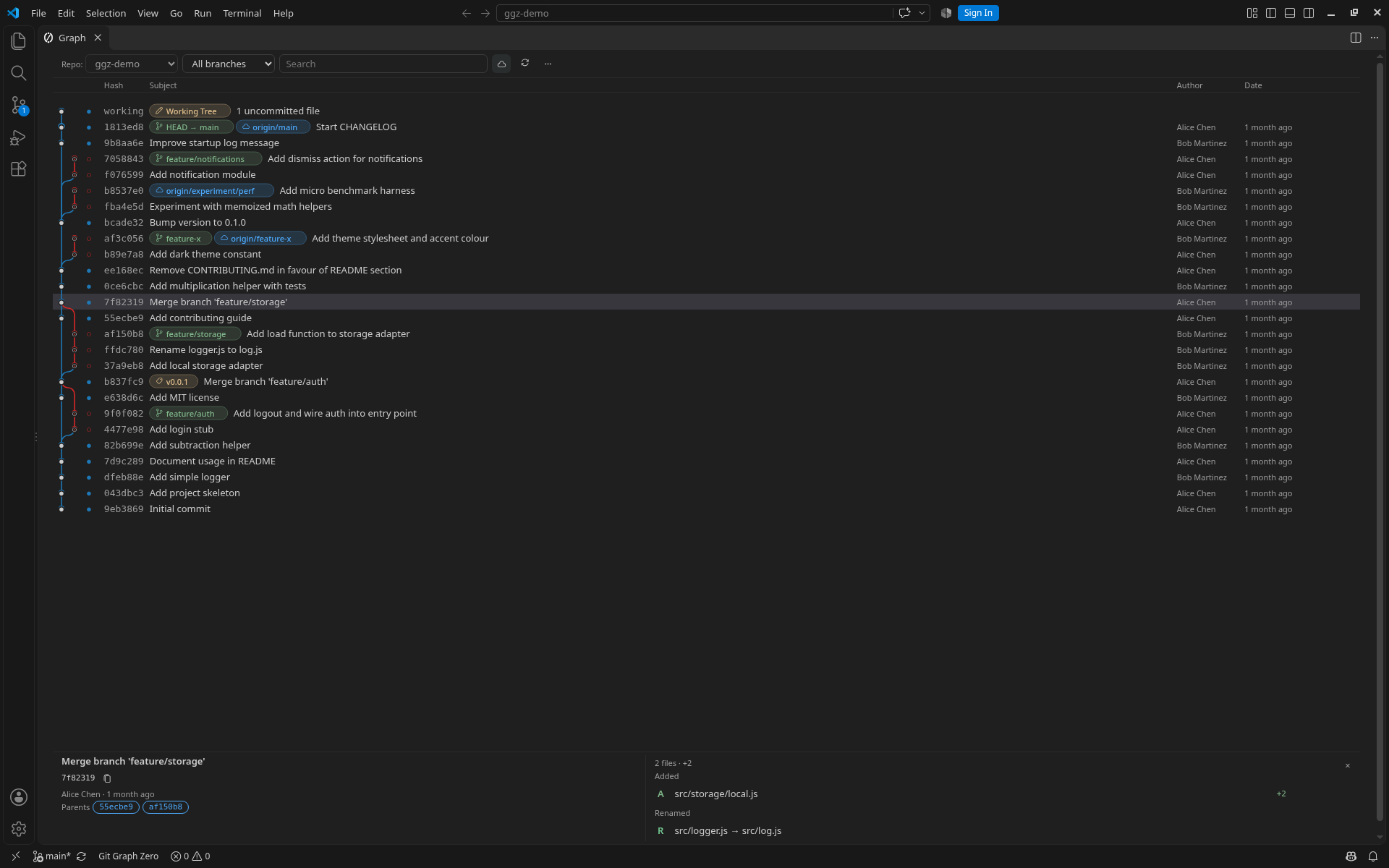
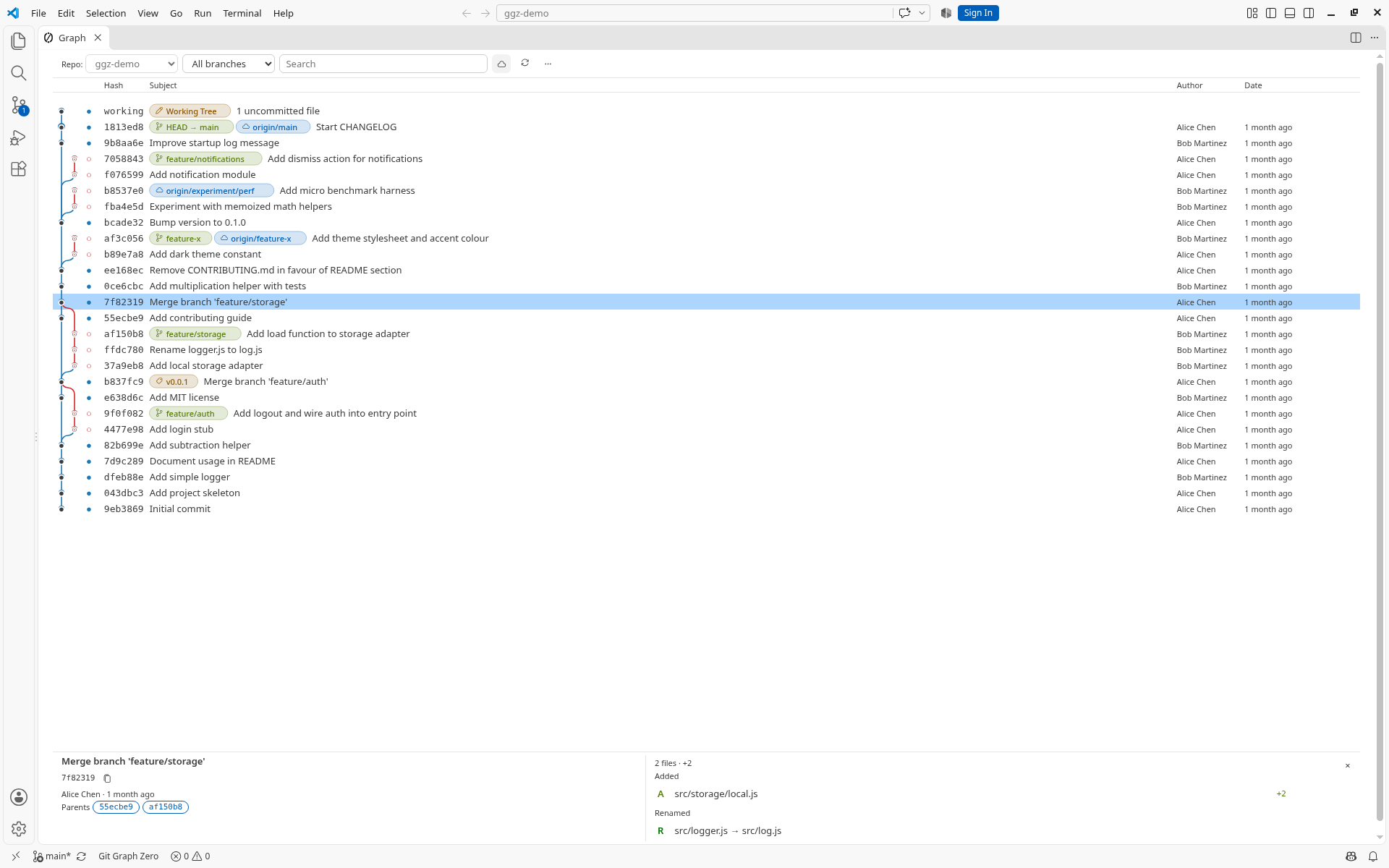
Graph view
- SVG (default): lanes for branches and merges, with labels for local branches, remote-tracking branches, tags, and HEAD. Lane symbols are drawn as well as color. Left/Right follow a selected commit's parent or child; when that move is not possible they scroll the graph lanes.
- Terminal: Git's own
--graph text, shown as-is.
- Older commits load as you scroll. Columns (hash, author, date) can be shown or hidden, and the subject column can be resized.
Commit details and diffs
Select a commit to see the full message, author, hash, parents, and changed files. Click a file to open VS Code's diff editor (against the first parent). You can copy a file path, open the file as it is in the working tree, and open http/https links in the message. Close the panel with × or Escape to give the graph the full height; Escape first clears the search box or closes an open menu.
Compare
Ctrl/Cmd-click a second commit to list changes between the two. The same comparison works between the uncommitted row and a commit.
Filters
Filter the loaded graph by branch (commits reachable from that ref). A toolbar cloud button shows or hides remote-tracking branches: both the remote pills and commits reachable only from those refs. The choice is remembered per workspace and is on by default. Show or hide tags, the uncommitted row, and stash rows from the "…" menu.
Right-click Git actions
Checkout a commit or ref, merge into the current branch, rebase the current branch onto another, cherry-pick, revert, drop a commit, reset (soft / mixed / hard), create a branch, rename or delete a local branch, add or delete a tag, and copy a hash or ref name. Destructive actions ask for confirmation.
Remote
Fetch (--all --prune), pull, and push the current branch from the "…" menu. Push can set an upstream. A tag can be pushed from its menu.
Stash
Apply, pop, or drop a stash from its row. The "…" menu opens stash actions (apply, pop, drop, or create a branch) and jumps to the stash rows.
Uncommitted changes
A working-tree row sits at the top of the graph. From that row you can stash the changes, clean untracked files, or discard all changes.
Find
The search box matches commit messages, authors, and hashes on rows that are already loaded. Enter jumps to the next match, Escape clears the box, and Ctrl/Cmd+F focuses it.
Refs watch
gitGraphZero.watchRefs is off by default. While the graph is open, it watches Git refs (including a linked worktree's shared refs) and refreshes in place, keeping the current scroll position and selection.
Commands
| Command |
Title |
gitGraphZero.openGraph |
Git Graph Zero: Open Graph |
gitGraphZero.refreshGraph |
Git Graph Zero: Refresh Graph |
gitGraphZero.version |
Git Graph Zero: Show Version |
gitGraphZero.addGitRepository |
Git Graph Zero: Add Git Repository |
gitGraphZero.removeGitRepository |
Git Graph Zero: Remove Git Repository |
Commands are grouped under Git Graph Zero in the Command Palette, so each one appears as Git Graph Zero: …. Open Graph is also on the Source Control title bar.
Open Graph asks you to pick a repository when the workspace has more than one, then reopens that repository the next time. If the remembered repository is gone, it asks again. The Source Control title-bar button opens that view's repository. The editor tab is titled Graph. The current repository is shown in the view. By default the extension activates when VS Code finishes starting, so the status bar item appears immediately (gitGraphZero.showStatusBar is on by default). Git is not started until you open the graph. Turn on gitGraphZero.lazyActivation if you want the extension to stay idle at startup and only activate fully when you run a Git Graph Zero command.
Settings
Generated from contributes.configuration in package.json.
| Setting |
Type |
Default |
Description |
gitGraphZero.renderer |
string (svg, terminal) |
svg |
How commit history is drawn. Terminal mode shows Git's --graph output. Details, filters, toolbar actions, and the context menu are available only in SVG mode. The in-progress banner is shown in both modes. |
gitGraphZero.laneColors |
array of strings |
[] |
Colors for graph lanes. Empty uses the built-in palette of 10 colors. ["terminal"] uses terminal ANSI theme colors (--ansi-0 through --ansi-15). Any other value is an array of #RRGGBB colors. |
gitGraphZero.initialCommitCount |
number (50–5000) |
300 |
How many commits the graph loads the first time you open it. |
gitGraphZero.loadMoreCount |
number (10–1000) |
100 |
How many older commits are added when you scroll to the end of the graph. |
gitGraphZero.detailsLayout |
string (split, headline) |
split |
Commit details panel layout. split: identity on the left, files on the right; falls back to Headline when the panel is narrower than 32rem (512px). headline: stacked subject, body, wrapping meta row, then files. Changing this updates the open panel without reloading the graph. |
gitGraphZero.dateFormat |
string (iso, relative, locale) |
relative |
Date format in the date column and in commit details. iso: ISO 8601 (for example 2026-07-07T12:00:00+09:00). relative: relative time (for example 3 hours ago). locale: the locale of this VS Code window. Relative is the default so the date column stays narrow. |
gitGraphZero.commitOrder |
string (date, topo, default) |
date |
Order of commits in the graph. There is no toggle in the view. date: git log --date-order. topo: git log --topo-order. default: Git's own order. |
gitGraphZero.firstParent |
boolean |
false |
When enabled, the graph follows only the first parent of each merge (git log --first-parent). There is no toggle in the view. |
gitGraphZero.watchRefs |
boolean |
false |
While the graph is open, refresh it when Git refs change. The current scroll position and selection are kept. |
gitGraphZero.showStatusBar |
boolean |
true |
Show a status bar item after the extension activates. On by default. Git is not started until you open the graph. |
gitGraphZero.lazyActivation |
boolean |
false |
When enabled, the extension does nothing at startup and only activates fully when you run a Git Graph Zero command. |
Requirements
- Visual Studio Code
^1.80.0
- Git on
PATH
License
Proprietary, not open source. Use of the published extension is free. Copying, modification, reverse engineering for reuse, redistribution, sublicensing, and publishing derivative works are prohibited except as permitted by law. The full terms are in the LICENSE file shipped with this extension.
Feedback
Feedback is welcome while this beta is in preview, including rough edges and behavior that should stay stable. This listing does not link to a public issue tracker.

