kUML for Visual Studio Code
First-class editor support for kUML diagram scripts
(*.kuml.kts) in Visual Studio Code.
Screenshots
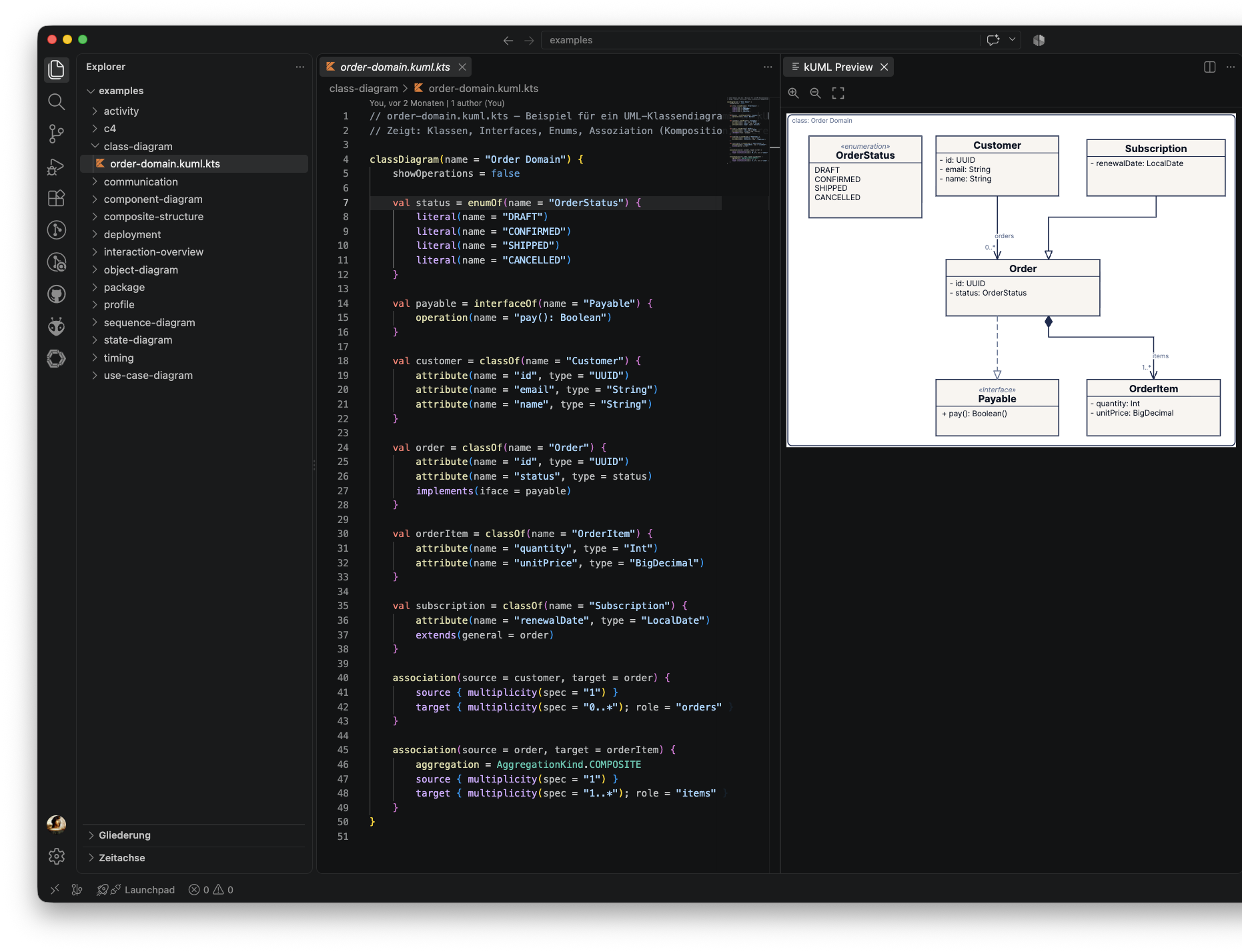
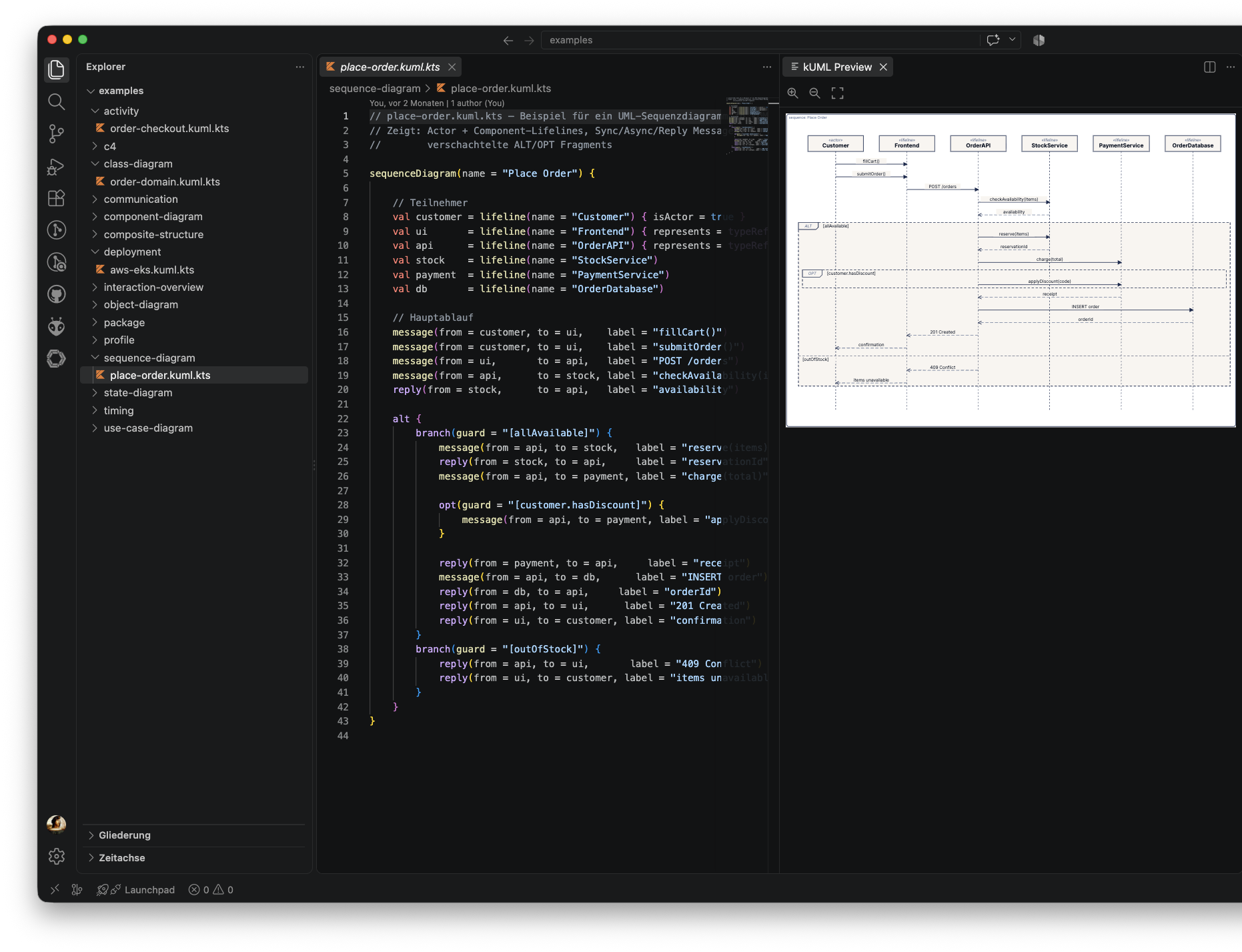
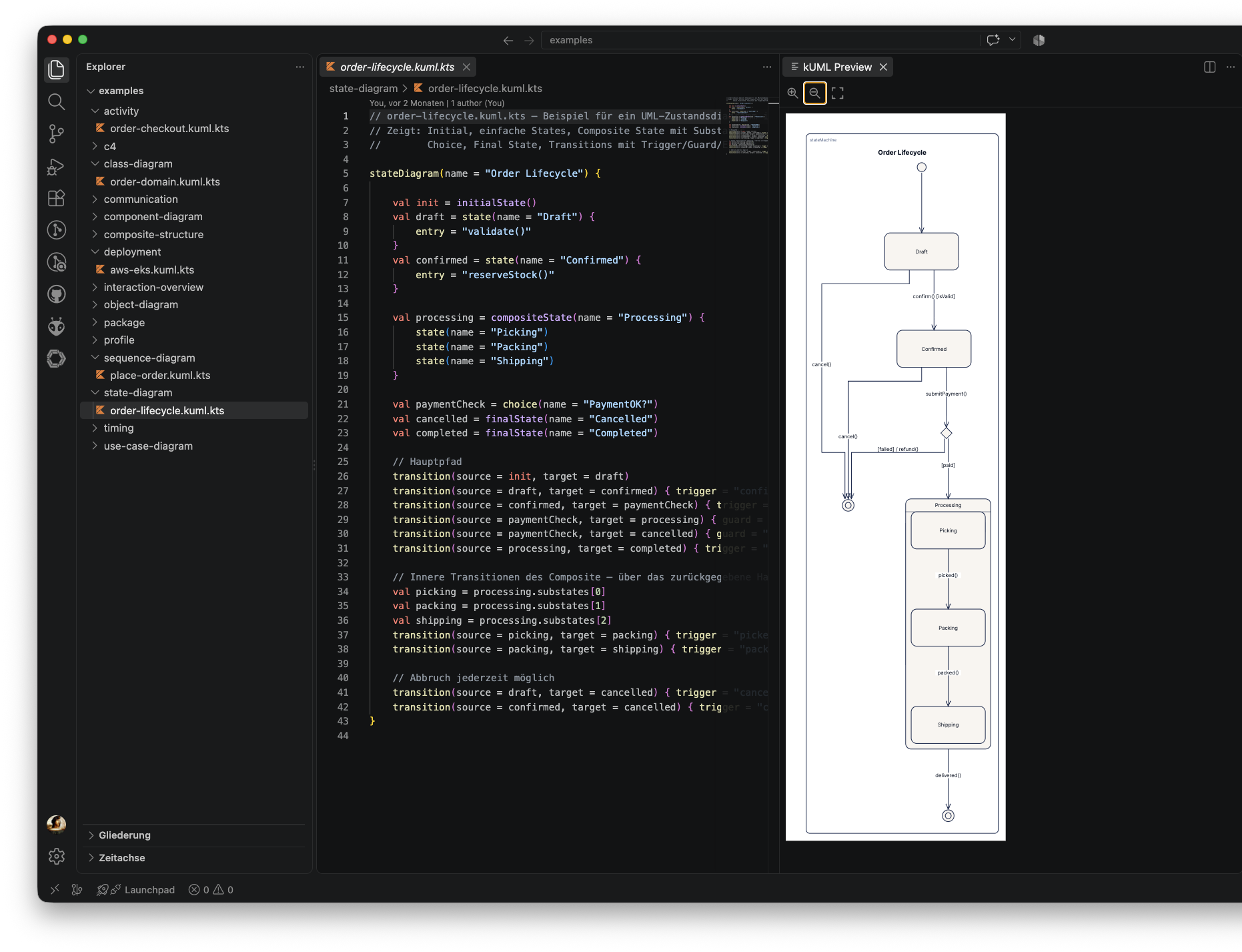
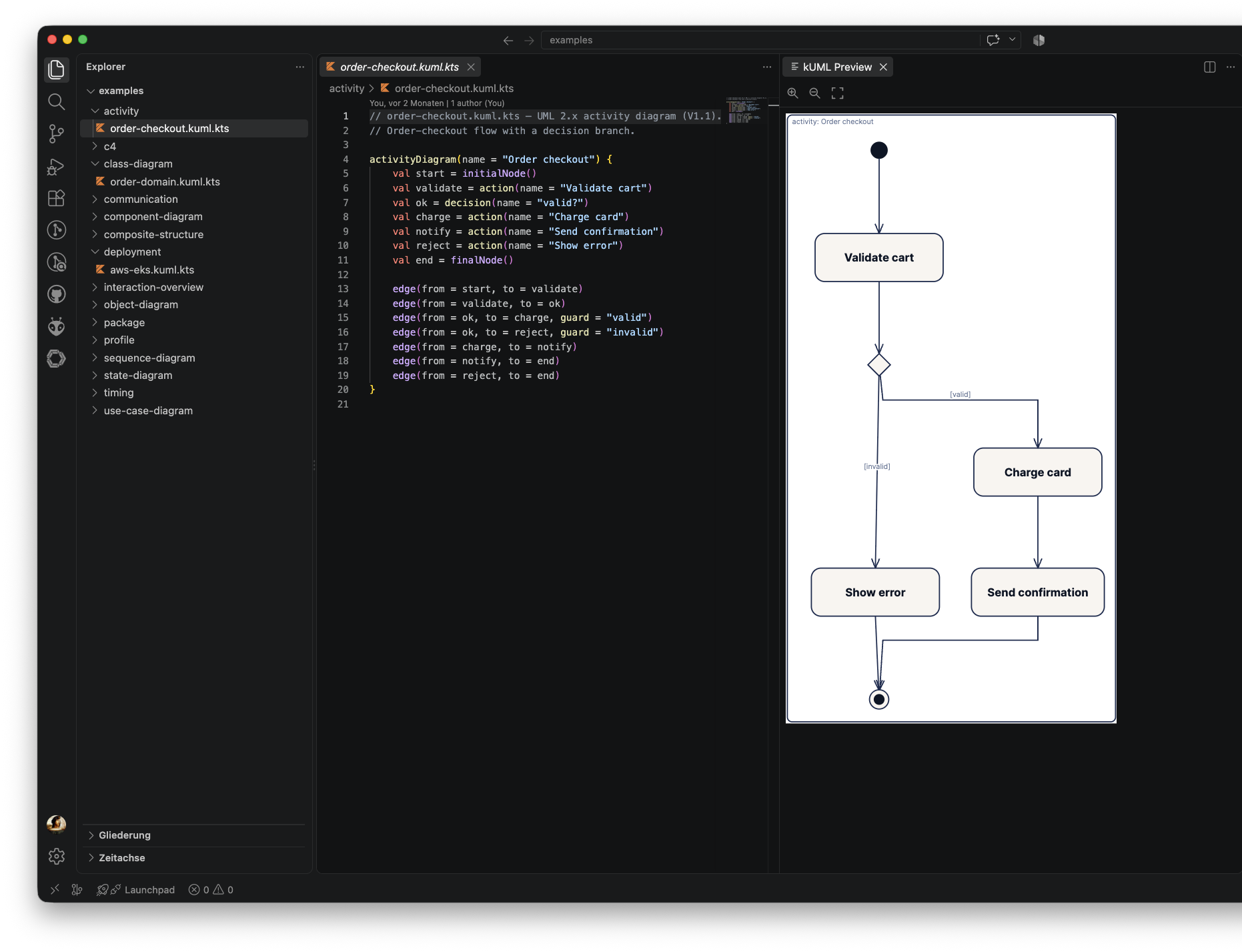
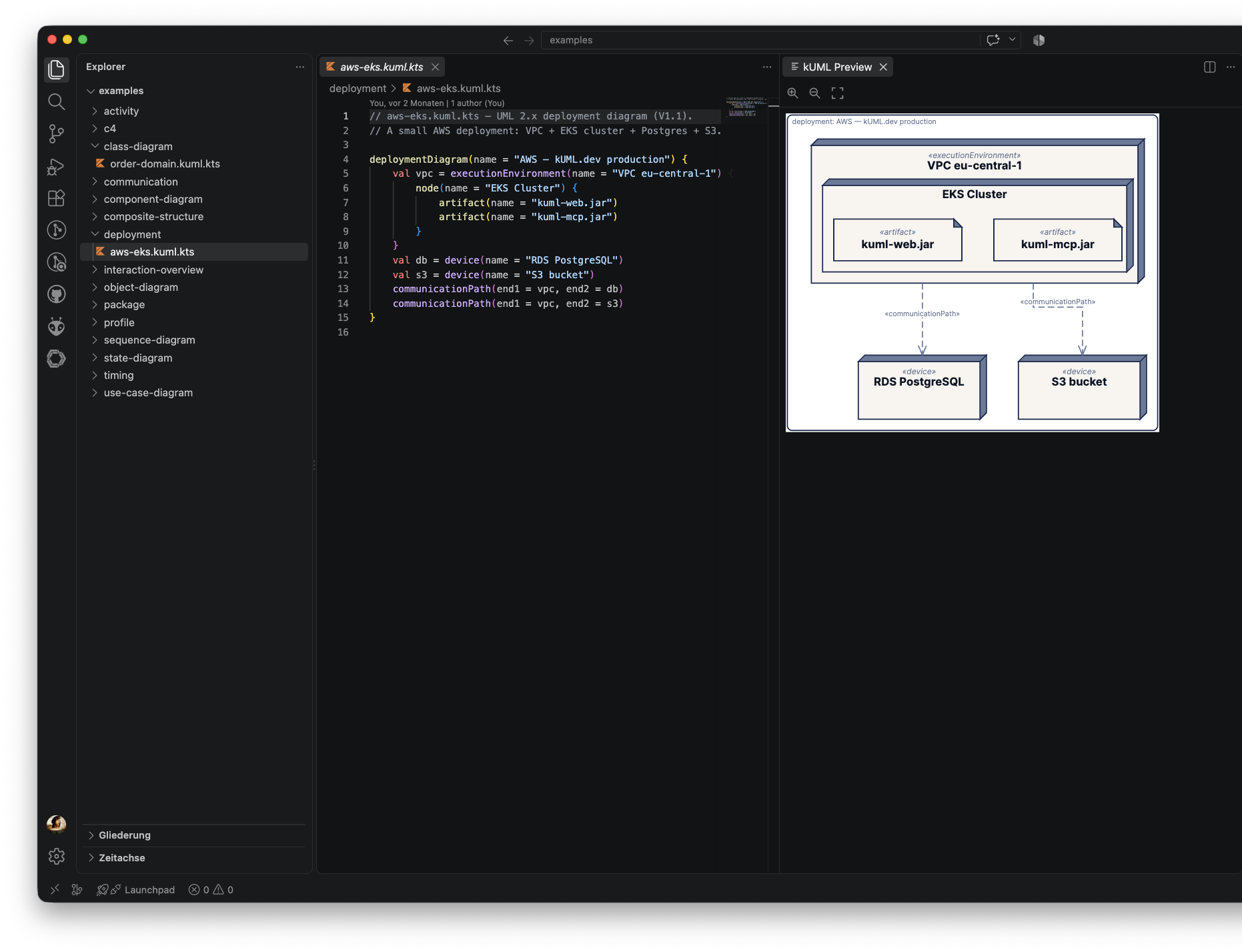
Source on the left, live-rendered SVG preview on the right — for every kUML
diagram type.
Features
- Syntax highlighting for the kUML DSL on top of Kotlin script syntax —
diagram entry points (
classDiagram, umlModel, c4Model, …) and DSL
builders (classOf, interfaceOf, enumOf, association, …) are
highlighted as first-class language constructs.
- Snippets for the common diagram shapes:
diagram, umlModel, classOf,
interfaceOf, enumOf, c4Model, association, stateMachine,
generalization, realization, applyProfile.
- File icon for
*.kuml.kts in the explorer and editor tabs.
- One-click render via the kUML: Render to SVG command — invokes the
kuml CLI. PNG output opens in your OS viewer; SVG output opens in the
live-preview panel (see below).
- kUML: Export to PNG — always exports PNG (regardless of the
kuml.format setting) and opens it in your OS's default image viewer.
- Diagnostics + completion via the
kuml-lsp language server — parse and
validation errors are pushed as you type (debounced), and completion
(including resolve) is available for DSL builders and identifiers.
- kUML: Open Live Preview — a persistent webview panel that renders the
active document as sanitized inline SVG and re-renders automatically on save
and when you switch to another
*.kuml.kts editor tab. The panel has its
own Zoom In / Zoom Out / Zoom Fit toolbar for inspecting large diagrams.
- kUML: Restart Language Server — stops and relaunches
kuml-lsp without
reloading the whole extension host window.
- The Open Live Preview, Render to SVG, and Export to PNG
commands also appear as icon buttons in the editor title bar and the editor
context menu when a
*.kuml.kts file is active.
Requirements
- The kUML CLI (
kuml) must be installed and
reachable on your PATH (or pointed at via the kuml.cliPath setting).
The render command and the live preview's CLI fallback both shell out to
kuml render.
- The
kuml-lsp language server binary must also be reachable — it's
discovered the same way as kuml: an explicit path (kuml.lspPath setting
or KUML_LSP env var) → PATH → Homebrew (/opt/homebrew/bin,
/usr/local/bin) / ~/.local/bin → a local Gradle build. If you're running
from a clone of the kUML repo rather than an installed distribution, run
./gradlew :kuml-language-server:installDist first so
kuml-language-server/build/install/kuml-lsp/bin/kuml-lsp exists for the
walk-up discovery to find.
- Syntax highlighting and snippets work without either binary installed.
Live preview: dual render strategy
The kUML: Open Live Preview panel renders via two strategies, in order:
kuml serve HTTP API — if kuml.serverUrl is set (e.g.
http://127.0.0.1:8080, from a locally running kuml serve --port …), the
panel POSTs to {serverUrl}/api/render and inlines the returned SVG.- CLI fallback — if
kuml.serverUrl is empty, or the HTTP call fails for
any reason, the panel shells out to kuml render against a temp-file
snapshot of the buffer (works for unsaved/dirty documents too).
Only SVG is inlined into the webview; PNG output from kuml.renderToSvg (or
the dedicated kuml.exportPng command) still opens in your OS's default
image viewer.
Diagrams in Markdown and AsciiDoc
kUML diagrams also render live inside VS Code's built-in Markdown preview
and, if you have the
asciidoctor.asciidoctor-vscode
extension installed (version 4.0.0 or later), the AsciiDoc preview — no
separate command needed, just open the preview.
Markdown — a fenced code block with the kuml info string:
```kuml {theme="plain" name="login" width=800}
umlModel {
    classOf("User") { attribute("email", "String") }
}
```
Attributes are optional and can also be written without braces
(```kuml theme=plain).
AsciiDoc — either an inline [source,kuml] listing block, or a
kuml::path[] macro pointing at an existing .kuml.kts file (path resolved
relative to the referencing document):
[source,kuml,name="login",width=800]
----
umlModel {
    classOf("User") { attribute("email", "String") }
}
----

kuml::diagrams/login.kuml.kts[width=800]
Both surfaces share three settings — kuml.embed.markdown.enable,
kuml.embed.asciidoc.enable, and kuml.embed.allowPathsOutsideWorkspace —
see the table below.
Restricted (untrusted) workspaces: embedded diagrams do not render there.
kUML compiles and executes Kotlin script when rendering, and unlike opening a
.kuml.kts file yourself, a diagram embedded in someone else's README can
render just by opening the preview — so this path stays off until you
explicitly trust the workspace.
Settings
| Setting |
Default |
Description |
kuml.cliPath |
kuml |
Path to the kuml CLI executable. Override if installed in a non-standard location. |
kuml.theme |
kuml |
Default --theme passed to kuml render. Any ThemeRegistry name works. |
kuml.format |
svg |
Output format for kuml.renderToSvg (svg or png). SVG routes into the live-preview panel; PNG opens in your OS viewer. |
kuml.lspPath |
"" |
Explicit path to the kuml-lsp launcher. Empty auto-detects it (PATH → Homebrew → ~/.local/bin → local build). |
kuml.serverUrl |
"" |
Base URL of a running kuml serve instance used by the live preview. Empty makes the preview shell out to kuml render instead. |
kuml.diagnostics.enable |
true |
Enable push diagnostics from the language server. |
kuml.diagnostics.debounceMs |
300 |
Debounce interval (ms) between an edit and the server re-validating the document. |
kuml.embed.markdown.enable |
true |
Render ```kuml fenced code blocks as live diagrams in the built-in Markdown preview. |
kuml.embed.asciidoc.enable |
true |
Render [source,kuml] blocks and kuml::path[] macros as live diagrams in the AsciiDoc preview (requires asciidoctor.asciidoctor-vscode ≥ 4.0.0). |
kuml.embed.allowPathsOutsideWorkspace |
false |
Allow kuml::path[] macros to reference files outside the workspace folder, limited to the referencing document's own directory. |
kuml.cliPath, kuml.lspPath, and kuml.serverUrl are machine-scoped: they
cannot be overridden by a workspace's own .vscode/settings.json. That's
intentional — a diagram embedded in Markdown/AsciiDoc can now render just by
opening a preview, so a workspace-writable command path or render endpoint
would let a cloned repo choose what runs on your machine.
Out of scope
This extension is intentionally minimal — it gives you a good editor without
trying to be a full IDE. The following are deliberately left out for now:
- Hover, go-to-definition, rename, and code actions.
- Any custom render request on the LSP itself — the server stays
render-agnostic; all rendering is a client-side concern.
- Click-to-zoom / lightbox on embedded Markdown/AsciiDoc diagrams — for that,
use the dedicated kUML: Open Live Preview panel instead.
For OCL validation and code generation, use the
dev.kuml Gradle plugin or the CLI directly.
License
Apache-2.0 — same as the rest of the kUML toolchain.

