Mark and Recall
"No recall or intervention can work in this place." -- Dagoth Ur
Fortunately, Recall works perfectly fine in VS Code, thanks to this extension. Inspired by the Mark and Recall spells from Morrowind, it lets you define marks in a marks.md file and teleport to them instantly.
Unlike native vim marks which are ephemeral and stored in binary format, these marks are:
- Persistent: Saved in a plain text
marks.md file that survives editor restarts
- Human-readable: Easy to view, edit, and share with your team
- Maintainable: Symbol marks (
@function) can be updated via LSP when code shifts (e.g., after pulling from upstream)
- LLM-friendly: Feed
marks.md to an AI to point it to key locations in your codebase, or have the LLM explore your code and generate marks for important entry points, APIs, or architectural boundaries
Screenshots
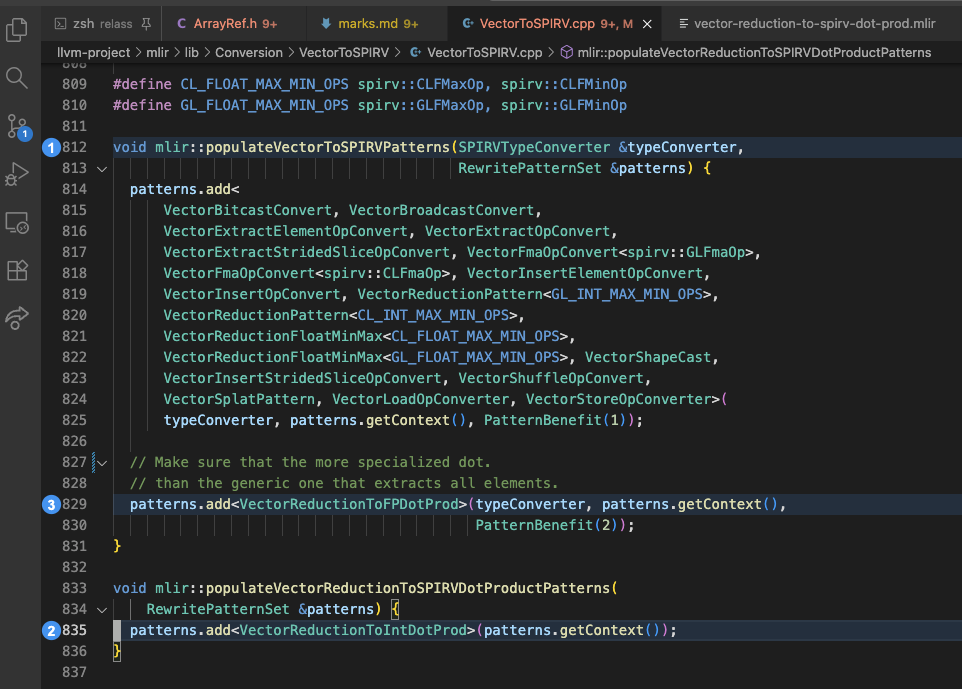
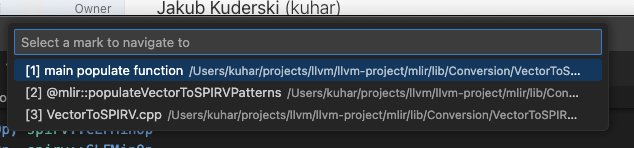
Features
- Numbered marks (1-9) with quick-access keybindings
- Visual indicators: blue gutter icons, line highlighting, and file decoration (color tint + mark count badge in explorer, tabs, and open editors)
- Automatic line tracking: marks update when you insert/delete lines
- Symbol marks: auto-named from function/class definitions with
@ prefix
- Anonymous and named marks: name is optional
Create a marks.md file in your workspace root:
# Marks (see mark-and-recall skill)
# Examples: name: path:line | @symbol: path:line | path:line

tester: agents/llvm-tester.md:11
@parseConfig: src/utils.ts:42
src/helpers.ts:18
@ prefix indicates auto-detected symbol names (can be updated with updateSymbolMarks)- Paths can be relative (to workspace root) or absolute
- Line numbers are 1-based
- Lines starting with
# are comments
- HTML-style comments (
<!-- ... -->) are also supported, including multi-line
AI Agent Integration
Run Mark and Recall: Install AI Agent Skills to install the mark-and-recall skill and codebase-cartographer agent for your AI coding tools. The command auto-detects Claude Code, Cursor, and Codex by looking for their config directories in your home folder, and lets you choose between project-level and global installation.
Commands
| Command |
Description |
recall |
Show picker to jump to any mark |
recallByIndex |
Jump to mark by index (use with args) |
openMarks |
Open marks.md for editing |
prependMark |
Add mark at cursor (top of list, auto-names with @symbol if on definition) |
prependNamedMark |
Add named mark at cursor with prompt (top of list) |
appendMark |
Add mark at cursor (bottom of list, auto-names with @symbol if on definition) |
appendNamedMark |
Add named mark at cursor with prompt (bottom of list) |
deleteMarkAtCursor |
Delete mark at current line |
deleteAllMarksInFile |
Delete all marks in current file |
gotoPreviousMark |
Jump to previous mark in file (wraps) |
gotoNextMark |
Jump to next mark in file (wraps) |
gotoPreviousMarkGlobal |
Jump to previous mark globally by index (requires being at a mark or having navigated to one) |
gotoNextMarkGlobal |
Jump to next mark globally by index (requires being at a mark or having navigated to one) |
updateSymbolMarks |
Update @symbol mark line numbers in current file |
selectMarksFile |
Pick a different marks file (browse, enter path, or select from existing) |
installAgentSkills |
Install mark-and-recall skill and codebase-cartographer agent for detected AI coding tools |
Settings
| Setting |
Default |
Description |
markAndRecall.marksFilePath |
marks.md |
Path to the marks file. Can be a filename, relative path (e.g., .vscode/marks.md), or absolute path. |
markAndRecall.fileDecoration.enabled |
true |
Highlight files that contain marks in the explorer, tabs, and open editors with a color tint and mark count badge. |
Theme Colors
Both decoration colors can be customized in workbench.colorCustomizations:
| Color ID |
Description |
markAndRecall.fileDecorationForeground |
Color tint for file names with marks (explorer, tabs, open editors). |
markAndRecall.lineHighlightBackground |
Background color for marked lines in the editor. |
Vim Keybindings
Add to vim.normalModeKeyBindingsNonRecursive in settings.json:
{"before": ["<leader>", "m", "r"], "commands": ["mark-and-recall.recall"]},
{"before": ["<leader>", "m", "e"], "commands": ["mark-and-recall.openMarks"]},
{"before": ["<leader>", "m", "a"], "commands": ["mark-and-recall.appendMark"]},
{"before": ["<leader>", "m", "A"], "commands": ["mark-and-recall.appendNamedMark"]},
{"before": ["<leader>", "m", "p"], "commands": ["mark-and-recall.prependMark"]},
{"before": ["<leader>", "m", "P"], "commands": ["mark-and-recall.prependNamedMark"]},
{"before": ["<leader>", "m", "d"], "commands": ["mark-and-recall.deleteMarkAtCursor"]},
{"before": ["<leader>", "m", "D"], "commands": ["mark-and-recall.deleteAllMarksInFile"]},
{"before": ["<leader>", "m", "g"], "commands": ["mark-and-recall.gotoPreviousMark"]},
{"before": ["<leader>", "m", "G"], "commands": ["mark-and-recall.gotoNextMark"]},
{"before": ["<leader>", "m", "m"], "commands": ["mark-and-recall.gotoNextMarkGlobal"]},
{"before": ["<leader>", "m", "n"], "commands": ["mark-and-recall.gotoPreviousMarkGlobal"]},
{"before": ["<leader>", "m", "u"], "commands": ["mark-and-recall.updateSymbolMarks"]},
{"before": ["<leader>", "m", "o"], "commands": ["mark-and-recall.selectMarksFile"]},
{"before": ["<leader>", "m", "1"], "commands": [{"command": "mark-and-recall.recallByIndex", "args": {"index": 0}}]},
{"before": ["<leader>", "m", "2"], "commands": [{"command": "mark-and-recall.recallByIndex", "args": {"index": 1}}]},
{"before": ["<leader>", "m", "3"], "commands": [{"command": "mark-and-recall.recallByIndex", "args": {"index": 2}}]},
{"before": ["<leader>", "m", "4"], "commands": [{"command": "mark-and-recall.recallByIndex", "args": {"index": 3}}]},
{"before": ["<leader>", "m", "5"], "commands": [{"command": "mark-and-recall.recallByIndex", "args": {"index": 4}}]},
{"before": ["<leader>", "m", "6"], "commands": [{"command": "mark-and-recall.recallByIndex", "args": {"index": 5}}]},
{"before": ["<leader>", "m", "7"], "commands": [{"command": "mark-and-recall.recallByIndex", "args": {"index": 6}}]},
{"before": ["<leader>", "m", "8"], "commands": [{"command": "mark-and-recall.recallByIndex", "args": {"index": 7}}]},
{"before": ["<leader>", "m", "9"], "commands": [{"command": "mark-and-recall.recallByIndex", "args": {"index": 8}}]}


