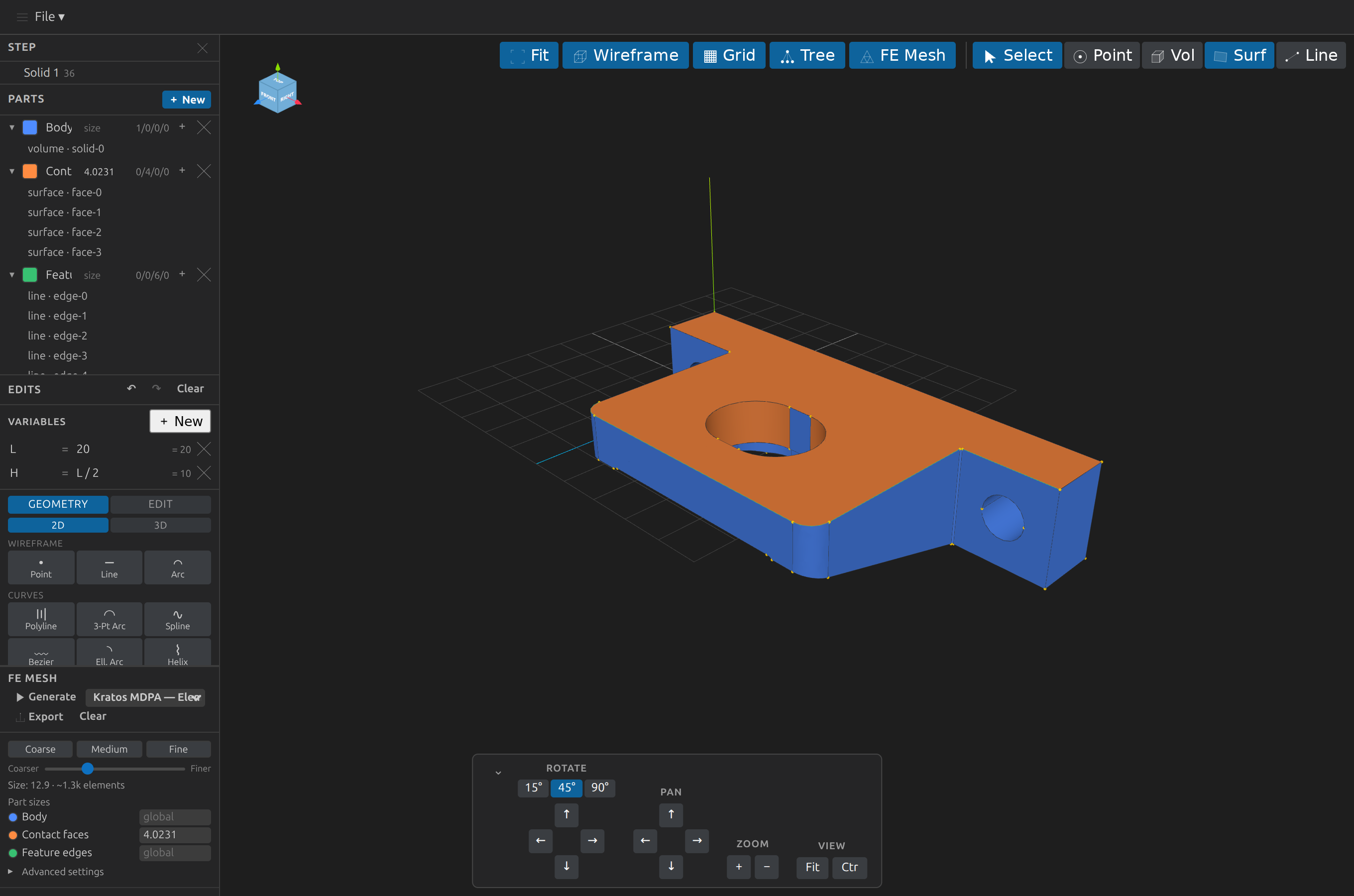
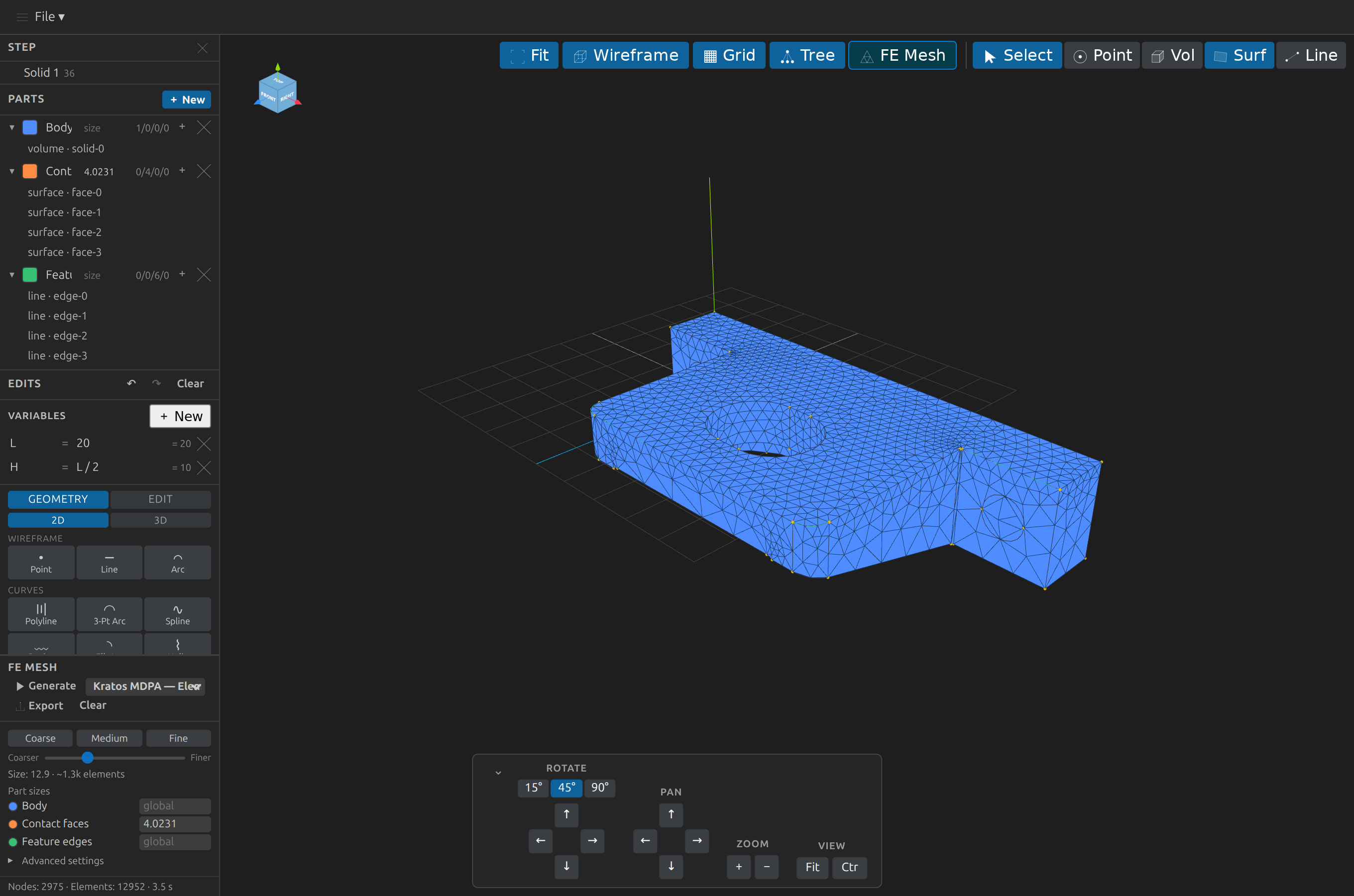
CAD-Preview
      
A Visual Studio Code extension that previews and edits 3D CAD and mesh files directly in the editor. Open a supported file and CAD-Preview renders an interactive 3D view (orbit / pan / zoom); every edit persists to sidecars beside the source, and the source itself is written only by an explicit, confirmed save (Ctrl+S on a dirty tab, or an Export/Save-in-place pick).
B-rep (boundary-representation) formats are parsed and tessellated with OpenCascade.js (the OCCT CAD kernel compiled to WebAssembly). Already-triangulated mesh formats are loaded with native Three.js loaders. Rendering is always Three.js.
| Format |
Extensions |
Pipeline |
| STEP |
.step, .stp |
OpenCascade.js → BRepMesh tessellation |
| IGES |
.iges, .igs |
OpenCascade.js → BRepMesh tessellation |
| BREP |
.brep |
OpenCascade.js → BRepMesh tessellation |
| OpenSCAD CSG |
.csg |
CSG parse → OCCT build → BRepMesh |
| OpenSCAD Src |
.scad |
openscad binary → .csg → same as above |
| STL |
.stl |
Three.js STLLoader |
| OBJ |
.obj |
Three.js OBJLoader |
| PLY |
.ply |
Three.js PLYLoader |
| glTF |
.gltf, .glb |
Three.js GLTFLoader |
| VTK |
.vtk, .vtu |
meshio++ → STL boundary surface → Three.js |
| MED |
.med |
meshio++ → STL boundary surface → Three.js |
| CGNS |
.cgns |
meshio++ → STL boundary surface → Three.js |
| Exodus |
.exo, .e |
meshio++ → STL boundary surface → Three.js |
| XDMF |
.xdmf |
meshio++ → STL boundary surface → Three.js |
| Kratos MDPA |
.mdpa |
meshio++ → STL boundary surface → Three.js |
| OpenFOAM |
.foam |
meshio++ (case staging) → STL boundary surface → Three.js |
| Gmsh Mesh |
.msh, .msh2 |
meshio++ → STL boundary surface → Three.js |
| Abaqus |
.inp |
meshio++ → STL boundary surface → Three.js |
| I-DEAS Universal |
.unv |
meshio++ → STL boundary surface → Three.js |
| SU2 |
.su2 |
meshio++ → STL boundary surface → Three.js |
| INRIA Medit |
.mesh |
meshio++ → STL boundary surface → Three.js |
| GiD Postprocess |
.post.msh (+ its .post.res sibling) |
meshio++ → STL boundary surface → Three.js |
| Nastran Bulk Data |
.bdf |
detected as Nastran; current meshio++ reader rejects this extension's Gmsh-written deck |
Format details and limitations
The Pipeline column is how each format is rendered. STL, OBJ, PLY, and glTF/GLB additionally have pure host-side triangle parsers (no webview, no OCCT), which is what lets Compare Models, Mesh Health / Promote to B-rep, and Silhouette SVG export work on them headlessly as well as interactively. The glTF parser is geometry-only and cross-validated against three.js's own GLTFLoader; it rejects Draco/meshopt-compressed files with a clear error rather than guessing.
The last thirteen formats are imported as a triangulated boundary surface (meshio++, host-side) — same capabilities as an STL open (Parts, Edits, Export, Mass Properties, Measurement all work identically). Named cell regions in the source file now auto-become real, selectable/colourable Parts on first import (for a tetrahedral/triangular boundary); scalar-field and multi-material data beyond that still isn't preserved. OpenFOAM (.foam) is a case marker, not a mesh file — its real mesh lives in sibling files under <parent>/constant/polyMesh/, and import is geometry-only (no patch names or field data preserved). Gmsh Mesh / Abaqus / I-DEAS Universal / SU2 / INRIA Medit close a real export/import asymmetry — CAD-Preview's own FE Meshing panel already wrote these formats but couldn't re-open them. Nastran is detected but remains incomplete: the current meshio++ reader rejects this extension's Gmsh-written .bdf even after header normalization (tracked in the roadmap). .msh/.inp/.bdf are ambiguous extensions (also used by ANSYS/FreeFem, and .bdf by X11 bitmap fonts) and are assumed to be this extension's own Gmsh/Abaqus/Nastran output, with a one-line status caveat on open. GiD Postprocess (.post.msh) is a sibling pair — geometry in the .post.msh, results in a .post.res found by stem convention — and is both importable and exportable; only the .post.msh is opened directly. This is separate from the FE Meshing feature's own export path below, which writes a newly generated mesh, not the source file.
Features
CAD-Preview combines an interactive 3D viewer with non-destructive editing, sidecar-based project state, and optional engineering workflows. Its main capabilities are:
- Explore models — orbit, pan, zoom, projection, clipping, snapping, display controls, and saved viewpoints.
- Model non-destructively — transforms, booleans, features, sketches, curves, wireframe operations, and patterns.
- Organize and reuse — Parts, Standard Parts, BOM and hole tables, blank models, and portable sidecar state.
- Export and mesh — compatible 3D exports, SVG/DXF drawings, drawing sheets, and Gmsh/fTetWild FE meshing.
- Inspect and automate — measurements, annotations, mass properties, health checks, reports, batch operations, comparisons, and an MCP server.
Detailed feature reference
- File menu: a top menu bar with a File ▾ dropdown — New Blank Model… (start an empty model and build it from scratch, see below), Open… (open another CAD/mesh file), Save (flush the parts/annotations/edits/mesh sidecars now; the CAD file itself stays read-only), Save As… and Export… (both run the Export flow), Save Preprocess… / Load Preprocess… (bundle/restore the CAD file plus whichever parts/annotations/edits/mesh sidecars exist as a single portable, checksummed
.zip — restoring rejects a tampered archive or a destination whose extension doesn't match the archive's own format), Import SVG… / Import DXF… (import a traced .svg's shape elements — with ancestor transforms composed in, so a real "convert text to outlines" export lands correctly — or a DXF's model-space LINE/LWPOLYLINE/CIRCLE/ARC/SPLINE entities as B-rep sketch ops, ready to Build → Surface, which now accepts an outer loop plus its holes as one op, / Extrude), Export Silhouette SVG… / Export Silhouette DXF… (write a 2D outline of the model as SVG or DXF — see Export below), Export Technical Drawing… (the same outline WITH hidden-line removal — occluded edges dashed), and Export Drawing Sheet… (several views on one sheet at a shared scale with a title block — see Export below). Every item is also a VS Code command; most have a keyboard shortcut (Ctrl+O / Ctrl+S / Ctrl+Shift+S / Ctrl+E / Ctrl+Alt+S / Ctrl+Alt+O, scoped to a focused CAD Preview tab). You can also drag a file onto the 3D view to open it, falling back to the Open… dialog if the drop doesn't expose a filesystem path.
- Interactive camera: orbit, pan, zoom (OrbitControls with damping); an Ortho/Persp toggle switches between orthographic and perspective projection at any time
- View-manipulation panel: stepped rotate (15° / 45° / 90°), pan, zoom, Fit (reframe in place) and Ctr (reset to the default isometric view); a Clip group with a live, solid-capped section plane — along X/Y/Z, or along an arbitrary normal derived from a selected planar face (Face) or three selected points (3 Pts); an Appearance group for a session-only background colour override, whole-model opacity, the ortho/perspective toggle, a Units selector (mm/cm/m/in/ft) that rescales Mass Properties/Measurement readouts — display-only, seeded from a STEP file's own declared unit when present (geometry itself is always internally consistent in millimetres regardless of the source file's unit) — and a Grid size field controlling the Transform Gizmo's grid-snap increment. The panel is collapsible — use the ⌄ / ⌃ button to hide or show it.
- Grid and entity-point snapping: View ▾ → Snap to grid / Snap to points make a Transform Gizmo Translate drag round to the Grid size increment and/or snap onto nearby existing vertices — both off by default, and can be combined.
- Orientation cube: a labeled gizmo in the top-left corner that mirrors the current view; click a face to snap to that standard view
- Fit-to-view on open and on demand
- Shaded / wireframe toggle; edges can be shown/hidden independently of faces
- Axes and grid helpers
- Loading status indicator and error reporting — opening a STEP/IGES/BREP file for the first time (or after an external change) also shows a native, cancellable progress notification while it parses/tessellates; Cancel discards the result rather than interrupting the (uninterruptible) underlying computation. Routine edit-triggered re-tessellation stays on the lightweight status line only.
- Start from scratch: File ▾ → New Blank Model… (also a command, and a button in the Models view) creates an empty
.brep document and opens it, so the whole Edits creation vocabulary — primitives, 2D sketch profiles, bottom-up wireframe modeling, booleans, fillets, patterns — can be used with no source file at all. The blank file stays empty and the geometry lives in its .edits.json sidecar, exactly as for an edited STEP; Export… bakes it into a standalone file.
- Safe concurrency: every kernel job is owned by its document — Cancel (or closing a tab) interrupts only that document's work, never another tab's, and an MCP client's
notifications/cancelled cancels exactly that request's kernel work. An external write to a sidecar that lands while you have an unsaved change is a conflict prompt (reload or keep yours), never a silent overwrite either way.
- Collapsible sidebar: every sidebar section (Components, Parts, Edits, FE Mesh, Mass Properties, B-rep Health, Mesh Health, Region fit, Macros, Standard Parts) collapses to its header with a click, independently, so the panel can be reduced to what you're using. The layout is remembered per document in the
<model>.view.json sidecar.
- Parts: define named groups by clicking volumes / surfaces / lines / points in the 3D view and assigning them to a part; assignments are colour-highlighted, listed in a tree panel, and saved to a
<model>.parts.json sidecar — never written into the CAD source. Each part has a per-row eye-toggle, and a panel-level ⊙ Isolate button shows only the selected part; both are display-only and compose with each other (never persisted). The Components tree has a matching per-row eye-toggle and a name filter. The Parts header can copy the BOM or the hole table (hole sizes, counts and nearest thread designation) as tab-separated text.
- Standard Parts: search the hosted step.parts catalog (fasteners, bearings, connectors, extrusions, …) from a sidebar panel and insert a result as a new STEP document with one click (checksum-verified against the catalog's own recorded SHA-256, when present).
- Edits: apply non-destructive operations — transforms (move / rotate / scale / mirror, with a draggable 3D Transform Gizmo live-previewing the drag and optional grid/entity-point snapping), booleans (unite / subtract / intersect), fillet/chamfer, feature modeling (extrude / revolve / sweep / loft), assembly (explode / mate / align / linear & circular pattern), primitive creation (box/cube, sphere, cylinder, cone, torus, N-sided prism, wedge, holes/counterbore/countersink), 2D profile sketches (circle, rectangle, N-sided polygon, ellipse, rounded rectangle, slot, trapezoid — pick one later as an extrude/revolve/sweep/loft profile), curves (polyline, 3-point arc, spline, Bézier, elliptical arc, helix), modify (shell, draft, split, section), construction geometry (any 2D sketch/curve can be marked reference-only — dimmed and excluded from feature profiles), and bottom-up wireframe modeling (points, lines, arcs → build a surface from a set of lines → build a volume from a set of surfaces); Explode has a live-preview slider that spreads the bodies as you drag before you commit it with Apply; operations are undoable, replayable, and saved to a
<model>.edits.json sidecar — the CAD file is otherwise untouched, and edits are baked in on Export or a confirmed same-format save in place (which marks the baked prefix so replay continues after it; undo cannot cross the save point). (Transforms, booleans, explode, primitive creation, align, and pattern work on both B-rep and mesh; fillet/chamfer, feature modeling, mate, 2D profile sketches, curves, modify ops, and the wireframe/build ops are B-rep only.)
- Export: convert the open model to a compatible format and save it via a native Save dialog, or write a 2D silhouette SVG outline of it — see Export below
- FE Meshing: generate a finite-element mesh (nodes + triangles/tetrahedra) of the open model with Gmsh compiled to WebAssembly, shown as an overlay on top of the existing view. Options (dimension, element size, algorithm, element order) are set in the FE Mesh panel and autosaved to a
<model>.mesh.json sidecar alongside a generated, editable <model>.geo script; a generate also reports an element-quality summary (min/mean minSICN plus a histogram) alongside the node/element counts; 📤 Export saves the mesh to disk in any format the panel's dropdown offers, defaulting to Kratos MDPA (hand-written, in either an Elements+Conditions or a Geometries layout, preserving named Parts as Kratos SubModelParts), or Gmsh .msh/.msh2/.geo_unrolled, VTK, MED, CGNS, XDMF, VTU, HDF Mesh Format, AVS UCD, COMSOL Mphtxt, Netgen, FLAC3D, Well-Known Text, Flux (the bolded formats all bridged through meshio++, since this Gmsh build has no writer for any of them), I-DEAS Universal, Abaqus, Nastran, SU2, INRIA Medit, STL, Diffpack, OFF. The CAD file stays read-only. For a dirty mesh-format source (holes, self-intersections, non-manifold edges) that Gmsh's own meshing rejects, an Engine choice in the panel switches to fTetWild, a tetrahedralizer built to survive exactly that input; the same engine option is available on generate_mesh/export_mesh, and a repair_mesh MCP tool writes a repaired, watertight STL from a dirty source. Named saved presets (global options only, with explicit units and a pinned engine) are shareable between the panel and the save_mesh_preset / list_mesh_presets / apply_mesh_preset MCP tools. Before meshing, the size readout shows a calibrated element range and memory estimate from the model's real volume and area (±25% on the calibration corpus; an advisory element budget warns, never blocks — estimate_mesh_budget headless), and the Passages panel measures annular gaps and slots against the requested size, suggesting a local Part size where a channel would get too few cells across (analyze_passages). After meshing, Deviation colours the mesh boundary by its distance from the CAD surface — geometric fidelity that element quality can't show (measure_mesh_deviation). See GMSH Integration for details. A Refinement sweep meshes at several sizes and tabulates nodes, elements, time and element quality side by side.
- MCP server: a standalone Model Context Protocol server (
dist/mcp-server.js) exposes the same load/edit/mesh/export pipeline to AI agents (e.g. Claude Code) headless, persisting to the same sidecar files the extension reads — see MCP Server below. The server ships an instructions block injected by conforming clients before any tool call, read-only resources (cad-preview://capabilities, cad-preview://op/{kind}) for the full op catalog, and a distributable skills/CAD-Preview/SKILL.md skill that fires on tool availability — so agents receive the invariants (absolute paths, sidecar-only state, facts-not-verdicts) without spending a tool call.
- Measurement tools: measure distance, edge length, angle, and circle/arc radius directly in the 3D view — a display-only overlay, never an edit operation; a completed 2-point result renders as an actual dimension (arrowheads, witness marks, value label), and a result can optionally be pinned (📌) as a persisted, topology-anchored annotation, saved to a
<model>.annotations.json sidecar and automatically re-matched to its anchored entity across topology-changing edits — the same best-effort geometric rebinding Parts already get. An optional tolerance band (nominal ± allowance) can be recorded on a pin; an out-of-band measurement is flagged by colour, and pinned annotations appear as dimension glyphs in Export Silhouette SVG/DXF drawings. Right-click any entity and choose Pin note… to pin a free-text note the same way (also headless via pin_annotation with tool: "note").
- Mass properties: volume, surface area, length, center of mass, and moments of inertia for the whole model or a single selected entity — computed via OpenCascade.js's
BRepGProp for B-rep sources, or entirely client-side for mesh sources.
- B-rep validity report: the B-rep Health panel (or the
check_brep_health MCP tool) runs OpenCascade's own validity checker on the edited model and lists every flagged solid, shell, face and edge with its named status (e.g. UnorientableShape, NotClosed), plus open-boundary edge counts — read-only, facts only.
- Screenshot: save the current 3D view as a PNG via a native Save dialog.
- Saved view bookmarks: named inspection viewpoints per document (View ▾ menu) — save the current camera, display mode, and clip plane, restore any of them later into the focused pane, rename/replace/delete; persisted to
<model>.view.json alongside the latest view.
- Settings: a handful of
cadPreview.* VS Code settings (default background, mesh-size preset, grid/axes visibility, up-axis) for newly opened documents.
- Simulation handoff manifest: tick Handoff manifest on the FE Mesh export (or pass
manifest: true to export_mesh) to also write <mesh>.handoff.json — source and edit-history fingerprints, options, unit, engine and kernel versions, output hashes, and how every Part landed in the mesh (empty and unresolved Parts, surfaces in no group, overlaps). check_handoff_manifest says later whether it still describes the model.
- Preparation report: CAD Preview: Preparation Report… (or
generate_prep_report) writes report.json and a self-contained, script-free report.html gathering mass properties, BOM, hole table, mesh health, passages, the budget estimate vs the generated mesh, deviation and more — each section marked ok, partial, unavailable (with why) or skipped.
- Batch export: CAD Preview: Batch Export… (or the
batch_export MCP tool) exports many files to STEP/IGES/BREP, technical drawings or drawing sheets in one go, one result row per file — a bad file never aborts the batch, sources are never written, and existing outputs are skipped unless you choose otherwise.
- Compare Models: diff two files solid-by-solid — matched by bounding-box-centroid proximity and volume similarity, reporting added/removed/matched solids with each match's raw centre displacement and volume delta (never a hidden moved/unchanged guess). STEP/IGES/BREP/CSG/SCAD, STL, OBJ, PLY, and glTF/GLB are supported, in any combination (only the meshio++ bridge formats aren't — they never expose a triangle array outside their own WASM module); display-only.
Export
The File ▸ Export… menu item (or Ctrl+E) converts the currently displayed model to a compatible format. Available targets depend on the source file's pipeline:
| Source pipeline |
Export targets |
| B-rep (STEP/IGES/BREP/CSG/SCAD) |
the other B-rep formats (true OCCT writers) + STL/OBJ/PLY/glTF |
| Mesh (STL/OBJ/PLY/glTF) |
the other mesh formats only |
The source format itself is never offered. B-rep targets are written entirely in the extension host via OCCT; mesh targets are serialized in the webview from the already-tessellated Three.js model (there is no way to promote a triangle mesh back into a B-rep). glTF export always produces a single binary .glb file. A B-rep → STL export can instead be mesh-aware: give the downstream volume-mesh cell size and a chordal fraction, and the STL is tessellated host-side at that tolerance (independent of the viewport) with the sampled chordal error reported — also headless as export_tessellated_stl. See File Formats → Export for details.
2D drawing exports and implementation notes
File ▸ Export Silhouette SVG… (and its Export Silhouette DXF… sibling) is a separate flow (a drawing, not a 3D model, so it never appears in the target list above): pick a view — Current view, or Front/Back/Top/Bottom/Left/Right/Iso — then an export unit, then a destination, and CAD-Preview writes a 2D outline of the model as a self-contained SVG (one <path>, no external references, 1 SVG user unit = 1 model unit with a physical size in mm, so it prints 1:1) or as a minimal DXF (LWPOLYLINE/LINE entities over the same outline). Both menu items share the flow; only the serializer and default extension differ. Works for STEP/IGES/BREP/CSG/SCAD (edits baked in, from the current tessellation) and STL/OBJ/PLY/glTF (pending edits baked in by the same mesh-edit engine the viewer uses).
It is an outline — no hidden-line removal. Back-facing geometry isn't drawn, but neither are interior feature edges that don't lie on a silhouette. For a drawing that also shows what's behind the part (interior feature edges, occluded runs dashed), use File ▸ Export Technical Drawing… instead — same view/unit picks, no separate menu of its own. Neither draws OpenCascade's hidden-line machinery, which is unavailable in the bundled WASM build; both derive from triangle adjacency instead, which is also why they work for mesh files and not just B-rep. Accuracy depends on consistent triangle winding; a mixed-winding mesh draws spurious interior lines.
File ▸ Export Drawing Sheet… places several views (front/top/right/iso by default) on ONE sheet at a shared scale — the ordinary drafting-workflow output the single-view exports above don't give you. A settings form picks views, projection, paper (Fit, or A4–A0 with the largest standard scale that fits), scale and the title-block fields, then a destination — no unit pick, since a sheet's scale ratio is only meaningful in the model's native millimetres. Views are laid out orthographically (first-angle/ISO by default: top below front, right view to its left; third-angle mirrors both) inside a frame with a title block, and a pinned measurement is drawn once, in whichever view shows it at true length. Scale can be automatic, a standard ratio or any custom ratio; title-block fields cover drawn by, drawing number, revision and material; reusable templates are shared with the export_drawing_sheet MCP tool.
MCP Server
CAD-Preview ships a standalone MCP (Model Context Protocol) stdio server so AI agents can drive the same pipeline headless — load models, apply edit operations, manage parts and parametric variables, and generate/export FE meshes — with no VS Code involved. It persists to the same .edits.json/.parts.json/.mesh.json sidecars the extension reads, so agent edits show up when you open the file (and never touches the CAD source file). After npm run build, register it with e.g. Claude Code:
claude mcp add cad-preview -- node /absolute/path/to/CAD-Preview/dist/mcp-server.js
Capabilities and limitations
B-rep sources (STEP/IGES/BREP) get the full pipeline; mesh-format sources are more limited headless. See MCP Server for the tool reference and capability matrix.
Architecture
OpenCascade.js (the WASM kernel) runs in the Node extension host, not in the webview. The host reads the file, tessellates B-rep shapes, and sends plain geometry buffers (base64-encoded typed arrays) to the webview. The webview runs only Three.js and is responsible for rendering and camera interaction. This keeps the WASM out of the webview (no CSP issues), keeps activation fast (the kernel is lazy-loaded only on the first B-rep open), and means pure-mesh files never load the WASM at all.
Runtime data flow
Extension host (Node)                    Webview (Chromium)
  read file bytes                          Three.js scene + OrbitControls
  OpenCascade.js parse + tessellate  ───▶  build BufferGeometry from buffers
  → base64 {positions, indices}            render, orbit/pan/zoom, toolbar
             — or —
  asWebviewUri(file)                 ───▶  STL/OBJ/PLY/GLTFLoader.loadAsync(url)
Development
npm install        # install dependencies
npm run build      # build extension host + webview bundles (esbuild) and type-check
npm run watch      # rebuild on change
npm test           # run unit tests (vitest)
Contributing and local fixtures
Questions or fixes welcome: see doc/contributing.md for the development workflow, and use the issue forms (bug report / feature request) and the PR checklist that GitHub surfaces when opening an item — carrying your reproduction steps and a possible non-confidential fixture is what makes a report actionable.
Press F5 in VS Code to launch an Extension Development Host, then open any supported file from examples/:
| Fixture |
Format |
examples/STP/bull.stp |
STEP (B-rep, OCCT pipeline) |
examples/STL/cube.stl |
STL mesh |
examples/OBJ/cube.obj |
OBJ mesh |
examples/PLY/cube.ply |
PLY mesh |
examples/GLTF/cube.gltf |
glTF mesh |
Packaging
Build and install a VSIX
npm run package    # produces cad-preview.vsix
code --install-extension cad-preview.vsix
Documentation
Full documentation is available at https://loumalouomega.github.io/CAD-Preview/
Source lives in the doc/ folder, built with VitePress and deployed automatically to GitHub Pages on every push to master. See .github/workflows/docs.yml.
Non-goals and known constraints are recorded in the Roadmap.
CI
CI and dependency maintenance
GitHub Actions runs on every push and pull request to master: builds the extension, runs unit tests, and uploads a .vsix artifact. See .github/workflows/ci.yml.
Dependencies are kept current and vetted by two mechanisms in .github/: Dependabot opens weekly update PRs (and raises security alerts) for npm and GitHub Actions dependencies, and the Dependency Review workflow blocks any pull request that introduces a package with a known moderate-or-worse vulnerability.
Licensing
CAD-Preview is distributed under the GPL-3.0-or-later. See LICENSE for the full text; bundled dependencies retain their respective licenses and notices.
Dependency licenses and licensing history
CAD-Preview bundles @loumalouomega/gmsh-wasm, which compiles the Gmsh mesh generator and statically links it (together with OpenCASCADE Technology) into a single WebAssembly binary. Gmsh is distributed under the GNU General Public License, version 2 or later (GPL-2.0-or-later), with a linking exception that covers Netgen, METIS, OpenCASCADE, and ParaView.
CAD-Preview itself is distributed under the GPL-3.0-or-later — see LICENSE for the full text. This was GPL-2.0-or-later (which Gmsh's own license, and every other bundled dependency, would still be compatible with on its own) until 2026-09-24, when the project committed to doc/roadmap.md's Build and bundle an OpenSCAD WASM port item: a real OpenSCAD build genuinely links CGAL (GPLv3-or-later/LGPLv3-or-later, no GPLv2 option) and/or Manifold (Apache-2.0, which the FSF's own compatibility guidance treats as GPLv3-compatible but not GPLv2-compatible), so shipping that binary forces a GPL-3.0-or-later floor regardless of which of the two backends the eventual build uses — confirmed directly against OpenSCAD's own COPYING file and the FSF's license-compatibility notes, not assumed. The relicense was made ahead of that dependency actually landing (nothing bundled today requires it beyond Gmsh's own already-compatible GPL-2.0-or-later) specifically to avoid a second license churn once it does.
OpenCASCADE Technology (OCCT) is used in two places in this extension: directly, via opencascade.js, for the native B-rep read/export pipeline, and indirectly, inside gmsh-wasm's meshing pipeline. OCCT is licensed under the GNU Lesser General Public License, version 2.1, with an additional exception granted by its authors.
Anyone who needs to use Gmsh under terms other than the GPL can obtain a separate commercial license directly from its authors at gmsh.info.
The MCP server bundle additionally includes @modelcontextprotocol/sdk and zod, both distributed under the MIT License — GPL-compatible, so bundling them into the shipped extension is fine. fflate (used to build/read the Save/Load Preprocess .zip archives, in both the extension and MCP server bundles) is also MIT-licensed. @meshioplusplus/wasm (mesh I/O for VTK/MED/CGNS/Exodus/XDMF/MDPA and more, compiled to WebAssembly, used to import those formats and to export generated FE meshes to MED/CGNS) is also MIT-licensed, including the compiled .wasm binary as shipped in its npm package.
float-tetwild-wasm (the optional, alternative volume-mesh engine for dirty triangle meshes — see Features below) is MPL-2.0-licensed, including the compiled .wasm binaries as shipped in its npm package. MPL-2.0 is a weak, file-level copyleft license that is explicitly compatible with GPL relicensing (MPL-2.0 §3.3) — the "Incompatible With Secondary Licenses" notice that would block that is not attached to this codebase's source, confirmed by checking its actual license file. Bundling it does not, on its own, require any particular GPL version — fTetWild's own dependency set (geogram, libigl, Eigen, spdlog, fmt) is BSD-3/MPL-2.0/MIT throughout, with no CGAL or GMP in the compiled binary. (CAD-Preview's overall license is GPL-3.0-or-later regardless, for the unrelated reason given above — see doc/roadmap.md's "Non-goals" for TetGen/CGAL/ParMmg, and its "Meshing library review" for the proposed, LGPL-3.0-licensed MMG remesher.)
node-hid (SpaceMouse 6DOF input — only the extension-host bundle, loaded lazily) is MIT OR X11-licensed, including the per-platform .node prebuilds as shipped in its npm package — GPL-compatible, so bundling the linux-x64 / darwin-arm64 / darwin-x64 / win32-x64 prebuilds is fine. Only those four prebuilds ship (other platforms get a clear message, not a crash); the package is never imported by the MCP/kernel bundles.
Attribution
License
See LICENSE.
Planar Kratos exports
Planar Kratos workflows can export 2D domain elements and line boundary conditions
with named Parts; see planar exports.
| |