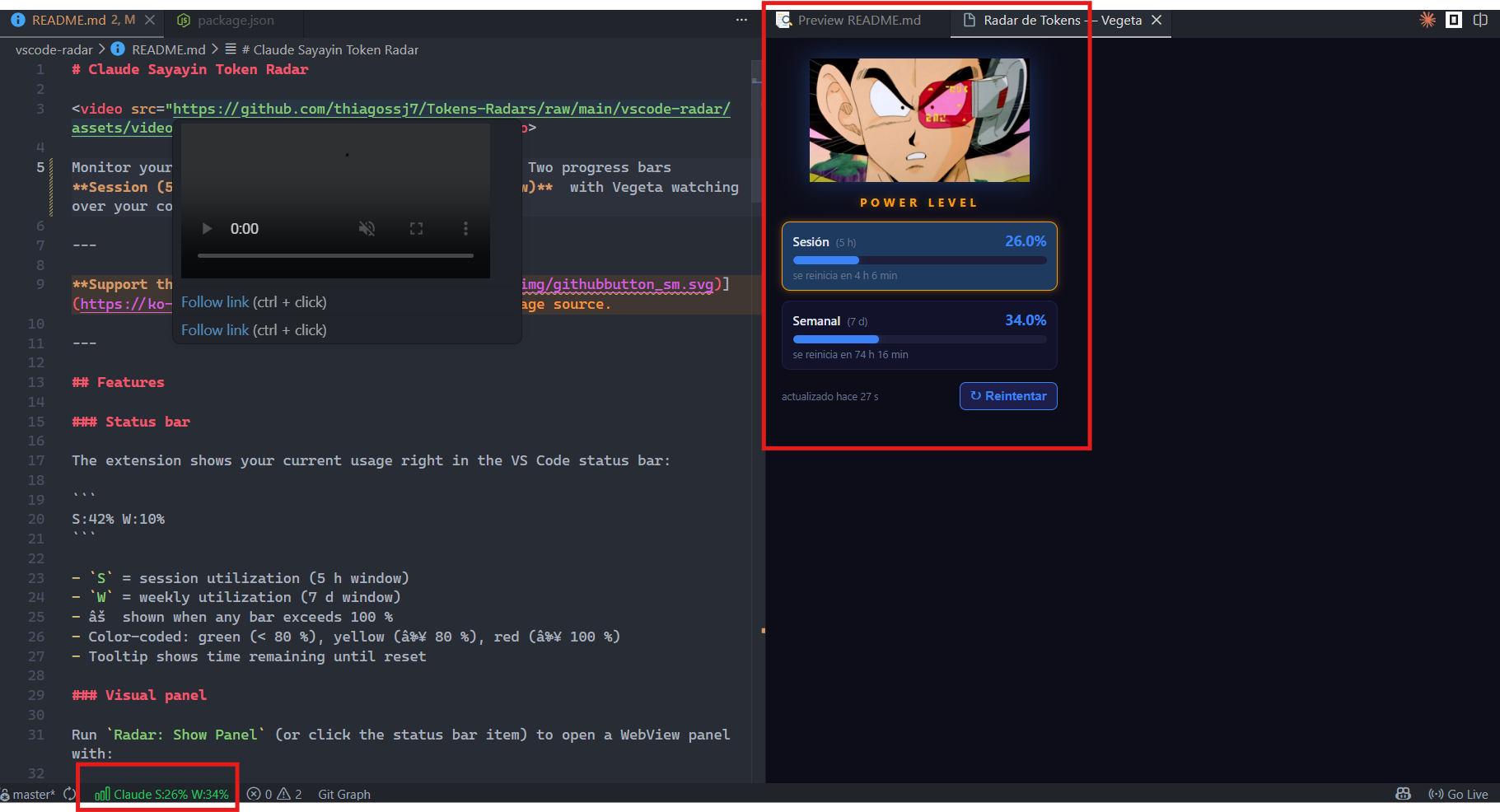
Monitor your Claude plan usage directly from VS Code. Two progress bars Session (5-hour window) and Weekly (7-day window) with Vegeta watching over your consumption.
Support the project:
Features
Status bar
The extension shows your current usage right in the VS Code status bar:
S:42% W:10%
S = session utilization (5 h window)
W = weekly utilization (7 d window)
⚠ shown when any bar exceeds 100 %
Color-coded: green (< 80 %), yellow (≥ 80 %), red (≥ 100 %)
Tooltip shows time remaining until reset
Visual panel
Run Radar: Show Panel (or click the status bar item) to open a WebView panel with:
Vegeta image with glow effect
Animated progress bars
Gold border on the bar that is currently limiting you (representative claim)
Last updated timestamp
Rupture sequence
When a bar reaches ≥ 90 %, a visual alert triggers:
The critical bar flashes red
Vegeta pulses red
A full-screen overlay appears with an animated GIF (over.gif for weekly only, vegeta-scanning.gif when session is also critical)
Auto-refresh
Polls Claude's API every 60 seconds
Retry button in the panel forces a fresh reading
Status bar updates in real time
Commands
Command
Description
Radar: Show Panel
Opens the usage panel
Radar: Refresh
Forces a new reading from the API
Radar: Close Panel
Closes the panel
Requirements
VS Code ≥ 1.85
Claude account (Pro/Max plan)
Claude Code CLI installed and logged in (provides the OAuth token)
Installation
From VS Code Marketplace
Search for "Claude Sayayin Token Radar" in the Extensions view (Ctrl+Shift+X) and click Install.
Click the status bar item to open the visual panel
Troubleshooting
Symptom
Cause
Solution
Status bar shows "no auth"
OAuth token not found
Run claude in your terminal to log in
Status bar stuck on "Radar..."
Token missing or expired
Run claude to refresh your session
Panel won't open
Window too narrow
Resize or open VS Code in a wider window
Changelog
1.0.0
Status bar with session and weekly percentages
WebView panel with Vegeta and animated bars
Rupture sequence on ≥ 90 % usage
Auto-refresh every 60 seconds
Commands: Show Panel, Refresh, Close Panel
Also available for Google Chrome
See the GitHub repository for the Chrome extension version and full documentation.
Technical notes
The anthropic-ratelimit-unified-* headers are unofficial — discovered through reverse engineering of Claude Code's OAuth protocol. They may change or disappear without notice. Reference: claude-rate-monitor
Your OAuth token never leaves your machine and is never exposed to the extension UI