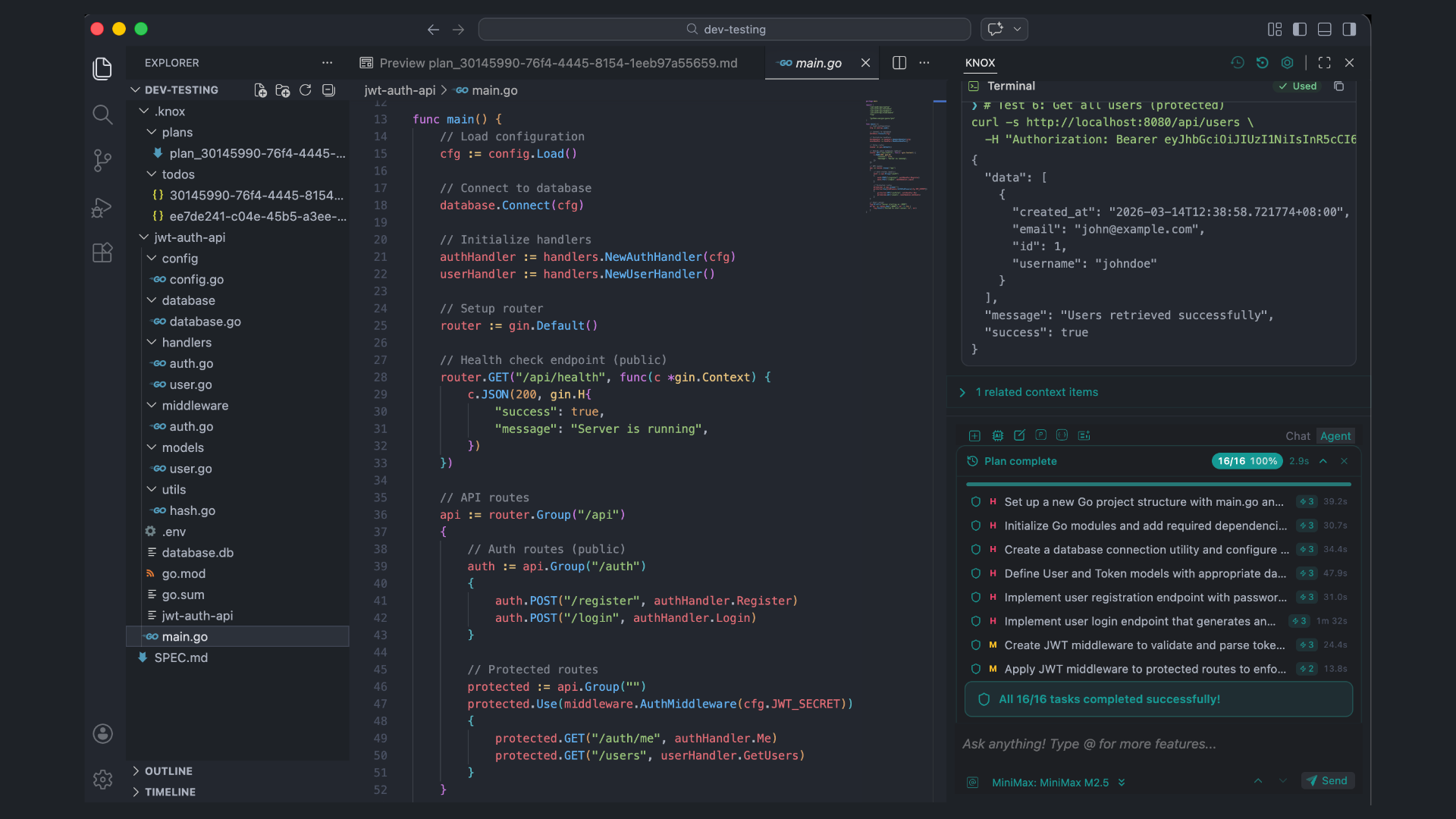
The Agent. The System. The Solution.
Knox is an AI-powered VS Code extension that combines an autonomous agent, context-aware code completion, automatic checkpoints, and a full suite of built-in tools into a single development environment. It supports Anthropic Claude, OpenAI GPT, and Knox's own models out of the box.
Core Features
AI Chat Interface
A sidebar chat powered by your choice of LLM. Conversations are streamed in real time with full tool execution displayed inline.
- Multi-model support — Anthropic Claude (4.5/4.6 Haiku, Sonnet, Opus), OpenAI GPT (GPT-5.4, GPT-5.4 Pro), and Knox's memory system On-Demand model
knox/knox-ms
- Role-based model routing — Assign different models to different tasks:
chat, autocomplete, edit, apply, summarize, viewRead, realTimeSearch
- Session management — Multiple conversation tabs, session history, and session restore
- Rich context — Attach files, folders, selections, images/screenshots, terminal output, git diffs, and 26 context providers
Agent Mode
An autonomous agent that can plan, execute, and verify multi-step development tasks.
- Task decomposition — AI breaks complex requests into a structured todo list with priorities, dependencies, and complexity estimates
- Built-in tools — The agent has access to 14+ tools: file read/create, terminal commands, code search, web search, repo map, git diff, LSP operations (go-to-definition, find references, hover, symbols), deep code analysis, and multi-file semantic search
- Shadow workspace — Test changes in an isolated environment before applying
- Auto-verification — Automatically verifies changes after applying (runs diagnostics, checks for errors)
- Error pattern detection — Monitors terminal output for 20+ error patterns and suggests fixes
- Undo/redo —
Cmd/Ctrl + Shift + Alt + Z to undo, Cmd/Ctrl + Shift + Alt + Y to redo agent operations
- Diagnostic integration — Check and fix code diagnostics with AI assistance
Code Completion
Tab-triggered inline autocomplete that understands your codebase context.
- Context-aware suggestions — Uses recently edited files, visited ranges, and project structure
- Battery-aware — Can pause on low battery to conserve power
- Toggle —
Cmd/Ctrl + K, Cmd/Ctrl + A to enable/disable
- Status bar indicator — Shows Enabled, Disabled, or Paused state
Inline Code Editing
Natural language code edits with visual diff review.
Cmd/Ctrl + I — Describe a change in English; Knox generates and streams a diff- Vertical inline diffs — See proposed changes directly in the editor with green/red highlighting
- Accept/Reject per block —
Alt + Cmd/Ctrl + Y to accept, Alt + Cmd/Ctrl + N to reject individual blocks
- Accept/Reject all —
Shift + Cmd/Ctrl + Enter to accept all, Shift + Cmd/Ctrl + Backspace to reject all
- Multi-file batch diffs — Review and apply changes across multiple files in a dedicated Batch Diff panel
- Smart apply strategies — Unified diff detection, LLM-assisted lazy apply, or AST-based fallback
Checkpoint System
Automatic version control for AI-generated changes. Never lose work.
- Auto-checkpoints — Created before every AI conversation response
- Manual checkpoints — Create on demand via the command palette
- One-click restore — Revert to any previous checkpoint instantly
- Configurable retention — Max checkpoints (default: 1000), retention period (default: 7 days), max storage (default: 1 GB)
- Compression — Enabled by default to minimize storage
- File filtering — Tracks 22+ file extensions (js, ts, py, java, go, rs, cpp, etc.) and respects
.knoxignore
- Conflict resolution — Handles checkpoint conflicts gracefully
- Visual timeline — Browse checkpoints from the sidebar title bar or command palette
- Enterprise monitoring — Built-in metrics and performance monitoring for checkpoint operations
Slash Commands
Built-in slash commands for common workflows:
| Command |
Description |
/cmd |
Generate terminal commands from natural language |
/commit |
Generate conventional commit messages from staged changes |
/changelog |
Generate a changelog from git history |
/issue |
Draft GitHub issues |
/pr |
Generate pull request descriptions |
/review |
Code review with detailed feedback |
/share |
Share content via Knox |
/http |
Call HTTP endpoints |
/skills |
List loaded skills |
Custom slash commands can be defined in config.yaml.
Context Providers
Knox provides 26 context providers that can be attached to any conversation using @:
| Provider |
Description |
@CurrentFile |
Currently open file |
@FileTree |
Project file tree |
@OpenFiles |
All open editor tabs |
@Folder |
Contents of a folder |
@GitCommit |
Specific git commit |
@Diffs |
Current workspace git diffs |
@Terminal |
Terminal output |
@Problems |
VS Code diagnostics/problems |
@DebugLocals |
Debug session local variables |
@GitHub Issues |
GitHub issues from your repo |
@Database / @Postgres |
Database context |
@URLs / @Web / @Google |
Web content and search |
@ProjectMemory |
Stored project conventions and notes |
@Clipboard |
Clipboard contents |
@RepoMap |
Full repository structure |
@OS |
Operating system info |
@MCP |
Model Context Protocol servers |
Right-click selected code to access Knox actions:
- Add as Context — Send selection to Knox chat
- Write Comments — Generate inline comments
- Write Docstring — Generate documentation
- Fix Code — AI-powered code fix
- Optimize Code — Suggest optimizations
- Fix Grammar / Spelling — For Markdown files
Explorer context menu:
- Select Files as Context — Add files to chat context
Terminal context menu:
- Debug Terminal — AI-assisted terminal debugging
Rules System
Define project-specific coding standards that are injected into every AI interaction.
File locations (merged by priority, highest last):
~/.knoxrules — Global rules{workspace}/.knoxrules — Workspace-level rules{workspace}/.knox/rules/*.md — Per-topic rule files{subfolder}/.knoxrules — Folder-level overrides
Format:
---
applyTo: ["**/*.ts", "**/*.tsx"]
priority: 10
---
- Use `interface` for object shapes, `type` for unions
- Prefer `const` over `let`
- All exports must have JSDoc
Supports applyTo glob patterns, priority levels, and template variables ({os}, {arch}, {home}).
Skills System
Reusable domain-specific instruction sets that extend Knox's capabilities.
Discovery locations:
.knox/skills/, .claude/skills/, .agents/skills/ (project-level)~/.knox/skills/, ~/.claude/skills/, etc. (global)
Each skill is a folder containing a SKILL.md:
---
name: react-components
description: React component development patterns
---
## Instructions
- Use functional components with hooks
- Extract shared logic into custom hooks
@src/components/Button.tsx
List loaded skills with /skills in chat.
Prompt Files
Custom reusable prompts stored as .prompt files in .prompts/ or .knox/prompts/.
---
name: api-endpoint
description: Generate a new API endpoint
---
Create a RESTful endpoint following our patterns.
@src/routes/example.ts
@currentFile
<system>You are an expert backend developer.</system>
Supports file references (@file.ts), URL references (@https://...), context provider references (@currentFile, @repo-map), system message blocks, and recursive nesting.
Configuration
Knox can be configured via config.yaml (in .knox/ or workspace root) or the interface settings.
VS Code Settings
| Setting |
Default |
Description |
knoxchat.enableTabAutocomplete |
true |
Enable tab autocomplete |
knoxchat.showInlineTip |
true |
Show inline shortcut hints |
knoxchat.enableQuickActions |
false |
Enable quick actions on selection |
knoxchat.pauseTabAutocompleteOnBattery |
false |
Pause autocomplete on battery |
knox.checkpoints.maxCheckpoints |
1000 |
Maximum stored checkpoints |
knox.checkpoints.retentionDays |
7 |
Days to retain checkpoints |
knox.checkpoints.maxStorageBytes |
1000000000 |
Max checkpoint storage (bytes) |
knox.checkpoints.enableCompression |
true |
Compress checkpoint data |
knox.checkpoints.enableAutoCheckpoints |
true |
Auto-create checkpoints on AI responses |
knox.checkpoints.trackedExtensions |
[js, ts, py, ...] |
File extensions to track |
knox.checkpoints.autoCleanup |
true |
Automatically clean old checkpoints |
Keyboard Shortcuts
| Action |
macOS |
Windows / Linux |
| Open Knox Chat |
Cmd + L |
Ctrl + L |
| Add Selection as Context |
Cmd + Shift + L |
Ctrl + Shift + L |
| Inline Edit |
Cmd + I |
Ctrl + I |
| Toggle Agent Mode |
Cmd + Shift + Alt + A |
Ctrl + Shift + Alt + A |
| Accept All Diffs |
Shift + Cmd + Enter |
Shift + Ctrl + Enter |
| Reject All Diffs |
Shift + Cmd + Backspace |
Shift + Ctrl + Backspace |
| Accept Diff Block |
Alt + Cmd + Y |
Alt + Ctrl + Y |
| Reject Diff Block |
Alt + Cmd + N |
Alt + Ctrl + N |
| Toggle Autocomplete |
Cmd + K, Cmd + A |
Ctrl + K, Ctrl + A |
| Debug Terminal |
Cmd + Shift + R |
Ctrl + Shift + R |
| Undo Agent Operation |
Cmd + Shift + Alt + Z |
Ctrl + Shift + Alt + Z |
| Redo Agent Operation |
Cmd + Shift + Alt + Y |
Ctrl + Shift + Alt + Y |
| Apply Code from Chat |
Alt + A |
Alt + A |
| Exit Edit Mode |
Escape |
Escape |
Language & File Support
Knox works across all major languages and file types:
- JavaScript / TypeScript (
.js, .jsx, .ts, .tsx)
- Python (
.py)
- Java (
.java) / Kotlin (.kt)
- C / C++ (
.c, .cpp)
- C# (
.cs)
- Go (
.go)
- Rust (
.rs)
- PHP (
.php)
- Ruby (
.rb)
- Swift (
.swift)
- HTML / CSS / SCSS (
.html, .css, .scss)
- JSON / YAML (
.json, .yaml, .yml)
- Markdown (
.md)
- SQL (
.sql)
- Custom
.prompt files — Syntax-highlighted prompt language
JSON schema validation is provided for .knox/config.json and .knoxrc.json.
Internationalization
Knox supports multiple languages:
- English (default)
- Chinese (中文)
Language can be changed from the Settings page in the sidebar.
Project Memory
A SQLite-backed persistent memory store for project-specific knowledge.
- Store conventions, architectural decisions, and patterns
- Memory is searchable and automatically surfaced as context
- Manage via the Memory panel in the sidebar
- Create, search, and delete memory entries
MCP Server Support
Knox integrates with the Model Context Protocol for extensible tool and context access.
- Configure MCP servers in
.knox/mcp.json in your workspace directory
- Click "Add MCP Servers" in the MCP panel to open the config file directly
- MCP tools appear as agent tools automatically
- MCP context providers are available via
@MCP
- Dynamic slash commands from MCP servers
- Config auto-reloads on save — servers connect seamlessly
Example .knox/mcp.json:
{
  "mcpServers": [
    {
      "name": "filesystem",
      "command": "npx",
      "args": ["-y", "@modelcontextprotocol/server-filesystem"],
      "env": {}
    }
  ]
}
Requirements
- VS Code ≥ 1.109.0
- Node.js ≥ 22.22.0
- An API key for at least one supported LLM provider (Anthropic, OpenAI, or Knox)
Documentation & Support