kipmox — AI for Salesforce Apex & LWC, right inside VS Code
Deploy, catch errors, fix them, and document your code — without leaving your editor.
Built specifically for Salesforce developers working with Apex and Lightning Web Components. When a deploy fails, kipmox explains every error and generates a fix. As you write, it flags governor-limit, security, and LWC issues before you deploy. And every AI fix is rated and independently verified — so you always know whether it's safe to apply.
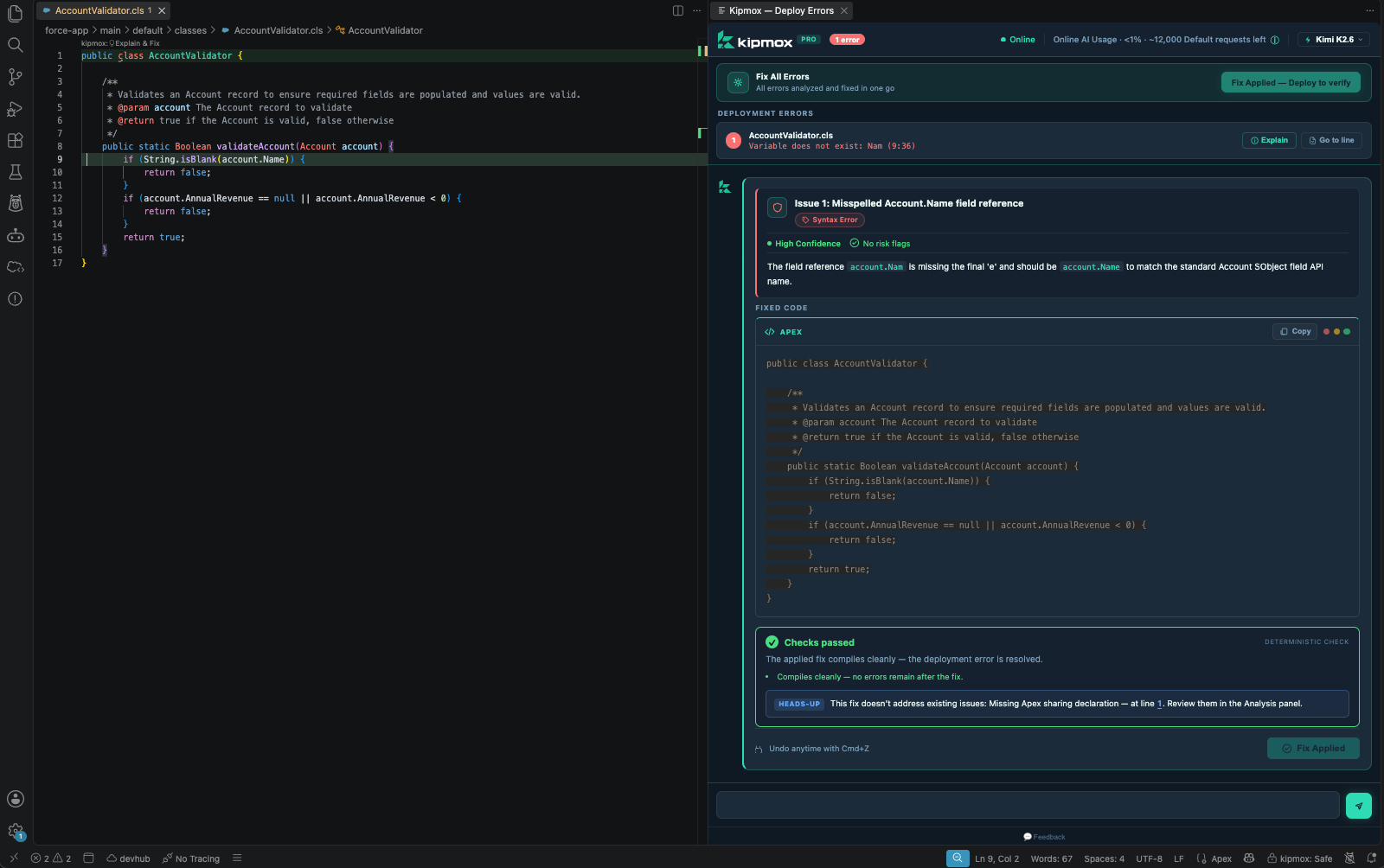 Deploy → see every error → fix it → verified before you apply
⚡ Get started in seconds
- Install kipmox and open any Apex or LWC file.
- Right-click → kipmox: Deploy to Org (or run it from the Command Palette).
- If the deploy fails, the Deploy Errors panel opens automatically — click Explain on any error, or (on Pro) Analyze & Generate Fixes to fix them all at once.
Your first 2 requests are free with no account. From the 3rd, sign in with a magic link — no password.
Why kipmox?
Most AI coding tools are generic. kipmox is built for Salesforce — it understands Apex, LWC bundles, governor limits, trigger patterns, sharing rules, and the deployment lifecycle. No tab-switching, no copy-pasting into a chatbot: everything happens in VS Code, against your real org.
And unlike a generic assistant, kipmox doesn't ask you to take a fix on faith — see Every fix is verified below.
What kipmox does
1. Deploy & fix deployment errors
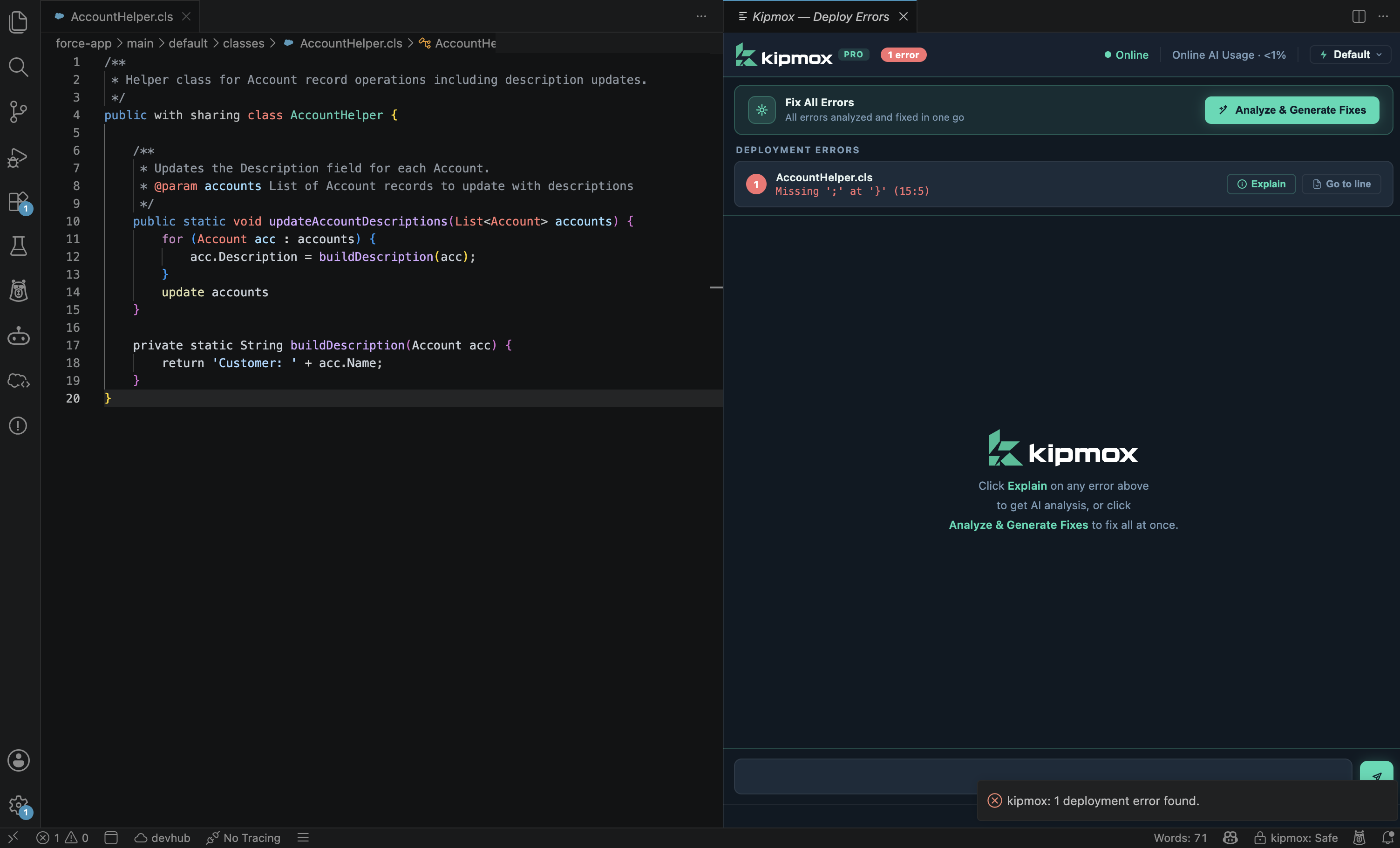
Right-click any .cls, .trigger, .js, or .html file → kipmox: Deploy to Org. On failure, the Deploy Errors panel lists every error with file, line, and message. Explain breaks down any error in plain English (all plans); Analyze & Generate Fixes (Pro) fixes them all at once, then you Apply Fix and re-deploy — repeat until it's clean.
2. Analyse your code as you save
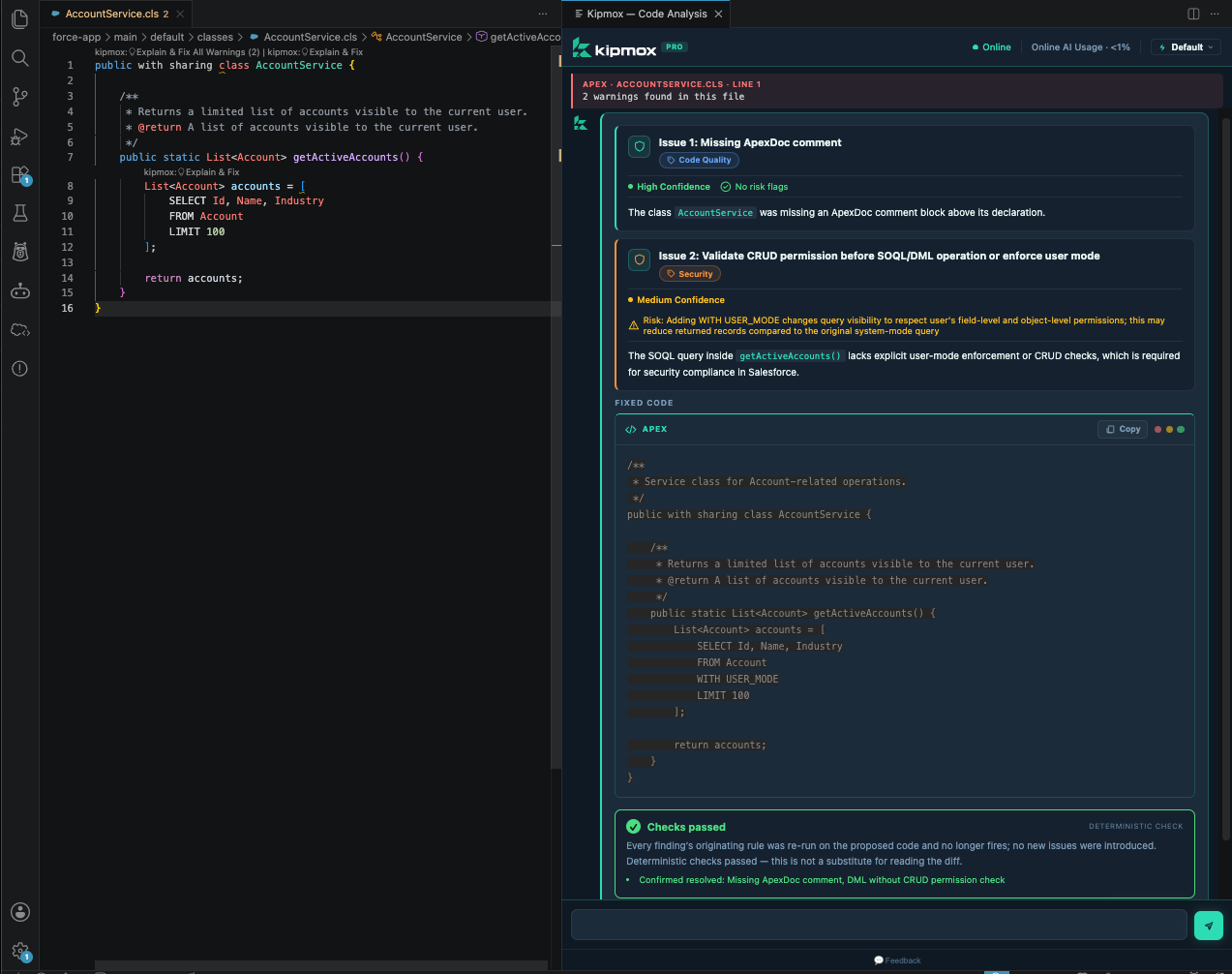
kipmox analyses your Apex and LWC on save, flagging SOQL/DML in loops, missing sharing declarations, CRUD/FLS gaps, Locker Service violations, LWC mistakes, and more — inline via CodeLens. Click kipmox: 💡 Explain & Fix on any warning for an instant, targeted fix. Powered by the Salesforce Code Analyzer (PMD, ESLint, Graph Engine) plus kipmox's own Salesforce-specific rules, and your team's custom rules.
3. Document any class or component
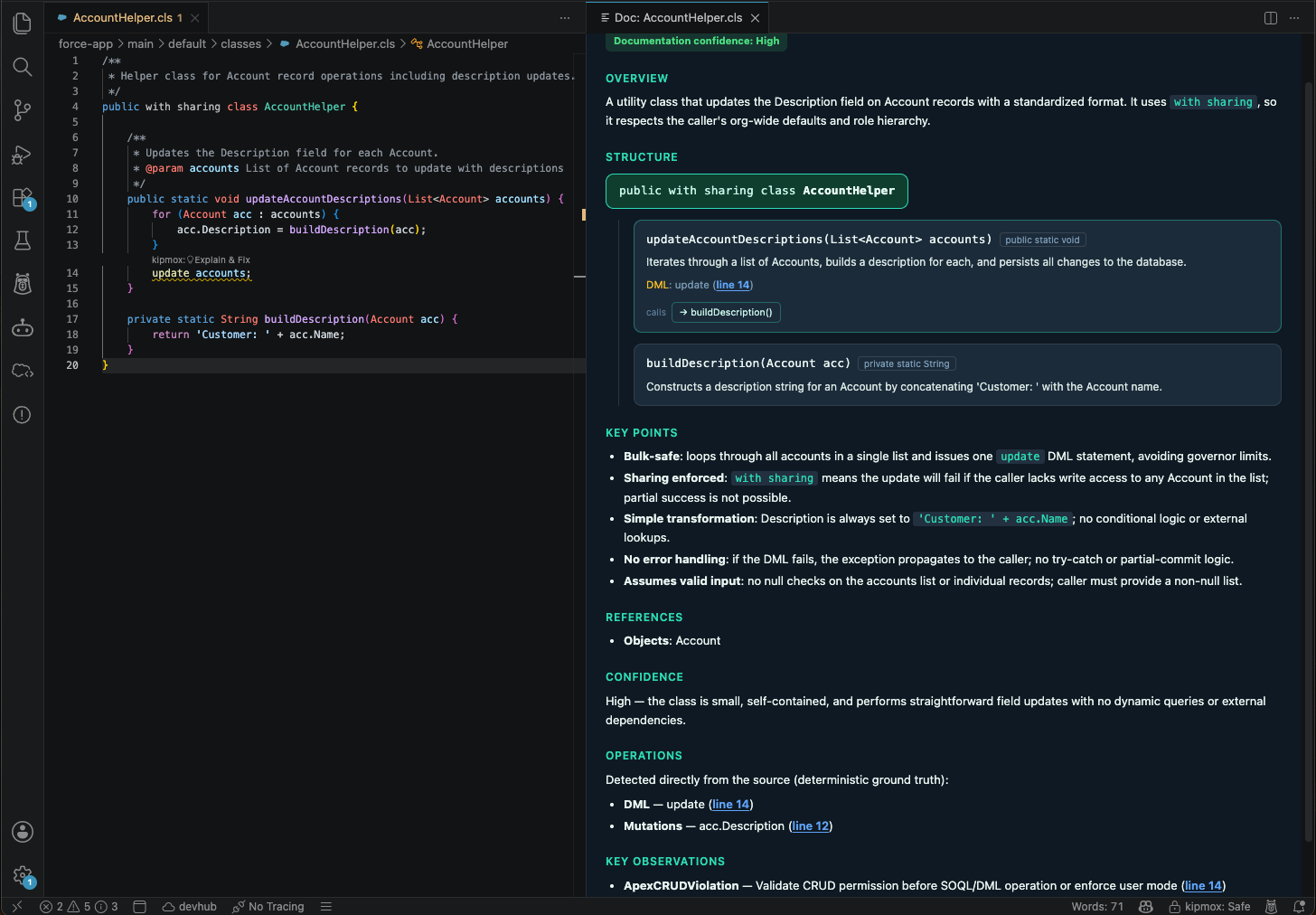
Run kipmox: Explain this code on any Apex class, trigger, or LWC to generate a clear technical document — overview, key methods, dependencies, and static-analysis findings — read straight from your source, so it stays accurate.
✅ Every fix is verified — not just suggested
AI can be wrong. kipmox is built so you never have to guess:
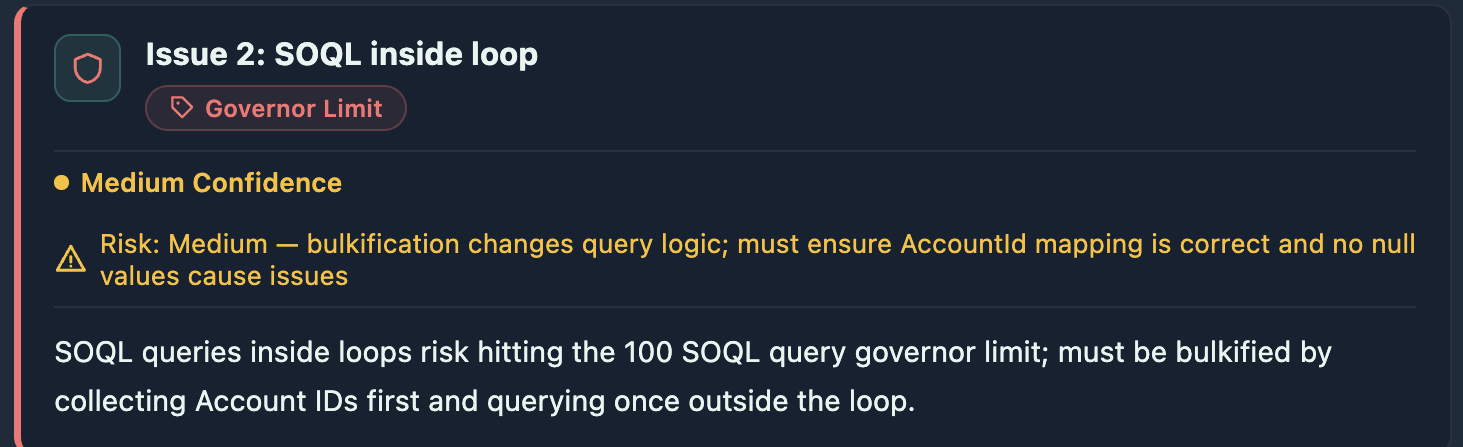
- Confidence — High, Medium, or Low: how sure kipmox is the fix is correct.
- Risk — a plain-English note on what to double-check before applying (or No risk flags).
- Deterministic check — kipmox re-runs the originating rule on the proposed fix in the extension (not by asking the AI to grade itself) and shows a verdict: Checks passed, Review recommended, or Validation failed. It also catches regressions — a fix that trades one problem for another never reads as clean.
- Reversible — nothing changes until you apply; undo anytime with
Cmd/Ctrl+Z.
More features
- 🔒 Offline Mode (Pro) — run entirely on your machine with Ollama +
qwen2.5-coder. Your code never leaves your computer. Guided one-time setup; kipmox keeps the local model running for you.
- 🎛️ Choose your AI model (Pro) — pick the model kipmox uses from a picker in the panel — a fast one for everyday fixes, a higher-capability one for tricky debugging.
- ⚡ Safe Mode & Auto Fix Mode — Safe Mode (default) waits for you to click Apply Fix; Auto Fix Mode applies automatically. Both auto-save on apply, with undo always available.
- 🧩 Custom analysis rules — point kipmox at your team's PMD rulesets via a Salesforce Code Analyzer config.
👩💻 Who is this for?
- Salesforce developers working with Apex and LWC
- Teams tired of hand-fixing deployment errors and chasing governor limits
- Developers in restricted or offline environments who can't send code to the cloud
Plans
|
Free |
Pro |
| Deployment-error fixes |
15 every 4 hours |
Never blocked* |
| Code documents |
2 every 4 hours |
Never blocked* |
| Explain & Fix (view + copy the fix) |
✓ |
✓ |
| One-click Apply Fix |
— |
✓ |
| Inline analysis + verified fixes |
✓ |
✓ |
| Bulk Fix All · Auto Fix Mode |
— |
✓ |
| Choose your AI model |
— |
✓ |
| Offline Mode (local AI) |
— |
✓ |
Pro — $24.99/month or $19.99/month billed yearly (USD) · kipmox.com
Pro is never blocked: a generous online allowance, and when it's used up you keep working with the local Offline Mode model.
Enterprise — team management, usage analytics, governed AI on AWS Bedrock, and data-governance controls. Contact us.
Requirements
- VS Code 1.85 or later
- Salesforce CLI (
sf) installed and authenticated
- An active Salesforce org connection (kipmox deploys to your default org)
- For full code analysis (recommended): the Salesforce Code Analyzer plugin (
sf plugins install code-analyzer) and Java 11+ — kipmox falls back to its built-in rules if they're unavailable
- For offline mode: Ollama — set up automatically by kipmox
Extension settings
| Setting |
Default |
Description |
kipmox.mode |
online |
online for cloud AI, offline for local Ollama |
kipmox.safeMode |
true |
Require manual approval before applying fixes |
kipmox.deterministicCheck |
true |
Independently verify each fix before/after applying |
kipmox.offlineModel |
qwen2.5-coder:7b |
Local model to use in offline mode |
kipmox.analysis.configFile |
— |
Optional Salesforce Code Analyzer config for custom rules |
Privacy & Security
- In online mode, the file you're working on (plus its LWC bundle or dependent Apex classes for context) is sent to the kipmox backend to generate the fix — never your whole project. Your code is used only for that request; it is not stored or used to train models.
- In offline mode, all processing runs locally via Ollama — no code leaves your machine.
- Authentication tokens are stored in VS Code SecretStorage, never in settings.
- Fixes are applied only when you choose, and are always reversible with undo.
- kipmox runs Salesforce CLI deploy commands only when you explicitly invoke deployment.
- Built and operated by Aptivate Pty Ltd (ABN 42 686 342 147), based in Australia.
- Privacy Policy · Terms and Conditions
Support
Release notes
1.0.0 — Initial release
- Deploy-and-fix for Apex & LWC deployment errors
- Inline code analysis (Apex + LWC) via the Salesforce Code Analyzer + kipmox rules, with custom-rule support
- One-click code documentation (Explain this code)
- Every fix rated (Confidence / Risk) and independently verified by a deterministic check
- Choose-your-model picker (Pro)
- Offline Mode via Ollama +
qwen2.5-coder, with automatic local-server management
- Safe Mode & Auto Fix Mode

