Claude Code Usage Monitor
Monitor Claude Code API usage in VS Code with real-time statistics.
Important Notice
This is an unofficial, community-developed extension and is not affiliated with, endorsed by, or supported by Anthropic. "Claude" is a trademark of Anthropic.
This extension uses the same authentication mechanism as Claude Code CLI and does not require separate authentication.
Platform Compatibility: Supports macOS, Linux, and Windows.
Features
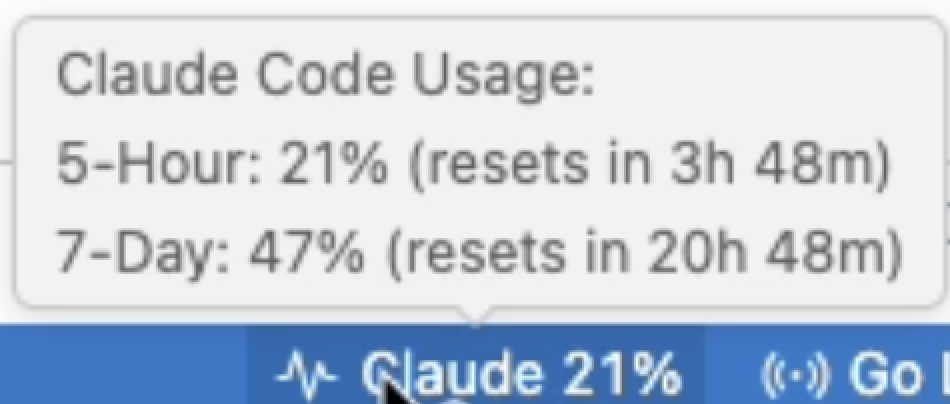
- Status Bar Integration: See your Claude API usage at a glance in the VS Code status bar
- Real-time Monitoring: Automatically updates usage statistics every minute (configurable)
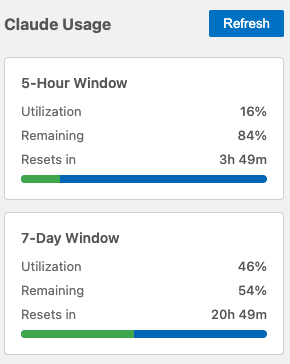
- Detailed Statistics: View comprehensive usage information in a dedicated sidebar
- Usage Alerts: Get notified when your usage exceeds configurable thresholds
- Multiple Windows: Track 5-hour, 7-day, and 7-day Opus usage windows
- No Re-authentication: Uses your existing Claude Code CLI credentials
- Cross-platform: Works on macOS, Linux, and Windows
Screenshots
Status Bar
Requirements
- Claude Code CLI: Must be authenticated with Claude Code CLI (
claude command)
- VS Code: Version 1.85.0 or higher
- macOS: Credentials are read from macOS Keychain
- Linux/Windows: Credentials are read from
~/.claude/.credentials.json
Installation
From Source
- Clone or download this repository
- Install dependencies:
cd claude-usage-monitor
npm install
- Compile the extension:
npm run compile
- Package the extension:
npm run package
- Install the generated
.vsix file:
code --install-extension claude-code-usage-monitor-0.1.1.vsix
Setup
- Ensure you're authenticated with Claude Code CLI:
claude
- Reload VS Code
- The extension will automatically start monitoring your usage
Usage
Status Bar
The status bar item shows your current maximum usage across all windows:
$(pulse) Claude 45% - Normal usage (< 75%)$(warning) Claude 80% - Warning usage (75-90%)$(alert) Claude 95% - Critical usage (≥ 90%)
Click the status bar item to open the detailed statistics view.
The extension adds a "Claude Code Usage Monitor" sidebar with:
- Usage Statistics: Tree view with usage breakdown
- Detailed Statistics: Webview with progress bars and visual indicators
Commands
Available commands (accessible via Cmd+Shift+P):
Claude Code Usage Monitor: Refresh Claude Usage - Manually refresh usage dataClaude Code Usage Monitor: Show Detailed Usage - Open the detailed statistics viewClaude Code Usage Monitor: Login to Claude Code - Get help with authentication
Configuration
Configure the extension in VS Code settings (Cmd+,):
| Setting |
Type |
Default |
Description |
claude-usage-monitor.updateInterval |
number |
60 |
Update interval in seconds (minimum 60) |
claude-usage-monitor.showNotifications |
boolean |
true |
Show notifications when usage is high |
claude-usage-monitor.warningThreshold |
number |
90 |
Warning threshold percentage (0-100) |
Example Configuration
{
  "claude-usage-monitor.updateInterval": 180,
  "claude-usage-monitor.showNotifications": true,
  "claude-usage-monitor.warningThreshold": 85
}
How It Works
- Authentication:
- macOS: Reads OAuth credentials from macOS Keychain (same credentials used by Claude Code CLI)
- Linux/Windows: Reads credentials from
~/.claude/.credentials.json
- API Calls: Fetches usage data from
api.anthropic.com/api/oauth/usage
- Caching: Stores usage data locally in
~/.claude/stats-cache.json (5-minute cache)
- Updates: Automatically refreshes usage data at configured intervals
- Notifications: Shows warning when usage exceeds threshold
Troubleshooting
"Not authenticated" error
- Ensure you're logged in with Claude Code CLI:
claude
- macOS: Check that credentials are stored in Keychain:
security find-generic-password -s "Claude Code-credentials"
- Linux/Windows: Check that
~/.claude/.credentials.json exists
No usage data shown
- Try manually refreshing:
Cmd+Shift+P → "Refresh Claude Usage"
- Check the Output panel for errors: View → Output → "Claude Code Usage Monitor"
- Ensure you have an active internet connection
Privacy & Security
- Local Storage: All data is stored locally on your machine
- No Logging: OAuth tokens are never logged or transmitted to third parties
- HTTPS Only: All API calls use HTTPS encryption
- Secure Credential Access: macOS uses Keychain; Linux/Windows reads from local file
Development
Building from Source
# Install dependencies
npm install

# Compile TypeScript
npm run compile

# Watch mode (auto-compile on changes)
npm run watch

# Package extension
npm run package
Testing
- Open the project in VS Code
- Press
F5 to launch Extension Development Host
- Test the extension in the new window
Known Limitations
- OAuth only: Only supports OAuth authentication (not API keys)
- Read-only: Cannot modify usage limits or settings via API
- Unofficial API: Uses undocumented API endpoints that may change without notice
Roadmap
- [x] Linux and Windows support
- [ ] Historical usage charts
- [ ] Cost tracking and estimation
- [ ] Multi-account support
- [ ] Export usage reports (CSV/JSON)
- [ ] Desktop notifications
- [ ] Usage prediction (ML-based)
Contributing
Contributions are welcome! Please feel free to submit issues or pull requests.
License
MIT
Disclaimer
This is an unofficial, community-developed extension.
- Not affiliated with, endorsed by, or supported by Anthropic
- "Claude" is a trademark of Anthropic
- Uses undocumented API endpoints that may change or be discontinued at any time
- Provided "as is" without warranty of any kind (see LICENSE for details)
Use this extension at your own risk. The developers are not responsible for any issues arising from its use.
Acknowledgments
Note: This is an unofficial extension and is not affiliated with Anthropic. "Claude" is a trademark of Anthropic.

