
Skip to content
| Marketplace
Sign in
Visual Studio Code>Visualization>BetaXivNew to Visual Studio Code? Get it now.
BetaXiv

BetaXiv

kevin-os7

|
4 installs
| (1) | Free
An alphaXiv-style paper-reading experience inside VS Code, fully local: the real PDF on the left, an AI-generated structured summary on the right. The summary is produced by your own coding agent (Claude Code / Codex / Gemini CLI) via a bundled Agent Skill. The extension is a pure renderer — it neve
Installation
Launch VS Code Quick Open (Ctrl+P), paste the following command, and press enter.
Copied to clipboard
More Info

Read papers in VS Code with the frontier model you already pay for. No second subscription. No per-token API key. Nothing leaves your machine.

An alphaXiv-style paper-reading experience — the real PDF beside an AI-written structured read, figures and math intact — without ever leaving your editor.
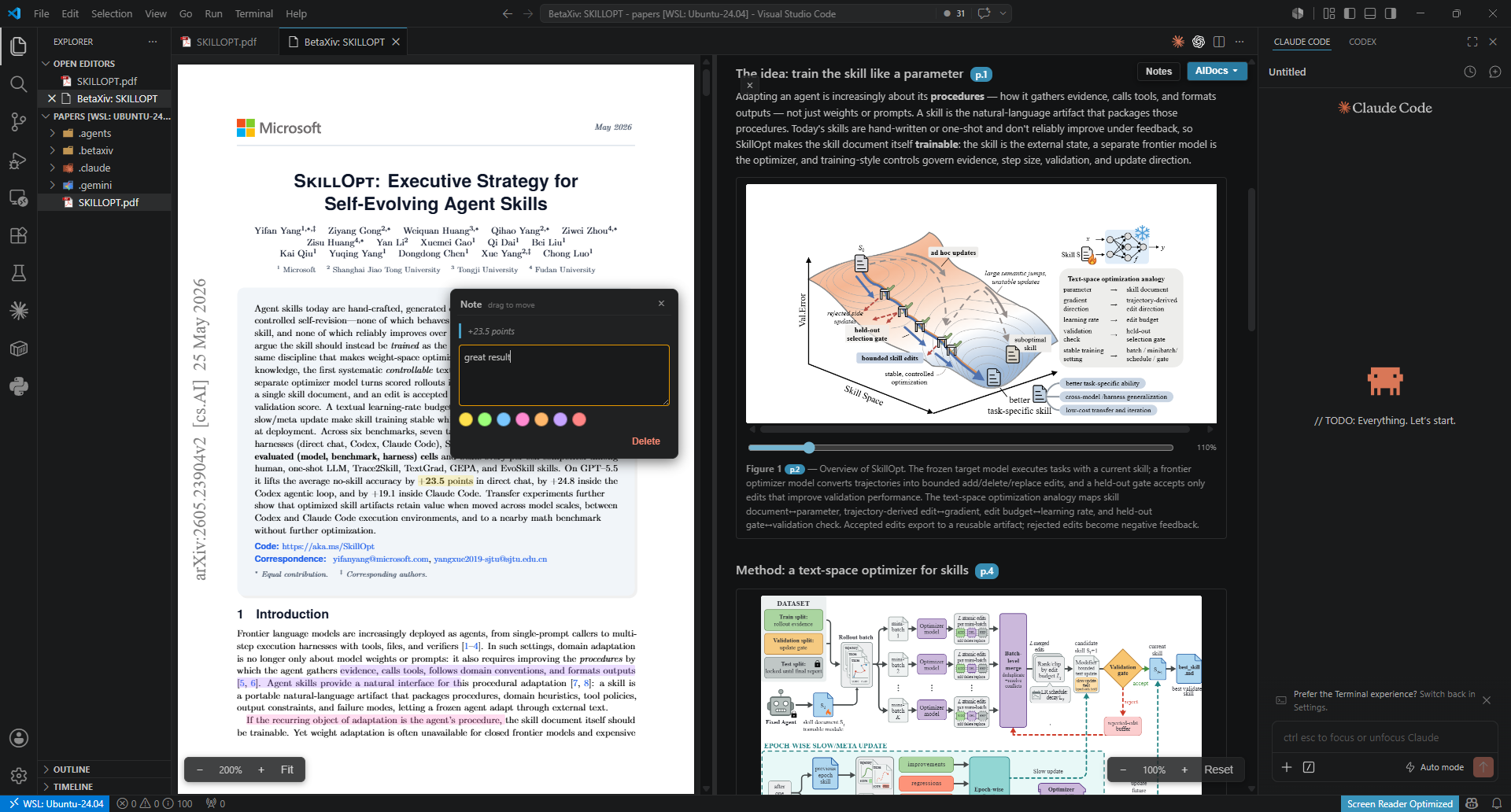
BetaXiv in VS Code: the real PDF on the left, an AI-generated structured summary on the right

The same AI-assisted reading flow — structured explanations and on-demand docs beside the paper — but inside your editor, fully local, and powered by the agent subscription you already pay for.

The real PDF on the left. An AI-generated structured summary — plus any AIDocs you ask for — on the right. Both are written by your own coding agent (Claude Code / Codex / Gemini CLI) running a bundled Agent Skill, under your own login.

The extension itself is a pure renderer: it reads JSON from disk and draws it. It never calls a model, touches OAuth/API keys, launches an agent, or makes a network call.

Why BetaXiv

  • 🔑 Use the subscription you already have. Summaries come from your existing Claude / Codex / Gemini agent — no extra subscription, no API key, no per-token billing.
  • 🔒 Fully local & private. Zero model or network calls from the extension. No telemetry, no accounts. PDFs and summaries never leave your machine.
  • 📄 The real paper, not a reflow. Left pane is the actual PDF via PDF.js — figures, equations, layout intact — beside a clean, structured read on the right.
  • 🧩 More than a summary. Ask your agent for comparison tables, method flowcharts, or derivations on demand — they render right next to the paper.

How it works

papers/foo.pdf ──► your agent runs the betaxiv-summarizer skill
                          │  (reads the PDF, writes JSON)
                          ▼
   .betaxiv/summaries/<id>.summary.json   ◄── the versioned contract
                          ▼
   BetaXiv renders: PDF left, summary right (live-reloads on change)

<id> is the first 16 hex of the PDF's SHA-256, so the summary follows the paper through any rename or move.

AIDocs — beyond the summary

The summary is one fixed artifact. AIDocs are open-ended documents your agent writes on request — a results table with extra models it fetched, a method flowchart, a derivation, a glossary of a subfield. They live next to the summary and appear in the right pane's AIDocs dropdown.

Docs are authored declaratively: the agent writes prose, tables, and Mermaid diagrams (flowcharts, sequence/state diagrams, pie/xychart charts), which the extension renders to SVG locally. The agent never draws raster images — it declares, the extension renders.

Requirements

BetaXiv is a renderer, not an AI client. To produce summaries and AIDocs you need a coding agent installed locally — Claude Code, Codex, or Gemini CLI — running under your own login. The extension makes no model or network calls of its own.

Getting started

  1. Install the skills. Run BetaXiv: Install Skills into Workspace from the Command Palette. It copies both betaxiv-summarizer and betaxiv-documenter into .agents/skills/, .claude/skills/, and .gemini/skills/ (it only writes files — it never launches an agent).
  2. Drop a PDF into your workspace (e.g. a papers/ folder).
  3. Open it. Right-click the PDF in the Explorer → BetaXiv: Open, or use the Command Palette. The PDF renders on the left immediately.
  4. Ask your agent for a summary: run betaxiv-summarizer on the PDF → it writes .betaxiv/summaries/<id>.summary.json and the right pane fills in live.
  5. Ask for an AIDoc any time: run betaxiv-documenter with what you want (e.g. "a table comparing this to Llama-3/GPT-4 by params and FLOPs", "a flowchart of the training pipeline"). It appears in the right pane's AIDocs dropdown.

Everything live-reloads: edit the JSON and the right pane updates; delete it and the pane shows the "run the skill" guidance.

Commands

Command What it does
BetaXiv: Open Open the selected PDF with PDF on the left, summary/AIDocs on the right
BetaXiv: Install Skills into Workspace Copy the summarizer + documenter skills into your workspace
BetaXiv: Copy with Data to Workspace… Right-click PDF(s) in the Explorer → copy each paper together with its summary, AIDocs, and notes into another folder you pick. The .betaxiv data is keyed by content id, so opening a copied PDF there re-links automatically — moving a paper between libraries/workspaces keeps everything attached.

Privacy & compliance

Everything is local. The extension makes zero model/network calls — inference happens only inside your own agent, under your own login. No telemetry, no accounts, no API keys. PDFs and summaries never leave your machine.

License

MIT

  • Contact us
  • Jobs
  • Privacy
  • Manage cookies
  • Terms of use
  • Trademarks
© 2026 Microsoft