Kestrel for VS Code
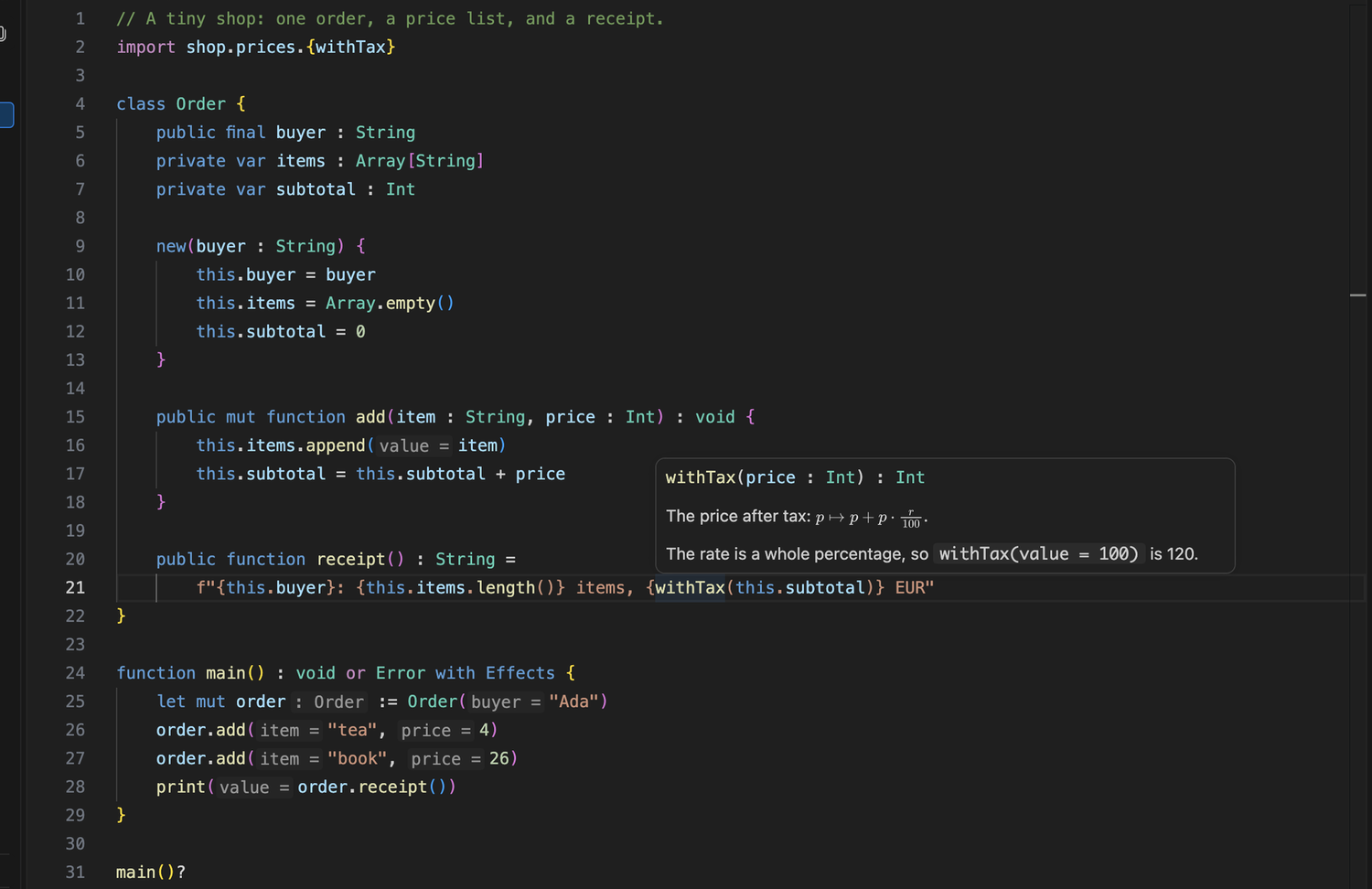
Support for .kes files: highlighting, completion, hover, inlay hints,
diagnostics, and a live proof state.
Install
1. Install the compiler. With Homebrew:
brew install GeronimoCastano/kestrel/kestrel
Or build it from source; the repository
has the steps.
2. Install this extension. Open the Extensions view and search Kestrel
by kestrel-lang. You can also install the .vsix from
Releases with
Install from VSIX....
3. Open a .kes file. The status bar shows Kestrel.
If the compiler is not on PATH, set kestrel.compilerPath to the binary.
What it does
The extension is lightweight and syntactic. The compiler stays the source of
truth for types, effects and ownership, so every error you see comes from
kestrel check.
Writing
- Completion for functions, classes, traits, enums, constants, keywords, built-in
types and nearby names. After a dot it filters by the receiver's inferred type,
including chains that end in
T or Error.
- Snippets for
function, class, test, match and if.
- Inlay hints for inferred
let and var types, such as tree : Node[Int].
- Gray parameter names at call arguments,
value = 3, on every call or only on
the cursor's line.
- Quick fixes for a class's missing trait methods, uncovered
match arms and
missing proof cases.
Proving
- The Kestrel Proof State view follows the cursor inside a
by { ... }
block. It lists the variables, hypotheses and target of every open goal,
updates as you type, and turns green when the kernel accepts the proof. A
proof that still uses sorry, or leans on a trusted smt result, shows an
amber badge; linear certificates checked by the kernel count as proved.
- Tactic completion offers the shape of each tactic, and the proof constructors
And, OrLeft, OrRight, Iff, Exists and True complete inside a proof.
- A theorem call shows its parameters in signature help, and a theorem name in a
proof shows its statement on hover.
\cup, \cap, \compl, \notin, \iff, \larr and \ot expand to their
symbols as you type.
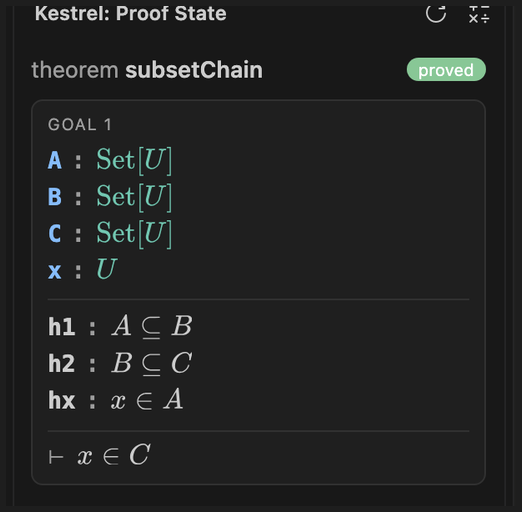
Run Kestrel: Show Proof State from the Command Palette, or click the Kestrel
icon in the activity bar.
Reading
- Hover for functions, classes, constants, locals, parameters, every tactic, and
the standard library.
- Go to definition with F12 or Cmd-click for functions, classes, traits, enums
and their cases, constants, fields and methods, across files.
/// documentation appears in hover, signature help and completion. Markdown
works, and $...$ and $$...$$ render with bundled MathJax, offline, in light,
dark and high-contrast themes, scaled with the editor font.- An outline of classes, functions and constants.
Checking
- The compiler checks your file as you type and reports its errors with their
hints. One warm
kestrel serve process per package keeps an edit in the
millisecond range; a rebuilt compiler starts a new process.
- Project-local imports resolve from the file's path before you save, so an
unsaved buffer does not report a missing import.
- In a notebook, a cell is read behind the cells above it, because the kernel
runs the notebook as one session.
Imports
import std.linalg                 // linalg.solve(A, b)
import std.linalg as la           // la.solve(A, b)
import std.linalg.{solve, lu}     // solve(A, b), lu(A)
The editor completes standard module paths and their exported names. Typing a
dot after a complete module path, as in import std.linalg., offers that
module's names and inserts the one you pick as a selective import.
Settings
| Setting |
Default |
What it does |
kestrel.compilerPath |
empty |
The compiler to run. Empty uses kestrel on PATH. |
kestrel.checkOnType.enabled |
true |
Check as you type. When off, a file is checked on save. |
kestrel.checkOnType.pauseMs |
60 |
Quiet time after the last keystroke before checking. |
kestrel.useServer |
true |
Keep one warm kestrel serve per package folder. |
kestrel.inlayHints.parameterNames |
always |
always, cursorLine or off. |
kestrel.inlayHints.parameterNameStyle |
equals |
value = 3 or value: 3. |
kestrel.inlayHints.types |
true |
Inferred types after let and var. |
kestrel.proofState.enabled |
true |
Follow the cursor with the proof state. |
kestrel.proofState.math |
true |
Typeset propositions with TeX. |
kestrel.expandSymbols |
true |
Turn \in into ∈ when you type a space. |
Kestrel: Cycle Parameter Name Hints switches between the three parameter
name modes.
Troubleshooting
| Symptom |
Fix |
| An error names a form the compiler should accept |
The extension ran an older binary. Point kestrel.compilerPath at the current build and reload the window; the warm server restarts. |
kestrel is not found |
Install the compiler, or set kestrel.compilerPath. |
| The proof state stays empty |
Put the cursor inside a theorem statement or its by { ... } block. |
A .kes file opens as plain text |
The extension is not active. Reload the window. |
Limits
- Quick fixes need the warm checker (
kestrel.useServer). An older compiler
without the actions operation reports errors but offers no light bulb.
- A namespace import, such as
import facts, adds the qualifier but not its
members yet, and imports of imports are not followed.
- Project-local module paths are not suggested after
import.
- Parameter-name hints follow the cursor's line. VS Code does not tell extensions
where the mouse is, so a hint cannot appear on hover alone.
Development
From this folder:
npm ci
npm run build          # bundle the MathJax renderer
npm test               # unit tests
npm run test:vscode    # drive a separate VS Code instance with an isolated profile
../package-vscode-extension.sh builds the VSIX without installing it.
| |

