
Codex Navigator
Your Codex chats and accounts, in one place.
An independent extension. Not affiliated with or endorsed by OpenAI.
Try the interactive demo at keenanselbee.com.
Find conversations by project, switch between saved accounts, and see their last known usage, all from a compact sidebar. Make it yours with custom names, labels, colours and favourites.
It was built to make development in a multi-repository workspace more enjoyable, with less time spent hunting for conversations and more time focused on your work.
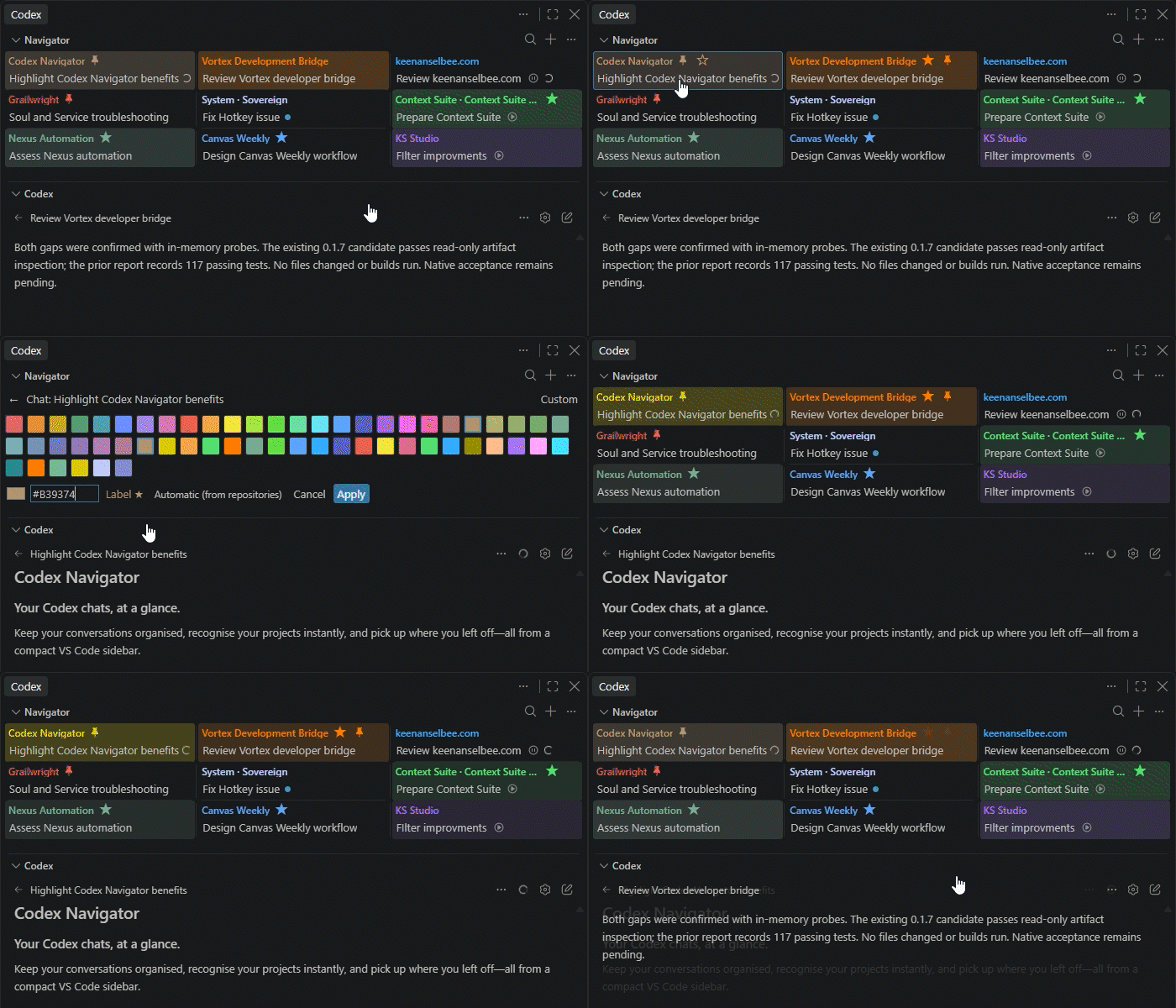
Organise your chats, personalise project colours and switch saved accounts.
Recent chat highlights fade over time, showing which conversations you visited most recently.
A layout that fits your workspace
Columns (left) · List (right)
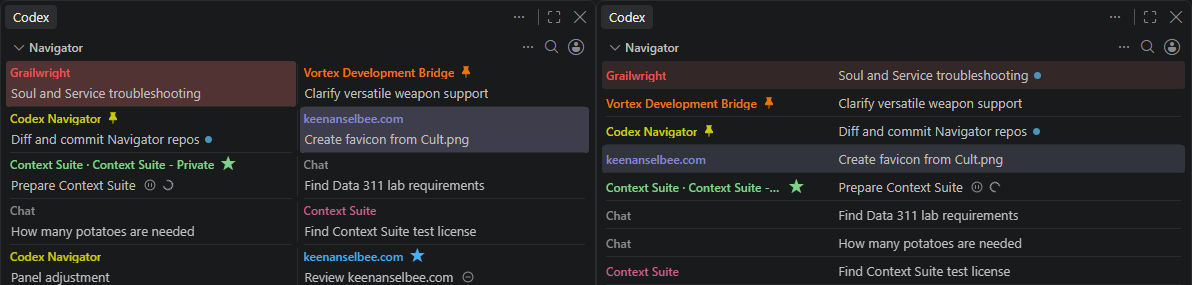
Navigator automatically adapts to the available panel space, switching between compact grids, columns and a list. Rows gently expand to use spare height while keeping text readable.
Features
- Switch accounts: Securely save and name your Codex sign-ins. Check last known usage, plan and reset details, manage banked resets, and switch accounts with a click and window reload.
- Find chats faster: Browse and search conversations in a sidebar that adapts to your space. Recognise projects through automatic repository labels, custom labels and colours.
- Keep chats organised: Rename conversations, star favourites and pin important chats. Hide and restore chats without deleting them, and highlight recent visits.
- Separate your work: Keep your chat organisation across workspaces with the shared Default profile, or create separate profiles for work, school and personal projects. Optionally filter chats to the current workspace.
- Follow activity and goals: See working, ready, waiting and error states, plus a question mark for detected unanswered questions. Pause or resume goals where supported.
- Get notified: Choose separate sound and desktop alerts for finished responses, questions and approvals. On Windows, click a notification to open its chat. Keep Navigator visible for monitoring.
Get started
- Install Navigator and open its view. Choose Try for free or Activate Licence. On macOS/Linux, follow the storage check first: fully quit and reopen VS Code when prompted.
- Choose Set Up Codex Navigator, then Install Hooks.
- Choose Open Hook Review, type
/hooks in the Codex terminal, and review and trust all Navigator hooks.
- In setup, enable Account Switching to save sign-ins, Automatic Labels to follow your projects, and Project Instructions to help Codex find repository rules, as needed. Start a new Codex chat after enabling labels or instructions.
Navigator shows your chats once hooks are installed, enabled and trusted. Later hook problems keep your chats available, with a compact notice when attention is needed.
Tip: Drag the Navigator heading above the Codex heading to move it to the top.
Settings
Right-click a chat for naming and label options. Matching custom labels share a colour within the chat profile; choose Chat Colour to change the label colour or override just one chat. Open the ... menu for Chat Profile, the workspace filter, Repository Colours, Restore Hidden Chats and Extension Settings.
- Automatic labels: Enable this option in setup, then start a new Codex chat. Labels follow the repositories the agent reports; you can always choose a repository yourself.
- Chat history: Turn off Recent Chats Only to include older chats.
- Chat layout: Choose Layout... from the ... menu for Auto, Columns, List or Compact. Auto adapts to panel height; fixed styles still fit their columns to the available width.
- New Chat button: Enable Show New Chat Button to add the optional + button to Navigator's toolbar.
- Chat tooltips: Enable Show Chat Tooltips for chat details on hover. Off by default.
- Notifications: Set separate sound and desktop rules for finished responses and questions: Off, Always, Only when VS Code is focused, or Only when VS Code is unfocused. Set Notification Volume from 0 to 100% (default 50%; 0 mutes sounds). Use Codex Navigator: Test Notification to preview delivery at that volume. Sound preference remains installed Codex audio, your platform's notification sound, then a bundled Balafon chime.
- Custom labels and repositories: Choose Repository keeps your custom label. Choose No repository association to keep a custom label without linking it to a project.
- Visit highlights: Choose which visited chats glow and how long the highlight lasts.
- Project instructions: Optionally help Codex find your repository's AGENTS.md and shared rules.
Trial and licence
Try Codex Navigator free for 7 days, then pay $5 CAD once. No card is required for the trial.
One active installation, transferable between devices. Includes all future updates.
Open License from Navigator's menu to activate or transfer your licence. Paid access checks daily and allows up to 30 days offline after successful validation. If access expires, Navigator preserves your data. Codex chats and tasks continue independently.
Requirements and support
- Desktop VS Code 1.137 or newer, the OpenAI Codex extension, and Node.js available on PATH.
- Windows x64 is tested. macOS and Linux on x64 or ARM64 have best-effort support; native testing is pending. Windows ARM64 is unverified.
- Remote SSH, WSL, containers and browser VS Code are outside the current support scope.
Activity and goal controls depend on the Codex runtime. A ready indicator means a turn finished, not necessarily that it succeeded. Visit highlights track chats opened through Navigator.
Setup and troubleshooting · Privacy and local data · Report an issue
Selected source code and component tests are available for inspection. Commercial licensing components remain private. Source reuse, modification and redistribution require written permission. Licence terms.
Made by Keenan Selbee.

