TopoDraft — Network Topology as Code
Draw network topologies on a canvas, store them as clean JSON, and let AI
agents edit the very same file as text — the canvas follows live.
Other languages: Japanese (日本語)
TopoDraft is a graphical editor for *.topo.json files: physical view
(cables, carrier circuits, sites) and logical view (VRF compartments
connected by L3 links). The text document is authoritative for the
canvas — the drawing is a view of your file, not a separate model;
every canvas operation becomes a regular document edit, so undo/redo is
plain Ctrl/Cmd+Z and git diffs stay clean thanks to deterministic,
NetBox-friendly serialization.
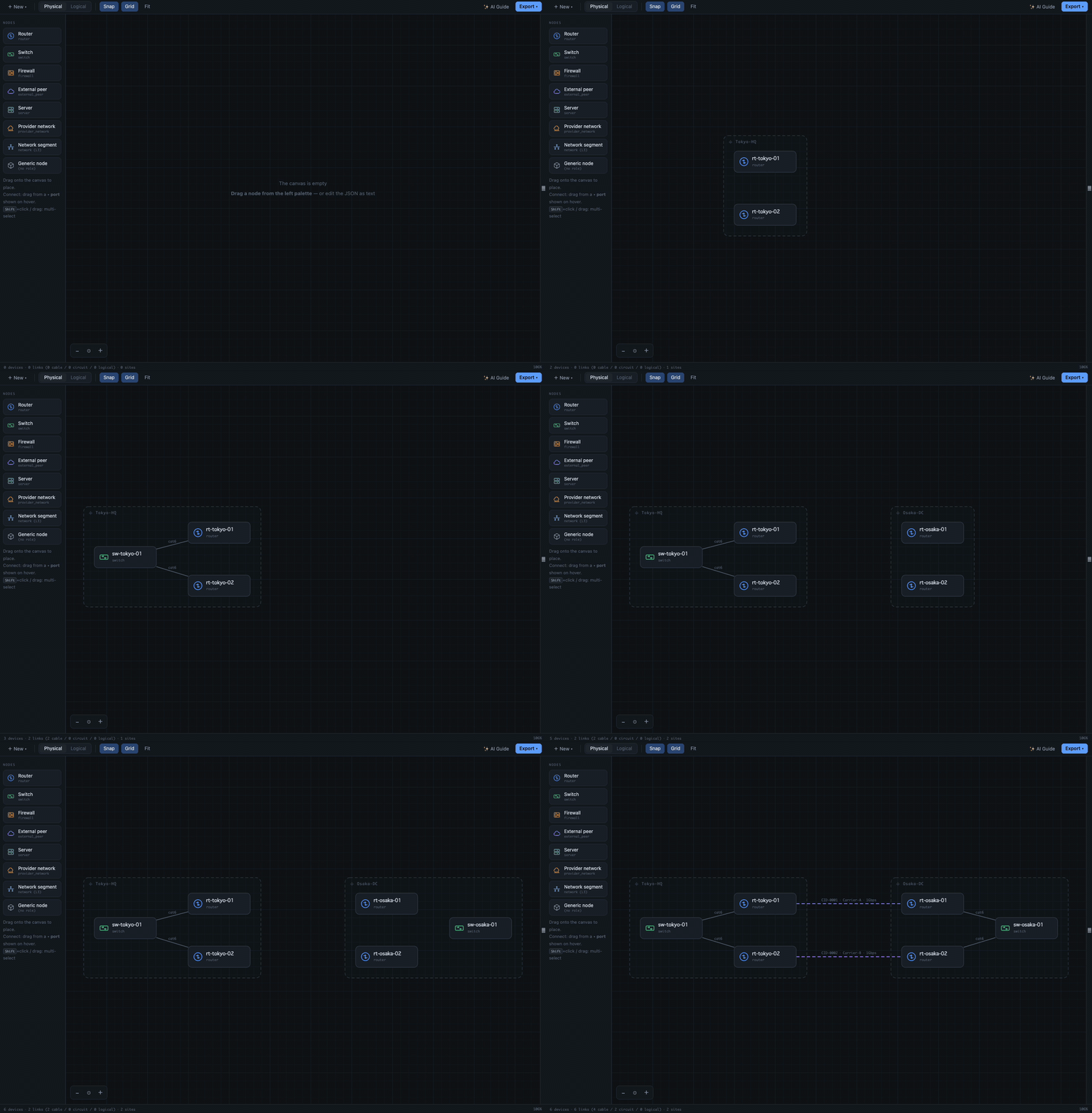
An AI agent builds a two-site network by editing the JSON — the canvas follows every step live.
Getting started
A Get Started with TopoDraft walkthrough opens on VS Code's Welcome page
after install (also: Welcome: Open Walkthrough…). The short version:
- Open the Command Palette (
Ctrl/Cmd+Shift+P) and run
TopoDraft: Open Example Topology — a live canvas opens instantly,
nothing to set up (works on vscode.dev / github.dev too).
- Make it yours: TopoDraft: New Topology File offers built-in
templates — or simply create any file ending in
.topo.json and start
dragging nodes onto the blank canvas.
- Working with an AI agent? Click ✨ AI Guide in the canvas toolbar to
write the file-format contract into
AGENTS.md, then ask your agent for
a network diagram — the canvas follows its edits live.
Features
- Custom editor for
*.topo.json (alias: *.topo) — open a file, get
the canvas. The </> title-bar button switches to the text view and back.
- Physical and logical layers in one file — cables/circuits/sites on the
physical view; VRF compartments, L3 links, and multi-access segments
(
networks[] with HSRP/VRRP virtual IPs) on the logical view.
- Full editing — palette drag & drop, port-drag link creation
(cable / circuit / logical by context), property panels, interfaces &
VRFs, JSON config contexts, copy/paste/duplicate, align & distribute,
inline rename with automatic reference updates, collapsible properties
panel for a full-width canvas.
- Agent-friendly by design — a published JSON Schema gives text editors
completion and validation; semantic diagnostics (duplicate names, dangling
references, undeclared VRFs, IPs outside a segment prefix, misspelled
fields with did-you-mean hints, …) land in the Problems panel with exact
ranges, so AI agents can self-correct. Stale canvas edits are discarded,
never overwriting agent edits; invalid mid-edit JSON just dims the canvas
until it parses again. The ✨ AI Guide button writes the full format
contract into your workspace's
AGENTS.md so coding agents learn it up
front.
- Export — Markdown documentation, an AI-chat-ready description, the
import schema for agents, draw.io diagrams, and images of the current
view — SVG or PNG in the editor's look, ready for READMEs and design
docs (toolbar button or
TopoDraft: commands).
- MCP server — the companion
topodraft-mcp package
gives AI agents native tools over Model Context Protocol: learn the
format, read, validate, make structured edits (post-edit diagnostics in
every response), and render the diagram as SVG to see their work.
Edits to a file open in VSCode appear on the canvas live.
- Templates — the toolbar + New menu (or
TopoDraft: New Topology File) starts from built-ins or your own *.topo.json files in
topodraft.templatesFolder (TopoDraft: Save as Template).
- English / Japanese UI, following the VSCode display language.
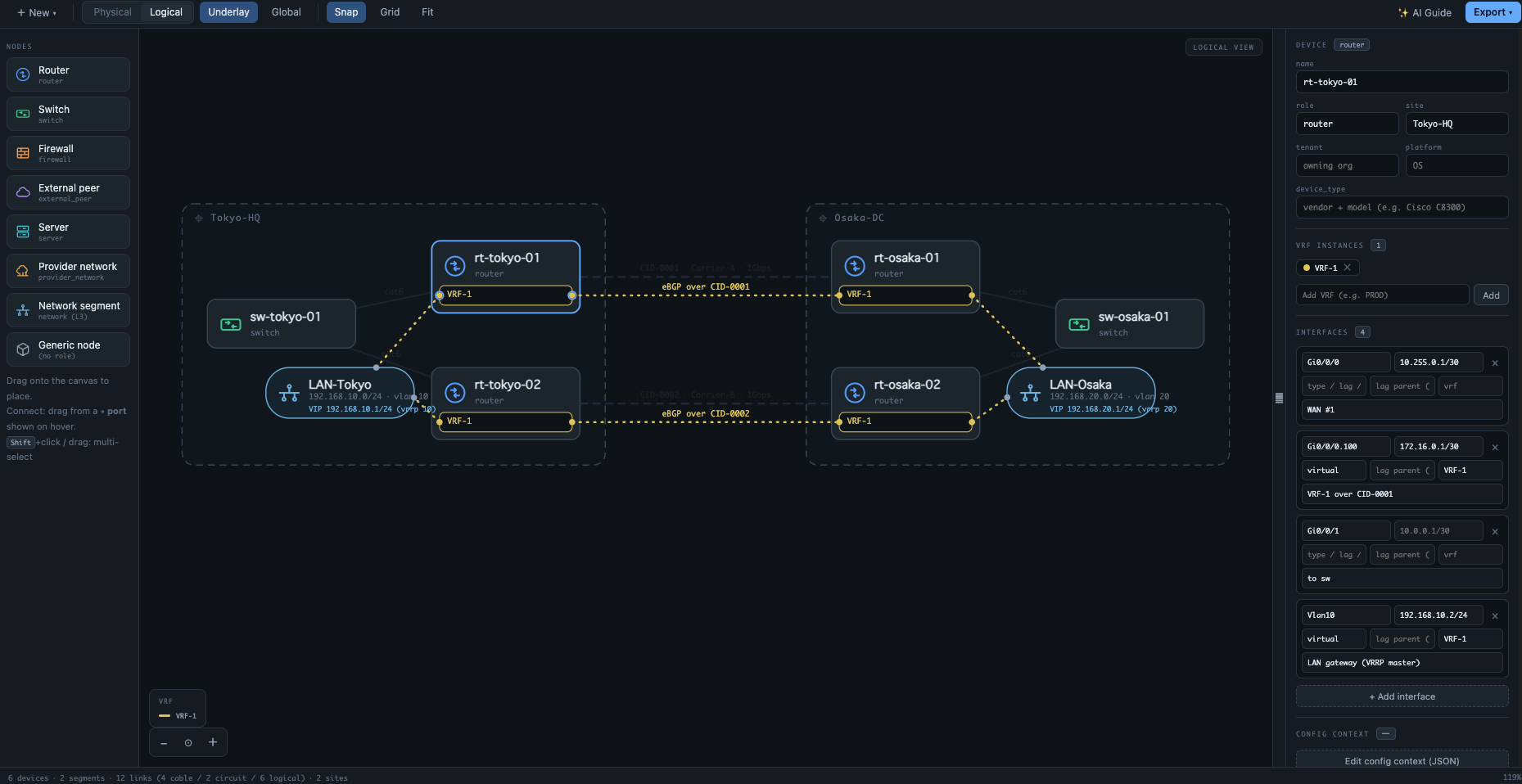
The logical view: VRF compartments, L3 adjacencies, and multi-access VRRP segments.
Versioned, documented, and schema-validated JSON with NetBox-friendly field
names — see the
format specification.
Legacy exports of the standalone TopoDraft (v3–v7) load and are normalized
on save.
Third-party software
The extension is fully bundled — it installs nothing at runtime. The only
third-party library shipped inside the bundle is
jsonc-parser (MIT, by
Microsoft), used to map diagnostics to exact text ranges. The canvas
(webview) bundle contains no third-party code at all. Dependency
advisories are checked in CI on every change; see the repository README
for how to verify the supply chain yourself.
Privacy
No telemetry. No remote code.
License
Apache License 2.0.

