💧 Water Reminder
A clean, minimalist VS Code extension to help you stay hydrated while coding! Features a modern, distraction-free UI that blends seamlessly with your development environment.
📸 Screenshots
Main Timer View
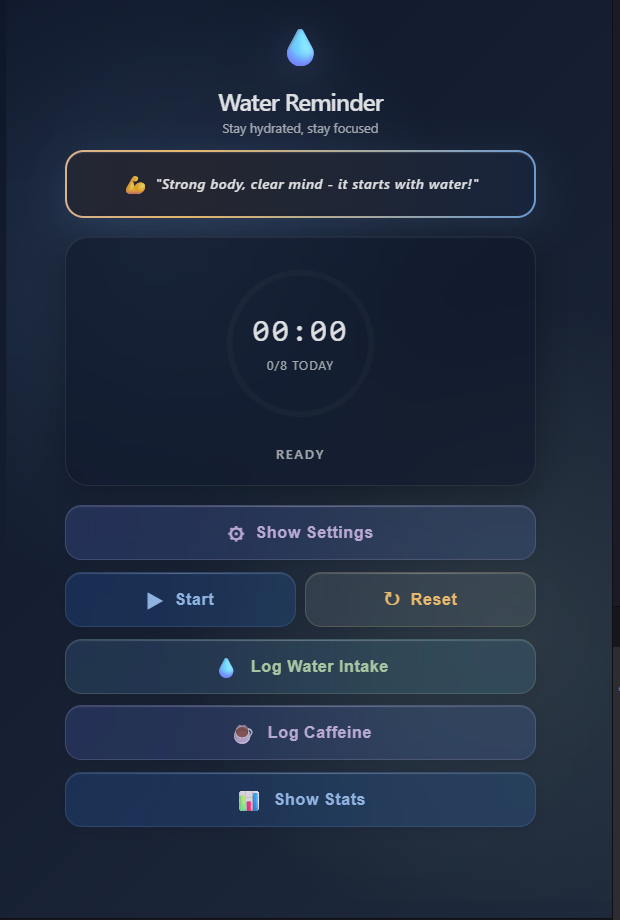
Beautiful timer interface with animated progress bar and theme selection
Settings Panel
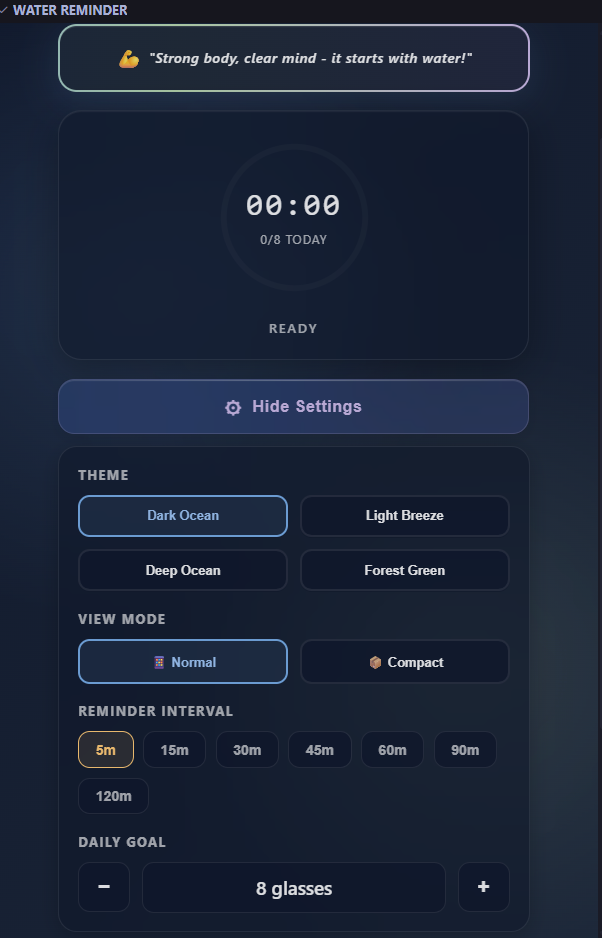
Configure reminder intervals, daily goals, and themes
Log Water Intake
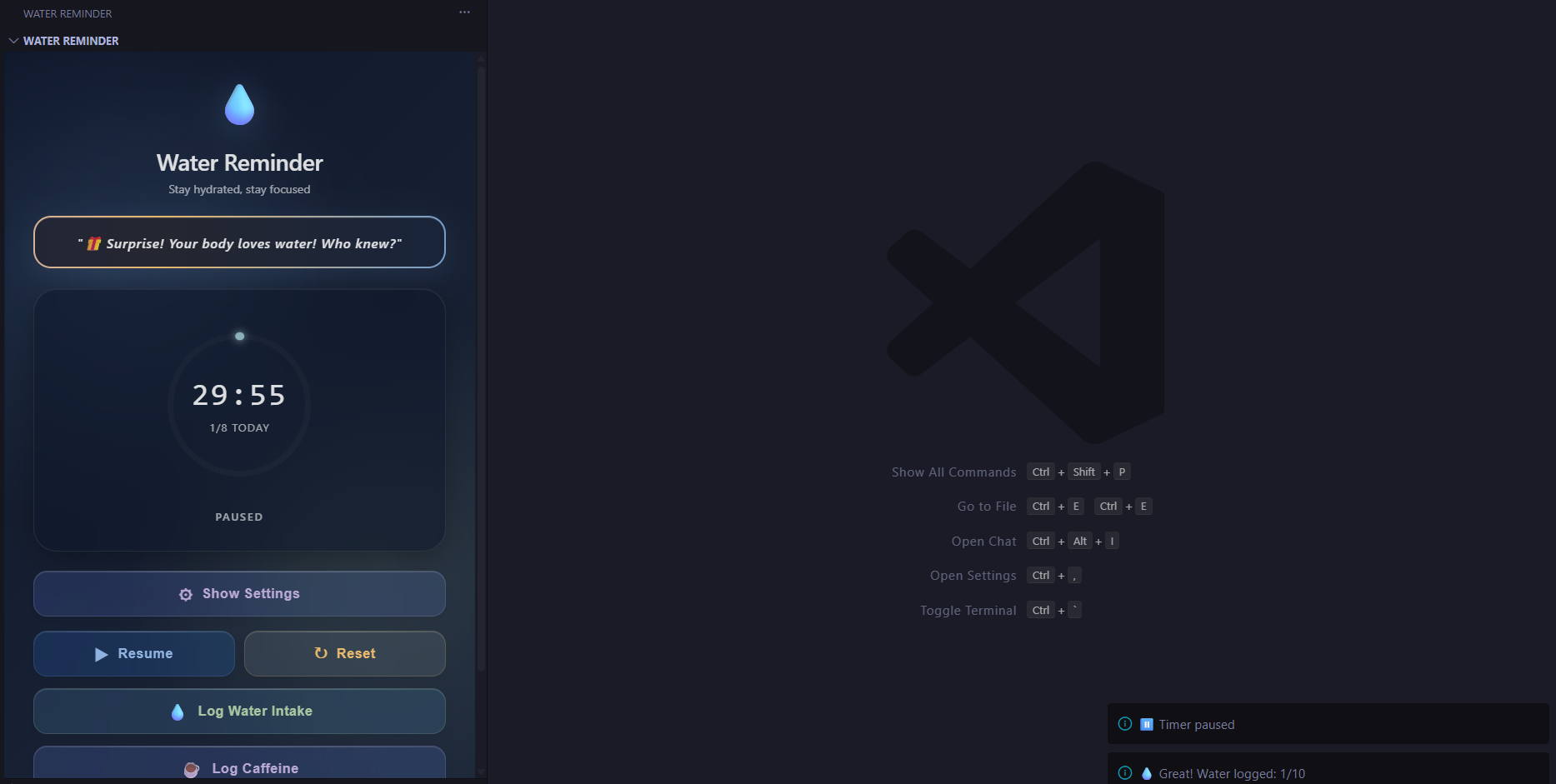
Simple and professional water intake logging
Smart Reminders
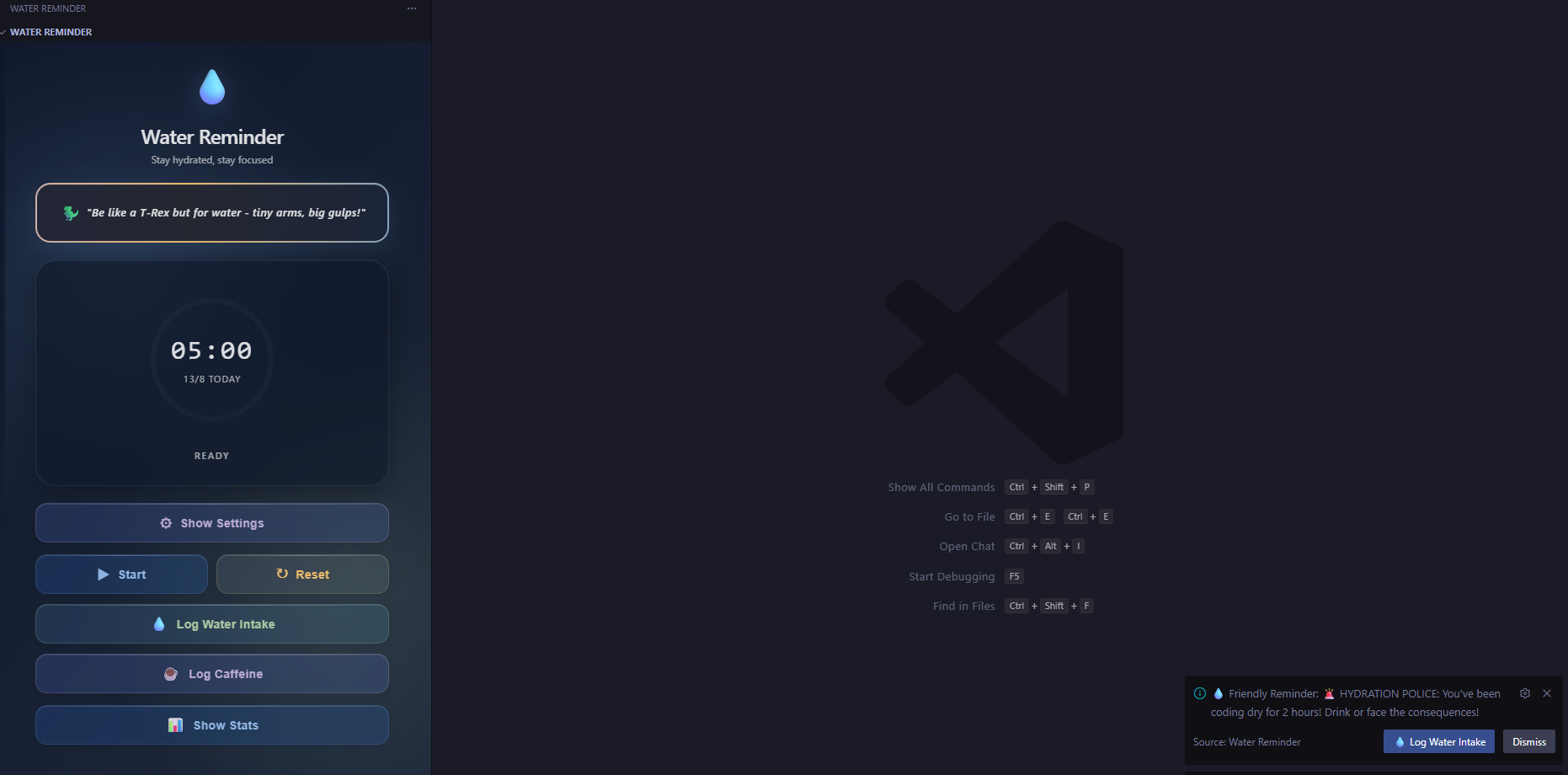
Intelligent hydration reminders with motivational quotes
✨ Features
- ⏰ Customizable Timer - Set reminders at your preferred intervals (default: 30 minutes, configurable 30-60 minutes)
- 🎨 4 Beautiful Themes - Dark, Light, Ocean, and Forest themes with smooth transitions
- 🌊 Gradient Animations - Eye-catching animated gradients on quote displays
- 📊 Daily Progress Tracking - Track your water intake, reach your daily goal, and build streaks
- 🔔 Smart Reminders - Get funny yet professional notifications after 90 minutes of inactivity (29+ unique quotes)
- 💧 Log Water Intake - Simple, professional button text for tracking hydration
- 📍 Status Bar Integration - Always see your timer and daily progress at a glance
- 🌳 Sidebar View - Quick access controls with progress bar and timer in the activity bar
- 💾 Persistent State - Your progress is saved even when you close VS Code
- 🚀 Auto-start - Optionally restart the timer automatically after logging water
- 🏆 Streak System - Track your consecutive days of meeting hydration goals
- 📈 Weekly History - View your hydration patterns and statistics
🎯 How to Use
Quick Start
- Install the extension
- Click the water droplet icon (💧) in the Activity Bar
- Click "▶️ Start Timer" to begin your first reminder
- When the timer completes, you'll get a notification
- Click "💧 Log Water Intake" to track your hydration
Views
Sidebar View - Compact tree view in the activity bar:
- See timer countdown
- View daily progress with visual progress bar
- Quick access to all controls
Water Reminder View - Clean, modern webview:
- Large countdown display
- Theme switching (4 beautiful themes)
- Daily goal tracking with progress visualization
- Stats panel showing streaks and history
- Professional UI with gradient animations
- Click the water icon or the desktop icon in sidebar to open
Commands
Access these commands from the Command Palette (Ctrl+Shift+P / Cmd+Shift+P):
Start Water Timer - Start or resume the countdownPause Water Timer - Pause the current countdownReset Water Timer - Reset to default interval💧 Log Water Intake - Log water intake and restart timerOpen Retro Timer View - Open the main water reminder webviewReset Daily Water Count - Reset today's water count
⚙️ Settings
Customize the extension in VS Code Settings:
{
  // Timer interval in minutes (30-60)
  "waterReminder.intervalMinutes": 30,

  // Auto-start timer after drinking water
  "waterReminder.autoStart": true,

  // Daily water intake goal (1-20)
  "waterReminder.dailyGoal": 8,

  // Hour of day when daily counter resets (0-23, local time)
  // Default: 5 AM - accounts for sleep schedule
  "waterReminder.dailyResetHour": 5
}
🎨 Design & Themes
- 4 Themes Available: Dark, Light, Ocean, and Forest
- Gradient Animations: Dynamic gradient borders on quote displays
- Smooth Transitions: Professional animations for theme switching
- Accessible Colors: High contrast for readability
- Responsive Layout: Adapts to different VS Code window sizes
- Modern UI: Glass-morphism effects with backdrop blur
🔔 Smart Reminders
The extension includes intelligent reminder notifications:
- 90-Minute Intervals: Reminders trigger after 90 minutes of inactivity
- 29+ Unique Quotes: Funny yet professional messages to keep you motivated
- Smart Timing: Reminders only when timer is paused or stopped
- No Spam: Single reminder per 90-minute period
- Contextual Messages: Developer humor mixed with health tips
Example quotes:
- "💻 Status Update: Your body.exe has stopped responding"
- "☕ Debug tip: Before Googling that error, try hydrating"
- "🚀 Mission critical: Fuel check required before launch"
- "🎯 Productivity hack: Stay hydrated. Your brain runs 73% on water, not coffee!"
📊 Progress Tracking
- Daily Counter: Tracks how many times you've logged water today
- Goal System: Set your daily target (default: 8 glasses, customizable 1-20)
- Visual Progress: Animated progress bar with percentage
- Streak Tracking: Shows consecutive days meeting your hydration goals
- Weekly History: View your hydration patterns over the last week
- Longest Streak: Personal record tracker
- Auto-reset: Progress resets daily at your preferred hour (default: 5 AM)
- All-Time Stats: Total glasses drunk since installation
- Lightweight: Minimal impact on VS Code performance
- Bundled Dependencies: React and dependencies self-contained (works offline)
- Persistent: State saved to VS Code global storage
- Background Timer: Continues even when views are closed
- Resume on Reload: Timer and progress persist after VS Code restart
- Efficient Updates: Debounced state saves to minimize storage writes
🐛 Known Issues
- None currently reported! Please file an issue if you encounter any problems.
🌍 Compatibility
- Windows: ✅ Fully tested and compatible
- macOS: ✅ Compatible (ARM64 and Intel)
- Linux: ✅ Compatible
- VS Code: ✅ Version 1.106.0 and higher
📝 Tips
- Set realistic intervals - Start with 30-60 minutes for sustainable reminders
- Use the status bar - Quick glance at remaining time without opening views
- Customize your goal - Adjust daily goal based on your activity level
- Open main view - When you need to see stats and full tracking
- Enable auto-start - For consistent, automated reminders throughout your workday
- Check weekly history - Monitor your hydration patterns
- Build your streak - Track consecutive days of meeting goals
🤝 Contributing
Found a bug or have a feature request? Please open an issue on GitHub at:
https://github.com/karth06/Water-Reminder/issues
📜 License
MIT License - See LICENSE file for details. Free to use for personal and commercial purposes.
👏 Credits
Created by karth06 with ❤️ for developers who forget to drink water while coding!
💡 Why Water Matters for Developers
- Better Focus: Dehydration impairs cognitive function and concentration
- Increased Productivity: Studies show a 14% boost in productivity from proper hydration
- Reduced Fatigue: Combat afternoon slump with consistent water intake
- Improved Health: Long-term benefits for physical and mental well-being
- Recommended Daily Intake: 8 glasses (64oz / 2L) or more depending on activity
Tips for Better Hydration
- Keep a water bottle at your desk
- Set reminders at comfortable intervals (30-60 minutes)
- Drink water during breaks between coding sessions
- Increase intake during intense or high-stress work
- Track your progress using the daily goal system
Stay Hydrated, Stay Productive! 💧✨

