Git Branches Panel
Git Branches Panel is a Visual Studio Code extension that shows local and
remote Git branches, stashes, worktrees, hooks, tags, and remotes in a dedicated tree view with folder grouping,
search, filtering, compare/history workflows, remote-host integration, sync status, current-branch context, quick actions, and multi-repository support.
This extension lives in the vscode-extensions repository under extensions/git-branches-panel/.
Overview
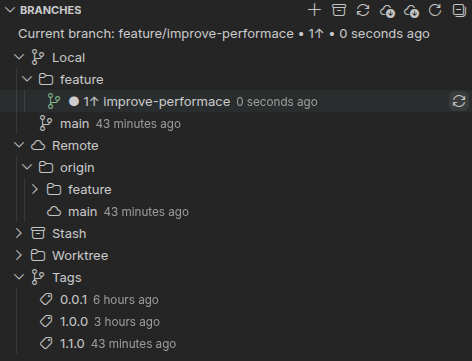
The panel keeps the active branch visible at the top, groups slash-separated
branch names into folders, and separates Local, Remote, Stash, Worktree, Hooks, and Tags into their own
sections so common Git navigation feels fast and tidy. In multi-repository workspaces, the extension can
group those sections under repository containers or focus on one active repository at a time. The Local
section opens first, while Remote, Stash, Worktree, Hooks, and Tags stay collapsed until you expand them.
Features
- 🌿 Folder grouping — branches like
feature/auth or feature/payments/stripe are nested into folders automatically
- 🗂️ Multi-repository aware — automatically switches between a flat single-repo tree and repository containers when multiple Git repositories are open in the workspace
- 🎯 Active repository focus — keep one repository active for toolbar actions and current-branch context, or switch directly to the repository that owns the active editor
- 🏢 Repository-row quick actions — when repositories are grouped, each repository row now exposes repo-specific inline actions such as New Branch, Sync / Publish Current Branch, Fetch All (Prune), and a repo-scoped More Actions picker
- 🧭 Grouped multi-repo toolbar actions — when repository containers are visible, the top toolbar switches from active-repository-only branch/fetch shortcuts to workspace-wide actions like syncing, pulling, and fetching across all shown repositories, and More Actions there is now all-repositories only
- 🔎 Find Ref... — search branches, tags, stashes, worktrees, and optionally hooks with query prefixes like
remote: or state:stale
- 🎚️ Tree filtering — filter the visible tree by query text, pinned-only mode, or a Needs Attention preset without losing the surrounding repository or folder context
- 🕘 Ref history quick picks — browse branch and tag commits with actions to open changed files, inspect commit details, or copy commit SHAs
- 🆚 Richer compare workflows — compare a branch with its upstream, compare any two refs, or open changed files for the latest commit on a selected ref
- 🌐 Remote-host actions — open a branch on its remote, open a browser compare page, create a pull request, or copy hosted branch/compare URLs without leaving VS Code
- 🧭 Local and remote sections — local branches are shown first, with remote branches listed in a separate group below them
- 🔗 Remotes section — configured remotes appear in their own section with fetch, rename, URL, homepage, and remove actions that focus on remote configuration rather than remote-tracking branches
- 🧩 Per-section visibility — show or hide Local, Remote, Remotes, Stash, Worktree, Hooks, and Tags independently from settings; the dedicated Remotes section now starts hidden by default
- 🧺 Stash section — stashes are shown between remote branches and tags so parked work stays close at hand
- 🪵 Worktree section — worktrees are shown under stashes so additional checkouts are easy to find and maintain, including prune, lock, unlock, ref-copy, and terminal actions
- 🪝 Hooks section — appears only when the repository has configured Git hooks, showing local
.git/hooks scripts and any shared hooks from core.hooksPath with active/disabled state
- 🏷️ Release-friendly tag workflows — create lightweight, annotated, or signed annotated tags; optionally push the new tag immediately; push a single tag later; delete a remote tag; compare a tag with the current branch; inspect tag metadata; and copy the peeled target SHA
- 📁 Folders first — folders are listed before branch leaves inside each section
- ⚡ Faster first paint — the tree loads Local branches first so the view opens quickly in larger repositories
- 📦 Lazy-loaded sections — Remote, Stash, Worktree, and Tags are loaded only when you expand them
- 🧭 Focused default expansion — Local starts expanded while other sections and nested folders start collapsed
- ✅ Current branch first — highlighted with a
▶ prefix and a green icon
- 🪄 Optional current branch banner — keep or hide the top
Current branch: ... summary from settings, now off by default for a quieter tree
- 🧭 Customizable branch right-click menu — reorder or hide the primary branch actions from settings while More Branch Actions... always stays available as the full fallback picker and now includes the advanced rebase/reset/squash/force-push flows directly
- 🎛️ Configurable toolbar quick actions — reorder or hide per-mode toolbar buttons with
toolbar.singleRepository.quickActions and toolbar.multiRepository.quickActions, while the older toolbar.show* booleans remain as compatibility fallbacks
- 🧺 Changes-view stash buttons — surface stash shortcuts in the built-in Changes view title bar, with Stash all changes silently enabled there by default
- 🖱️ Section hover quick actions — hover Local, Remote, Stash, Worktree, and Tags groups to reveal section-specific inline buttons for high-frequency actions
- 🧹 Quiet branch-name sanitization — new branch names are cleaned up automatically to stay Git-valid, with optional lowercase kebab-case normalization that also strips extra special characters while preserving
- and /
- 🕐 Last commit time — shown as a relative description when sync counts are not using that space, and always available in the tooltip
- 🔄 Color-coded sync icons and counts — tracked local branches use blue/green sync icons plus right-side counts like
↓2, ↑1, or ↓2 ↑1 so divergence stays readable without crowding the branch label
- ☁️ Inline sync button — every branch gets a small sync button, including branches that are not currently checked out
- 🌀 Inline sync animation — branch sync and publish actions swap to a spinning inline indicator while Git is working
- 🏷️ Inline action buttons — checkout, create new branch from selected and checkout, pin/unpin, and delete appear inline alongside sync/publish for quick access
- 🚀 Non-current branch sync — sync a branch with its upstream without checking it out first
- ☁️ Publish actions — publish local branches without an upstream, including the current branch and descendant folder actions
- 🧭 Classified remote-branch delete recovery — remote deletion failures now distinguish local hook blocks, stale tracking refs, and remote-side rejections instead of offering a generic retry
- 🧹 Stale remote-tracking cleanup — branches whose remote was removed are marked as stale, skip destructive remote-delete actions, and can be cleaned up locally in one click
- ⚠️ Missing upstream detection — local branches whose tracked upstream no longer exists are shown with a warning color and the publish action instead of sync
- 📌 Pin starred items to the top — pin local or remote branches, stashes, and worktrees so they stay easy to reach
- 🪵 Create worktrees from refs — create a linked worktree directly from a branch or a detached worktree from a tag without checking that ref out first
- 🍒 Cherry-pick into current — cherry-pick a selected branch into the checked out branch from the context menu
- 🧪 Advanced branch operations — safely rebase the current branch onto a selected ref, rebase a non-current local branch through a temporary worktree, squash-merge into the current branch, reset the current branch to a selected ref, and force-push with lease after explicit confirmation
- 🛡️ Protected branch safeguards — block delete actions for configured branch names such as
main, master, and develop
- 🧭 Branch prefix picker — optionally prefill new branch names from common folders like
feature/, bugfix/, or hotfix/
- 🆚 Compare with current branch — compare a local or remote branch against the currently checked out branch from the context menu
- 📦 Stash actions — apply, pop, drop, or pop the latest stash from the Stash section context menu, plus stash all or staged changes from the Branches toolbar or built-in Changes view title bar
- 🪝 Hook actions — enable/disable and edit configured Git hook scripts directly from the Hooks section hover buttons or context menu
- 🏷️ Tag hover quick actions — checkout and delete a tag directly from the tag row hover buttons
- 📦 Stash hover quick actions — pop, apply, or drop a stash directly from the stash row hover buttons
- 🪝 Hook hover quick actions — enable/disable a hook and open it in the editor directly from the hook row
- 🪟 Worktree actions — open, rename, reveal, copy, or remove linked worktrees from the context menu, with open/open-in-new-window buttons now available directly on worktree item hover
- ⚡ Double-click checkout — double-click a branch to switch instantly
- 🔀 Merge into current — merge a selected branch into the current branch from the context menu
- 🧰 Context menu actions — checkout, sync, publish, create tags, rename, merge into current, cherry-pick, compare with current, copy branch name, delete/cleanup, and open a codicon-based branch actions picker, all with settings-driven branch-menu ordering and visibility
- 🧷 Section context menu parity — the new Local, Stash, Worktree, Hooks, and Tags section hover actions are also available from those section context menus where that improves discoverability
- ➕ Toolbar quick actions — create a new branch, sync or publish the current branch, fetch all remotes, fetch all with prune, refresh, open advanced actions, and open extension settings from the panel title bar, with the stash shortcut moved out of the Branches toolbar by default
- 🔄 Targeted auto-refresh — updates loaded sections when
.git/HEAD, .git/FETCH_HEAD, .git/config, .git/packed-refs, .git/refs/heads/, .git/refs/remotes/, .git/refs/tags/, .git/refs/stash, .git/logs/refs/stash, .git/hooks/, .git/worktrees/, workspace folders, or settings change
Commands
| Command |
Description |
| Refresh |
Refresh the loaded branch sections and remote sync state |
| Find Ref... |
Search branches, tags, stashes, worktrees, and optionally hooks across the workspace and run quick actions on the selected result |
| Set Filter... |
Filter the visible tree by query text, scope prefix, or state: flags |
| Clear Filter |
Clear the current tree filter and restore the full visible tree |
| Toggle Show Only Pinned |
Toggle a pinned-only tree filter without losing the current query |
| Show Needs Attention |
Filter the visible tree down to stale remote refs, missing-upstream branches, and publishable branches |
| Select Active Repository |
Choose which repository drives the current-branch banner and toolbar actions in singleActiveRepository mode or from the Command Palette |
| Focus Repository from Active Editor |
Switch the active repository to the one that owns the current editor file |
| Add Remote... |
Add a new remote to the active repository, optionally with a separate push URL |
| Fetch Remote |
Fetch a specific configured remote |
| Fetch Remote (Prune) |
Fetch a specific configured remote and prune deleted remote-tracking refs |
| Copy Fetch URL |
Copy a remote's fetch URL |
| Copy Push URL |
Copy a remote's push URL |
| Open Remote Homepage |
Open the hosted repository page for a configured remote |
| Rename Remote... |
Rename a configured remote |
| Set Fetch URL... |
Change the fetch URL for a configured remote |
| Set Push URL... |
Change the push URL for a configured remote |
| Remove Remote |
Remove a configured remote from the repository |
| Compare with Upstream |
Compare a tracked local branch with its configured upstream branch |
| Compare Two Refs... |
Pick any two branches, remote branches, tags, or stashes from the active repository and open a file comparison |
| Show Branch Commits |
Browse commit history for a selected branch or remote branch and open commit-level actions |
| Show Ref History |
Browse commit history for a selected branch, remote branch, or tag |
| Open Changed Files for Ref |
Open the latest commit's changed files for a selected branch, remote branch, or tag |
| Open Branch on Remote |
Open the selected branch or remote branch on its hosting provider in the browser |
| Open Compare Page |
Open the selected branch on its hosting provider's compare page using the configured base-branch strategy |
| Create Pull Request |
Open a pull request / merge request creation page for the selected branch on its hosting provider |
| Copy Branch URL |
Copy the hosted browser URL for the selected branch |
| Copy Compare URL |
Copy the hosted compare URL for the selected branch and its resolved base branch |
| Open Extension Settings |
Open the extension's settings filtered in the Settings editor |
| Stash all changes silently |
Stash all tracked and untracked files without prompting for a stash name |
| Stash staged changes silently |
Stash only staged changes without prompting for a stash name |
| Stash all changes |
Prompt for an optional stash name, then stash tracked and untracked files |
| Stash staged changes |
Prompt for an optional stash name, then stash only staged changes |
| Sync All Branches |
Sync every tracked local branch in the repository and report any branches that still need publishing |
| Pull All Branch Changes |
Pull changes for every tracked local branch in the repository without pushing outgoing commits |
| Fetch All |
Fetch all remotes and refresh the tree without pruning stale refs |
| Fetch All (Prune) |
Fetch all remotes, prune deleted refs, and refresh the tree |
| Fetch All Repositories |
Fetch every shown repository when grouped multi-repository mode is active |
| Fetch All Repositories (Prune) |
Fetch and prune every shown repository when grouped multi-repository mode is active |
| Sync Current Branch |
Sync the currently checked out branch with its upstream |
| Sync All Repositories Branches |
Sync tracked local branches across every shown repository when grouped multi-repository mode is active |
| Pull All Repositories Changes |
Pull tracked local branches across every shown repository when grouped multi-repository mode is active |
| Publish Current Branch |
Publish the currently checked out branch to its remote |
| Checkout Branch |
Switch to the selected local or remote branch |
| Checkout Tag |
Check out the selected tag in detached HEAD state |
| Sync Branch |
Pull and/or push the branch with its remote, even when it is not checked out |
| Publish Branch |
Publish the selected local branch to its remote |
| More Branch Actions... |
Open a Quick Pick with iconized branch actions |
| Create Worktree... |
Create a linked worktree from a selected branch or a detached worktree from a selected tag |
| Rename Branch |
Rename the selected branch |
| Create Tag |
Run a guided tag flow that chooses the target ref, tag type, name, annotation message, and optional push target |
| Push Tag |
Push the selected local tag to a chosen remote |
| Delete Remote Tag |
Delete the selected tag from a chosen remote after confirmation |
| Compare Tag with Current Branch |
Open a multi-file comparison between the selected tag and the currently checked out branch |
| Show Tag Details |
Open a markdown summary with the tag type, target SHA, author, and message metadata |
| Copy Tag Target SHA |
Copy the peeled target SHA for the selected tag |
| Cherry-pick into Current Branch |
Cherry-pick the selected branch into the currently checked out branch |
| Compare with Current Branch |
Open a multi-file comparison between the selected branch and the checked out branch |
| Advanced Branch Operations... |
Open the standalone advanced branch operation picker from the Command Palette when you want those actions outside the normal branch menu flow |
| Rebase Current onto Selected |
Rebase the checked out branch onto the selected branch, remote branch, or tag |
| Rebase Selected onto Current |
Rebase a selected non-current local branch onto the current branch in a temporary worktree |
| Squash Merge into Current |
Stage a squash merge of the selected ref into the current branch without creating a commit |
| Reset Current to Selected... |
Reset the checked out branch to the selected ref using soft, mixed, or hard mode |
| Force Push with Lease |
Push a rewritten local branch to its tracked upstream while protecting against remote races |
| Remove Stale Tracking Ref |
Delete a stale local refs/remotes/<remote>/... entry without contacting any remote |
| Apply Stash |
Apply the selected stash without removing it |
| Apply Latest Stash |
Apply the newest stash directly from the Stash section hover/context actions |
| Pop Stash |
Apply the selected stash and remove it if successful |
| Pop Latest Stash |
Pop the latest stash directly from the Stash section context menu |
| Drop Stash |
Delete the selected stash |
| Drop All Stashes |
Delete every stash entry from the Stash section |
| Edit Hook |
Open the selected hook script in the editor |
| Enable Hook |
Re-enable a disabled hook script |
| Disable Hook |
Disable the selected hook script |
| Enable All Hooks |
Re-enable every disabled hook shown in the Hooks section |
| Disable All Hooks |
Disable every enabled hook shown in the Hooks section |
| Open Worktree |
Open the selected worktree in the current window |
| Create New Worktree... |
Create a new worktree from the currently checked out branch directly from the Worktree section |
| Prune Worktrees... |
Remove stale worktree metadata for missing or broken linked worktrees |
| Open Worktree in New Window |
Open the selected worktree in a new window |
| Open Worktree in Terminal |
Open a terminal rooted at the selected worktree path |
| Rename Worktree... |
Rename a selected linked worktree by moving it to a new path |
| Reveal Worktree in File Explorer |
Reveal the selected worktree in the OS file browser |
| Copy Worktree Path |
Copy the selected worktree path to the clipboard |
| Copy Worktree Ref |
Copy the selected worktree's branch or detached reference |
| Lock Worktree... |
Lock a linked worktree to protect it from prune/remove flows, optionally with a reason |
| Unlock Worktree |
Unlock a previously locked linked worktree |
| Pin / Unpin Item |
Toggle pinning for branches, stashes, and worktrees so pinned items stay at the top |
| Remove Worktree |
Remove the selected linked worktree |
| Push All Tags |
Push all local tags to a selected remote from the Tags section context menu |
| Push Descendant Branches |
Push tracked descendant branches and publish unpublished ones from a local folder |
| Sync Descendant Tracked Branches |
Sync only descendant branches that already track a live upstream |
| Prune Local Branches with Missing Upstream |
Delete local non-current branches whose tracked upstream no longer exists |
| Clean Repository |
Remove untracked and ignored files via git clean -fdx after confirmation |
| Merge into Current Branch |
Merge the selected branch into the current branch |
| Copy Branch Name |
Copy the branch name to the clipboard |
| Copy Tag Name |
Copy the selected tag name to the clipboard |
| Delete Branch |
Delete the selected branch with merge safety checks and context-aware remote-delete recovery |
| Delete Tag |
Delete the selected local tag |
Changes view stash placement
- The built-in Changes view stash buttons are contributed through the stable
scm/title menu API.
- VS Code's stable API does not let extensions place custom buttons directly inside the built-in Commit button row, so the Changes view title bar is the closest supported placement.
- By default, only Stash all changes silently is enabled there; the staged and message-prompting variants stay off until you enable them in settings.
Section hover actions
- Local — New Branch, Sync All Branches, Pull All Branch Changes
- Remote — Fetch All, Fetch All (Prune)
- Stash — Pop Latest Stash, Apply Latest Stash
- Worktree — Create New Worktree... (from the current branch), Prune Worktrees...
- Hooks — Enable All Hooks appears when at least one hook is disabled, and Disable All Hooks appears when at least one hook is enabled
- Tags — Create Tag... (on the current branch), Push All Tags
For the Tags and Worktree section shortcuts, the extension uses the currently checked out branch as the source ref when you trigger the action from the section itself.
Worktree item hover actions
- Hover a specific worktree item to reveal Open Worktree, Open Worktree in New Window, and—when the worktree is in a removable state—Remove Worktree.
- Right-click a linked worktree item to Rename Worktree..., Open Worktree in Terminal, Copy Worktree Ref, Lock Worktree..., Unlock Worktree, or Prune Worktrees... depending on whether that worktree is detached, locked, or prunable.
- Locked and prunable worktrees hide destructive rename/remove actions until you unlock them or prune stale metadata first.
Tag and stash item hover actions
- Hover a specific tag item to reveal Checkout Tag, Push Tag, and Delete Tag.
- Hover a specific stash item to reveal Pop Stash, Apply Stash, and Drop Stash.
Hook item actions
- Hover a specific hook item to reveal Enable Hook or Disable Hook, plus Edit Hook.
- Double-click a hook item to open Edit Hook directly.
- Right-click a hook item to use the same actions from the context menu.
- The Hooks section appears only when the current repository has configured local or shared hooks.
- Shared hooks are read from the repository's configured
core.hooksPath; if that path lives outside .git/hooks, use Refresh after editing those files elsewhere.
Remote delete behavior
- Live remote branches still use
git push <remote> --delete <branch>.
- If a local
pre-push hook blocks deletion, the extension offers Retry Without Hook… and only asks for a modal confirmation before bypassing local hooks with --no-verify.
- If a remote-tracking branch belongs to a remote that no longer exists locally, it is shown as a stale remote-tracking ref and the extension offers Remove Stale Tracking Ref instead of pretending a remote delete can work.
- If the remote/server rejects deletion, the extension shows details and Git output actions without offering a misleading force-delete path.
Settings
| Setting |
Default |
Description |
gitBranchesPanel.groupByFolder |
true |
Group branches by /-separated prefix |
gitBranchesPanel.normalizeNewBranchNames |
false |
Apply extra lowercase kebab-case normalization after branch creation first sanitizes the entered text into a valid Git branch name, stripping special characters other than - while preserving / folder separators |
gitBranchesPanel.newBranchPrefixes |
["feature", "bugfix", "hotfix"] |
Optional prefixes to offer before the new-branch input opens; use an empty array to disable the picker |
gitBranchesPanel.protectedBranchNames |
["main", "master", "develop"] |
Branch names to protect from delete actions; remote branches also honor the short branch name, so main protects origin/main |
gitBranchesPanel.branchContextMenu.primaryActions |
["syncOrPublish", "checkout", "newBranchFromSelected", "newBranchFromSelectedAndCheckout", "createWorktree", "renameBranch", "createTag", "copyBranchName", "compareWithCurrent", "mergeIntoCurrent", "cherryPickIntoCurrent", "deleteOrCleanup"] |
Ordered list of primary branch right-click actions; remove ids to hide them, while More Branch Actions... remains the full fallback picker with the advanced branch commands included there by default |
gitBranchesPanel.branchContextMenu.showRebaseCurrentOntoSelected |
false |
Show Rebase Current onto Selected directly in the first-level branch context menu |
gitBranchesPanel.branchContextMenu.showRebaseSelectedOntoCurrent |
false |
Show Rebase Selected onto Current directly in the first-level branch context menu for local non-current branches |
gitBranchesPanel.branchContextMenu.showSquashMergeIntoCurrent |
false |
Show Squash Merge into Current directly in the first-level branch context menu |
gitBranchesPanel.branchContextMenu.showResetCurrentToSelected |
false |
Show Reset Current to Selected... directly in the first-level branch context menu |
gitBranchesPanel.branchContextMenu.showForcePushWithLease |
false |
Show Force Push with Lease directly in the first-level branch context menu for tracked local branches |
gitBranchesPanel.sortOrder |
alphabetical |
alphabetical or recent |
gitBranchesPanel.tagSortOrder |
versionDescending |
versionDescending, versionAscending, alphabetical, or recent; version-aware sorting recognizes semver-like suffixes such as v1.2.3 or release/v1.2.3 and keeps non-version tags after version tags |
gitBranchesPanel.multiRepository.mode |
auto |
Show repository containers only when needed (auto), always group sections under repositories (alwaysGroupByRepository), or show only the active repository (singleActiveRepository) |
gitBranchesPanel.multiRepository.followActiveEditor |
false |
Keep the active repository aligned with the Git repository that owns the active editor when multi-repository support is in use |
gitBranchesPanel.sections.local.visible |
true |
Show the Local section in the tree |
gitBranchesPanel.sections.remote.visible |
true |
Show the Remote section with remote-tracking branches |
gitBranchesPanel.sections.remotes.visible |
false |
Show the dedicated Remotes section with per-remote fetch, URL, rename, and remove actions |
gitBranchesPanel.sections.stash.visible |
true |
Show the Stash section in the tree |
gitBranchesPanel.sections.worktree.visible |
true |
Show the Worktree section in the tree |
gitBranchesPanel.sections.hooks.visible |
true |
Show the Hooks section when the repository has configured hooks |
gitBranchesPanel.sections.tags.visible |
true |
Show the Tags section in the tree |
gitBranchesPanel.showRemotesSection |
false |
Deprecated compatibility alias for gitBranchesPanel.sections.remotes.visible |
gitBranchesPanel.tags.defaultType |
annotated |
Default tag type to preselect in the guided Create Tag flow (lightweight, annotated, or signedAnnotated) |
gitBranchesPanel.tags.pushAfterCreate |
false |
After creating a tag, immediately prompt for a remote and push that specific tag |
gitBranchesPanel.tags.requireMessageForAnnotated |
true |
Require a non-empty annotation message for annotated and signed annotated tags |
gitBranchesPanel.search.includeHooks |
false |
Include Git hook items in Find Ref... results |
gitBranchesPanel.search.maxResults |
200 |
Maximum number of Find Ref... results to show after ranking matches |
gitBranchesPanel.search.autoLoadAllSections |
true |
Load collapsed sections before running Find Ref... or applying a tree filter so results include refs outside the currently expanded sections |
gitBranchesPanel.remoteHosting.preferredRemote |
"" |
Prefer this remote when building hosted branch, compare, and pull-request URLs for local branches that do not already imply a remote |
gitBranchesPanel.remoteHosting.compareBase |
defaultBranch |
Resolve compare and pull-request base branches from the remote default branch, the selected branch's configured upstream branch, or the current local branch |
gitBranchesPanel.remoteHosting.customProviders |
[] |
Optional custom host matchers and URL templates with placeholders like ${hostRoot}, ${namespace}, ${repo}, ${branch}, ${base}, ${organization}, ${project}, and ${remoteName} |
gitBranchesPanel.history.maxCommits |
50 |
Maximum number of commits to load when showing branch or ref history in a quick pick |
gitBranchesPanel.history.includeMerges |
true |
Include merge commits in branch and ref history quick picks |
gitBranchesPanel.advanced.enableForcePushWithLease |
true |
Show Force Push with Lease inside advanced branch operation pickers and menus |
gitBranchesPanel.advanced.defaultResetMode |
mixed |
Default reset mode to preselect when resetting the current branch to another ref |
gitBranchesPanel.advanced.allowNonCurrentBranchRebase |
true |
Allow rebasing a selected non-current local branch onto the current branch through a temporary worktree |
gitBranchesPanel.advanced.rebaseAutostash |
true |
Prefer --autostash when rebasing the current branch and the working tree is dirty |
gitBranchesPanel.showCurrentBranchInfo |
false |
Show the current branch summary above the tree views |
gitBranchesPanel.toolbar.singleRepository.quickActions |
["findRef", "pullAllLocalBranches", "fetchAllPrune", "refresh", "advancedActions", "settings"] |
Ordered list of view-toolbar quick actions when only one repository is open; remove ids to hide buttons and reorder the array to change their position |
gitBranchesPanel.toolbar.multiRepository.quickActions |
["findRef", "currentBranchAction", "pullAllRepositoriesChanges", "fetchAllPrune", "refresh", "advancedActions", "settings"] |
Ordered list of view-toolbar quick actions when multiple repositories are open; adaptive ids such as currentBranchAction, pullAllRepositoriesChanges, fetchAll, fetchAllPrune, and advancedActions automatically switch between active-repository and grouped all-repositories behavior |
gitBranchesPanel.showStatusBarBranchAction |
true |
Deprecated. This setting no longer has any effect because the extension no longer contributes a status bar branch action |
gitBranchesPanel.toolbar.showNewBranch |
true |
Compatibility fallback for the New Branch toolbar slot when the new ordered quick-action arrays are not explicitly configured |
gitBranchesPanel.toolbar.showStashSilently |
false |
Compatibility fallback for the Stash all changes silently toolbar slot when the new ordered quick-action arrays are not explicitly configured |
gitBranchesPanel.changesView.showStashAllChangesSilently |
true |
Show Stash all changes silently in the built-in Changes view title bar |
gitBranchesPanel.changesView.showStashStagedChangesSilently |
false |
Show Stash staged changes silently in the built-in Changes view title bar |
gitBranchesPanel.changesView.showStashAllChanges |
false |
Show Stash all changes in the built-in Changes view title bar |
gitBranchesPanel.changesView.showStashStagedChanges |
false |
Show Stash staged changes in the built-in Changes view title bar |
gitBranchesPanel.toolbar.showCurrentBranchAction |
true |
Compatibility fallback for the adaptive Sync / Publish Current Branch toolbar slot; in grouped multi-repository mode it becomes Sync All Repositories Branches |
gitBranchesPanel.toolbar.showFetchAll |
true |
Compatibility fallback for the adaptive Fetch All toolbar slot; in grouped multi-repository mode it becomes Fetch All Repositories |
gitBranchesPanel.toolbar.showFetchAllPrune |
true |
Compatibility fallback for the adaptive Fetch All (Prune) toolbar slot; in grouped multi-repository mode it becomes Fetch All Repositories (Prune) |
gitBranchesPanel.toolbar.showPullAllRepositoriesChanges |
true |
Compatibility fallback for the adaptive pull toolbar slot; in active-repository multi-repo mode it behaves like Pull All Branch Changes, and in grouped mode it becomes Pull All Repositories Changes |
gitBranchesPanel.toolbar.showRefresh |
true |
Compatibility fallback for the Refresh toolbar slot when the new ordered quick-action arrays are not explicitly configured |
gitBranchesPanel.toolbar.showAdvancedActions |
true |
Compatibility fallback for the adaptive More Actions toolbar slot; in grouped multi-repository mode it opens the all-repositories picker |
gitBranchesPanel.toolbar.showSettings |
true |
Compatibility fallback for the Open Extension Settings toolbar slot when the new ordered quick-action arrays are not explicitly configured |
Useful configuration ideas already supported
- New branch creation always performs minimal cleanup to keep names Git-valid, for example
feature/hello world?? becomes feature/hello-world
- If the entered text sanitizes down to nothing useful, the prompt asks for a better name instead of silently creating a generic fallback branch
- Turn on
gitBranchesPanel.normalizeNewBranchNames if you also want extra cleanup like lowercasing, special-character stripping, and duplicate-dash collapsing, so - Feature / Hello--- World!_@ - becomes feature/hello-world
- Keep
gitBranchesPanel.newBranchPrefixes set to feature, bugfix, and hotfix for a lightweight branch-folder picker, or clear it entirely if you prefer typing everything yourself
- Extend
gitBranchesPanel.protectedBranchNames with long-lived release or environment branches to add an extra UI safety net before delete commands run
- Leave
gitBranchesPanel.showCurrentBranchInfo disabled if you prefer a leaner tree, or turn it back on if you want the current branch banner above the sections again
- Use
gitBranchesPanel.toolbar.singleRepository.quickActions and gitBranchesPanel.toolbar.multiRepository.quickActions to reorder the title-bar buttons per mode instead of only hiding them one by one
- In multi-repository mode, ids such as
currentBranchAction, pullAllRepositoriesChanges, fetchAll, fetchAllPrune, and advancedActions adapt automatically between active-repository and grouped all-repositories behavior, so one array can still cover both layouts cleanly
- Trim
gitBranchesPanel.branchContextMenu.primaryActions down to a smaller ordered list if you want a shorter right-click menu, knowing More Branch Actions... still keeps every supported branch action one click away
- Turn on any of the
gitBranchesPanel.branchContextMenu.show* advanced-action toggles if you want rebase, squash-merge, reset, or force-push-with-lease entries visible directly in the first-level branch context menu again
- Keep
gitBranchesPanel.tagSortOrder on versionDescending for release-style tags, or switch to recent or alphabetical if your repository uses non-version tag names more heavily
- Leave
gitBranchesPanel.multiRepository.mode on auto to keep the familiar flat layout for single-repo workspaces while automatically adding repository containers in polyrepo workspaces
- Switch
gitBranchesPanel.multiRepository.mode to singleActiveRepository if you prefer focusing on one repository at a time while using Select Active Repository or Focus Repository from Active Editor to move around; grouped mode now prefers row-specific actions plus all-repositories toolbar actions instead of an explicit select button
- Enable
gitBranchesPanel.multiRepository.followActiveEditor if you want the current-branch banner and toolbar actions to follow the repository that owns the file you are editing
- In grouped multi-repository mode, use repository-row hover buttons for repo-specific actions like New Branch, Sync / Publish Current Branch, and Fetch All (Prune), while the top toolbar switches to all-repositories actions
- Hide any section you rarely use through
gitBranchesPanel.sections.*.visible; the dedicated Remotes section now starts off by default so the tree can stay leaner unless you actively manage remotes
- Leave
gitBranchesPanel.sections.remotes.visible enabled if you want a visible place to fetch, rename, or remove remotes, or keep it hidden if you prefer accessing remote management from commands and the advanced-actions picker only
- Set
gitBranchesPanel.tags.defaultType = signedAnnotated if your release process signs tags by default, or leave it on annotated for a safer out-of-the-box flow that does not require signing keys
- Turn on
gitBranchesPanel.tags.pushAfterCreate if you usually publish release tags immediately after creating them
- Use Show Tag Details and Copy Tag Target SHA when you need to verify exactly what a release tag points to without dropping to the terminal
- Use More Branch Actions... on a selected branch to access the advanced rebase, reset, squash-merge, and force-push flows without a second nested picker, or turn on the dedicated
branchContextMenu.show* settings if you want those commands back in the first-level right-click menu
- Leave
gitBranchesPanel.advanced.rebaseAutostash enabled unless you explicitly prefer cancelling rebases whenever the current branch has local changes
- Disable
gitBranchesPanel.advanced.allowNonCurrentBranchRebase if you want to keep all rebases scoped to the checked-out branch only
- Use Find Ref... with prefixes like
remote:, tag:, stash:, or state:stale when repositories get large and you want a faster path than scrolling the tree
- Keep
gitBranchesPanel.search.autoLoadAllSections enabled if you want search and filtering to include collapsed sections, or turn it off if you prefer faster commands over broader result coverage
- Turn on
gitBranchesPanel.search.includeHooks if you want hook scripts to show up in Find Ref... results alongside regular Git refs
- Set
gitBranchesPanel.remoteHosting.preferredRemote if your branches commonly live on a fork or non-origin remote and you want hosted URLs to default there instead of prompting
- Leave
gitBranchesPanel.remoteHosting.compareBase = defaultBranch for PR-style compare pages, or switch to currentBranch / upstream if your workflow prefers browser comparisons against a checked-out or tracked branch
- Use
gitBranchesPanel.remoteHosting.customProviders to support self-hosted forge URLs with templates like ${hostRoot}/${namespace}/${repo}/compare/${base}...${branch}
- Use the Remotes section to keep fetch/push URLs visible and copyable without opening
.git/config or dropping to a terminal
- Use Compare with Upstream when you want to review a tracked branch's divergence at the file level instead of only relying on the tree's sync icons and counts
- Lower
gitBranchesPanel.history.maxCommits if you want faster commit pickers in very large repositories, or keep it higher if you often browse longer-lived release branches
- Turn off
gitBranchesPanel.history.includeMerges if you prefer commit pickers that focus on linear feature work instead of merge commits
- Leave
gitBranchesPanel.toolbar.showStashSilently off and use the built-in Changes view button by default, or turn the Branches-view stash button back on if you prefer the old placement
- Keep the legacy
gitBranchesPanel.toolbar.show* booleans only as simple compatibility toggles if you have not explicitly set the new ordered toolbar arrays yet
- Enable any of the additional
gitBranchesPanel.changesView.showStash* settings if you want staged-only stash buttons or stash commands that prompt for an optional message
- Hide any toolbar quick action you never use to keep the title bar compact
- Combine
sortOrder = recent with folder grouping for large feature-branch heavy repositories
Development
Requirements
- Node.js 18+ for local development
- Node.js 22+ recommended for creating
.vsix packages
- Visual Studio Code 1.85+
Run locally
From the repository root:
npm install
npm run test:git-branches-panel
code .
Then press F5 in VS Code to launch the Extension Development Host using the shared workspace launch configuration.
You can also run npm run compile, npm run lint, or npm run test from this folder; those scripts delegate to the repository root tooling.
Create a .vsix file
Quickest option from the repository root:
npm run package:git-branches-panel
The package scripts automatically download the pinned @vscode/vsce version used by this repo, so you do not need a separate global vsce installation.
Or from this extension folder directly:
npm run package
The generated file is written to this folder as git-branches-panel-<version>.vsix and can then be uploaded to the Visual Studio Marketplace.
Contributing
Contributions are welcome. See the repository-level CONTRIBUTING.md for development workflow and quality checks.
Support
For bug reports, feature requests, and usage questions, see SUPPORT.md.
License
This project is licensed under the MIT License. See LICENSE.
| |

