Zeigt PLC-Variablenwerte aus TcStarep.log beim Hovern in TeachTalk-Quelldateien (.tts, .ttd, .ttp) und markiert die aktuelle Ausfuehrungsposition im Quellcode.
Features
Beim Hovern ueber einen Variablennamen werden alle zugehoerigen Werte aus dem Starep-Log angezeigt — gruppiert nach Instanz mit aufklappbaren Member-Variablen.
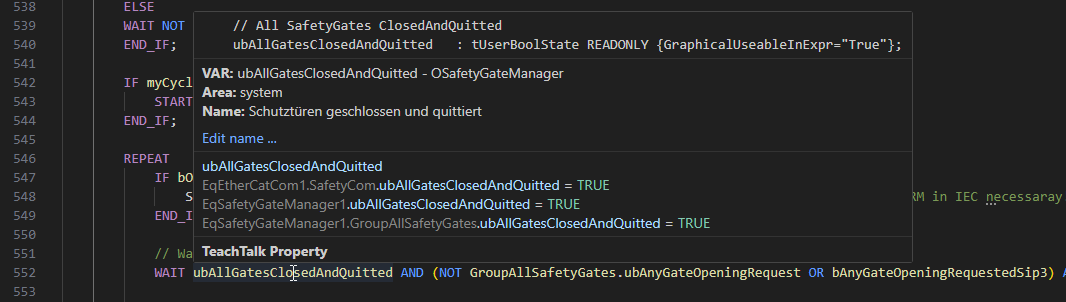
- Werte werden als kompakte Tabelle dargestellt
- Objekt-Member sind per Klick auf-/zuklappbar (Fold/Unfold)
- Sub-Objekte, Arrays und
.do-Items werden unterstuetzt
- Pointer-Eintraege optional anzeigbar
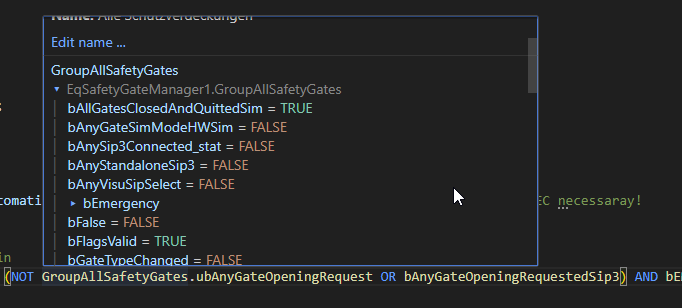
Objekt-Member Hover
Beim Hovern ueber einen Objektnamen werden alle Member-Variablen im Debug-Style angezeigt:
Execution Highlighting
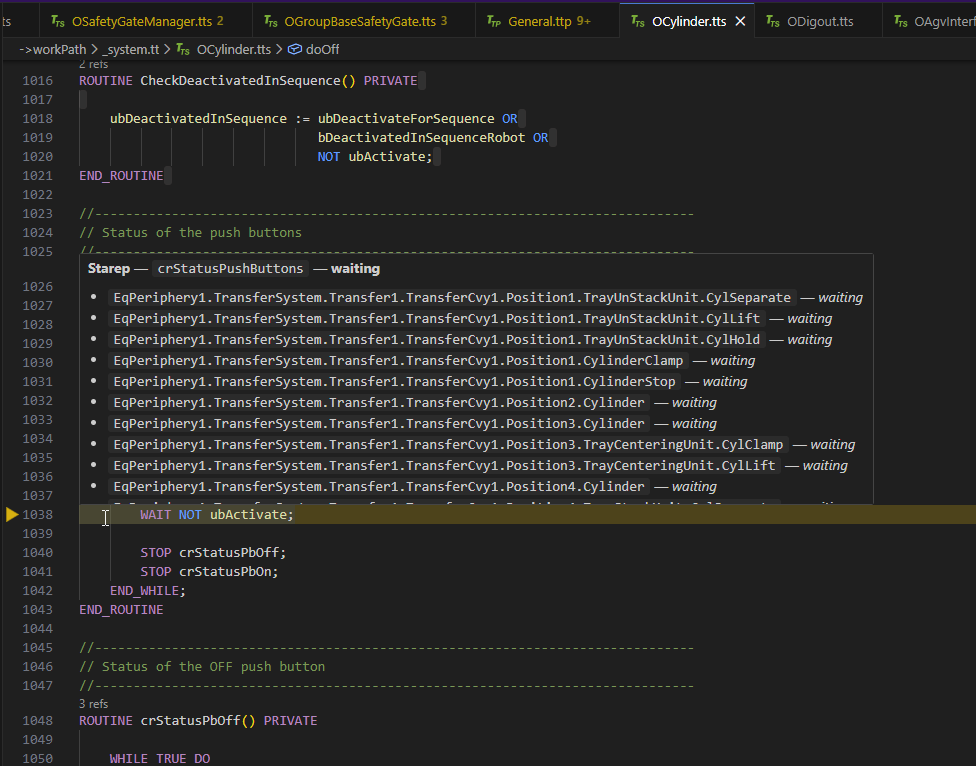
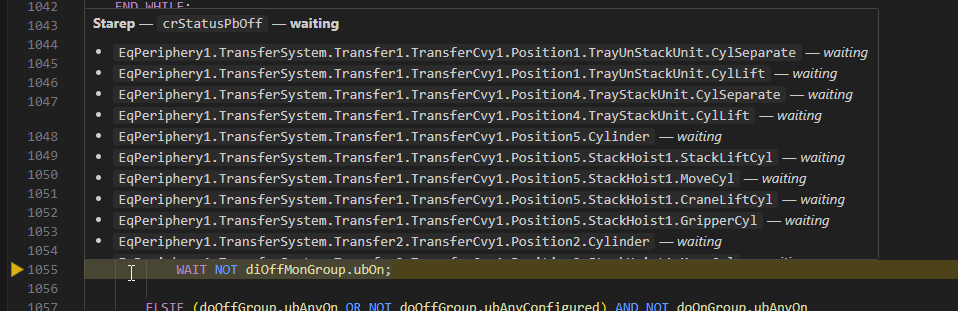
Die Extension markiert Zeilen, an denen der Ablauf zum Zeitpunkt des Starep stand:
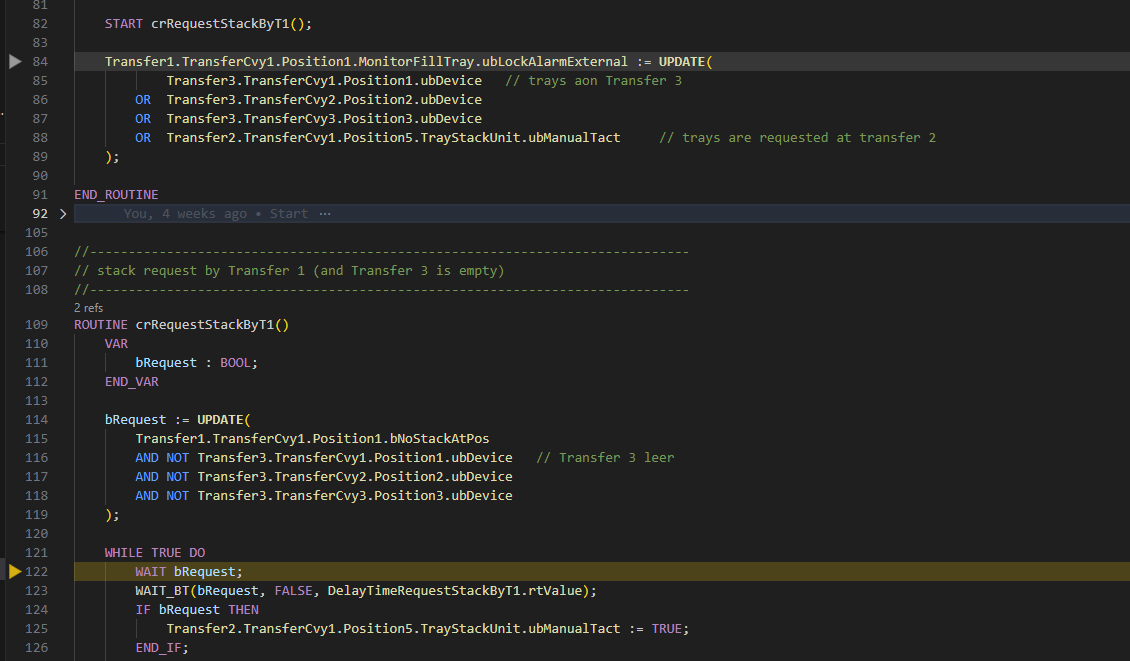
| Farbe |
Bedeutung |
| Gelb (Pfeil + Zeile) |
running oder waiting — Routine war aktiv |
| Grau (Pfeil + Zeile) |
returned — Routine war bereits beendet |
Der Hover auf einer markierten Zeile zeigt alle betroffenen Instanzen:
Intelligente Instanz-Zuordnung
Die Extension loest Instanzpfade aus dem Execution Tree exakt auf:
_global.EqPeriphery1.TransferSystem.Transfer1.TransferCvy1.Position5.NEW
   │          │              │           │            │          │      │
   │          │              │           │            │          │      └─ Routine
   │          │              │           │            │          └─ OCvyPosSysOutPeri1Cyl1Lb
   │          │              │           │            └─ OTransfer1CvyA
   │          │              │           └─ OTransfer1
   │          │              └─ OTransferSystem
   │          └─ OPeriphery1
   └─ Root
- Pfadbasierte Typ-Aufloesung ueber VAR-Deklarationen und INHERIT-Ketten
- STRUCT-Typen werden erkannt
- Mehrfach-Vererbung wird unterstuetzt
- Fallback auf Instanz-Tree und Basename-Matching
Owner-aware Attribution bei Vererbung (seit 0.0.10)
Wenn eine Methode in mehreren Klassen der Vererbungskette existiert (Override + Basis), bestimmt die Extension genau eine Datei pro Frame als „Owner": die konkreteste Klasse, deren ROUTINE-Body die geloggte Zeile tatsaechlich enthaelt. Damit:
- Ein
Conveyor3.BeforeGo @225 Frame zeigt den Pfeil nur in OConveyorClear.tts (wo der Override ist), nicht in OConveyor.tts (Basisklasse, Range-Ueberlappung).
- SUPER-Chain-Frames werden korrekt aufgeteilt: bei mehreren Frames mit gleichem Namen aber unterschiedlichen Zeilen landet jeder Frame in der Klasse, der er tatsaechlich gehoert.
- Keine Streupfeile mehr in Geschwister- oder Eltern-Klassen, deren Routine-Range zufaellig die Zeile enthielt.
Unterstuetzte Dateitypen
| Endung |
Beschreibung |
.tts |
TeachTalk Source (Typ-/Klassen-Definition) |
.ttd |
TeachTalk Data |
.ttp |
TeachTalk Program (Package) |
Befehle
| Befehl |
Beschreibung |
Starep Variable Tooltip: Reload TcStarep.log |
Cache leeren und Log bei naechstem Hover neu laden |
Starep Variable Tooltip: Show Debug Info |
Zeigt Cache-Statistiken im Output-Panel |
Einstellungen
| Einstellung |
Typ |
Standard |
Beschreibung |
kkStarepVarTooltip.supportedExtensions |
string[] |
[".tts", ".ttd", ".ttp"] |
Dateiendungen fuer die der Hover aktiv ist |
kkStarepVarTooltip.maxInstancesInHover |
number |
20 |
Max. Instanzen im Tooltip (1–200) |
kkStarepVarTooltip.maxMembersPerInstance |
number |
30 |
Max. Member-Variablen pro Instanz (5–200) |
kkStarepVarTooltip.showPointers |
boolean |
false |
Pointer-Eintraege (Zeilen mit -> ohne Wert) anzeigen |
kkStarepVarTooltip.logFileName |
string |
TcStarep.log |
Name der Log-Datei |
Funktionsweise
Starep-Archiv (entpackt)
├── starep_*.tgz_/
│   └── PLC/
│       └── TcStarep.log          <── Log wird automatisch gefunden
└── report_tc.tgz_/
    └── workspace/
        ├── _global.tt/
        │   ├── OPeriphery1.tts   <── Typ-Dateien mit VAR-Deklarationen
        │   ├── OTransfer1.tts
        │   └── ...
        ├── _system.tt/
        │   ├── OBase.tts
        │   ├── ORobotKrc.tts
        │   └── ...
        └── project.tt/
            ├── SqUser.ttp        <── Packages mit globalen Variablen
            └── ...
- Beim Oeffnen einer
.tts/.ttd/.ttp Datei innerhalb eines entpackten Starep-Archivs sucht die Extension automatisch die zugehoerige TcStarep.log.
- Das Log wird asynchron geparst und gecacht.
- Gleichzeitig wird der Typ-Baum aus allen Source-Dateien im Workspace aufgebaut (VAR-Deklarationen, INHERIT-Ketten, STRUCT-Typen).
- Execution-Tree-Eintraege werden pfadbasiert aufgeloest und den passenden Dateien zugeordnet.
- Markierte Zeilen zeigen an, wo der Ablauf zum Zeitpunkt des Starep stand.
Voraussetzungen
- VS Code 1.85.0 oder neuer
- TeachTalk-Dateien muessen innerhalb einer entpackten Starep-Archiv-Struktur liegen

