Skip to content
| Marketplace
Sign in
Visual Studio Code>Programming Languages>k-lani-code-translatorNew to Visual Studio Code? Get it now.
k-lani-code-translator

k-lani-code-translator

Preview

k-lani

|
3 installs
| (0) | Free
| Sponsor
Understand legacy, modern and AI-generated code through 17 familiar languages or German/English. Local synchronized reading aid, not a compiler.
Installation
Launch VS Code Quick Open (Ctrl+P), paste the following command, and press enter.
Copied to clipboard
More Info

k-lani-code-translator

+-------------------------------------------------------------+
|           _  __        _         _     _   _  ___           |
|          | |/ /       | |       / \   | \ | ||_ _|          |
|          | ' /  _____ | |      / _ \  |  \| | | |           |
|          | . \ |_____|| |___  / ___ \ | |\  | | |           |
|          |_|\_\       |_____|/_/   \_\|_| \_||___|          |
|                                                             |
|                C O D E   T R A N S L A T O R                |
|                                                             |
|   UNKNOWN LANGUAGE >>> KNOWN LANGUAGE >>> "NOW I GET IT"    |
+-------------------------------------------------------------+

Keep the engineering judgement you already have when the syntax is unfamiliar. Open Rust, Python or another supported source beside a synchronized reading aid in C#, another programming language, English or German.

The output is a reading aid, not an automatic port. It does not guarantee compilability or identical runtime behaviour.

Free for personal, educational, research, nonprofit and open-source use. Commercial use requires a commercial licence.

Where familiar syntax saves time

  • Maintain legacy systems: read inherited VB.NET, C, C++ or another codebase through the language your current team knows.
  • Resolve production issues: follow conditions, data changes and return paths in an unfamiliar service when time matters.
  • Recover embedded knowledge: approach years of business logic after developers, vendors or ownership have changed.
  • Review across languages: apply engineering experience throughout a polyglot system without mastering every syntax first.
  • Plan migrations: understand critical modules before rewriting, replacing or retiring an application.
  • Review AI-generated code: let AI choose a language while you inspect its visible logic through syntax you can judge confidently.

The reading aid does not automate a migration, prove correctness or replace expertise in the source language. It lowers the syntax barrier so experienced developers can understand more of the visible logic and make better-informed decisions.

See it in action

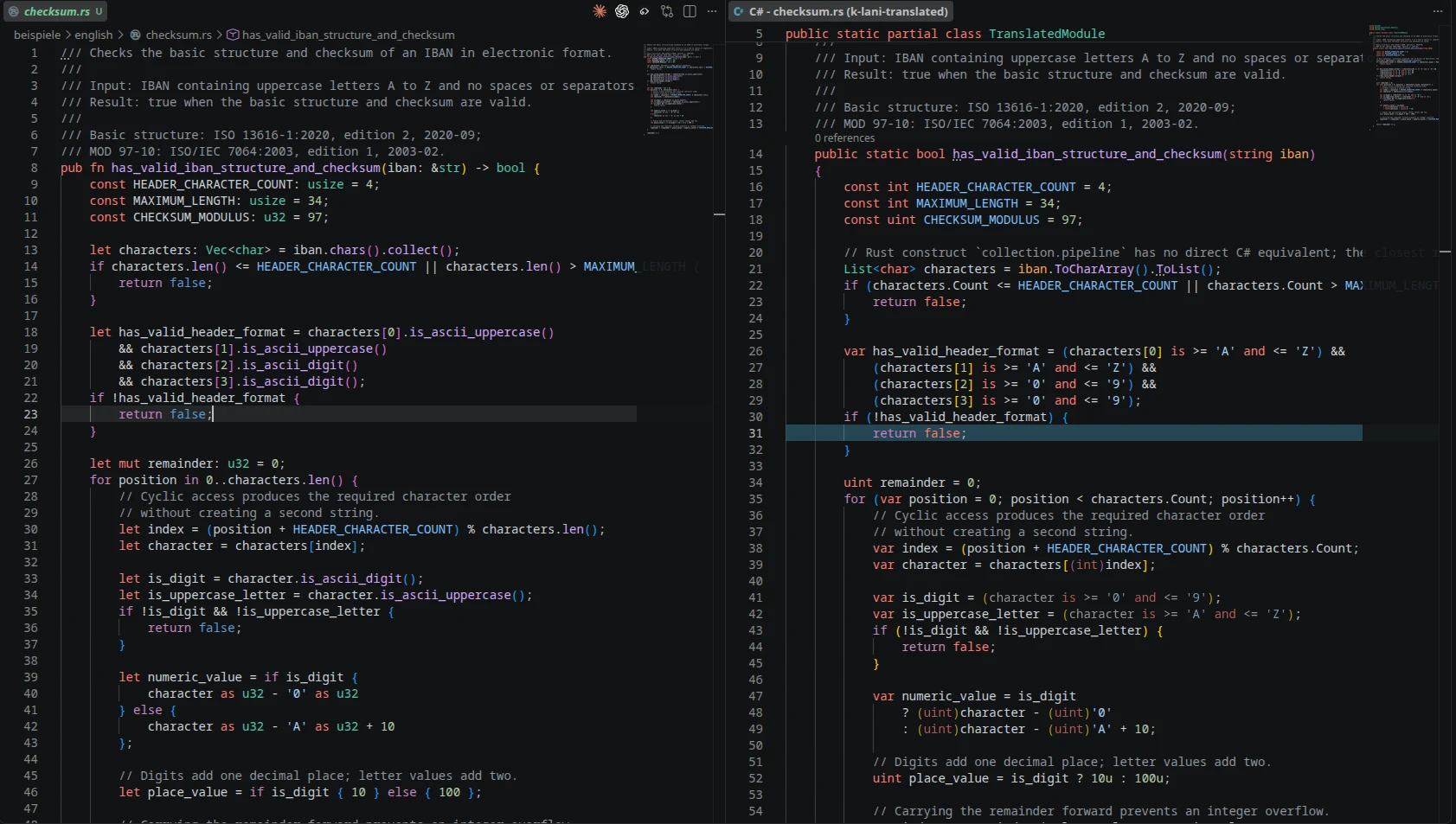
Rust source with a synchronized C# reading aid

Rust source beside its C# reading aid

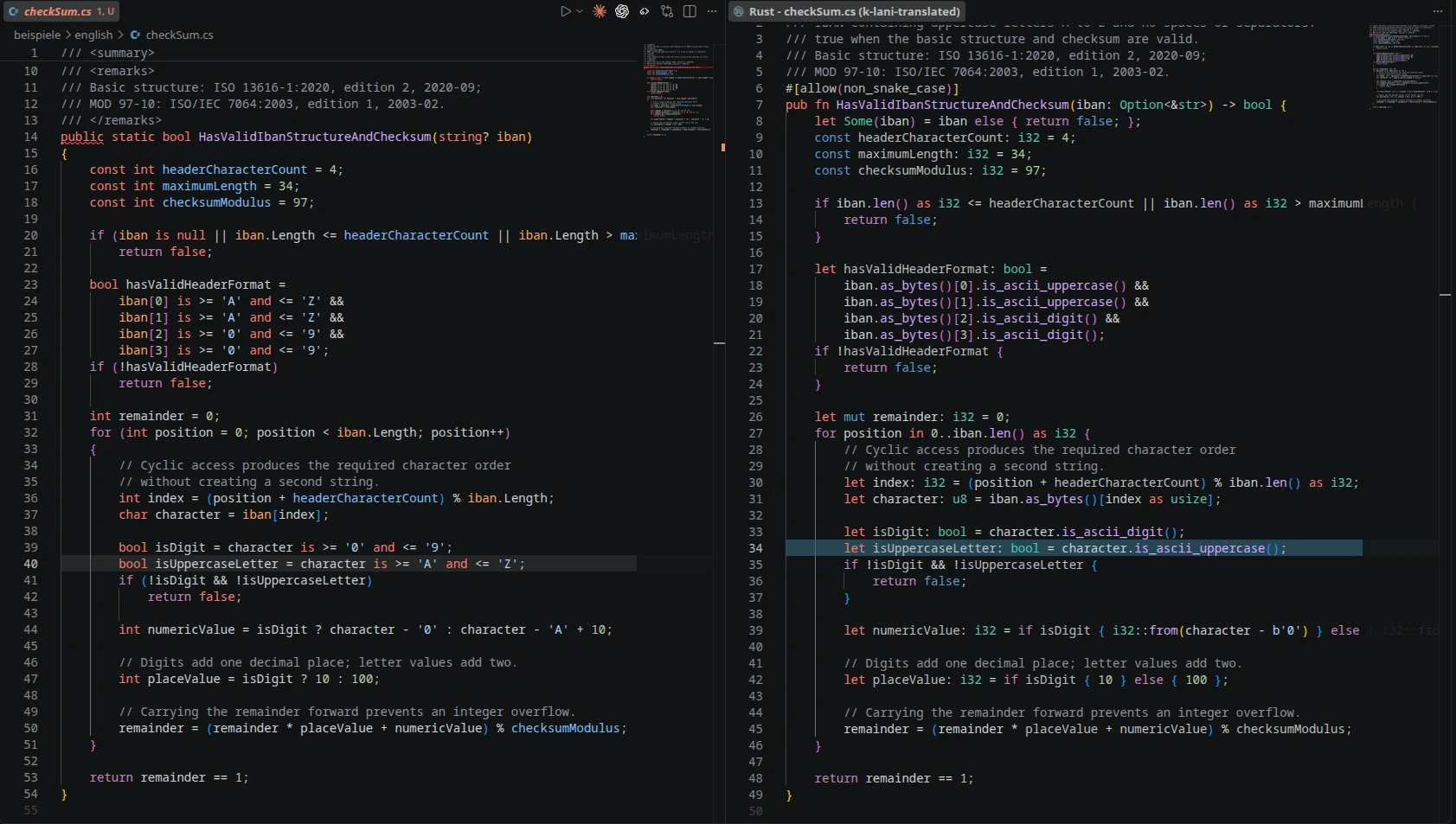
C# source with a synchronized Rust reading aid

C# source beside its Rust reading aid

One source, several ways to understand it

A Rust file can be opened beside C# and an English explanation at the same time:

validator.rs
├── C#       familiar syntax for experienced C# developers
└── English  readable control-flow and condition explanation

The original remains visible. Unsaved edits, selections and scrolling stay synchronized across the open reading views.

Supported languages

Python · TypeScript · C# · Java · C++ · C · PHP · Go · Rust · Kotlin · Ruby · Swift · VB.NET · Elixir · Zig · Erlang · JavaScript

All 17 programming languages can be used as source and reading target. English and German are additional human-language reading targets.

Start

  1. Open a supported source file.
  2. Right-click inside the source editor.
  3. Select k-lani-code-translator → Open reading aids.
  4. Select one or more targets, for example C# and English.

The target selection can also be prepared under Settings → k-lani-code-translator → Target languages. More reading views can be added later from the same context menu.

Reading and analysis help

The extension can show:

  • several synchronized target views at once
  • unsaved source changes
  • comments, blank lines and multiline formatting where transferable
  • visible diagnostics for language features without a direct equivalent
  • optional hints for selected probable problems in the original
  • a locally editable problem report with no automatic submission
  • a cross-language Live Debugger view over an ordinary debug session

Use k-lani-code-translator → Enable all help (Full) from the source context menu to enable detailed translation hints and optional problem analysis. Findings appear at the affected source location and in VS Code's normal Problems view with source k-lani.

Local and private

Translation runs on the local machine:

  • no source-code upload
  • no AI request
  • no telemetry
  • no password, wallet or system-key request

Types, libraries and methods outside the visible source can remain unresolved. Language features without a direct counterpart are approximated or marked instead of silently inventing equivalent behaviour.

Platforms

Platform-specific packages are available for:

  • Windows x64
  • Linux x64 and ARM64
  • macOS Intel and Apple Silicon

Support and licensing

Report an issue · Product website · Privacy · Commercial terms · Support development on Ko-fi

The bundled software is licensed under the PolyForm Noncommercial License 1.0.0. The commercial licence is separate from voluntary Ko-fi support.

  • Contact us
  • Jobs
  • Privacy
  • Manage cookies
  • Terms of use
  • Trademarks
© 2026 Microsoft