Parquet Xplore
The lightest Apache Parquet viewer for VS Code. Ultra-fast with zero bloat, it packs serious power into a tiny footprint, opening multi-gigabyte Parquet files in milliseconds without slowing down your editor.
Features
- Ultra-lightweight with zero bloat: Installs in seconds while providing full Parquet compression codec support (Snappy, ZSTD, GZIP, Brotli, LZ4), column statistics profiling, rich cell inspectors, and 8 export formats.
- Instant byte-range lazy loading: Reads only the metadata footer on open, fetching only the specific row group byte ranges needed for the current viewport. A 50 GB Parquet dataset opens just as quickly as a 50 KB file without loading the dataset into memory.
- Cross-platform: Works in desktop VS Code and on the web (vscode.dev, github.dev).
- Read-only by design: Safe, zero-mutation viewing ensures production datasets are never accidentally modified.
2. Virtualized Grid & Data Exploration
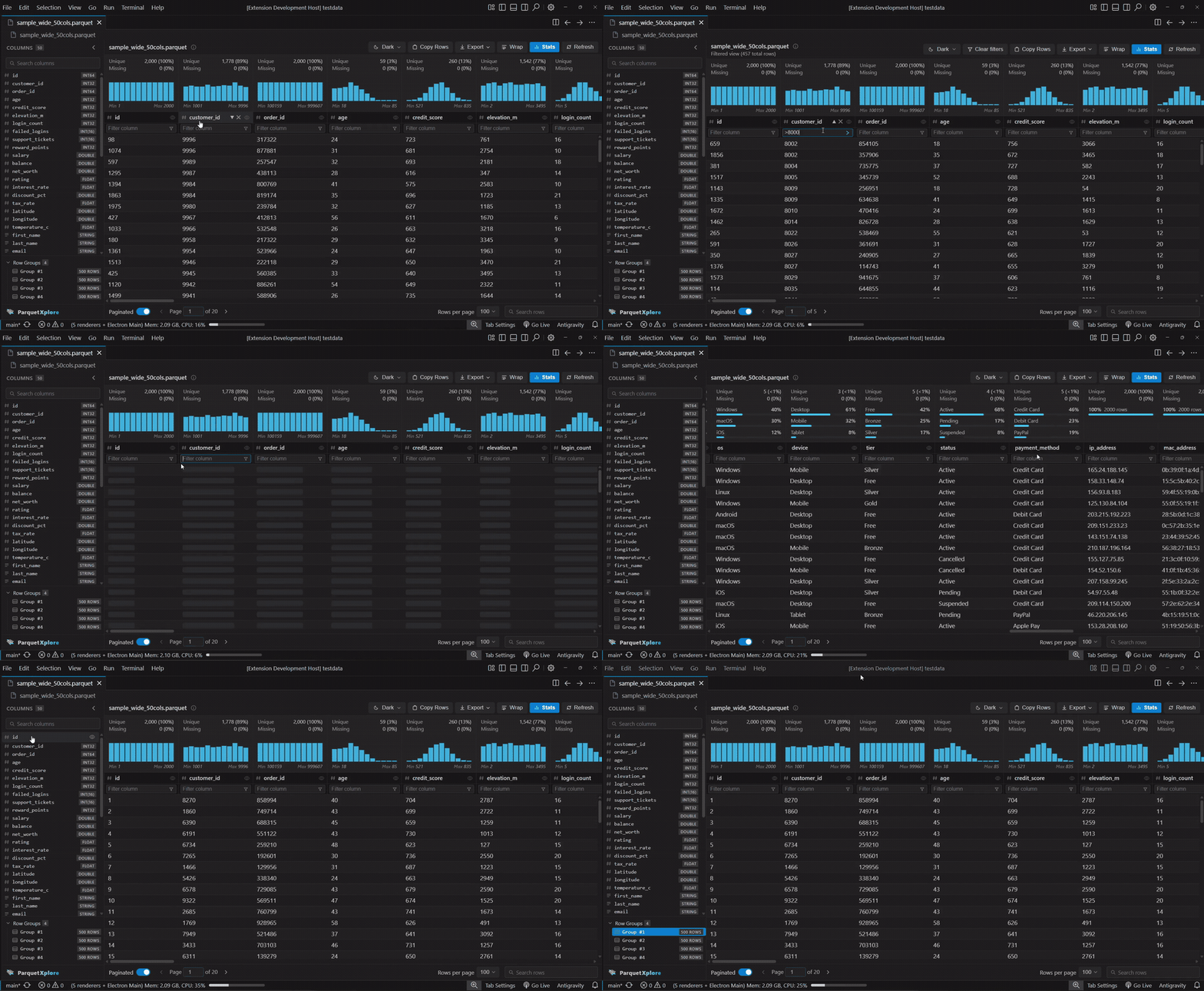
- Sort & Filter: Click column headers to sort; use the filter row under any column for substring matching or comparison operators (
>, >=, <, <=, !=/<>, NULL, NOT NULL).
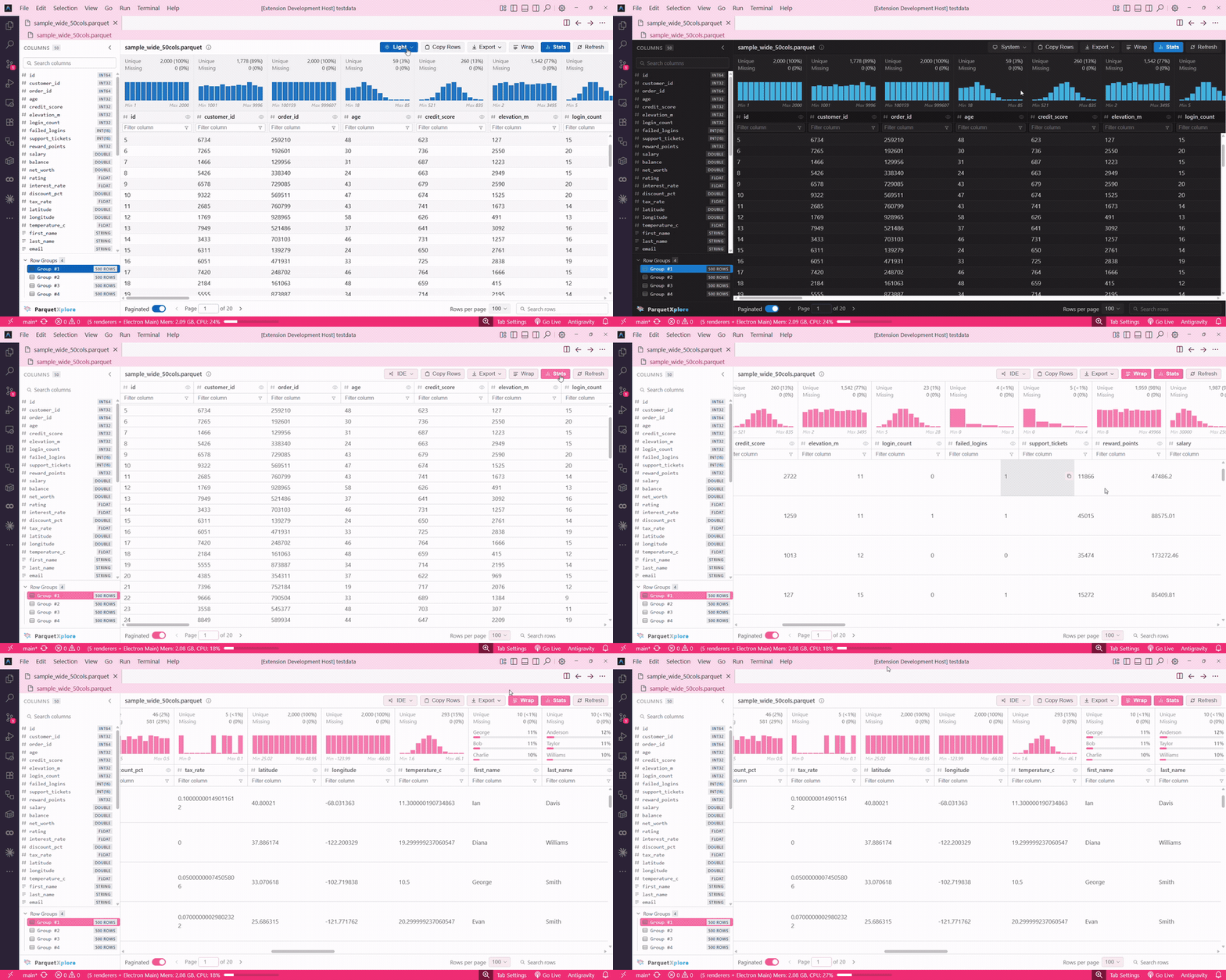
- Autosize Column Widths: Double-click any header resize handle or choose Options → Autosize Column Widths to snap columns to their exact content width.
- Cell Word Wrap & Dynamic Auto-Height: Toggle word wrap from the toolbar or Options menu to wrap multiline strings with automatic row expansion and vertically centered sibling cells.
- One-Click Copy & Context Menu: Single-click any cell to copy its content to the clipboard with an instant visual pulse, or right-click to filter the table by that cell value (
Alt+Click shortcut on hover copy button).
- Column Visibility: Hide columns directly from the header eye icon or toggle them from the sidebar column list.
- In-Cell Search Highlighting: Filter queries highlight matched substrings inside cells in real time.
- Persistent Headers & Filter Row: Column headers, data types, and filter inputs stay visible and editable even when a filter matches zero rows.
- Pagination & Row Group Navigation: Page through rows with configurable page sizes (50, 100, 250, 500, 1,000), or select individual Row Groups directly from the sidebar to inspect chunked data.
- Rich Data Types & NULL Formatting: Native support for INT, FLOAT, DOUBLE, DECIMAL, TIMESTAMP, DATE, TIME, JSON, STRUCT, LIST, and MAP, with distinct italic styling for NULL values so they stand apart from empty strings.
3. Column Profiling & Statistics
- Column Profiler: Inspect column distributions, null percentages, distinct counts, and min/max boundaries directly in the header or the detailed diagnostics modal.
- Inline Histograms & Sparsity Bars: Visual distribution bars for numeric columns and completeness/sparsity bars for text columns.
4. Advanced Cell Viewers & Inspectors
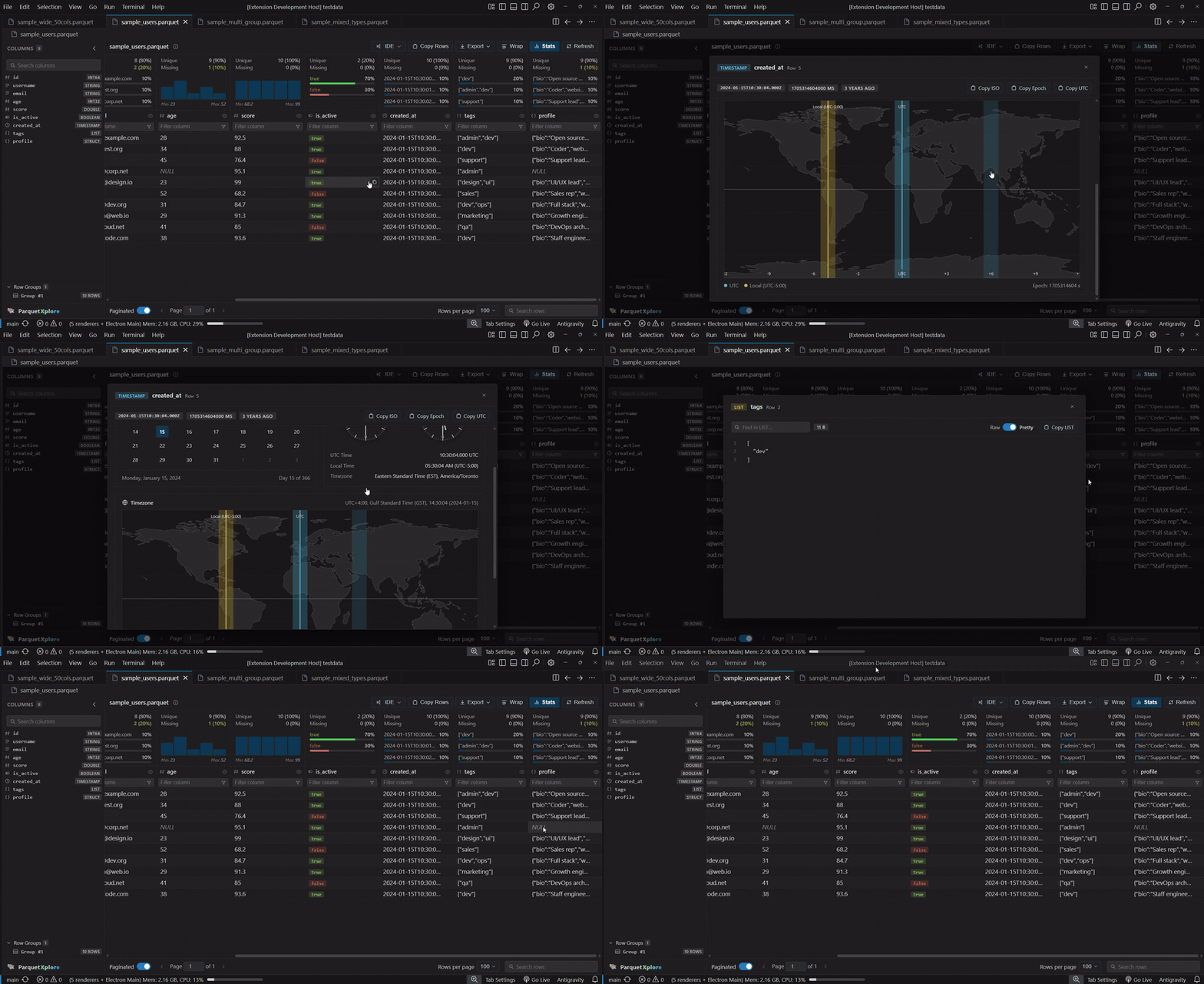
- Date & Timestamp Inspector: Dedicated inspectors featuring a monthly calendar, dual UTC and Local analog clocks, and an interactive equirectangular world map with live meridian hover readouts and timezone abbreviations.
- JSON Inspector: View nested STRUCT, MAP, and LIST columns in formatted JSON with syntax highlighting, line numbers, search, a raw/pretty toggle, and quick copy.
- Hex & Binary Inspector: Inspect raw byte arrays, fixed-len byte arrays, and embeddings in a 16-byte-per-line Hex & ASCII modal with synchronized byte hover and export to Hex, Base64, or C Array.
- Text Reader with Word Wrap: Expand multiline passages in a modal viewer with line numbers and a word wrap toggle.
5. Parquet File Overview & Diagnostics
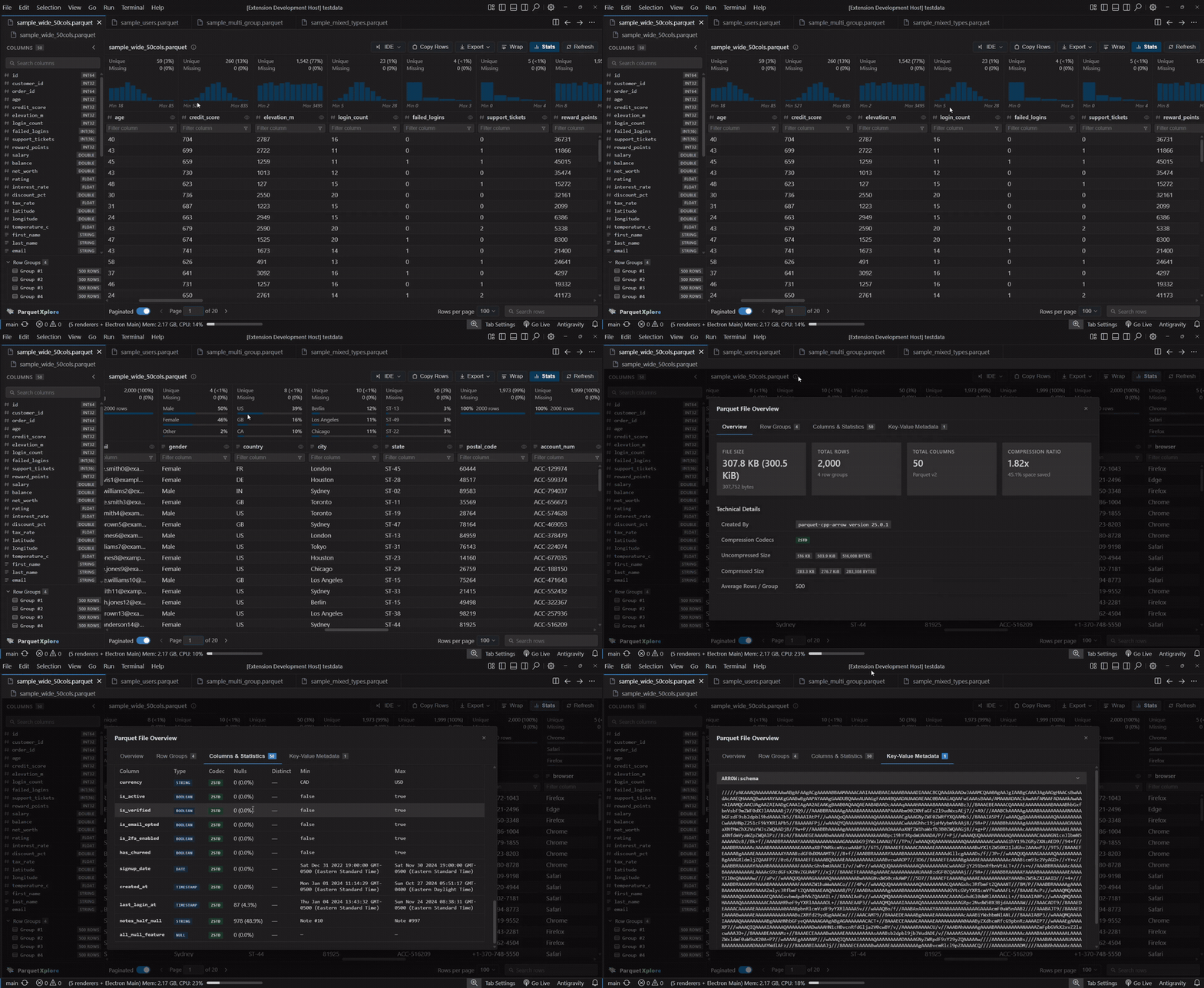
- Comprehensive Metadata Modal: Inspect Parquet format version, created-by engine string, compression codecs, uncompressed size, compressed size, space saved ratio, and row group count.
- Row Group Breakdown: Inspect each row group's row count, byte range, compression ratio, and size tags (KB, KiB, bytes).
- Column & Statistics Breakdown: Complete schema table showing physical and logical types, codecs, null counts and percentages, distinct counts, and min/max values without horizontal scroll.
- Key-Value Metadata: View custom application metadata tags (including embedded
ARROW:schema descriptors) with clean collapsible views.
- 8 Export Formats: Export table data or row groups to CSV, TSV, JSON, JSON Lines (NDJSON), Markdown, HTML, XML, or SQL INSERT statements.
7. Workspace & Ergonomics
- Sidebar Column & Row Group Explorer: Browse columns and types with instant search filter; select individual row groups to inspect chunked data.
- Collapsible Sidebar: Collapse the sidebar into a slim 40px icon rail with vertical branding to maximize your data viewing area.
- Theme Support: Seamlessly follows VS Code Dark Modern, Light, and System themes.
- Minimal memory footprint: Runs quietly in the background without slowing down your editor or eating RAM.
- Resizable Layout & Quick Refresh: Resize columns and sidebars freely; Refresh picks up file changes immediately.
Supported file types
The following file formats open automatically in Parquet Xplore:
If another extension is already registered as the default for one of these extensions, use Open With > Parquet Xplore once and VS Code will remember your choice for that file type going forward.
Reporting issues
Found a bug or have a feature request? File it at github.com/jaxendutta/parquet-xplore-feedback.
License
MIT
| |

