Joyous Inspector to Rive - VS Code
Joyous Inspector to Rive 0.9.14 is the VS Code skeleton-animation visualization release. It builds on the completed 0.9.13 state-machine visualization and preview-image delivery baseline while keeping .riv Inspect, browser preview, LAN QR preview, framework-aware Usage Reference, local rivc, first-use project guide, and Agent Skill workflows available.
Open .riv -> Inspect structure -> Preview -> Browser/mobile preview -> Usage Reference -> Install rivc -> Project guide / Agent Skill
中文:
Joyous Inspector to Rive 0.9.14 是 VS Code 骨骼动画可视化版本。本版建立在已经完成的 0.9.13 状态机可视化与预览图片交付基线之上,并继续保留 .riv Inspect、浏览器预览、局域网二维码预览、框架感知 Usage Reference、本地 rivc、首次使用项目指南和 Agent Skill 工作流。
打开 .riv -> 检查结构 -> 预览 -> 浏览器/手机预览 -> Usage Reference -> 安装 rivc -> 项目指南 / Agent Skill
Screenshots / 截图
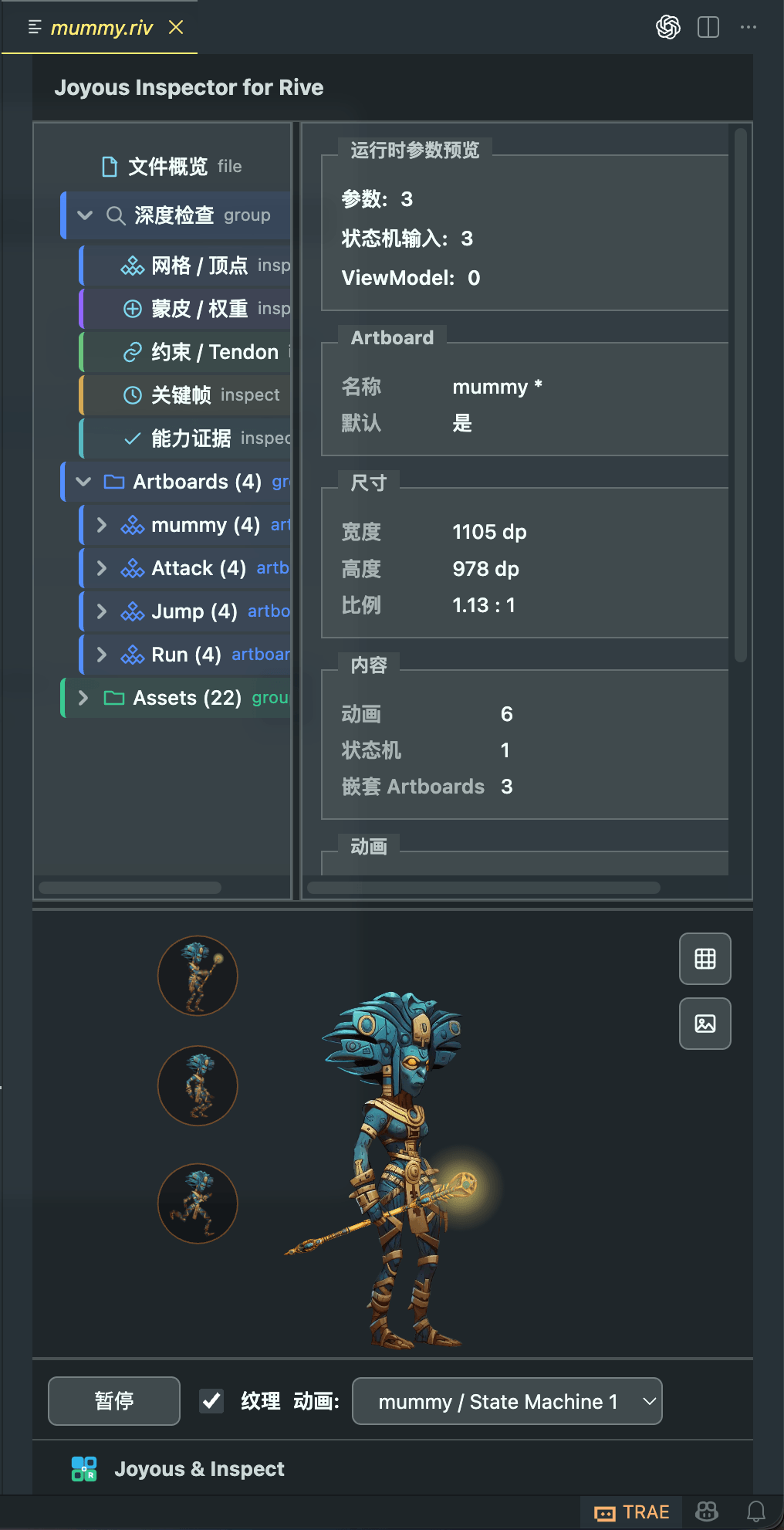
Inspect right panel / 右侧 Inspect 面板
|
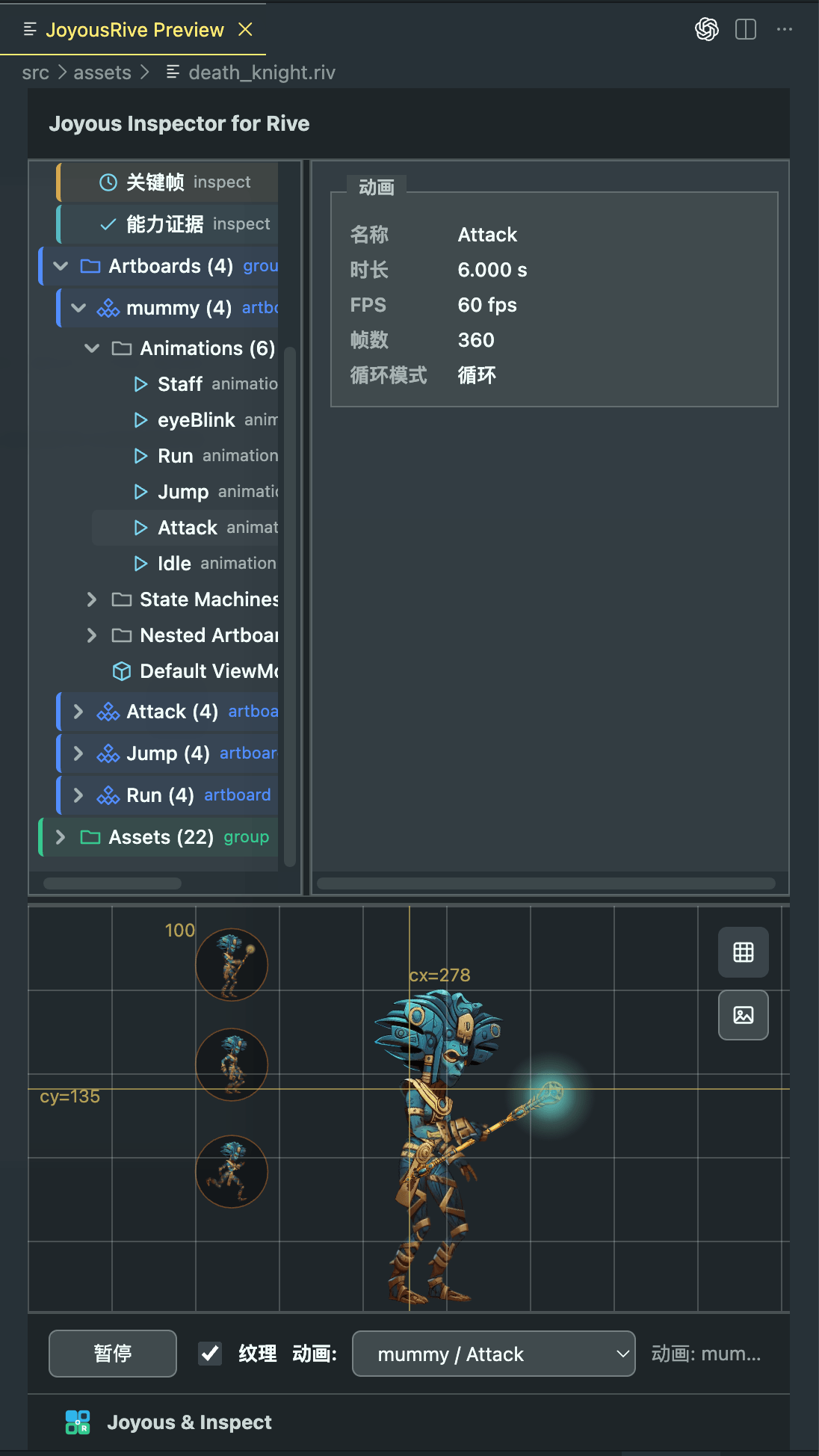
Preview interaction and grid / 预览交互和网格
|
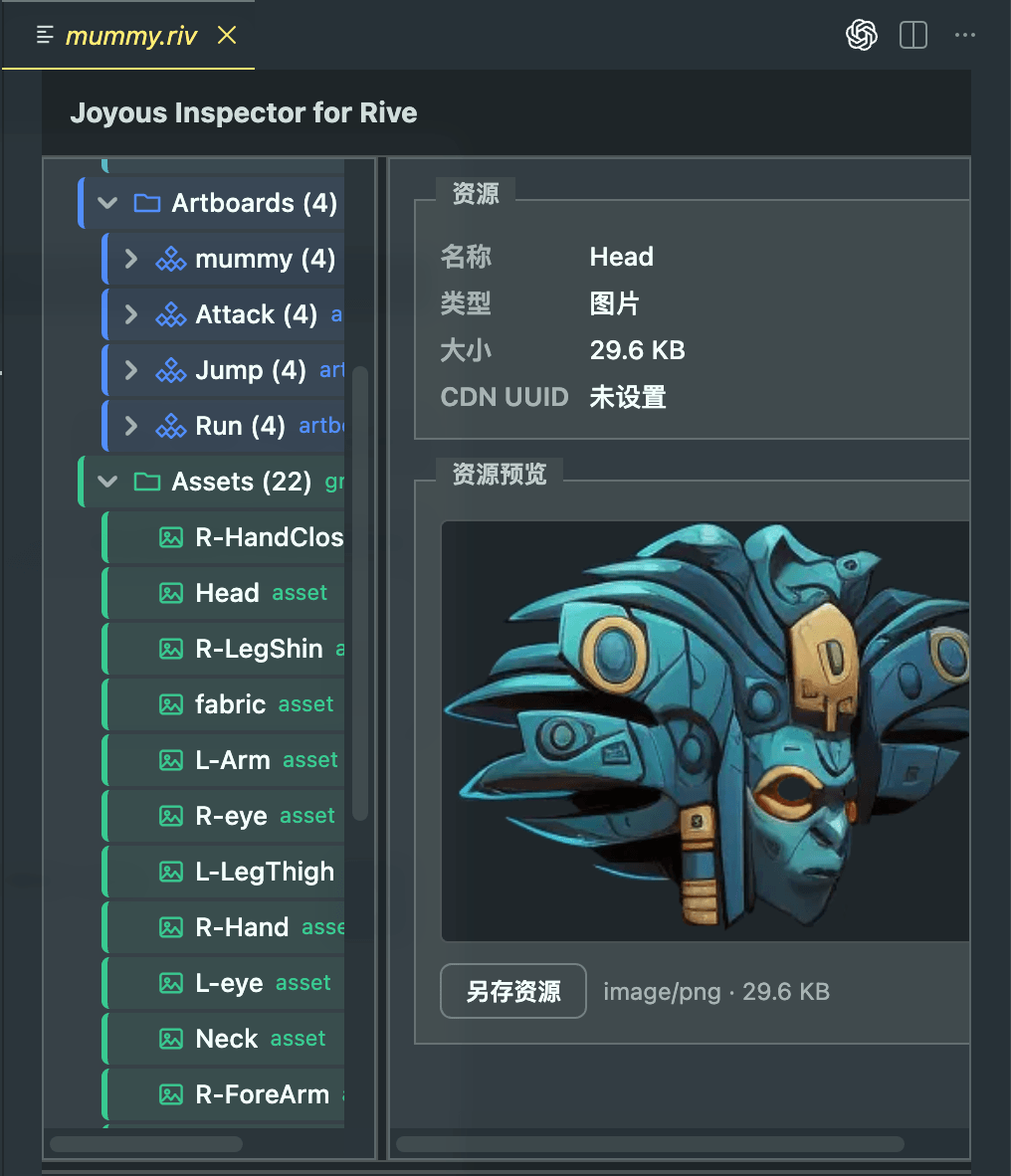
Asset preview / 资源预览
|
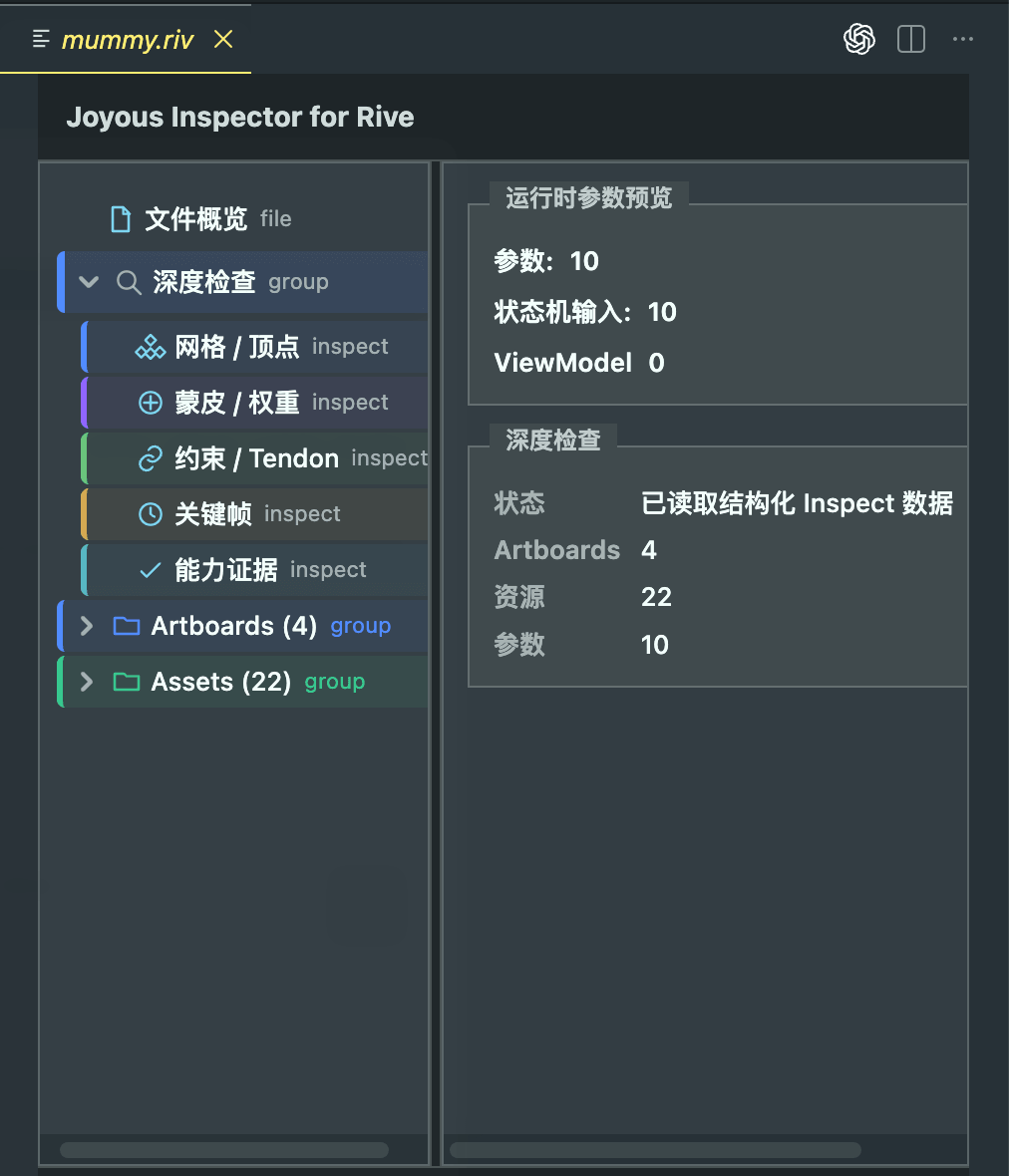
Deep Inspect evidence / 深度检查证据
|
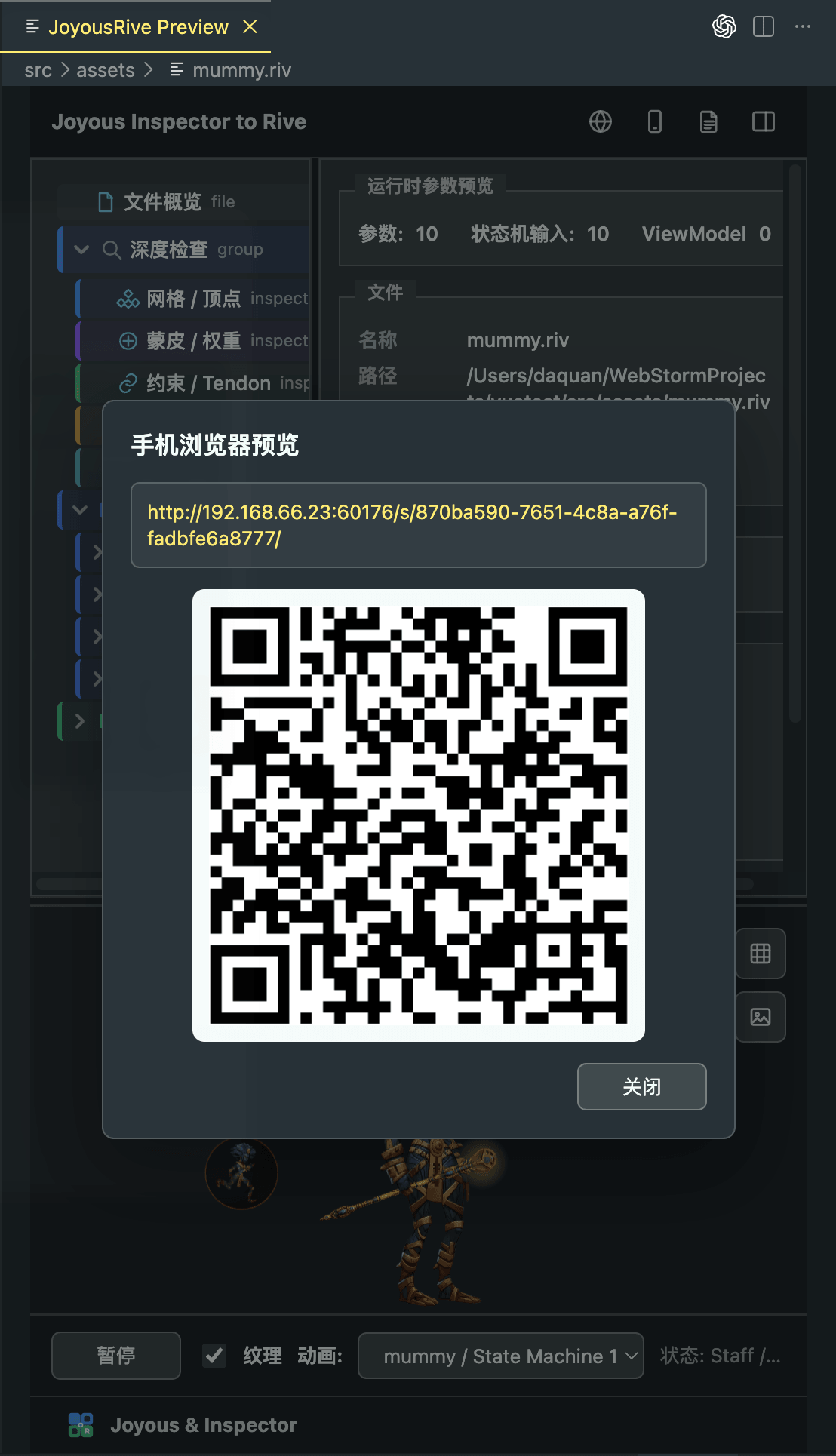
QR mobile preview / 二维码手机预览
|
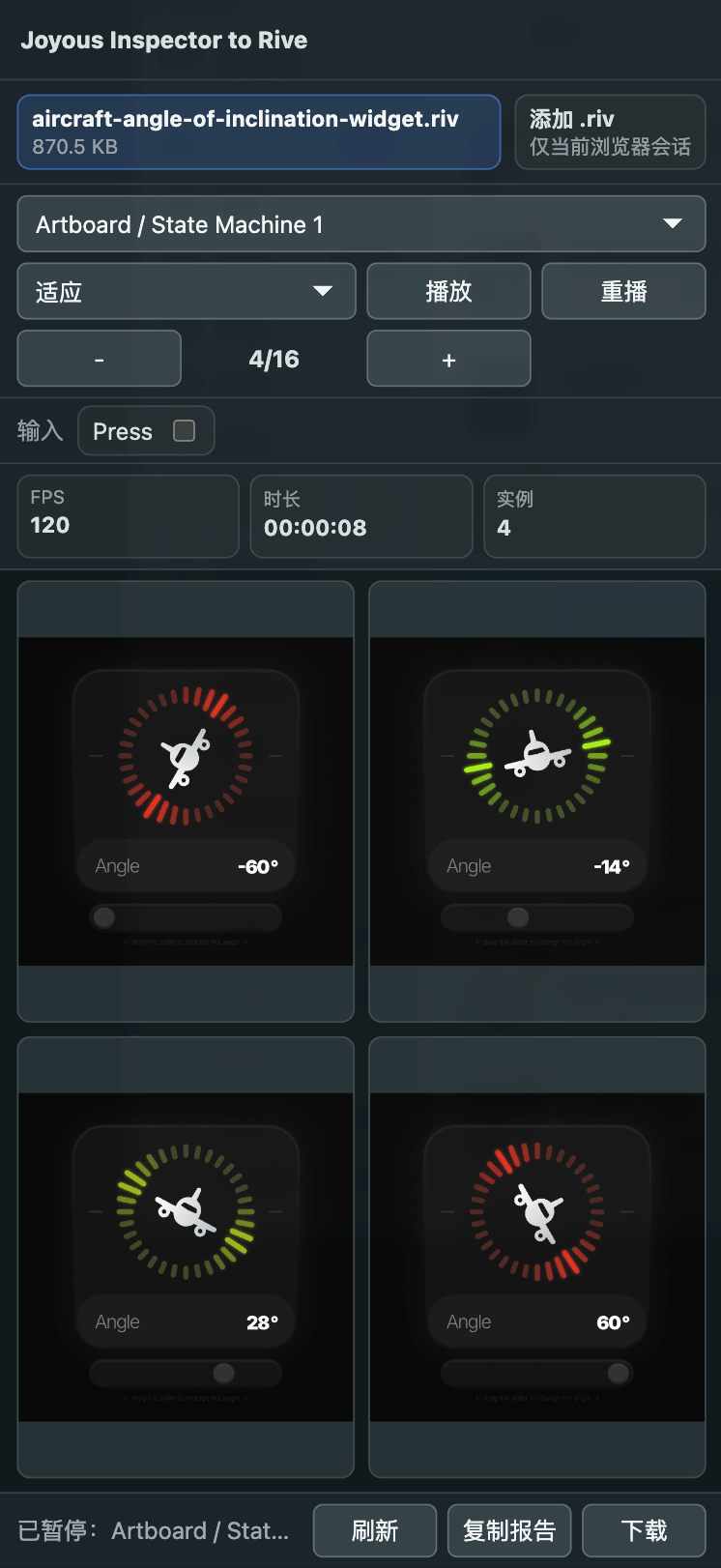
Device browser preview / 设备浏览器预览
|
Features in 0.9.14
- Associate
.riv files with Joyous Inspector to Rive.
- Double-click
.riv files from the Explorer to open a singleton Inspect panel.
- Reuse the same Inspect panel when switching between
.riv files instead of opening duplicate preview tabs.
- Prefer a right-side editor group when another editor is already open, so code can stay on the left and Inspect can stay on the right.
- Open
.rev files in the same Joyous panel with a clear unsupported diagnostic for the current VS Code scope.
- Use Explorer and editor context menu commands:
Joyous Rive: Open InspectJoyous Rive: Open PreviewJoyous Rive: Open Browser PreviewJoyous Rive: Open Mobile Browser PreviewJoyous Rive: Generate Usage ReferenceJoyous Rive: Locate CLIJoyous Rive: Install rivcJoyous Rive: Generate Agent Skill
- Inspect file, runtime, structure, artboard, animation, state machine, input, event, and asset details.
- Browse an expandable tree for file overview, Deep Inspect evidence, artboards, and assets.
- Preview
.riv files inside a VS Code Webview with bundled local WebGL2 and Canvas Rive runtimes.
- Support preview play / pause, default playback selection, texture toggle, grid toggle, screenshot export, and basic pointer interaction used by Rive state machines.
- Preview embedded image assets and save supported asset files locally.
- Show diagnostics instead of a blank Webview when structured Inspect or Preview cannot start.
- Open the current
.riv in a local browser preview server.
- Start a LAN browser preview explicitly, copy the LAN URL, and show a QR code for phone/tablet scanning.
- Use the mobile browser preview page with responsive controls, playback selection, instance count controls, runtime stats, report export, and pointer interaction for Rive state machines.
- Visualize state-machine graphs, including state, input, transition, and runtime-current-state highlighting.
- Show runtime input values and recent click, drag, input-change, and state-change events in the preview workflow.
- Show synchronized skeleton visualization driven by the active preview playback. Texture and Skeleton can be enabled from the preview controls, while Mesh, Vertex, BBox, and Weight remain disabled placeholders for later releases.
- Copy preview reports that align with Inspect / Deep Inspect data and exclude tokens, device serial numbers, and historical LAN IP addresses.
- Export preview PNG images at 1.5x scale with background, optional grid, and a clear watermark that does not cover the animation subject.
- Show live preview logs in the Joyous Rive bottom panel during browser and mobile preview sessions.
- Generate Usage Reference for supported Web / TypeScript / React / Vue project types; unsupported language/framework projects show a clear notice instead of generating unsuitable snippets.
- Show a first-use confirmation when opening a
.riv or .rev file, then generate JOYOUS_RIVE.md after the user agrees.
- Generate
.joyous/rive/SKILL.md from the explicit Generate Agent Skill action.
- Keep command, CLI, project guide, and Agent Skill work scoped to local VS Code workflows. These workflows do not modify business code automatically and do not call external AI services.
- Locate the bundled or configured
rivc CLI and diagnose Java 21+ runtime availability from the Joyous Rive bottom log panel.
- Install the bundled CLI to the user-local Joyous directory from an explicit terminal command. VS Code opens a
Joyous Rive CLI terminal, runs the visible install command, prepends the user-local Joyous bin directory to that terminal session, and verifies rivc --help. The installer does not modify shell startup files or system PATH.
0.9.14 功能
- 将
.riv 文件关联到 Joyous Inspector to Rive。
- 从资源管理器双击
.riv 文件,打开单例 Inspect 面板。
- 切换
.riv 文件时复用同一个 Inspect 面板,避免打开重复预览标签。
- 当已有编辑器打开时,优先使用右侧编辑组,让代码留在左侧、Inspect 留在右侧。
.rev 文件会在同一个 Joyous 面板中显示清晰的暂不支持诊断说明。- 支持资源管理器和编辑器上下文菜单命令:
Joyous Rive: Open InspectJoyous Rive: Open PreviewJoyous Rive: Open Browser PreviewJoyous Rive: Open Mobile Browser PreviewJoyous Rive: Generate Usage ReferenceJoyous Rive: Locate CLIJoyous Rive: Install rivcJoyous Rive: Generate Agent Skill
- 检查文件、runtime、结构、artboard、animation、state machine、input、event 和 asset 详情。
- 浏览文件概览、Deep Inspect 证据、artboards 和 assets 的树形导航。
- 使用内置本地 WebGL2 和 Canvas Rive runtime,在 VS Code Webview 内预览
.riv 文件。
- 支持播放 / 暂停、默认播放目标选择、纹理开关、网格开关、截图导出,以及 state machine 预览中的基础指针交互。
- 支持内嵌图片资源预览,并可另存支持的资源文件。
- 当结构化 Inspect 或 Preview 无法启动时显示诊断信息,而不是空白 Webview。
- 支持把当前
.riv 打开到本地浏览器预览服务。
- 用户显式启动 LAN 浏览器预览后,复制局域网 URL,并显示可供手机/平板扫码的二维码。
- 手机浏览器预览页支持响应式控制区、播放目标选择、实例数量控制、运行统计、报告导出,以及 Rive state machine 指针交互。
- 支持状态机图形可视化,展示 state、input、transition 关系,并高亮运行时当前 state。
- 在预览工作流中展示 runtime input 当前值,以及最近点击、拖动、input 变化和 state 变化事件。
- 支持由当前预览播放状态驱动的同步骨骼可视化。Texture 和 Skeleton 可在预览控制区启用,Mesh、Vertex、BBox、Weight 保留为后续版本的禁用入口。
- 支持复制预览报告;报告数据与 Inspect / Deep Inspect 保持一致,并排除 token、设备序列号和历史 LAN IP。
- 支持以 1.5x 倍率导出预览 PNG,保留背景、可选网格和清晰且不遮挡主体动画的水印。
- 浏览器预览和手机预览启动时,会在 Joyous Rive 底边面板显示实时预览日志。
- 在支持的 Web / TypeScript / React / Vue 项目中生成 Usage Reference;其他语言或框架会显示明确提示,不生成不匹配的示例。
- 首次打开
.riv 或 .rev 文件时显示确认提示;用户同意后生成 JOYOUS_RIVE.md。
- 通过显式的
Generate Agent Skill 动作生成 .joyous/rive/SKILL.md。
- 命令、CLI、项目指南和 Agent Skill 能力只限定为 VS Code 本地工作流;不会自动修改业务代码,也不会调用外部 AI 服务。
- 支持在 Joyous Rive 底边日志面板中定位内置或用户配置的
rivc CLI,并诊断 Java 21+ runtime 可用性。
- 支持通过用户显式触发的终端命令,把内置 CLI 安装到用户本地 Joyous 目录。VS Code 会打开
Joyous Rive CLI 终端,显示并执行安装命令,把用户本地 Joyous bin 目录加入当前终端会话,并验证 rivc --help。安装器不会修改 shell 启动文件或系统 PATH。
Not included yet
These features are intentionally outside the current VS Code package baseline until their implementation is completed and verified:
.rev parsing and preview support.- Mesh / Skin / Tendon / Keyframe visualization.
- Runtime parameter editing or writing changes back to
.riv.
- A native VS Code Auxiliary Bar implementation identical to Codex Chat. The current VS Code editor uses a singleton Webview panel and prefers the right editor group when possible.
- Native device installation preview. The VS Code package provides browser and LAN QR preview only.
- Automatic modification of business source files, dependency files, shell startup files, or system PATH.
暂不包含
以下能力在当前 VS Code 包基线中仍不对外声明为已完成,需完成实现和验证后再进入公开能力:
.rev 解析和预览。- Mesh / Skin / Tendon / Keyframe 可视化。
- Runtime 参数编辑或写回
.riv。
- 与 Codex Chat 完全一致的 VS Code 原生 Auxiliary Bar 实现。首版使用单例 Webview 面板,并在可行时优先显示到右侧编辑组。
- 原生真机安装预览。VS Code 包只提供浏览器和 LAN 二维码预览。
- 自动修改业务源码、依赖文件、shell 启动文件或系统 PATH。
Settings / 配置项
Joyous Inspector to Rive contributes these VS Code settings:
Joyous Inspector to Rive 提供以下 VS Code 配置项:
joyousRive.rivcPath
Optional path to a local rivc / joyous-rive CLI executable used for structured .riv Inspect data.
可选的本地 rivc / joyous-rive CLI 可执行文件路径,用于读取结构化 .riv Inspect 数据。
joyousRive.javaPath
Optional path to a Java 21+ executable used by the bundled Joyous Inspector to Rive CLI.
可选的 Java 21+ 可执行文件路径,用于运行插件内置的 Joyous Inspector to Rive CLI。
joyousRive.lockInspectLayout
Lock the Inspect editor split layout. The default layout already uses the designed tree, details, and preview proportions.
锁定 Inspect 编辑器分割布局。默认打开时已经使用树形区、详情区和预览区的设计比例。
Privacy
The VS Code extension reads local .riv files only for local Inspect and Preview. Browser and LAN mobile preview use a local read-only preview server started by explicit user action. LAN preview exposes the selected .riv to devices on the same local network until the preview is closed. .rev files are opened only for file-level diagnostics. It does not upload animation files, source code, or project data, and it does not call external AI services.
隐私
VS Code 插件只为本地 Inspect 和 Preview 读取本地 .riv 文件。浏览器和 LAN 手机预览使用由用户显式启动的本地只读预览服务。LAN 预览开启后,同一局域网设备可以访问所选 .riv,直到预览关闭。.rev 文件只打开文件级诊断信息。插件不上传动画文件、源码或项目数据,也不调用外部 AI 服务。
Animation Credits
Some preview screenshots and sample workflows use animation materials from rive.app. Special thanks to ersanakpinarr (https://rive.app/@ersanakpinarr/) for providing the animation assets used in these examples.
| |

