nautilus IEC 61131-3
Develop PLC logic like software: IEC 61131-3 in VS Code, in git, with live
values from a running controller.
Structured Text (.st), Function Block Diagram (.fbd), Ladder (.ld) and
Sequential Function Chart (.sfc) are plain text files that diff and merge
in git. This extension opens them as diagrams you can edit, shows what
changed between any two revisions as a diagram, and paints live values and
power flow from a running nautilus
controller onto both the text and the diagram.
Get started in 3 steps
- Install this extension.
- Install the
naut CLI. Click Install naut when the extension
asks, or run nautilus: Install or Update the naut CLI. It downloads
the release for your OS and CPU from GitHub, checks it against
checksums.txt, and keeps it in the extension's storage. No Go
toolchain needed.
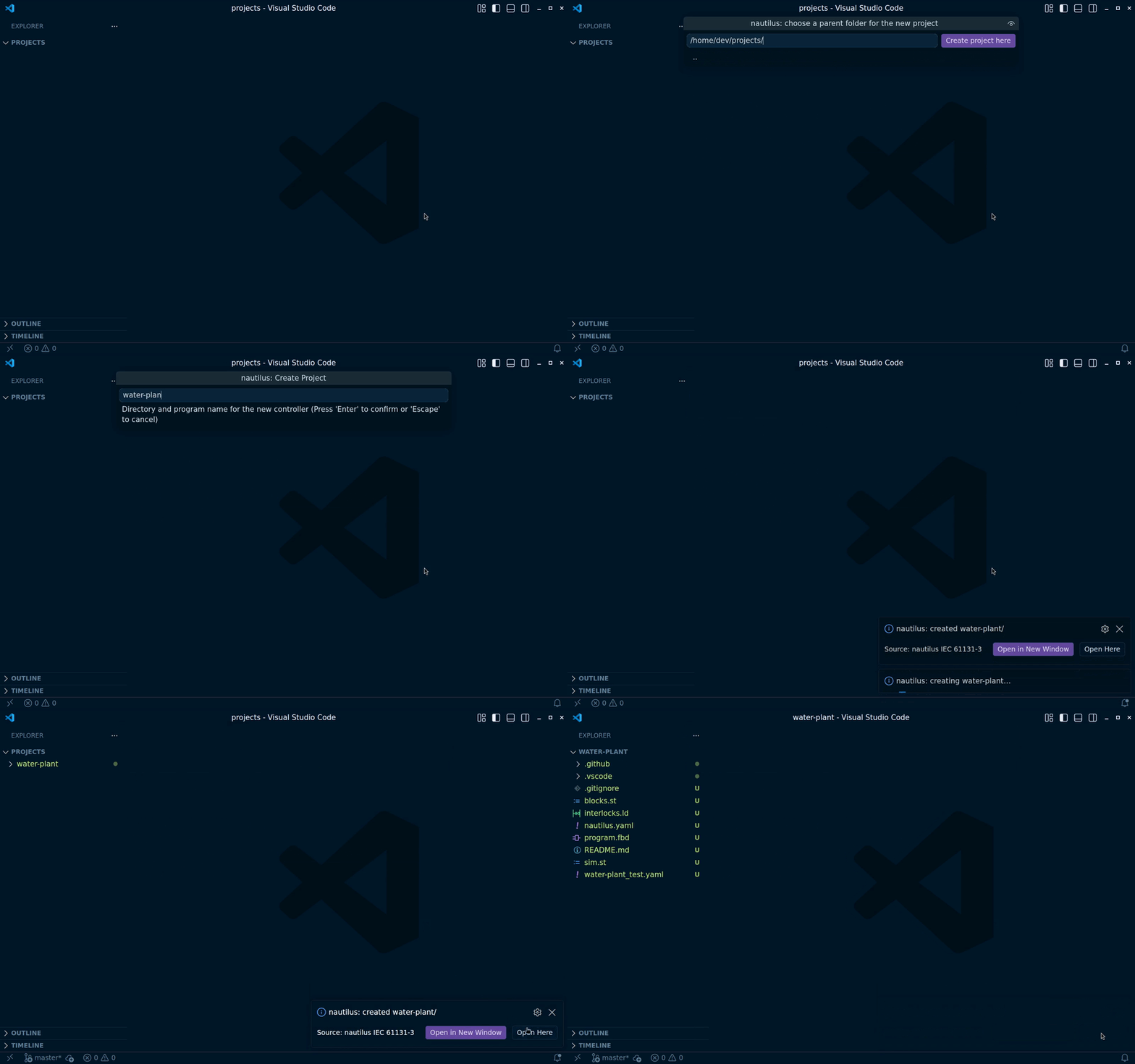
- Create a project. Run nautilus: Create Project…, or follow the
nautilus: Get Started walkthrough (install, create, open a diagram,
run, test; about five minutes). The default Demo template is a
three-task, three-language tour with a simulated plant. Then run
naut run in the project folder and the editor goes live.
Diagrams: FBD, Ladder and SFC
- The text is the source of truth. Every gesture on the diagram is a
structural edit that the Go compiler turns into a minimal text change, so
the file stays small and reviewable. Layout comes from the logic; a node
you drag is pinned in the file.
- Open as Diagram Editor in a text editor's title bar turns the tab into
the diagram; Show Source opens the text beside it. The preview button
opens the diagram next to the text instead. To open these files as
diagrams by default, set
"workbench.editorAssociations": { "*.fbd": "nautilus.fbdDiagram" } (likewise nautilus.ldDiagram,
nautilus.sfcDiagram).
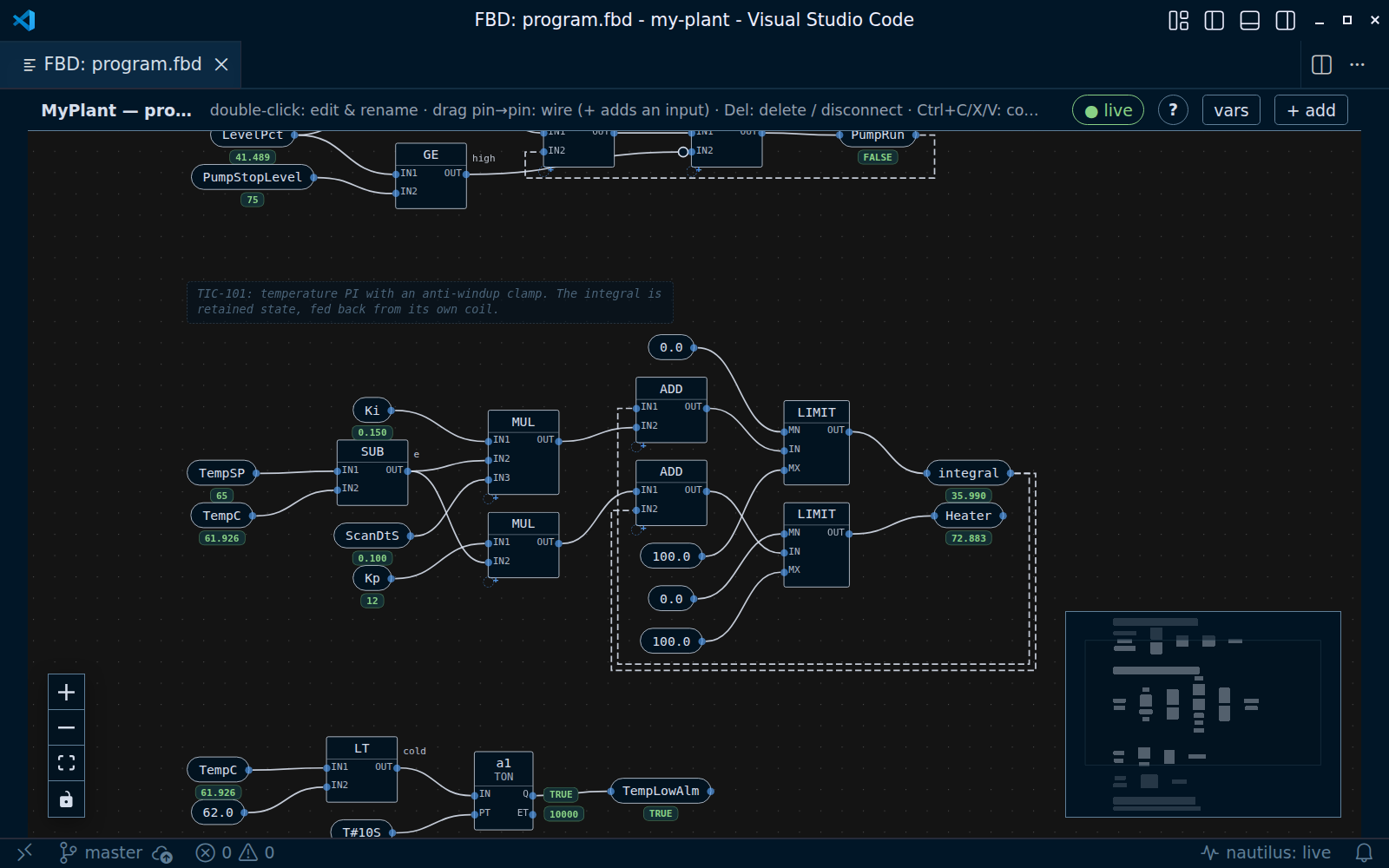
- FBD: drag pin to pin to wire, double-click to retype a constant or
rename, insert blocks from the + add palette — function block places
any standard block (PID included) or project block with every input an
open pin — box-select, arrow keys to move. Double-click an FB's header to
rename the instance.
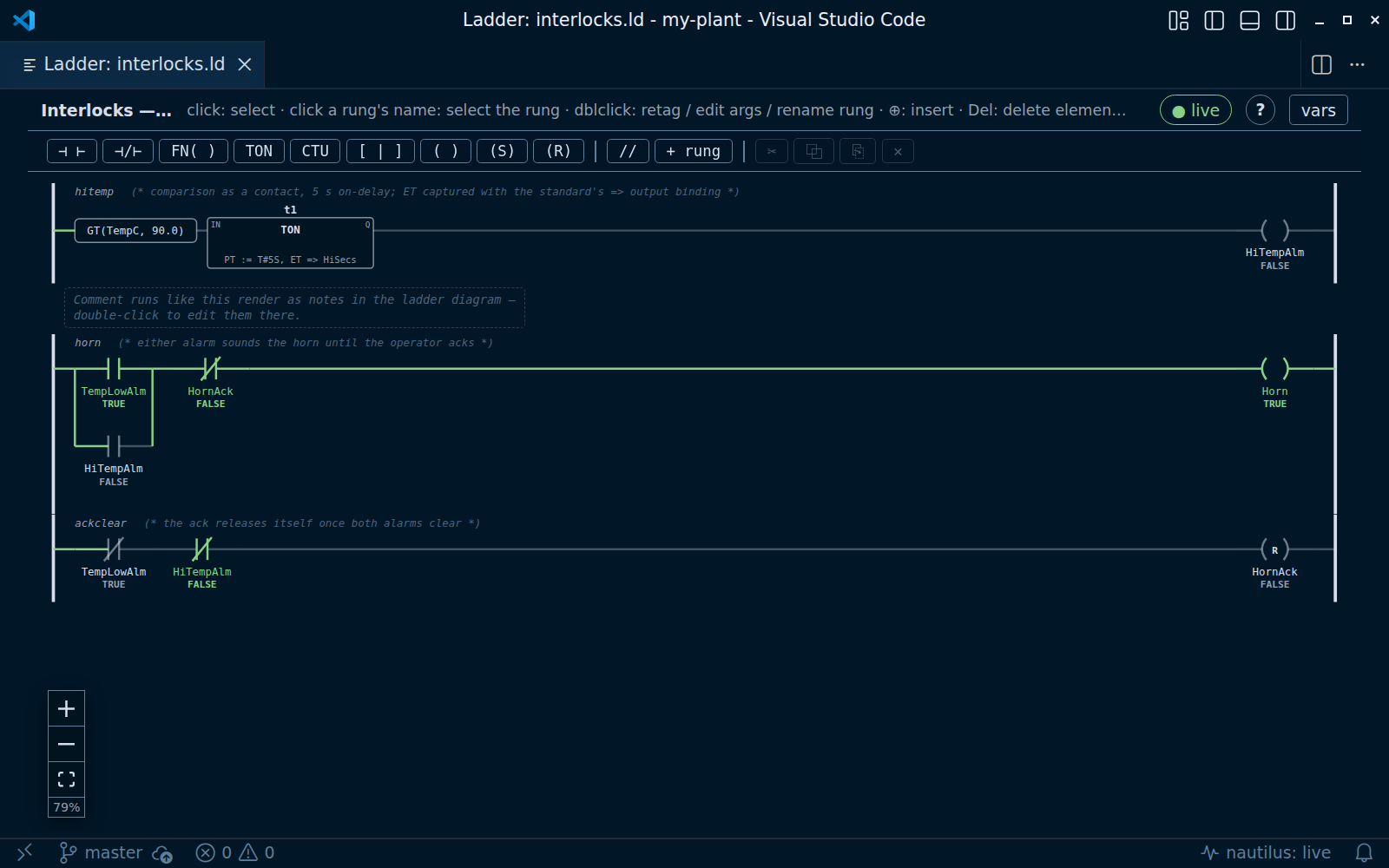
- Ladder: drag instructions from the palette onto a rung, drag elements
between spots and rungs, ⊕ to insert,
N for NO/NC, M for coil mode,
B to branch around the selection, click a rung's name to select or
delete the rung. FB… places any function block — standard or one of
the project's library blocks — under a name you choose; double-click a
block's header to rename the instance. With a controller running, power
flow paints the rung.
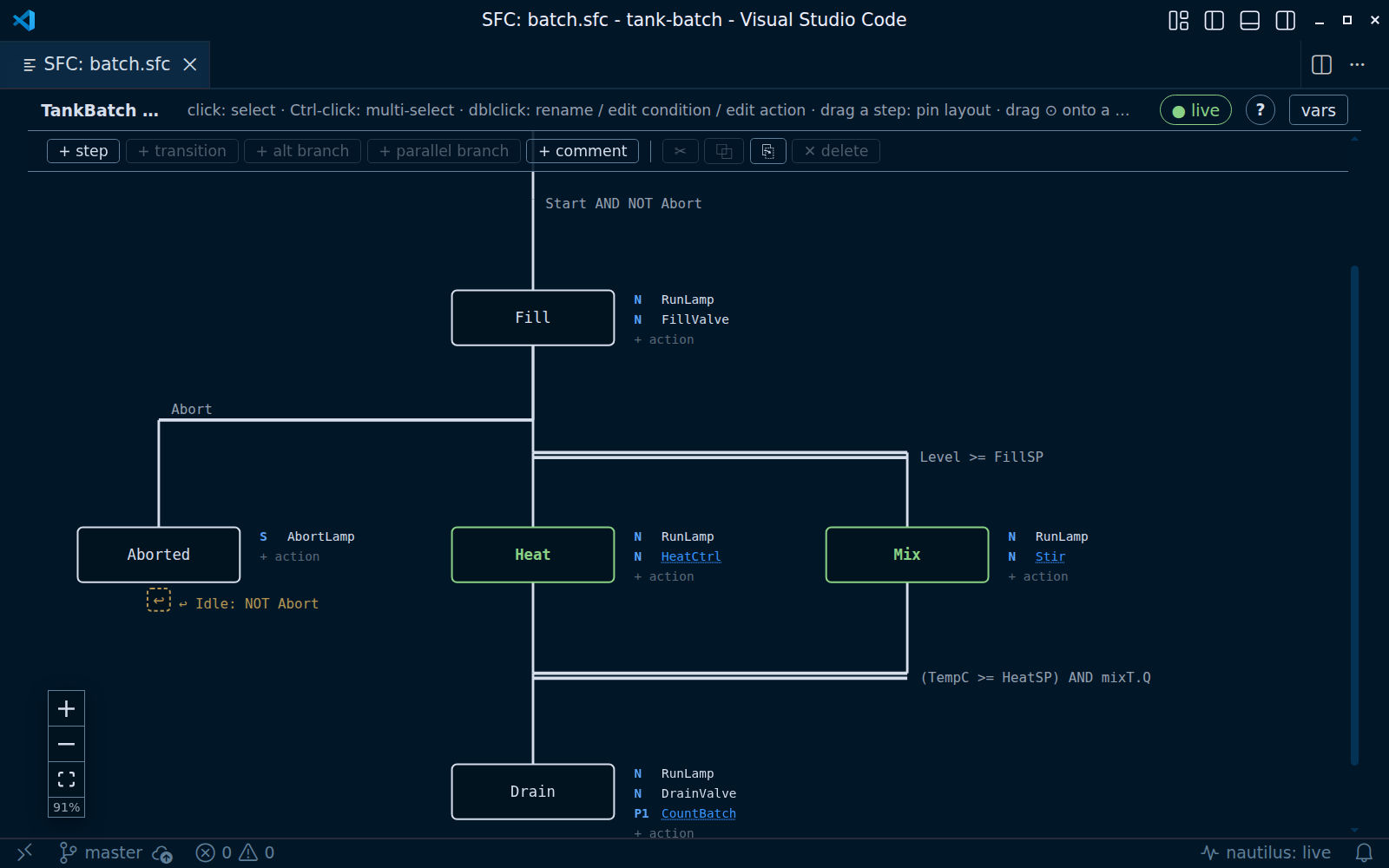
- SFC: steps, transitions, parallel and alternative branches, action
tables and ACTION bodies, all editable in place; drag a step's handle
onto another step to connect them. The active step highlights live.
- In every diagram: copy, cut and paste (into another file of the same
kind too), undo / redo / save with the usual keys, zoom and fit
(Ctrl+wheel, Ctrl+= / Ctrl+- / Ctrl+0), and a ? button that lists
every gesture and key for that editor.
- Cross-reference from the diagram: select a contact, coil or block, an
FBD variable chip, FB instance or pin, or an SFC step or action and press
Shift+F12 (or right-click → Find All References). The References
view lists every read and write of that name across the project and its
declaration in
nautilus.yaml or a tag file.
- Tag descriptions on the elements: a tag's
desc from nautilus.yaml
(or a tag file), or a trailing (* comment *) on its VAR line, shows in
the element's tooltip in all three editors, and under each ladder contact
and coil as a second line, Studio 5000 style. Turn the second line off
with nautilus.diagram.showDescriptions; FBD and SFC keep the
description in the tooltip only, since their elements are packed too
closely for another line.
Visual diff
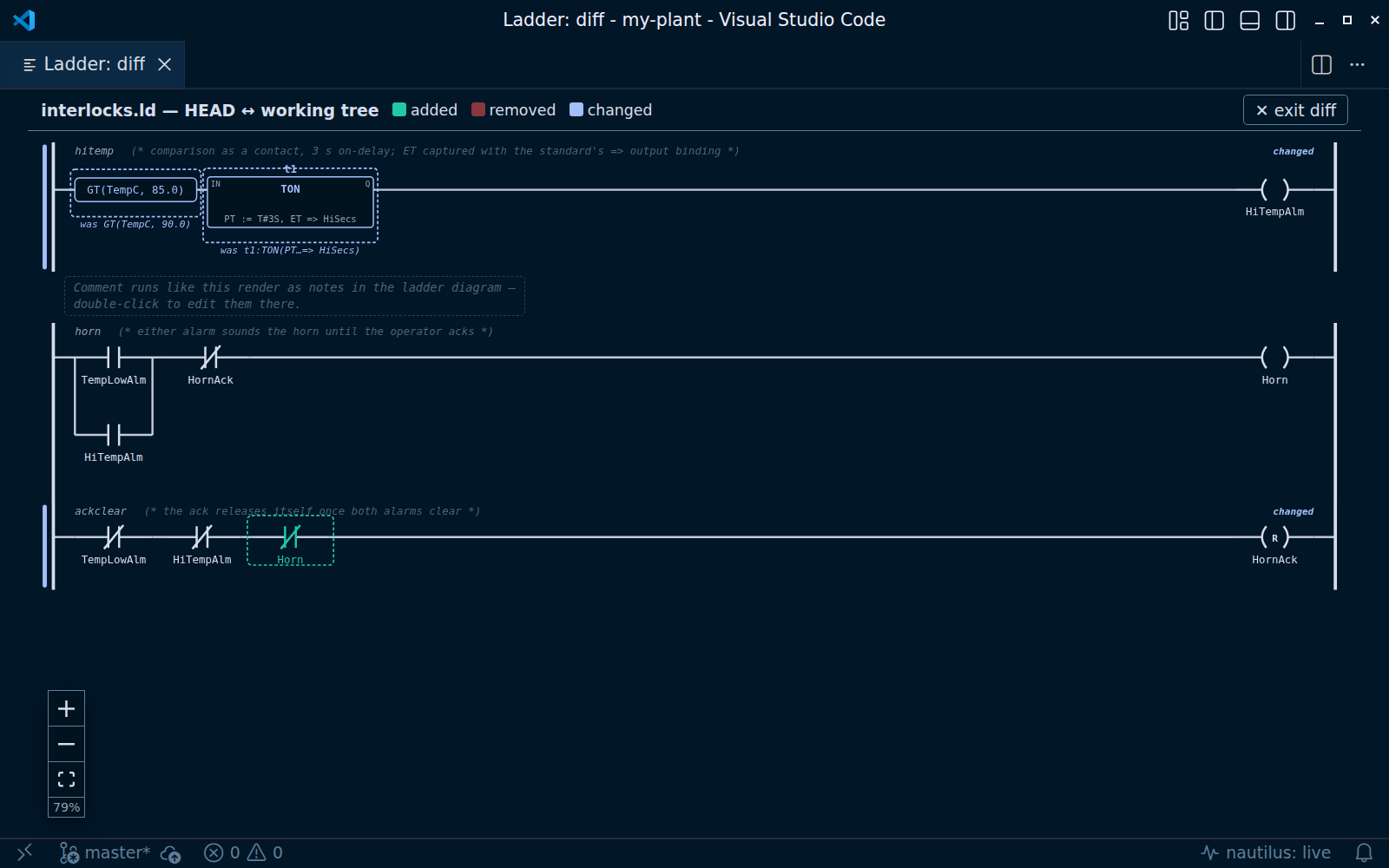
Review a logic change as a diagram, not as text.
- vs git HEAD: the diff button in the diagram editor's title bar
overlays your working copy on the last commit.
- Between git revisions… (under "…"): pick any two commits from the
file's history (renames followed), or one commit and the working tree.
- vs Controller (under "…"): compare against the program a running
controller is executing.
- Added, removed and changed blocks, wires, rungs, steps and transitions are
marked in place; removed elements come back ghosted. Works for FBD,
Ladder, SFC and Rockwell
.L5X.
Live values and online edit
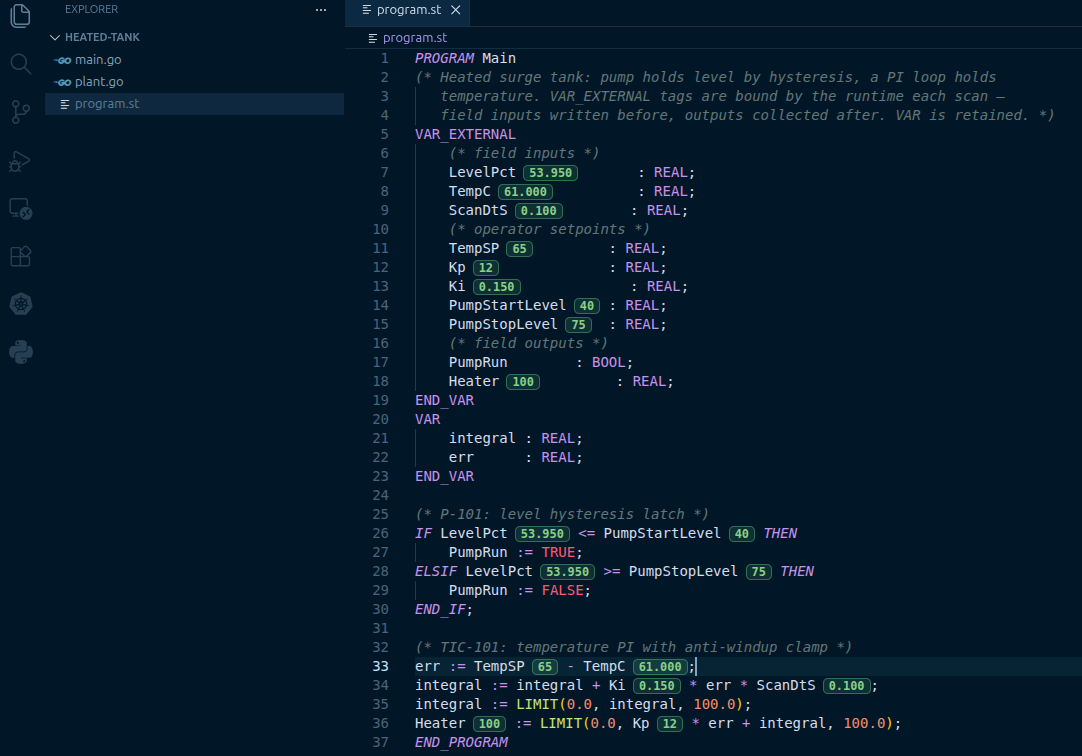
- Inline values: with a controller running, every identifier in your
source gets its current value as a pill, and the diagrams animate. Values
gray out when the stream goes stale. Point at a controller with
nautilus: Connect to Controller… (default
http://localhost:8080).
- Live Values panel (nautilus in the Activity Bar): every tag and
program local with its value; the pencil on a tag sets it.
- Set Live Value…: right-click an identifier to write a new value.
- Force… / Remove Force / Remove All Forces: hold a tag at a value
against the field and the logic until you remove it — the PLC force
table. Forced values show an amber F on the inline pill, in the Live
Values panel (a Forces group first) and on the diagrams, and a status-bar
item reads N forces active until the last one is removed.
- SFC online: right-click a step in a live SFC diagram for Set Active
Step (jump the chart there, once), or a transition for Fire
Transition (take it, once).
- Online edit: Download Program to Controller swaps the running
program without a restart; Diff Program with Controller, Pull
Program from Controller and Rollback Controller Program do what
they say. A status-bar item shows whether the file matches the controller.
- Download and Rollback ask for confirmation, naming the controller URL and
program, before changing what a controller runs
(
nautilus.confirmControllerWrites). For a token-protected controller,
set nautilus.token in workspace settings.
HMI mimic editor
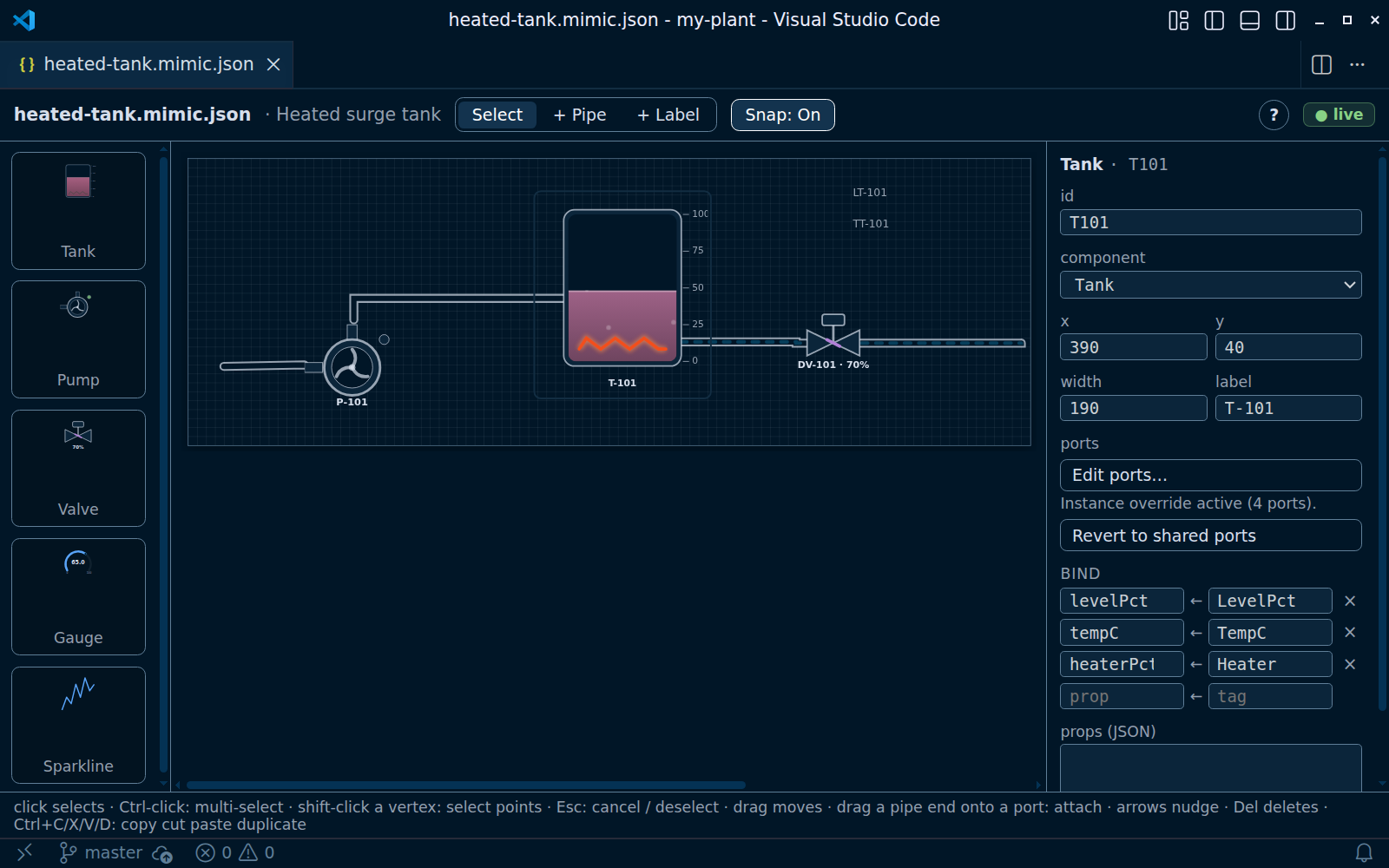
*.mimic.json P&ID documents for the
@joyautomation/nautilus-hmi
<Mimic> component open in a graphical editor. The JSON stays the file you
commit (Open With → Text Editor any time).
- Equipment renders with the real HMI components (Tank, Pump, Valve, Gauge,
Sparkline), and your own
*.svelte components render next to them.
- Place equipment from the palette, draw pipes that snap to ports and follow
the equipment when it moves, and get an orthogonal route suggested around
whatever is in the way.
- Bind props to tags in the props panel; with a controller running, the
canvas animates with the real process.
- Every gesture is one text edit, so undo is text undo. Press
p to edit an
equipment's ports; Nautilus: Edit Component Ports… does the same for
the built-ins.
Testing
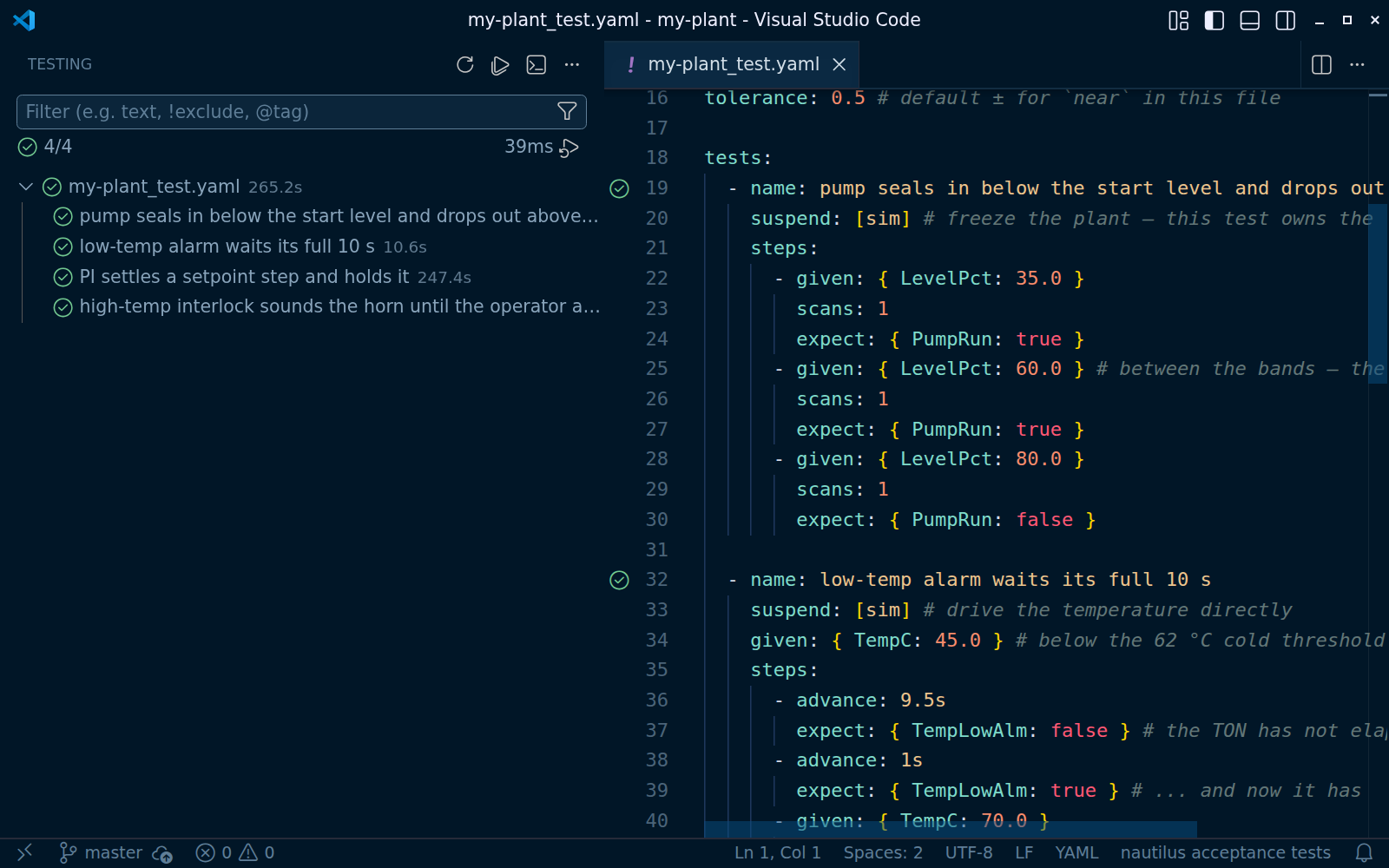
*_test.yaml acceptance suites appear in VS Code's Testing view,
run through naut test.- Tests run on a virtual clock, so a ten-second alarm delay is asserted
exactly, in milliseconds, without waiting.
- Run one test from the gutter; a failure shows the tag value that broke
(
PumpRun = false, want true) inline on the failing line of expect:;
the peek adds the step, the virtual time and the traced tags.
nautilus.yaml (including drivers:), tag, alarm and test files get
completion and validation from bundled JSON schemas, in any YAML editor
that honors schema associations (for example Red Hat's YAML extension).
Rockwell L5X
- A Logix
.L5X export opens as ladder: Open as Diagram Editor, or
nautilus: Open Ladder Diagram Preview. No Rockwell software, licence
or Windows; the file is parsed, not executed.
- The diagram is read-only (the controller is the source of truth), marked
with a read-only · Logix export pill.
- Diff vs HEAD and between git revisions work on
.L5X, so a changed rung
reads as a changed rung rather than a wall of XML.
Language intelligence
The extension runs naut lsp, the real nautilus compiler as a language
server.
Diagnostics as you type in .st, .fbd, .ld and .sfc: parse
errors, undeclared identifiers, unknown FB fields and type mismatches, on
the exact line (on the rung or step in a diagram).
Go to definition, hover (type, var section, a tag's unit and
description) and completion (in-scope variables, keywords, types, and
the compiler's own function and function-block registries).
Signature help while you type a call: the function's parameters with
their types (LIMIT(MN, IN, MX)), or a function block's input pins and,
after =>, its outputs, with the one you are on highlighted — by
position after each ,, or by name once you write PT :=.
Find all references (Shift+F12, or Go to References): a tag in
every program that binds it — .st, and .fbd/.ld/.sfc on the
diagram file's own lines — and where nautilus.yaml or a tag file names
it; a local only inside its POU; t1.Q only as that instance's Q.
Outline, breadcrumbs and Go to Symbol (Ctrl+Shift+O) in .st,
.fbd, .ld and .sfc: each POU and TYPE, its VAR sections and their
declarations (name : type), STRUCT fields; then the FBD netlist
statements, the ladder rungs (name and comment), or the SFC steps
(the initial one marked), transitions (From → To) and actions. It keeps
working while a line is half typed.
Syntax highlighting works with no CLI at all.
Requirements
- VS Code 1.82 or newer, on Linux, macOS or Windows.
- The
naut CLI, 0.13.0 or newer, for diagnostics, the diagram
editors, and online edits (which ask naut compose for the program's
composition). nautilus: Install or Update the naut CLI installs it; a
naut on your PATH (for example from go install github.com/joyautomation/nautilus/cmd/naut@latest) is used first. The
extension warns when the one it finds is older than it needs.
- A running nautilus controller (
naut run) for live values, online edit
and the controller diff.
Settings
| Setting |
Default |
Description |
nautilus.cliPath |
naut |
The naut CLI. A bare name is looked up on PATH, then the copy the install command manages, then $GOBIN, $GOPATH/bin, ~/go/bin, ~/.local/bin, /usr/local/bin, /opt/homebrew/bin (%LOCALAPPDATA%\nautilus on Windows). A full path skips the search. |
nautilus.runtimeUrl |
http://localhost:8080 |
Base URL of the controller for live values, online edit and the controller diff. |
nautilus.liveValues.enabled |
true |
Show live values inline and on diagrams when a controller is reachable. |
nautilus.token |
"" |
Bearer token for writes to a controller started with NAUTILUS_TOKEN. Set it in workspace settings. |
nautilus.confirmControllerWrites |
true |
Confirm before Download or Rollback changes what a controller runs. Leave it on for anything that might be live. |
nautilus.logix.resetValuesOnDownload |
false |
Download Project to Logix Controller keeps the controller's tag values where the tag is unchanged; turn this on to start every tag at the project's value (naut logix deploy --download --reset-values). |
nautilus.mimic.snapToGrid |
true |
Snap dragged equipment, labels and pipe points to the grid in the mimic editor. |
Commands
The most used; all are under nautilus: in the Command Palette.
| Command |
What it does |
| Install or Update the naut CLI |
Download and verify the latest naut release |
| Create Project… |
Scaffold a project with naut new |
| Get Started |
Open the walkthrough |
| Open as Diagram Editor / Show Source |
Switch a file between text and diagram |
| Open FBD / Ladder / SFC Diagram Preview |
Diagram beside the text |
| Diff … Diagram (vs git HEAD / between git revisions… / vs Controller) |
Visual diff |
| Connect to Controller… |
Set nautilus.runtimeUrl for this workspace |
| Set Live Value… |
Write a tag on the controller |
| Force… / Remove Force / Remove All Forces / Show Forces |
Hold a tag at a value until removed; list and clear forces |
| Set Active Step / Fire Transition |
Jump a running SFC chart to a step, or take one transition, once |
| Download Program to Controller |
Online edit |
| Diff / Pull / Rollback Program |
Compare with, bring back, or undo on the controller |
| Show CLI Info |
Which naut is in use, and its version |
Troubleshooting
- "Couldn't find the nautilus CLI." Run Install or Update the naut
CLI. VS Code started from a desktop launcher or the macOS Dock doesn't
see a PATH set in your shell profile; the extension searches the usual
install directories, and the nautilus output channel lists every one
it tried. Show CLI Info says which
naut it picked.
- Flatpak VS Code. Its sandbox can't run programs installed on the
host, so a
naut on your PATH is invisible. The install command puts a
copy inside the sandbox; or use VS Code from a .deb, .rpm or tarball.
- Closing the Show Source tab asks to save. A diagram editor and the
text editor share one document. Closing a dirty text tab prompts Save /
Don't Save, and Don't Save discards unsaved diagram edits too, not
just the text tab's — so save first (Ctrl+S) or close with Cancel.
This is VS Code behaviour for custom text editors, not something the
extension can opt out of.
- No live values / "no controller at …". Check that
naut run is
running and that its URL matches nautilus.runtimeUrl. The status-bar
item shows the connection state and toggles live values.
- The controller URL setting seems ignored. A scaffolded project's
.vscode/settings.json sets nautilus.runtimeUrl to
http://localhost:8080, and workspace settings win over user settings.
Use Connect to Controller… (it writes the workspace setting) or edit
that file.
.st files have someone else's highlighting and no diagnostics.
Another extension claimed .st. Add "files.associations": { "*.st": "iec-st" } (scaffolded projects already have it).- Commands appear but do nothing (local VSIX). A VSIX built with
vsce package --no-dependencies can't load its language client. Build
without that flag; see CONTRIBUTING.md.
Release channels
- Stable (even minor versions,
0.10.x, 0.12.x, …): what you get by
default. Each stable release is a pre-release that ran for a few days
without a follow-up fix.
- Pre-release (odd minor versions,
0.11.x, …): built from main on
every version bump. Choose Switch to Pre-Release Version on the
extension page, or code --install-extension joyauto.vscode-iec --pre-release.
The CHANGELOG
lists every change on both channels.
Links
Licensed under the Apache License 2.0.
| |

