ODD Ledger
If you keep your work in Markdown task documents inside the repository, this puts their
state in the editor: every feature, every task, the evidence that closed each one, and the
line that says what to do next. It reads those documents and the git history of them, and
nothing else.
It is a reader. It never writes to your documents, never commits, and never runs anything.
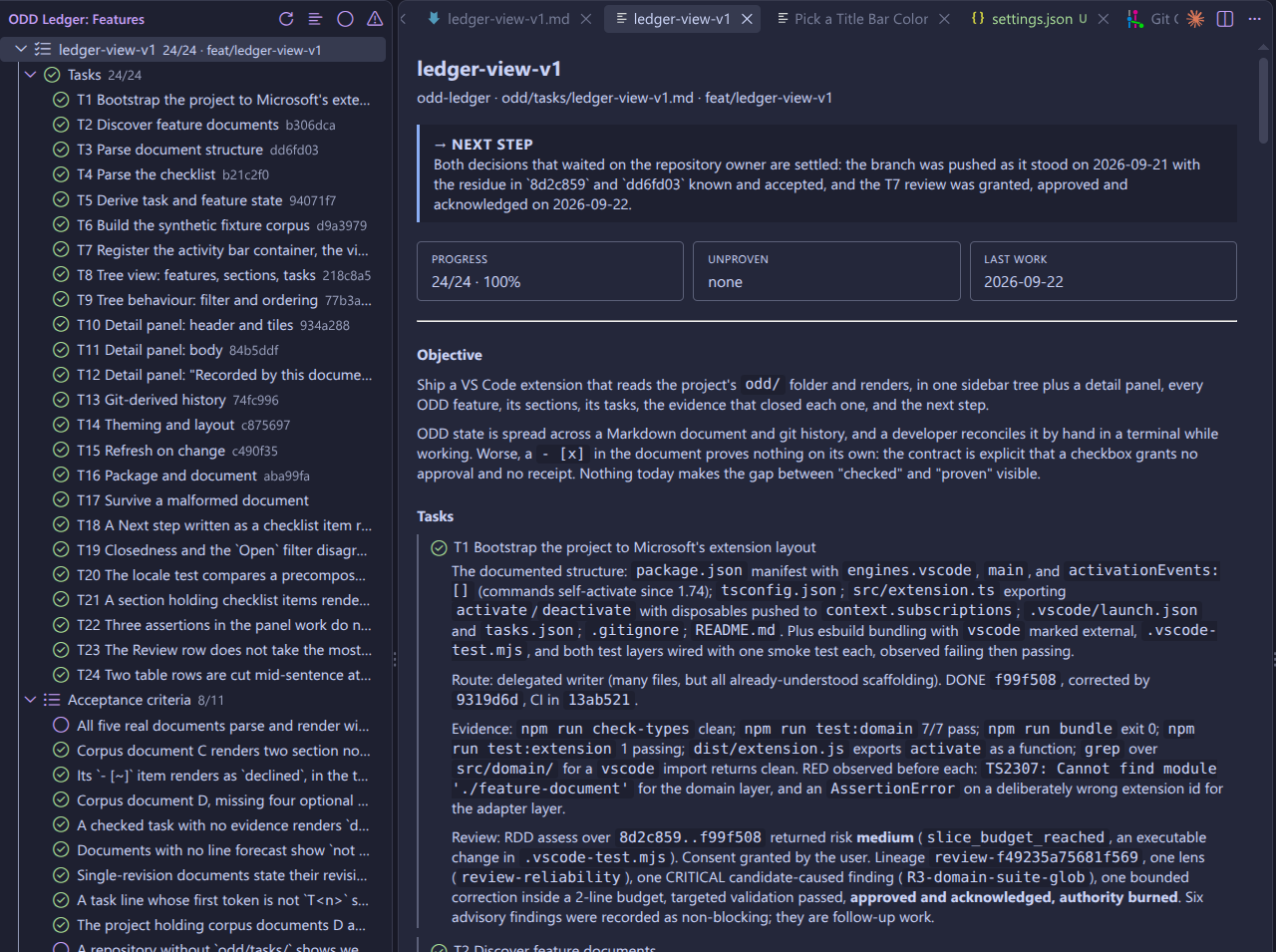
The tree on the left, one feature with its tasks and the commit each one names. The panel
on the right: what to do next, the progress tiles, the objective, and every task with its
evidence. This document's tasks are all closed and proven, so nothing here is amber.
The idea that makes it different
A ticked checkbox proves nothing. Anyone can type [x].
So a task closed while recording neither evidence nor a commit is shown as done but
unproven: counted honestly in the total, marked in amber, and named as what it is. A
section or a feature turns green only when everything under it is closed and proven. One
unproven task withholds the green from its whole group, because going green there would
repeat the very claim the document failed to back up.
Evidence can be written under the checkbox, in a progress table with one row per task
(first column the task ID, under a Progress or Evidence heading), or as a progress
list under the same heading, one bullet per task starting with its ID
(- T0.1 done: commit \a9526b1``; a bullet or table row naming several tasks, such as
- T0.1/T0.2 done: ..., counts for each of them). All three are read equally, and all can appear in one
document. A table row or list entry counts only when it actually says something: a row of
empty cells, dashes or a bare pending proves nothing (a Route cell alone does not
count), a bullet such as - T0.1 done is only an echo of the tick, and an entry for an
open task never changes its state. The panel names where each piece of evidence came from,
and shows any row or bullet that matches no task, or more than one, instead of dropping it.
The same rule governs silence. A field your document does not record is stated as not
recorded, never drawn as a zero and never left blank, because a blank and a zero both
read as answers when the truth is that nobody said.
What you get
| Where |
What it shows |
| Activity-bar badge |
Distinct task documents changed automatically while you could not see the Features view (window unfocused, view hidden, or both); clears once the window is focused and the view is visible, and uses the active VS Code theme |
| Sidebar tree |
Each feature, its sections and its tasks. A state icon, the identifier exactly as written, and the commit the evidence names |
| Filters |
All, Open, Unproven, from the view's toolbar |
| Sort |
Created (oldest feature first, by its first commit — the default), Status (open first, closed last), Name (alphabetical), from the view's toolbar. The choice is remembered |
| Detail panel |
The next step first, then progress, unproven and last-work tiles, the objective, every task with its evidence, the fields the document records, and the history |
| History |
Reconstructed from git: a sentence with the revision count and date range, and a chart once there are enough revisions to be worth plotting |
In a multi-root workspace (two or more folders), the tree groups features by project: one node
per workspace folder, labelled with the folder's name, showing the done/total of its features
(plus the unproven count) and holding only that folder's features. Filter and sort apply inside
each project, and a folder with nothing to show under the active filter is left out. A workspace
with a single folder is unchanged: features sit at the root with no project node.
Click a feature to open the panel. Click a task to open the panel focused on that task and
jump to its line in the document. Hover anything to read it in full.
Quick path
- Install the extension.
- Open a project that has feature documents at
odd/tasks/*.md.
- Click the ODD Ledger icon in the activity bar.
There is nothing to configure. The extension contributes no settings.
What it deliberately does not do
- Never writes to your documents. Not a checkbox, not a normalisation, not a commit.
- Never runs your workflow. It reports what happened; it does not make it happen.
- Reads nothing outside
odd/tasks/*.md and the git history of those files.
- Enforces nothing. A document that ignores every convention still renders; the
parser tolerates variety rather than demanding a template.
Commands
| Command |
What it does |
| ODD Ledger: Refresh |
Re-reads the documents now. The view also refreshes on its own when they change |
| ODD Ledger: Open Feature |
Opens the detail panel for a feature |
| ODD Ledger: Show All |
Removes the filter |
| ODD Ledger: Show Open |
Shows only what is not yet claimed as done |
| ODD Ledger: Show Unproven |
Shows only tasks ticked without evidence |
| ODD Ledger: Sort By… |
Picks the tree's sort order: Created, Status or Name |
Limits worth knowing
- The history region needs git. A project without it, or a document not yet committed,
says history is unavailable rather than guessing.
Created sort needs git too, for the same first-commit date. A document git cannot date
(no repository, or not yet committed) sorts after every dated one, by name; it is checked
again only after a manual refresh or a watched change, not on every tree redraw.- History reads the fifty most recent revisions, and says so when it truncates.
- A progress table is read only under a heading that starts with
progress or evidence,
and only when its first column header is Task, ID, Task ID or Tarea. Any other
table, such as scope or risks, is never treated as proof.
- A progress list is read under the same headings: each top-level bullet (or numbered item)
is one entry, with its indented and nested lines. It links to every task it names in its
leading ID group (
T1.3/T1.4 + follow-ups, T1, T2, T1 and T2, joined by , / & +
and y; the group ends at the first word that is not a task ID) and to a task ID that
starts a clause after a , or ; (T1.1 \22deb08` (RED), T1.2 `7a87dcf` (GREEN)). A table row does the same with its first cell. An ID mentioned mid-sentence never links, and a range (T0.1–T0.6b, T1 - T3, T1..T3) is never expanded, so a bullet that starts with a range is shown as a note and proves nothing. Every linked task receives the whole entry as its evidence, listed once per task; a duplicated task ID stays ambiguous while the other IDs of the entry still link. A bullet proves a checked task only when, after the ID and one status word (done, pending, wip, ...), it still says something: - T1 done.or- T1 done! proves nothing. Checkbox items in that section are tasks, not evidence, and are not counted in the item numbers of the source labels. A thematic break (---, * * *`) is
never an entry and ends the one above it.
- Markdown in your evidence is rendered, but images are not loaded and appear as a stray
marker. Nothing else is affected.
- Creation-date lookups never run more than 4 at once. A project with many undated
features queues the rest rather than spawning one git process per document at once;
every queued one still resolves once a slot frees up.
About what it reads
Everything on screen comes from files in a repository you may merely have cloned, so it is
treated as data and never as instruction. The panel runs with scripts disabled under a
policy that denies everything except one stylesheet and the icon font. Markdown is rendered
with raw HTML escaped, images off, and links restricted to http, https and mailto.
Hovers are untrusted, so a document cannot hide a command behind one.
Reading history and creation dates means running git against the workspace's own
repository, using that repository's own local config — a repository you may not have chosen
to trust. Every repo-local config key found able to make git run an arbitrary program
(including via a bogus commit signature and a repo-local gpg.program) is neutralised on
every invocation, and the extension declares itself unsupported in Restricted Mode
(untrusted workspaces), so none of this runs at all until you trust the workspace.
Licence
ODD Ledger is released under the MIT licence, which permits using, copying, modifying and
redistributing it, including for commercial purposes, as long as the copyright notice is
kept. See LICENSE for the full text.
Requires VS Code 1.85 or later.
| |

