Skip to content
| Marketplace
Sign in
Visual Studio Code>Programming Languages>AICode: Controlled AI Coding WorkflowNew to Visual Studio Code? Get it now.
AICode: Controlled AI Coding Workflow

AICode: Controlled AI Coding Workflow

Joel Abenhaim

|
11 installs
| (0) | Free
Generates clean code engineered for long-term maintainability under human review.
Installation
Launch VS Code Quick Open (Ctrl+P), paste the following command, and press enter.
Copied to clipboard
More Info

🤖 What is AICode?

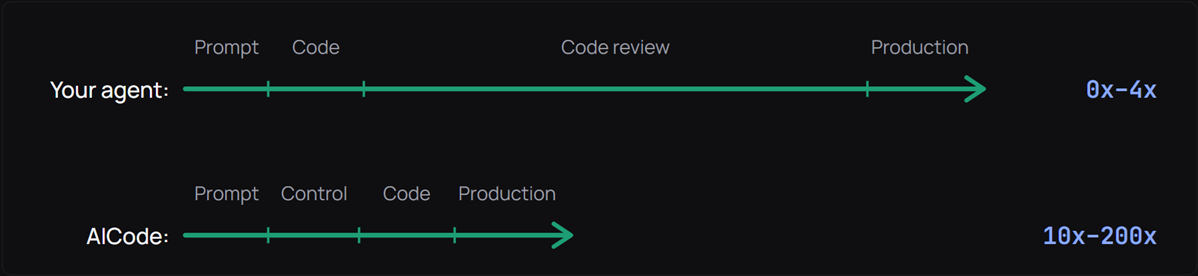
AICode is not an AI coding agent. It is a controlled AI development workflow.

AICode is a new kind of AI coding assistant built on ChatGPT, designed to generate clean code engineered for long-term maintainability through structured, human-validated decisions.

Instead of autonomous code generation, AICode introduces a review-first methodology focused on architecture and code quality.

YouTube introduction video: AI coding agents vs AICode.

Use it to:

  • explore and understand your codebase,
  • debug, write, or modify code with ChatGPT,
  • guide complex changes through structured specifications that can be reviewed before any line of code is touched.

Use case: Create, maintain, audit, and explain large production-grade enterprise applications.


📐 AICode's methodology

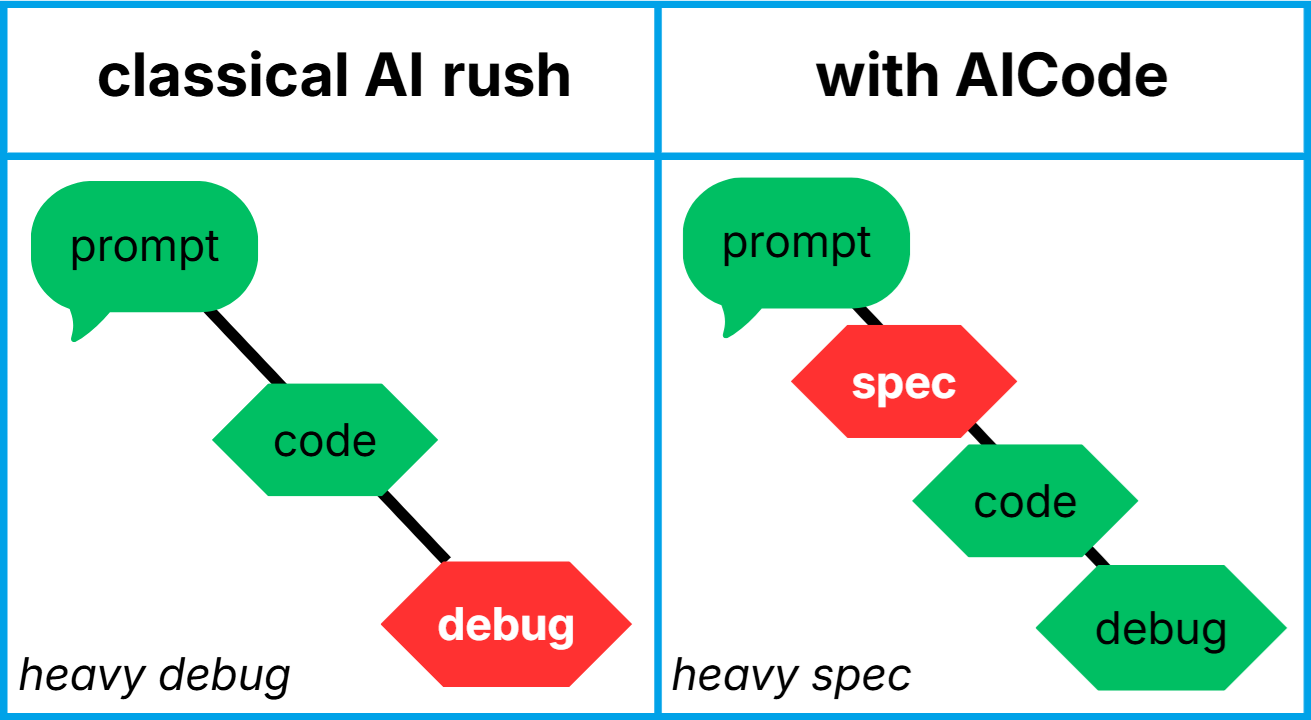
For the most complex tasks, to give you maximum control and ensure the best architecture and code quality, AICode uses a structured methodology:

Ideate → Specify → Refine → Code → Verify

1. 👉 Ideate: Explain your need to the AI assistant and negotiate until you reach an agreement.

methodology ideate user

methodology ideate assistant

2. 👉 Specify: The AI generates a detailed specification.

methodology ideate specify

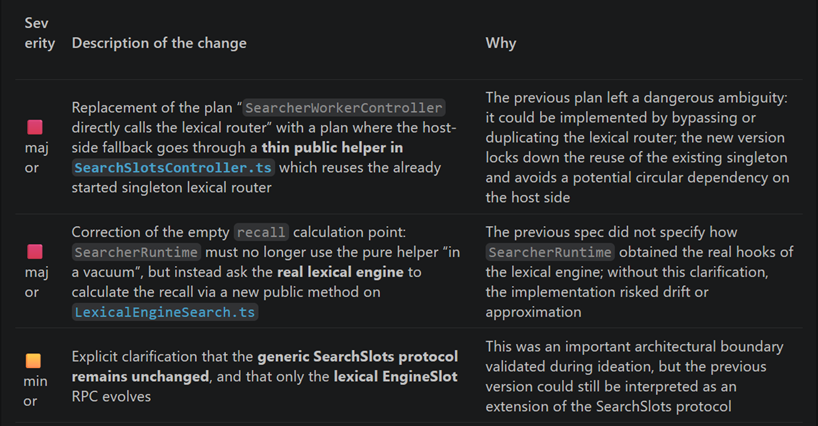
3. 👉 Refine: Instruct the AI to double-check the specification several times before the coding phase, to reduce design mistakes, catch edge cases early, and lower the overall bug rate.

methodology ideate refine

4. 👉 Code: The AI generates the code in a virtual workspace. You stay in control of your files.

methodology ideate code

5. 👉 Verify: After the coding phase, instruct the AI to audit the produced code versus the specification.

methodology ideate verify


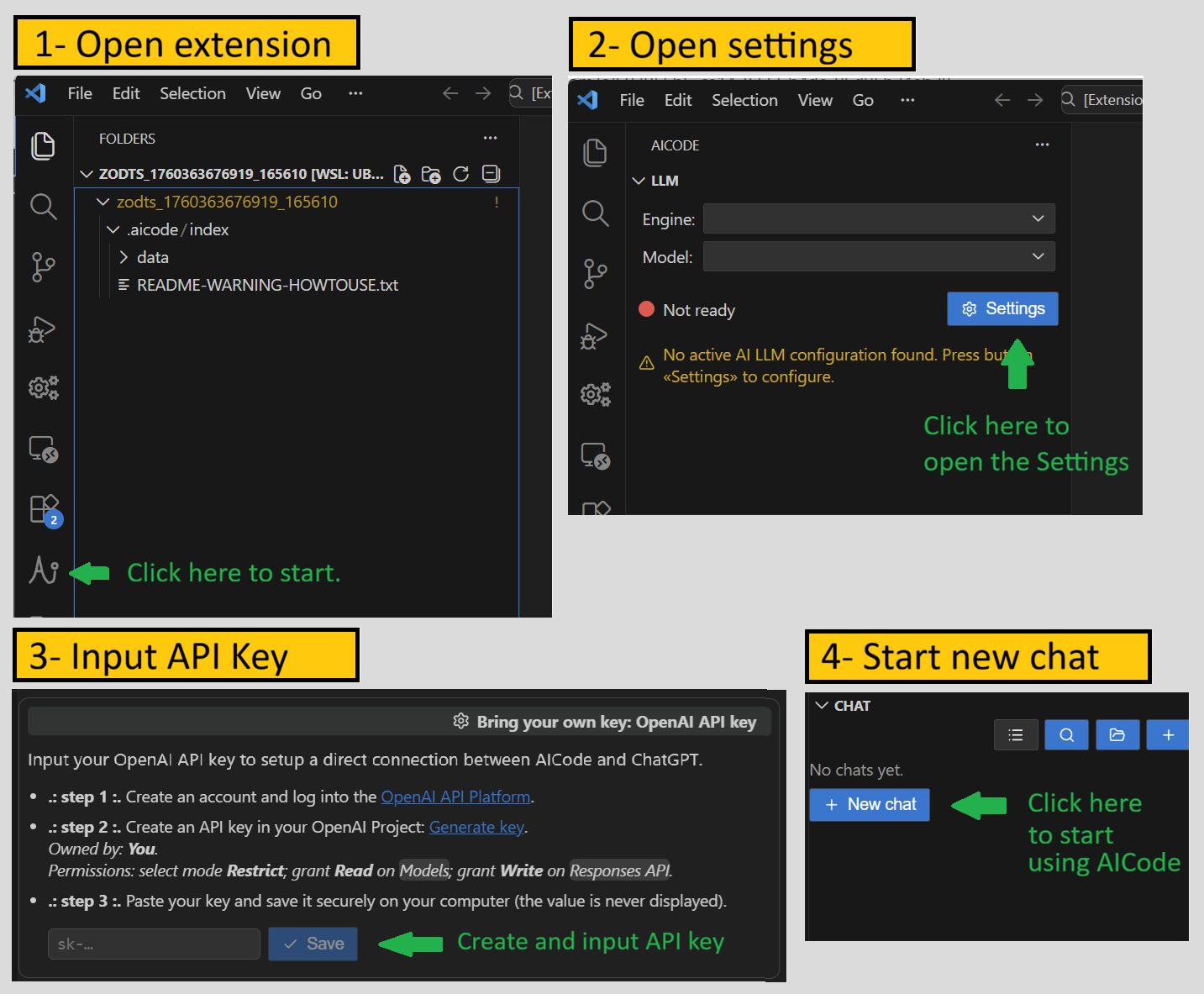
🚀 Quick setup

setup


🎯 Why choose AICode?

AICode is a review-first AI code assistant: no agents, no auto-edits. It generates detailed specifications and reviewable patches. You keep the architecture and assurance quality under the supervision of an expert developer.

It is built for developers who care about long-term quality and maintainance. You still get the assistance of an AI, but it stays under your strict control.

AI agents silently ruin your architecture

Illustration: Ask an AI agent to find a shorter path from A to B, and this is what you might get:

Schema: AI agent VS human-reviewed AI coding assistant chatbot reviewed by human in the loop

Proven effectiveness

AICode’s methodology was used to build AICode itself from scratch, in only 7 months, by a single developer with zero prior knowledge of VS Code extension development or AI protocols, using "vibe coding" for about 95% of the work. However, “vibe coding” with AICode is not about shipping a quick prototype that becomes unmaintainable. If you follow the methodology and its core principles, you can produce high-quality code through a tightly intertwined collaboration between the developer and the AI.

Core principles

AICode is designed around two core principles:

  1. AICode is built for developers who want the speed and knowledge of modern LLMs without giving up control.

    LLMs are often fast and impressive at analyzing code and generating solutions, but they also tend to:

    • skip factual analysis, jump to conclusions, and sound confident even when uncertainty is high,
    • hallucinate APIs, files, or behavior when context is missing, and propose "fixes" that hide the symptom instead of addressing the root cause,
    • introduce regressions, duplicated logic, inconsistent patterns, and delete or rewrite valuable code and comments.

    AICode addresses these failure modes with a human-controlled, review-first workflow:

    • Review the plan before coding: every non-trivial request can be turned into a structured specification (context, objectives, design choices, per-file plan, exact file paths, risks) that you review and refine before any code is proposed.
    • Review the code after coding: changes are delivered as reviewable patches that you inspect and apply manually in a VS Code diff view.
    • No silent actions: it never edits your repo or runs commands behind your back; every step is agreed on with you.
    • Honest-by-design assistant: when context is missing or confidence is low, AICode is instructed to say so clearly and ask for the missing evidence instead of bluffing.
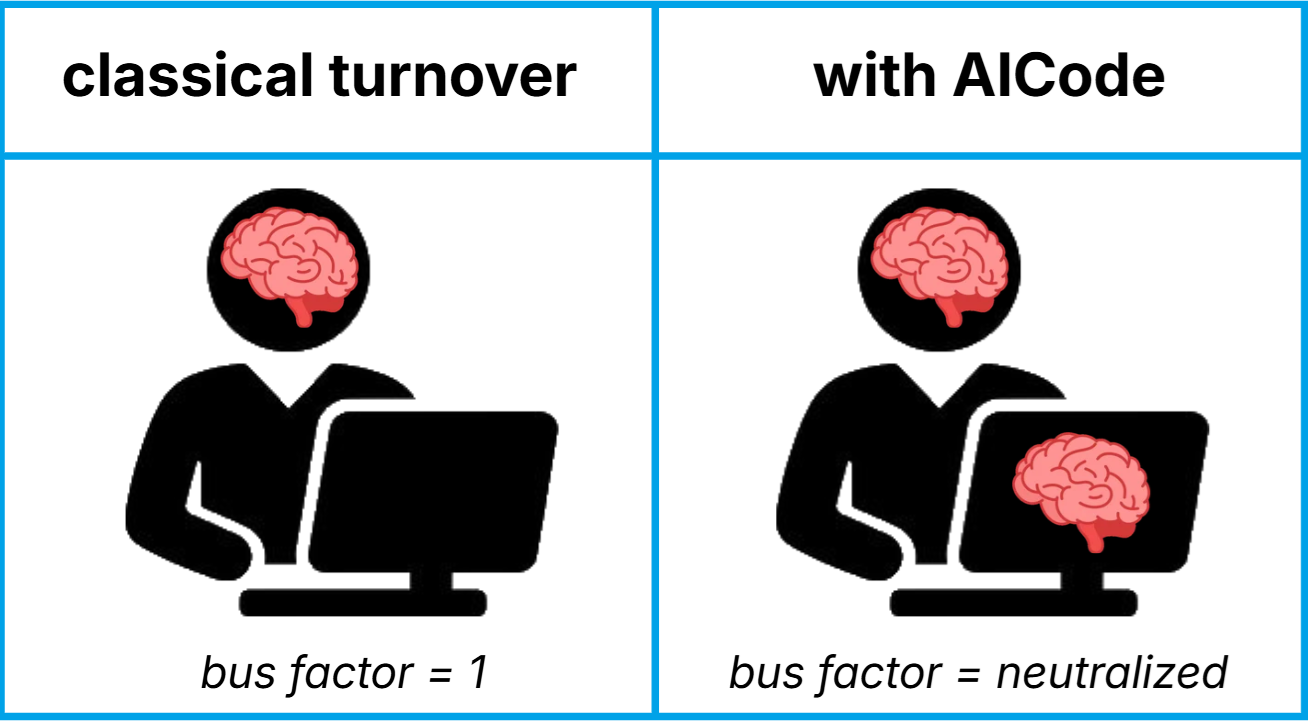
  2. AICode is not an agent but a chatbot. It is designed for ongoing conversations about your codebase. Start with an opening question: AICode searches your workspace and responds based on the real source code. Then you can drill down into specific parts of the project and validate hypotheses against the actual files, in the form of a conversation with someone who knows the codebase. This is a way to reduce the impact of turnover: your top engineer for module X has left? Ask AICode to explain the program to your new hire!

Bottom line: If you want AI speed and knowledge with fewer hallucinations, regressions, bad patterns, or overconfident guessing, and if you want to ask targeted questions and have relevant conversations about the codebase, AICode is the tool you are looking for.


🔎 A real story: AI proposed a "fix" that deleted my data

One day I had a subtle bug: the app couldn’t load an index file living under WSL. I asked an AI for help. At first it answered with vague explanations I didn’t really understand. After pushing it to be explicit, I eventually realized what it was suggesting: "fix" the issue by deleting the index file whenever loading it fails.

I challenged it: "So your plan is: we spend an hour indexing data, save a persistent index, and if we can’t reload it later, we just delete it and start over? That’s like Word saving a document… and then opening an empty file next time. That’s not a fix, that’s a destructive workaround." After more pressure, the bot finally admitted that yes, this was its plan, and backed off.

Now imagine the same AI as an autonomous coding agent with write access to the repo. It could have:

  • implemented the "fix" that deletes the index on load failure,
  • written a "regression" test to assert that behavior,
  • run the tests, lint, and type checks,
  • opened a clean PR named fix: wsl index load error,
  • and proudly told me: "All good, tests are green — ready to merge."

This real story is one example among many, and bad AI decisions happen over and over. That’s exactly why AICode is built around human-in-the-loop control, structured specifications, and manual patch review. The AI can propose ideas, but it never silently edits your codebase or ships a destructive "fix" behind your back.


✨ AICode Feature Highlights

🖼️ User friendly

AICode doesn’t require you to type commands. Everything it can do is available through its intuitive graphical user interface.

💬 Chat with your own codebase

Ask architecture, refactoring, and debugging questions grounded in your real project, not generic boilerplate.

AICode indexes your workspace using a five-dimensional index: a project map, a lexical index, a vector embedding index, an AST-based index, and access to Git history. This makes it extremely smart, lets it pull the right files and code regions to support its answers, and helps you navigate a large codebase fast.

Because the chat is stateful, and because the context management is optimized, you can run a real investigation: ask follow-ups, explore alternative hypotheses, call out contradictions, and have AICode re-check the source to confirm or invalidate assumptions. In practice, this can turn "a week of digging" into "getting oriented in minutes".

This also helps resist turnover: when the person who "knows module X" is gone, a new hire can ask AICode to explain how the module works, where the critical code lives, and what to look at next, backed by the actual repository.

📝 Automatic structured specifications

AICode follows the ISC methodology for structured, human-controlled AI work: Ideate → Specify → Code. Instead of jumping straight from a prompt to implementation, the assistant organizes the request into three phases. The extra Specify step keeps a human in the loop and significantly raises quality: the AI brings technical knowledge and speed, while the developer brings project knowledge and judgment.

Turn any user request into a self-contained specification document: context, objectives, chosen design, per-file plan, exact file paths, and an estimated regression risk.

Each specification can be iteratively refined before coding and verified after coding. For complex work, this multi-pass workflow dramatically improves quality by reducing design mistakes, catching edge cases earlier, and lowering the overall bug rate.

🐞 AI-assisted debugger

AICode is instructed out-of-the-box with several debugging workflows such as LLM-DEBUG-2: guided debugging with instrumentation or LLM-DEBUG-4: spotting regression cause through Git history. These workflows explore hypotheses and execution paths, audit regressions and runtime logs to help you track down the real root cause of a bug.

👀 Code reviews

AICode can perform code reviews of any PR, remote or local Git branch, because it can access your Git repository, but also though MCP connectors: Github, Gitlab, JIRA, etc.

💗 Honest-by-design AI assistant

AICode is configured with strict instructions never to bluff, hide uncertainty, or pretend it has done something it hasn’t. When it misreads your code, lacks information, or isn’t confident about a solution, it says so clearly and asks for your guidance instead of improvising. No fake "I already fixed it, trust me" or "go ahead, it’s safe, nothing can break" moments that blow up your project later. AICode is designed to be transparent, to acknowledge its limits, and to work with you to reach a reliable result.

On top of that, AICode is transparent about its reasoning: it lets you see the available "reasoning" trace, as well as all the tool calls behind each answer, including the files loaded, index searches and results, Git history lookups, MCP calls, and web searches and URLs. It helps you know what the assistant had access to, so you can retrace how conclusions were reached, catch flawed assumptions early, guide the model, and learn more from its analysis than from the final answer alone.

📋 Built-in prompt generator

Writing a good prompt that respects every constraint is hard. From each specification, the UI offers three actions: Refine, Code, Verify. Each action builds a rich XML-like clipboard prompt, already tuned with advanced prompt-engineering patterns. You just paste it back into the chat, and the assistant knows exactly what to do, under which constraints.

🛡️ Safe file-by-file patch workflow

Patches and full-file proposals appear as code frames with headers, actions, and diffs. You open a VS Code diff, tweak the code if needed, then accept or discard the changes. No automatic commits, no hidden background writes, no "surprise" modifications.

🧩 MCP integration

You can connect any kind of MCP to AICode:

  • Token based cloud authentication
  • OAuth cloud authentication
  • stdio local setup

🔑 Bring your own key (BYOK) for OpenAI ChatGPT

Connect VS Code directly to the OpenAI ChatGPT API using your own account. AICode does not use any intermediate server between your computer and OpenAI’s servers. You are billed directly by OpenAI at the standard public prices and you retain ownership of your inputs and own the outputs, under OpenAI’s terms.

🔒 Offline-first secure & private design

AICode does not upload your whole codebase contents to the cloud, because it runs primarily on your machine, connects directly to the OpenAI API servers, and sends only selected source code extracts:

  • project files are indexed locally in a .aicode/index/ folder inside your workspace, and only context-relevant excerpts are sent to the API cloud server,
  • chat history is stored locally in a .aicode/chat/ folder inside your workspace, and only parts of the active conversations are sent to the API cloud server,
  • the AI queries are minimal, and sent directly to OpenAI,
  • you will get billed directly by OpenAI.
╔═══════════════╗  ---file index--->  ╔═════════╗  --prompt + paths + snippets-->  ╔════════╗
║ Your computer ║                     ║ VS Code ║                                  ║ OpenAI ║
╚═══════════════╝  <--chat history--  ╚═════════╝  <---------AI response---------  ╚════════╝
      ↑                                                                                 │
      └─────────────────────────── direct billing ──────────────────────────────────────┘

🧪 Experimental local inference

AICode also includes experimental support for local LLMs (llama.cpp and chatgpt-oss).

  • This is a research feature meant for advanced users.
  • It is currently optimized for NVIDIA GPUs and WSL; performance and stability may vary.
  • Model downloads and engine setup are managed from the "Engine: Local" tab in the AI settings panel.

Local inference is ideal if you want to experiment without any OpenAI key, or if you need to keep all prompts and tokens entirely on your own machine. But this is mainly a research side project. For production workloads, we still recommend a high-quality cloud model.

  • Contact us
  • Jobs
  • Privacy
  • Manage cookies
  • Terms of use
  • Trademarks
© 2026 Microsoft