

oh-my-githubcopilotEnglish | 한국어 | 中文 | 日本語 | Español Multi-agent orchestration for GitHub Copilot. Supercharged productivity.
Get Started • Agents • Skills • MCP Server • Architecture Now, you can enjoy OMG's amazing features integrating OMC + ECC!
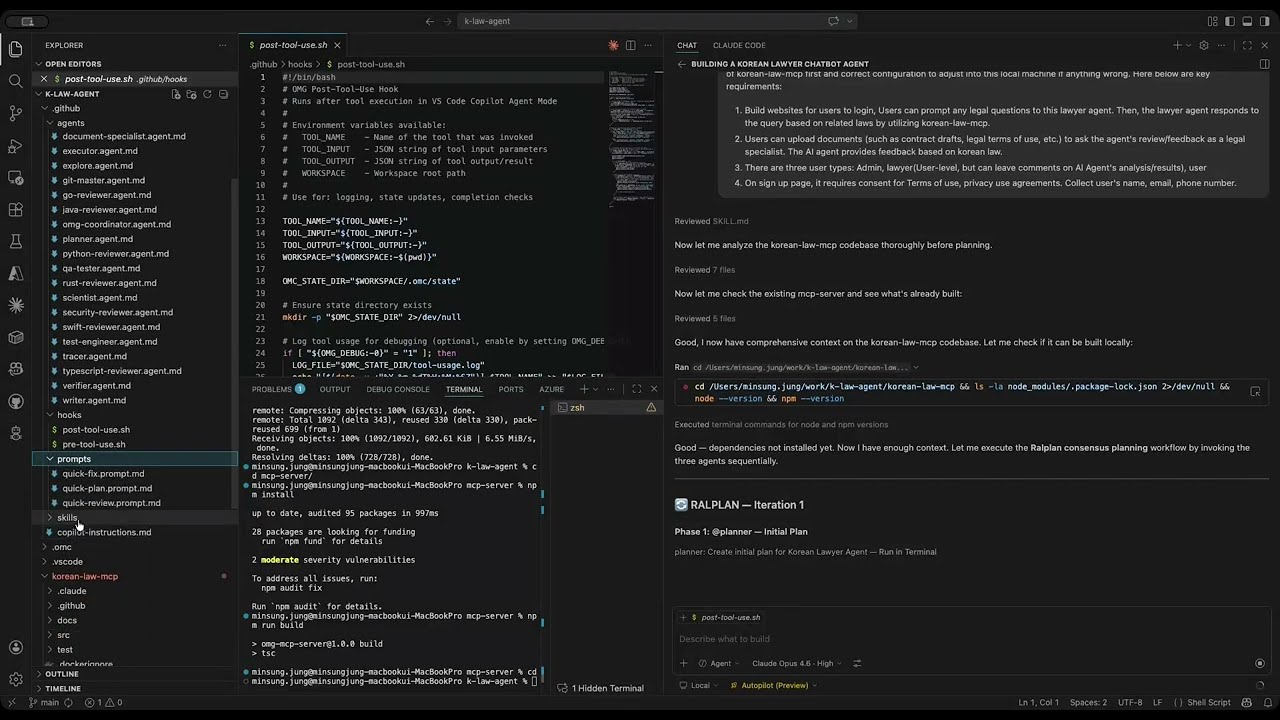
▶ Watch OMG in Action on YouTube What is OMG?oh-my-githubcopilot (OMG) brings the multi-agent orchestration paradigm — pioneered by oh-my-claudecode (OMC) for Claude Code — to GitHub Copilot, now further supercharged with the best features of Everything Claude Code (ECC). Where OMC supercharges Claude Code with specialized agents and workflow automation, OMG does the same for Copilot's agent mode in VS Code. And with the ECC integration (v1.1.0) plus the adapted OMC skill port, OMG now includes language-specialist reviewers, TDD enforcement, rapid security scanning, durable
Why OMG?
Quick StartPrerequisites
Option A: VS Code Extension (Recommended)
Option B: Manual Clone
Not Sure Where to Start?If your requirements are vague or you want structured clarification: OMG uses Socratic questioning to surface hidden assumptions and clarify requirements before any code is written. Use OMG in Other VS Code ProjectsOMG is workspace-scoped, so the recommended way is to apply it per project. This repository now includes an adoption script: macOS / Linux (Bash): Windows (PowerShell): Tip 1: Template-style for new projectsUse this for greenfield projects where you want OMG files copied directly into the project. Tip 2: Track updates with submodule or subtreeUse one of these when you want a sync strategy for future OMG updates. What the script applies to the target project:
After applying, open the target project as a trusted workspace and validate in Copilot Chat (agent mode): AgentsOMG includes 28 specialized agents, each with defined roles and access levels. Agents are declared as Core Agents (20)
Language Reviewer Agents — Tier 2 (8)Invoke with
SkillsSkills are reusable workflow routines triggered by slash commands or natural language keywords. Defined under Workflow Skills
Analysis & Quality Skills
Utility Skills
MCP ServerOMG includes a TypeScript MCP (Model Context Protocol) server that provides persistent state management for workflows. Registered via
State is stored under Tool GuardrailsOMG includes pre/post tool-use hooks ( Pre-tool-use guards:
Post-tool-use tracking:
Benchmark
Project Snapshot (as of v1.3.0)
Quality Metrics
ECC Integration — Single Commit Impact (
|












| Metric | Value |
|---|---|
| Files changed | 60 |
| Lines added | 5,844 |
| New agents | 8 language reviewer agents |
| New skills | 4 (/tdd, /security-scan, /coding-standards, /skill-stocktake) |
| Defects caught pre-merge | Shell injection in hooks + 7 CVEs |
RALPLAN Consensus Planning
| Decisions reviewed | Passed | Rejected by @critic |
Rejection rate |
|---|---|---|---|
| 9 | 7 | 2 | 22% |
22% of design decisions were revised at planning stage — before any code was written.
Security Scan Results
| Category | Found | Fixed |
|---|---|---|
| Hardcoded secrets | 0 | — |
| Production CVEs | 2 moderate | ✅ |
| Dev CVEs | 5 moderate | ✅ |
Shell injection (hook FILE_PATH) |
1 | ✅ |
.env missing from .gitignore |
1 | ✅ |
| Total vulnerabilities post-fix | 0 |
Pre-Tool-Use Safety Guards
| Guard | Blocked Operation |
|---|---|
node_modules write protection |
Edit/create inside node_modules/ |
.env secret protection |
Direct .env file modification |
| Critical config deletion block | Delete package.json, tsconfig.json, .gitignore |
| Force push prevention | git push --force |
| Hard reset prevention | git reset --hard, git clean -fd |
| Path traversal sanitization | ../ and metacharacters in FILE_PATH |
Architecture
oh-my-githubcopilot/
├── .github/
│   ├── copilot-instructions.md    # Root orchestration instructions
│   ├── agents/                    # 28 specialized agent definitions (20 core + 8 language reviewers)
│   ├── skills/                    # 37 workflow skill routines
│   ├── hooks/                     # Pre/post tool-use safety guards
│   └── prompts/                   # Quick-fix, quick-plan, quick-review templates
├── mcp-server/                    # TypeScript MCP server
│   └── src/
│       ├── index.ts               # Server entry point
│       ├── state-tools.ts         # Workflow state management
│       ├── prd-tools.ts           # PRD and story tracking
│       ├── workflow-tools.ts      # Phase transitions and completion checks
│       ├── memory-tools.ts        # Project memory persistence
│       └── model-router.ts        # Task complexity-based model routing
├── .vscode/mcp.json               # MCP server registration for VS Code
└── .omg/                          # Runtime state directory (gitignored)
How It Works
- Instructions (
.github/copilot-instructions.md) define the orchestration rules, delegation logic, and agent catalog - Agents (
.github/agents/*.agent.md) are specialized personas with scoped tool access and model preferences - Skills (
.github/skills/*/SKILL.md) are workflow routines loaded on-demand via keyword triggers or slash commands - MCP Server provides persistent state, PRD tracking, and project memory via the Model Context Protocol
- Hooks guard against destructive operations and track execution for workflow awareness
Commit Protocol
OMG uses structured git trailers to preserve decision context:
fix(auth): prevent silent session drops during long-running ops

Auth service returns inconsistent status codes on token expiry,
so the interceptor catches all 4xx and triggers inline refresh.

Constraint: Auth service does not support token introspection
Rejected: Extend token TTL to 24h | security policy violation
Confidence: high
Scope-risk: narrow
Available trailers: Constraint, Rejected, Directive, Confidence, Scope-risk, Not-tested
Comparison with OMC
| Feature | OMC (oh-my-claudecode) | OMG (oh-my-githubcopilot) |
|---|---|---|
| Target Platform | Claude Code CLI | GitHub Copilot (VS Code) |
| Installation | npm package / plugin marketplace | Clone + build MCP server |
| Agent Count | 19+ (with tier variants) | 28 agents (20 core + 8 language reviewers) |
| Skills | 10+ workflow skills | 37 skills with keyword triggers |
| State Management | .omc/ directory |
.omg/ via MCP server |
| Multi-model | Codex/Gemini via tmux CLI | ccg skill (advisory) |
| Configuration | ~/.claude/settings.json |
.github/ + .vscode/mcp.json |
| Tool Safety | Plugin-level hooks | Pre/post shell hooks |
| HUD / Statusline | Built-in HUD | VS Code native |
Requirements
- VS Code with GitHub Copilot extension
- GitHub Copilot Chat with agent mode enabled
- Node.js 18+ (for the MCP server)
What's New
v1.4.4 (2026-05-16) — Adapted OMC Skill Port + Ultragoal MCP
Ports high-value OMC workflows into OMG with VS Code/Copilot-native behavior. This release expands OMG from 24 to 37 skills and adds MCP-backed durable goal tracking.
- New MCP-backed
ultragoalworkflow:omg_ultragoal_create,omg_ultragoal_status,omg_ultragoal_checkpoint, andomg_ultragoal_completestore fail-closed durable goal artifacts under.omg/ultragoal/. - 13 adapted OMC-inspired skills:
visual-verdict,release,deepinit,skillify,writer-memory,configure-notifications,ultragoal,wiki,autoresearch,hud,external-context,sciomc, andask. - Updated routing and health checks: Copilot instructions now include new slash commands, keyword triggers, ultragoal completion rules, hook gates, and skill thresholds (
CORE=24,EXTENDED=37). - Template sync: Extension templates now include the new skills,
ultragoalMCP server source, tests, and updated README content. - Verification: MCP build/test passed (23 tests), VS Code extension unit tests passed (29 tests), VSIX package verified under 20MB.
- VSIX:
oh-my-githubcopilot-1.4.4.vsix.
v1.4.3 (2026-05-11) — Bidirectional Bridge: OMG → OMC Push
Closes the v1.4.0 bridge into a full OMG ↔ OMC round-trip. v1.4.0 shipped one-way omc → omg import; v1.4.3 adds the reverse omg → omc export so work done in GitHub Copilot can continue in Claude Code.
- New module
mcp-server/src/bridge/omg-exporter.ts: composes (does not blindly copy) —prd.jsonandproject-memory.jsonare file-copies;active_modes[]from the OMG checkpoint is decomposed into per-mode.omc/state/{mode}-state.jsonfiles (the inverse of v1.4.0's omc-importer composition);.omc/state/session-checkpoint.jsonis composed with translated provenance. - New shared helper
mcp-server/src/bridge/conflict-utils.ts:shouldSkipForConflict()uses embeddedtimestampfield as primary conflict primitive forsession-checkpoint.json(mtime fallback elsewhere — addresses git-checkout-touches-mtime brittleness);rotateBackup()keeps last N=3 timestamped.previous.{ISO}.jsonsnapshots, applied symmetrically on both import and export sides. - New MCP tool
omg_export_external_session({target: "omc", force?})with atomicity contract:.omg/state/last-export-token.jsonis the LAST side-effect — partial-write failures leave no token, so subsequent operations correctly treat the transaction as uncommitted. - Round-trip safety via dual-write loop guard: importer reads either
.omg/state/last-export-token.jsonOR the destination checkpoint'ssource_origin === "bridged-from-omg"— guard survives wipe of either side. No time-based TTL; token invalidates only when destination'ssource_originflips to"native"orsource_session_idchanges. - Provenance schema extended (backward-compatible): new
source_originfield ("native" | "bridged-from-omc" | "bridged-from-claude-code" | "bridged-from-omg") is the authoritative provenance signal; legacysource_tool: "copilot"is retained. Newworkspace_rootfield powers a project-identity guard that aborts before any mutation when source checkpoint's workspace path doesn't match the current workspace. /push-omcskill (6 steps): detect → compare → confirm → export → summarize → continue. Trigger keywords:/push-omc,"push omc","omc 푸시","omc로 보내기","sync to omc","export to omc". Mirror atvscode-omg/resources/templates/skills/push-omc/SKILL.md.- VS Code command
omg.pushExternal("OMG: Push to External Session (OMC)"): user-initiated only — no activation-time push notification (push remains a deliberate user action). omg_compare_checkpointsreports both directions: now returnsomg_newer_than_externalalongsidenewer_than_omgso/push-omcand/resume-claudeshare the same comparison surface.- Tests grow 8 → 18+ across 6 zones (Unit, Provenance, Round-trip guard, Composition, Conflict-path, Project-identity).
- Deferred to v1.5.x:
omg → claude-codedirection. Would require synthesizing validtool_use/tool_resultUUID chains compatible with Claude Code's resume-by-id contract; tracking: TBD. - VSIX:
oh-my-githubcopilot-1.4.3.vsix.
v1.4.2 (2026-05-10) — Opus 4.7 → 4.6 Fallback Array
Made Opus 4.7 routing tier-safe by adding Claude Opus 4.6 (copilot) as an inline fallback.
- The 7 deep-reasoning agents (
analyst,architect,code-reviewer,critic,omg-coordinator,planner,security-reviewer) now use a YAML model array:["Claude Opus 4.7 (copilot)", "Claude Opus 4.6 (copilot)"]. - Why: VS Code Copilot blocks subagent calls that exceed the active chat model's cost-tier ceiling. With a 7.5x base model (e.g.
GPT-5.5), anOpus 4.7-only request was hard-failing instead of degrading. - New behavior: when the session ceiling allows it, Opus 4.7 is used. Otherwise the agent transparently falls back to Opus 4.6 instead of failing.
- No change to GPT-5.5 (15 agents) or Sonnet 4.6 (6 agents) routing.
- VSIX:
oh-my-githubcopilot-1.4.2.vsix.
v1.4.1 (2026-05-09) — Role-Based Agent Model Routing
Mapped all 28 agents to task-fit Copilot model preferences using qualified model names
- Updated agent
model:frontmatter to use official qualified model-name strings such asGPT-5.5 (copilot)andClaude Sonnet 4.6 (copilot). - Kept high-stakes reasoning and approval agents on Claude Opus 4.7; routed debugging, verification, research, testing, design, and specialist review agents to GPT-5.5; routed execution, exploration, documentation, QA driving, git, and simplification workflows to Claude Sonnet 4.6.
- Updated
omg_select_modelrecommendations to use the same allowed model set and role-based agent overrides, removing stalegpt-4.1,gpt-4.1-mini, and dot-format Claude model recommendations. - Model smoke tests:
GPT-5.5 (copilot)invoked successfully;Claude Opus 4.7 (copilot)is recognized by Copilot but was blocked in this environment by the current cost-tier limit, not by a stale model string.
| Agent | Model |
|---|---|
analyst |
Claude Opus 4.7 (copilot) |
architect |
Claude Opus 4.7 (copilot) |
code-reviewer |
Claude Opus 4.7 (copilot) |
critic |
Claude Opus 4.7 (copilot) |
omg-coordinator |
Claude Opus 4.7 (copilot) |
planner |
Claude Opus 4.7 (copilot) |
security-reviewer |
Claude Opus 4.7 (copilot) |
csharp-reviewer |
GPT-5.5 (copilot) |
database-reviewer |
GPT-5.5 (copilot) |
debugger |
GPT-5.5 (copilot) |
designer |
GPT-5.5 (copilot) |
document-specialist |
GPT-5.5 (copilot) |
go-reviewer |
GPT-5.5 (copilot) |
java-reviewer |
GPT-5.5 (copilot) |
python-reviewer |
GPT-5.5 (copilot) |
rust-reviewer |
GPT-5.5 (copilot) |
scientist |
GPT-5.5 (copilot) |
swift-reviewer |
GPT-5.5 (copilot) |
test-engineer |
GPT-5.5 (copilot) |
tracer |
GPT-5.5 (copilot) |
typescript-reviewer |
GPT-5.5 (copilot) |
verifier |
GPT-5.5 (copilot) |
code-simplifier |
Claude Sonnet 4.6 (copilot) |
executor |
Claude Sonnet 4.6 (copilot) |
explore |
Claude Sonnet 4.6 (copilot) |
git-master |
Claude Sonnet 4.6 (copilot) |
qa-tester |
Claude Sonnet 4.6 (copilot) |
writer |
Claude Sonnet 4.6 (copilot) |
Opus 4.6 remains an explicit fallback alternative in the model router rather than the default for any agent.
v1.4.0 (2026-05-03) — Claude Code / OMC Session Bridge
One-directional bridge: resume interrupted Claude Code or OMC sessions in GitHub Copilot
- Claude Code JSONL importer: Parses
~/.claude/projects/session logs to extract modified files, last user prompt, and last assistant response. Supports Write/Edit/MultiEdit tool_use block detection. - OMC importer: Maps
.omc/state directory (PRD, workflow state, checkpoint, project memory) to.omg/equivalents with mtime-based conflict resolution. - 3 new MCP tools:
omg_detect_external_session(read-only detection),omg_import_external_session(performs import with backup),omg_compare_checkpoints(timestamp comparison). - VS Code auto-detection: On activation, detects external sessions and shows notification ("Resume / Ignore / Always ignore"). Skips if OMG checkpoint is fresh (< 30 min).
/resume-claudeskill: 6-step workflow — detect → compare → confirm → import → summarize → continue. Keyword triggers: "resume claude", "resume work", "continue session".- Security: Imported checkpoint files set to
chmod 0600. Existing checkpoints backed up to.previous.jsonbefore import. - Checkpoint schema extension: 4 new optional fields —
source_tool,source_session_id,imported_at,imported_summary(backward-compatible).
v1.3.1 (2026-04-23) — Copilot CLI Support
Dual-compatibility for VS Code agent mode and the standalone Copilot CLI (Issue #4)
- Agent frontmatter normalization:
model:field changed from array to string format across all 28 agents. CLI tool equivalents (read,edit,shell,create,delete) added totools:lists. - Hook dual-mode input: Pre/post tool-use hooks now accept both VS Code environment variables and CLI stdin JSON. Tool name normalization maps CLI names to VS Code equivalents before guard logic.
hooks.jsonregistration: New CLI hook wrapper forpreToolUse/postToolUsediscovery.- Adopt script
--target-env: New--target-env vscode|cli|bothflag (default:both). CLI mode generates.copilot/mcp-config.jsonand skips.vscode/mcp.json.--global-mcpinstalls MCP config at~/.copilot/. - Skill CLI fallback: All 5 interactive skills (
deep-interview,omg-autopilot,ralplan,plan,self-improve) updated with CLI fallback — numbered markdown options whenvscode_askQuestionsis unavailable. - Documentation: CLI badge, "Option C: Copilot CLI" quick start,
--target-envusage added to all READMEs.
v1.3.0 (2026-04-23) — Windows Support, MIT License & Non-Destructive Init
Three community-requested improvements (Issues #5, #6, #7)
- Windows PowerShell support (Fixes #5): Added
.ps1equivalents for all shell scripts —pre-tool-use.ps1,post-tool-use.ps1,omg-adopt.ps1. Hooks bundled in extension templates. READMEs updated with PowerShell examples. - Non-destructive copilot-instructions.md (Fixes #6):
initWorkspacenow appends OMG instructions to existing files instead of overwriting. Marker-based section detection supports re-init updates. - MIT License clarification (Fixes #7): Added root
LICENSEfile for GitHub API detection. Removed "All rights reserved" contradictions from all READMEs.
v1.2.0 (2026-04-17) — Agent Model Upgrade to Claude Opus 4.7
Upgraded all agent model references from Claude Opus 4.6 to Claude Opus 4.7
- Updated
model: [claude-opus-4-6]→model: [claude-opus-4-7]across all 8 Opus-routed agents. - Applied to both active agents (
.github/agents/) and extension templates (vscode-omg/resources/templates/agents/). - Affected agents: @architect, @code-reviewer, @planner, @security-reviewer, @analyst, @omg-coordinator, @code-simplifier, @critic.
- Verified: MCP server build + tests (18/18), vscode-omg build + tests (28/28), TypeScript type check — all passing.
v1.1.9 (2026-04-16) — .omc → .omg State Path Migration
State path consistency update across source + templates
- Renamed remaining state path references from
.omc/to.omg/across skills, agents, MCP templates, and extension templates. - Updated hook state variable naming from
OMC_STATE_DIRtoOMG_STATE_DIRwhere applicable. - Verified MCP server build and tests after migration (18/18 passing).
- Kept intentional
.omc/mentions only in OMC-vs-OMG comparison table rows.
v1.1.8 (2026-04-13) — Context Preservation & Memory Upgrade
Major reliability upgrade for long-running workflows
- Added Tier-2 memory enhancements to OMG MCP:
omg_search_memoryfor keyword lookup across keys, values, categories, and tagstagssupport inomg_write_memory- Backward-safe reads for existing memory entries
- Added Tier-3 context-pressure protocol:
omg_checkpoint,omg_restore_checkpoint,omg_context_status- Auto checkpoint advisory from pre/post hooks based on accumulated tool I/O bytes
- Configurable threshold via
OMG_CONTEXT_THRESHOLD(default: 400KB)
- Hardened hook safety and lifecycle behavior:
- Fixed checkpoint loop by resetting context counter after checkpoint
- Improved force-push detection (
--force,-f) while allowing--force-with-lease - Expanded destructive git guard coverage
- Added startup/session recovery guidance in
copilot-instructions.md
v1.1.7 (2026-04-12) — Interactive Hook System
OMC-parity: mid-workflow user decisions via vscode_askQuestions
Five core skills now fire structured multiple-choice prompts at decision gates, mirroring OMC's gateway-level interrupt hooks — natively inside VS Code Copilot.
Skills with Hooks
| Skill | Hook Points |
|---|---|
/deep-interview |
Every interview round (with ambiguity %) · Spec approval · Execution bridge |
/plan |
Interview questions · Readiness gate · Trade-off selection · Critic rejection · Plan approval |
/ralplan |
Options selection · Architect concerns · Critic rejection · Final approval |
/self-improve |
Repo target · Trust confirmation · Goal interview · Harness rules (setup only — loop runs autonomously) |
/omg-autopilot |
Vague input redirect · Spec confirmation · QA stuck recovery · Validation rejection |
How It Works
- At each decision gate the skill calls
vscode_askQuestionswith 3–5 labelled options, arecommendeddefault, andallowFreeformInput: true - User selects an option (or types a custom answer) — the workflow continues based on the response
- All hook calls use a unique
header(e.g."interview-round-3","ralplan-approval") for traceability - Global hook protocol documented in
copilot-instructions.md → Interactive Hook System
v1.1.0 (2026-04-10) — ECC Integration
Major upgrade: best-of-ECC (Everything Claude Code) features merged into OMG
New Agents — Language Reviewer Tier (8)
Eight new language-specialist review agents, each with 13–21 embedded style rules and a canonical coding standards reference:
- @typescript-reviewer — strict mode, no-any, exhaustive discriminated unions
- @python-reviewer — PEP 8, type hints, idiomatic patterns
- @rust-reviewer — ownership, borrow checker, unsafe justification
- @go-reviewer — idiomatic Go, goroutine safety, explicit error handling
- @java-reviewer — SOLID, Spring patterns, null safety
- @csharp-reviewer — nullable analysis, async/await, C# idioms
- @swift-reviewer — Swift concurrency, memory safety, SwiftUI patterns
- @database-reviewer — query performance, parameterization, schema design
New Skills (4)
/tdd— Full TDD enforcement: Red-Green-Refactor cycle, framework quick-ref (Jest/pytest/Cargo/Go test), gate table with fail conditions/security-scan— Rapid pre-commit security sweep: secrets patterns (sk-/ghp_/AKIA), CVE audit, input validation, auth checks/coding-standards— Canonical cross-language coding standards (naming, functions, errors, anti-patterns, SOLID). Cited by all reviewer agents./skill-stocktake— Audit skill inventory for frontmatter validity, template sync, stubs, and coverage gaps
Enhanced Core Agents (7)
| Agent | What Was Added |
|---|---|
| @debugger | 7-language build resolution guide (Node/TS, Python, Rust, Go, Java, C#, Swift) |
| @security-reviewer | Secrets detection regex patterns, JWT/session/crypto rules, OWASP annotations |
| @qa-tester | Playwright Page Object Model pattern, E2E classification table |
| @writer | CODEMAP generation template + auto-update workflow |
| @code-reviewer | Canonical D9 coding standards table embedded |
| @test-engineer | Framework detection table, coverage gap protocol, flaky test root causes |
| @code-simplifier | Complexity metrics table, simplification patterns, stability exceptions |
Enhanced Skill (1)
/remember— Quality gate added: 3-question filter (actionable? durable? unique?) before storing to project memory
Infrastructure
- Tiered agent/skill thresholds in
convention.ts: warn <20/18, info <28/22, silent ≥28/22 (backward compatible) - Tree-view category grouping: agents auto-split into "Core Agents" + "Language Reviewers" when count >20
- Post-tool-use hook (
OMG_LINT_ON_EDIT=1): opt-in TypeScript typecheck + ESLint on every file edit withFILE_PATHsanitization guard - Security patches: hono/node-server CVEs fixed, vitest upgraded to 4.1.4,
.env*added to.gitignore
v1.0.5 (2026-04-10)
Bug Fix: Skill name collision with VS Code built-in Autopilot
- Renamed
/autopilotskill to/omg-autopilotto avoid collision with VS Code's built-in "Autopilot (Preview)" permission level - Fixed invalid YAML frontmatter in all SKILL.md files: removed unsupported
allowed-toolsfield, renamedhinttoargument-hintper VS Code spec - Root cause: The skill name
autopilottriggered VS Code's internal permission mode switch instead of loading the OMG skill instructions - Scope: Updated skill directories, MCP server code, agent definitions, cross-references, tests, and all documentation
License
MIT
Copyright
Copyright (c) 2026 jmstar85. Licensed under the MIT License.
Inspired by: oh-my-claudecode by Yeachan Heo
The power of multi-agent orchestration, now for GitHub Copilot.