CodeLore
Institutional knowledge layer for AI-accelerated development. A VSCode extension that captures what AI agents and humans learn about a codebase — decisions, constraints, gotchas, business rules — and makes that knowledge available at the moment of relevance.
Know what changed and why.
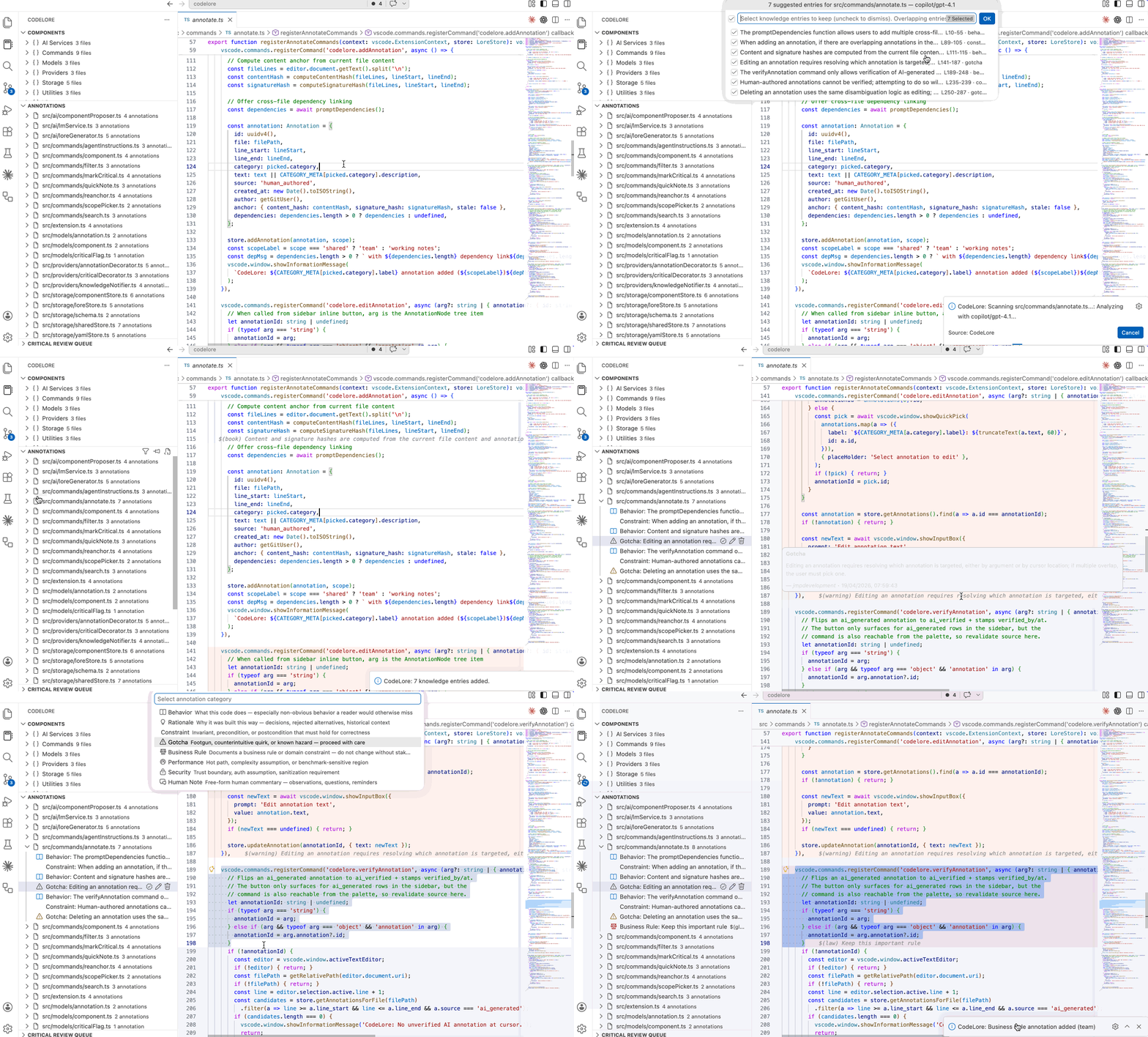
What it is
On large, mature codebases, the bottleneck isn't writing code — it's comprehension. AI agents modify modules last touched years ago. The knowledge a developer gains while working through unfamiliar code with AI assistance — what a module actually does, why a quirk exists, which regions are dangerous — dies in Slack threads or walks out the door.
CodeLore captures that knowledge as structured YAML alongside the source tree, surfaces it proactively when it matters (file open, file save), and feeds it back to AI agents and reviewers so they stop re-litigating the same things.
Unlike inline comments, CodeLore annotations are a separate metadata layer — queryable, lifecycle-aware, and split into shared (committed to git) and personal (gitignored) scopes so candid notes don't leak.
Install
- Clone and build:
git clone <repo>
cd codelore
npm install
npm run build
- Press
F5 in VSCode to launch the Extension Development Host.
- For a packaged
.vsix, run npx vsce package and install via Extensions → Install from VSIX.
Getting started
Two paths, depending on where you are:
Bootstrapping a mature codebase
- Open the CodeLore sidebar. The Components view is empty — start there.
- Run
Propose Components (AI). The AI reads file paths and proposes subsystem groupings; you accept the ones that fit.
- Run
Scan Project from the command palette. If components are missing it offers to propose first. It then makes one LLM call per source file and drops AI-drafted annotations into the store.
- Review drafts in the Annotations sidebar. Click ✓ on the ones that are right to promote them to
ai_verified; edit or delete the rest.
- Run
Generate Agent Instruction Files so Claude Code / Cursor / Copilot read annotations as context before modifying code.
Annotating as you work
- Open a file you want to understand, press
Cmd+Shift+K to scan just that file.
- Select a range you know better than the AI and press
Cmd+Shift+L to add a human annotation.
- Use
Cmd+Shift+J for a fast human_note when you just want to drop an observation.
The 8 knowledge categories
Annotations describe properties of the code, not workflow state:
| Category |
Purpose |
behavior |
What the code does — especially non-obvious behavior |
rationale |
Why it was built this way — decisions, rejected alternatives |
constraint |
Invariant, precondition, or postcondition that must hold |
gotcha |
Footgun, counterintuitive quirk, known hazard |
business_rule |
Domain rule — do not change without stakeholder sign-off |
performance |
Hot path, complexity assumption, benchmark-sensitive region |
security |
Trust boundary, auth assumption, sanitization requirement |
human_note |
Free-form human commentary — observations, questions |
Components
Files don't live alone. Components group related files into logical subsystems (a module, a feature area, a service boundary) so annotations can be scanned and browsed by area instead of flat-per-file.
Two ways to define them:
Propose Components (AI) — the AI reads file paths (uncommitted changes, then annotated files, then workspace source) and proposes 3–10 groupings. You pick which to accept. Best for a first-pass partition of an unfamiliar codebase.Manage Components for File — multi-select picker tagging the active file into existing components, or creating a new one inline. Best for ongoing maintenance.
Component definitions live at .codelore/components/<slug>.yaml with name, description, owners, files. The Components sidebar groups files by component; the status bar shows which component(s) your active editor belongs to.
Scanning
Three scopes, one shape — each drafts annotations and critical flags in a single LLM call per file:
| Command |
Scope |
When to use |
Scan Current File (Cmd+Shift+K) |
Active editor |
Exploring one file |
Scan Component |
Every file tagged into a component |
Building knowledge for a subsystem |
Scan Project |
Every source file in the workspace |
First-time bootstrap of a repo |
Scan Project on a component-less workspace first offers to propose components so the new annotations land tagged into subsystems. Drafts surface with source: ai_generated; click ✓ in the Annotations sidebar to promote them.
AI workflow
CodeLore is bidirectional: AI agents read annotations before modifying code and author new annotations when they learn something.
- Reading:
Generate Agent Instruction Files writes a CodeLore block into CLAUDE.md, .cursorrules, AGENTS.md, .github/copilot-instructions.md, or .windsurfrules. The block tells the agent where knowledge lives, how to read it, and how to maintain content/signature anchors on refactor.
- Authoring: The agent writes annotations directly into
.codelore/<path>.yaml with source: ai_generated. Humans promote them to ai_verified with the inline ✓ action.
- Verification status is a field, not a category. Every annotation has
source: ai_generated | ai_verified | human_authored. The ai_generated ones are drafts; the Annotations sidebar badges them as unverified so reviewers can sweep them.
- No custom LLM — uses
vscode.lm so it runs on whatever model you already have (GitHub Copilot, Claude, etc.).
Keyboard shortcuts
CodeLore caps itself at 3 chords. Everything else is in the command palette.
| Shortcut |
Action |
Cmd+Shift+L |
Add annotation on selection |
Cmd+Shift+K |
Scan current file for knowledge + critical regions (AI) |
Cmd+Shift+J |
Quick human_note on selection (skips the category picker) |
On Windows/Linux, swap Cmd for Ctrl.
Storage model
CodeLore has two stores:
- Shared (
.codelore/, committed to git): per-file YAML mirroring the source tree — .codelore/src/auth/middleware.ts.yaml holds annotations for src/auth/middleware.ts. Merge-conflict-safe. Survives turnover.
- Personal (
.vscode/codelore.yaml, gitignored): a single flat YAML for private notes ("I don't understand this") you don't want committed.
Personal annotations never leak into AI context or team-facing views. Delete .vscode/codelore.yaml directly if you want to wipe them.
Anchoring
Annotations are tied to code by two hashes, so they track the code across refactors:
- Content hash — SHA-256 of the trimmed non-empty lines; whitespace-immune. A sliding-window search finds the region when it moves.
- Signature hash — SHA-256 of the function/class signature line. Used as a fallback when the body changed but the declaration didn't. Supports Python and TypeScript/JavaScript.
On file open, stale anchors get a ⚠ warning. Check Annotation Anchors scans the active file and opens a picker of suggested re-anchor positions — the developer confirms, no silent drift.
Proactive surfaces
Knowledge finds you; you don't have to find it.
- On file open — unresolved critical flags pop a warning with a jump to the Critical Review Queue.
- On file save — if your edits overlap known annotations, flags, or incoming cross-file dependencies, a nudge appears: "Your changes overlap 2 critical flags — review before committing."
- Status bar — annotation count and unreviewed-critical count at a glance. Click to open the Annotations view.
- Agent review — AI agents read the annotations alongside your diff, so pre-commit awareness of knowledge now flows through the same reviewer that reviews the code.
FAQ
Do I need an AI model configured? No. CodeLore is fully functional with manual annotation. AI features use vscode.lm and are opt-in.
Can AI agents write annotations on their own? Yes — that's the intended model. The agent instruction block tells them to append to .codelore/<path>.yaml with source: ai_generated. Humans verify in review.
Are personal notes ever shared with AI? No. The shared/personal boundary is enforced — personal annotations are excluded from AI prompts and team-facing views.
Does CodeLore replace PR review? No. It captures the knowledge that review tools and comments don't preserve — the kind that usually lives in a senior engineer's head. Use it alongside your existing review process.
Development
npm run compile        # TypeScript compilation
npm run build          # esbuild bundle
npm run test           # Vitest unit tests
npm run test:coverage  # Tests with coverage report
npm run lint           # Type check without emit
License
MIT

