ADRs for AI
A VS Code extension that keeps your AI's reasoning from evaporating when the chat closes.


Your Tuesday, with this installed
You ask an AI model to help design something — auth, a schema, an API shape. It asks good questions, you argue a little, you land somewhere. Two weeks later you (or a different AI session, or a teammate) open the same file and none of that conversation is there anymore. Just the code, with no record of what you tried instead, or why.
This extension makes the deliberation—not just the code—a durable, browseable artifact inside your editor. Open questions live in a sidebar you can answer without hunting through chat history. Answers are captured the moment you type them, so a file refresh or an agent editing nearby never costs you a half-written thought. Every decision keeps its own history of how it changed and why.
It's built for a specific document format (adr v1) — Architectural Deliberation Records extended with a few navigation codes (QST:, ANS:, NOT:) so both you and any AI model can grep straight to what's unresolved. You don't need to memorize the format; the extension reads and writes it for you.
What this is called
The practice has a name: Deliberative programming — specifying software by capturing the reasoning behind a decision, not just the decision itself, so an AI collaborator (and your future self) can act on why, not only what. The property it depends on is epistemic continuity: That reasoning surviving intact across sessions, models, and however long it sits before someone reads it again.
(If "epistemic programming" rings a bell from computer-science education—Cheng, Hüsing, the ITiCSE line of work—that's a different, unrelated field about programming as a way to teach or discover epistemic beliefs. This points the other direction: Not programming to learn what's true, but recording why a decision was true enough to make.)
Why you'd want it
- Nothing gets buried. Every open question, across every decision in your project, shows up in one panel — sorted, counted, one click from "unresolved" to "answered."
- Your answers can't be lost. Type an answer, and it's saved as you type — even if the file changes underneath you mid-answer (an AI agent editing the same file, a git pull, a reindex), your draft survives and reloads where you left off. This isn't a hopeful claim: It's a regression test we run against the exact incident that used to destroy people's answers, documented in full the day we found it (DEBRIEF-001) — the source repo isn't public yet, so that record isn't independently checkable right now.
- Nobody has to remember the format. The sidebar tree shows status at a glance (draft, accepted, superseded); the panel handles the QST/ANS bookkeeping; plain Markdown files without any of the extra structure still show up and work, just with fewer bells.
- It's yours, not a walled garden. Everything lives in Markdown files in your repo (
docs/adr/ by default). Delete the extension tomorrow and you still have readable documents — no lock-in, no proprietary database.
- It scales the way AI-driven projects actually grow. The faster you can spin up a subproject with an AI collaborator, the faster you accumulate separate ADR trees that need to reference each other — a meta-repo of meta-repos, not a hypothetical. This extension is built for that pattern natively: A single project is the simplest case of the same structure it uses for ten nested ones, not a special mode bolted on after the fact. This isn't aspirational — the team's own coordination repo nests this extension's own repo as a subproject, and the extension navigates that structure without a special mode.
- A tour curates attention, not just storage. On a real project, "every open question" is a wall of text — the honest answer to "what actually matters right now" isn't the whole list. Save a chosen order over a subset of your open questions, with a note on each stop, as a shareable
docs/adr/tours/*.tour.json file (Mint Tour from Current Filter). Anyone who opens it sees your judgment, not just your backlog — same answering surface as the regular panel, just walked in the order and with the commentary you picked.
- A question can be paused or retired without lying about being answered. Mark a whole ADR
Deferred / Paused / Suspended / On Hold and its questions drop out of your open-question count everywhere—sidebar, badge, panel—while staying fully readable, never invisible. Retire a single question that will never get answered with withdrawn / superseded / moot. Neither one pretends a decision got made that didn't.
What you install
- Install ADRs for AI from the VS Code Marketplace (search "ADRs for AI", or
ext install jlumbroso.adrs4ai).
- Open a project that has a
docs/adr/ folder with at least one Markdown file in it. (Don't have one yet? The extension can scaffold your first ADR — see below.)
That's it — there's no server to run, no account, no API key required. (An Anthropic API key is optional and only unlocks AI-assisted extras; everything above works without one.)
If you're starting from nothing, pair this with the companion template — a set of starter files (CLAUDE.md, ADR templates, a short methodology doc) that gives an AI model the vocabulary this extension expects.
Your first ten minutes
- Open a project with a
docs/adr/ folder. The ADRs for AI icon appears in the Activity Bar automatically — no setup step.
- Click it. You'll see every ADR in your project, its status (draft / accepted / superseded), and how many open questions it has.
- Click "Answer Open Questions" (or the badge count) to open the live panel — every unresolved
QST: across your whole project, one at a time, with an answer box right there.
- Type an answer,
Cmd+Enter to submit. Watch for the small "draft saved" line while you type — that's the anti-clobbering fence working, not a feature you need to think about.
- Set your name once (
adrManager.humanName in Settings, or it'll fall back to your git user.name) so it pre-fills who's answering.
That's the whole loop. Everything else—deep links between ADRs, creating new ones, filtering by status, committing only your ADR changes—is discoverable from the sidebar's toolbar and right-click menu when you're ready for it.
See it in action
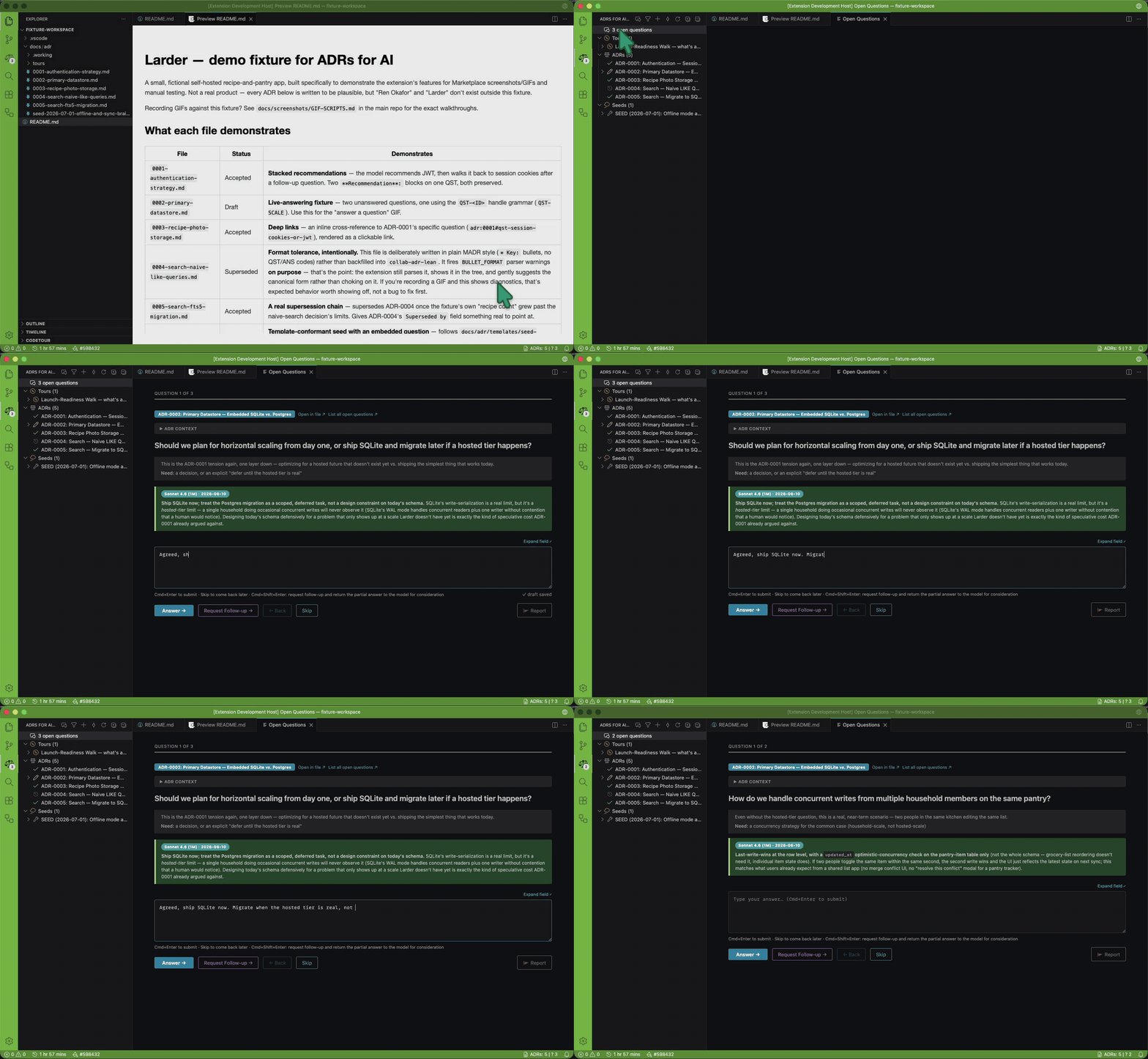
Answering a question, in place. An open question, the context for why it's being asked, and a stated recommendation to react to — no file to open, no place lost.
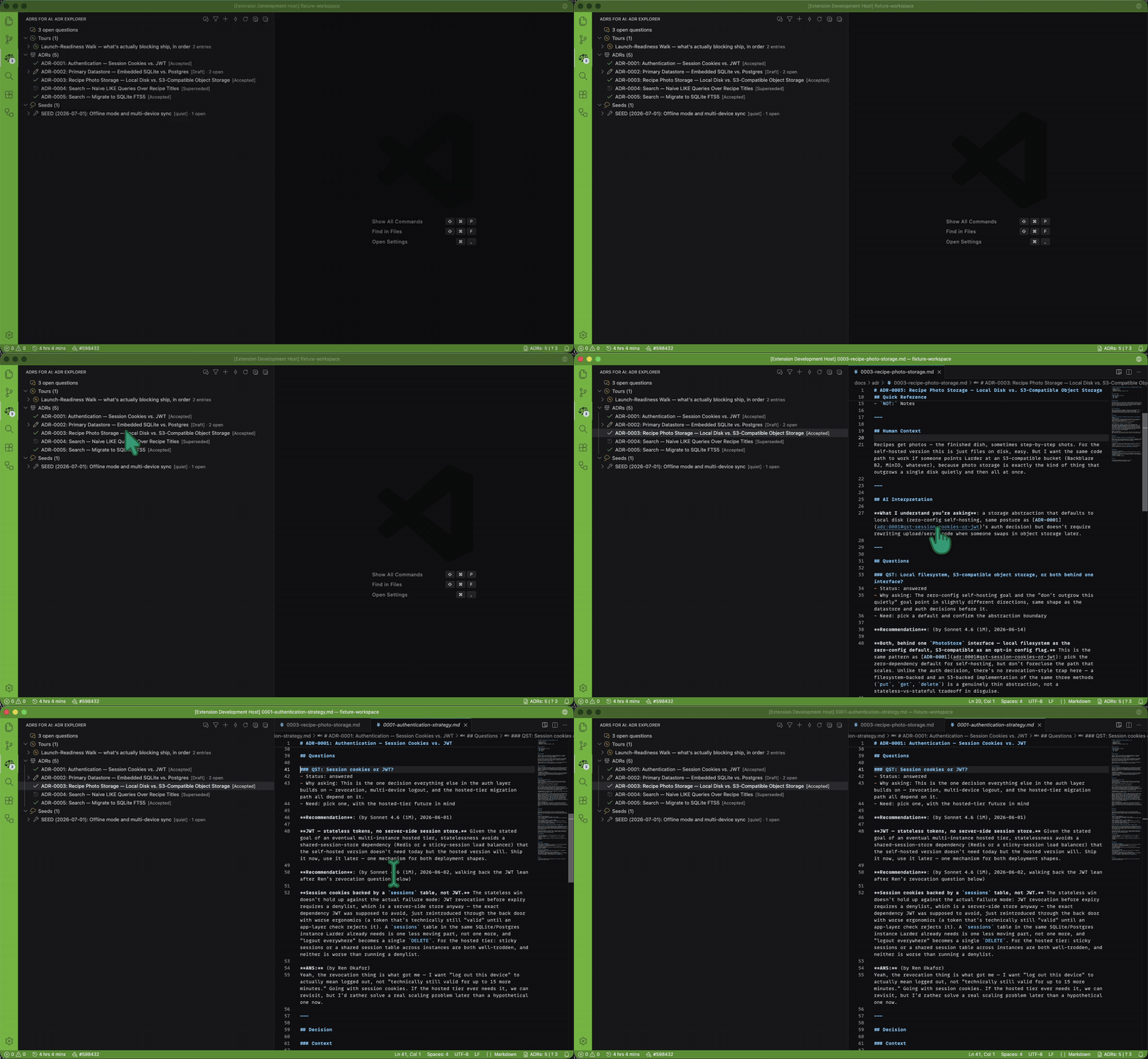
Every decision, at a glance. Settled, open, and replaced decisions all show up in the same tree — and a closed decision still carries the reasoning that closed it.
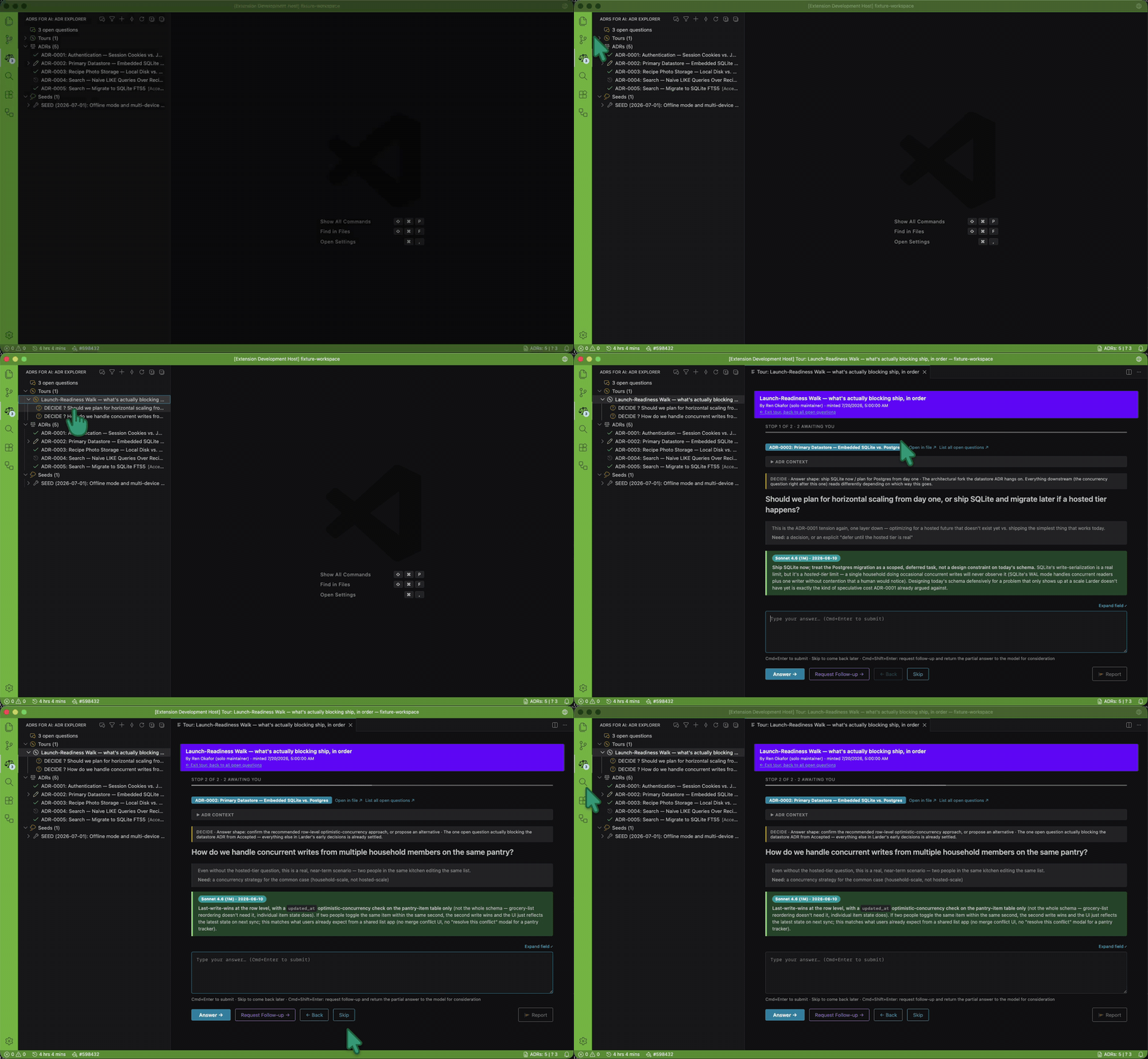
A tour, not a wall of text. A maintainer's own judgment about what actually matters right now, saved and shareable — the same answering surface, just walked in a chosen order with a note on each stop.
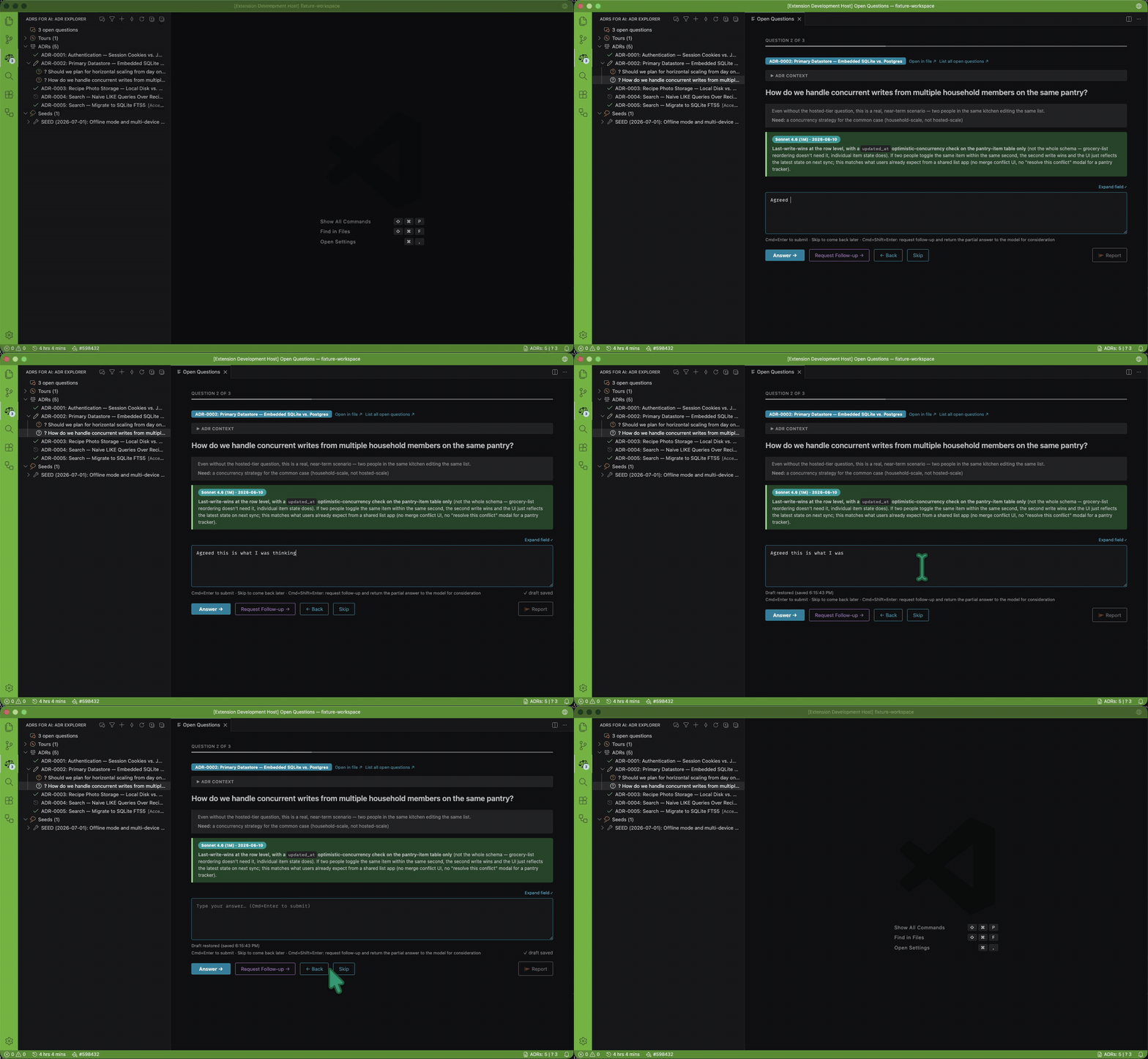
Your draft survives. Type an answer, and it's saved as you type — a file changing underneath you mid-answer never costs you the half-written thought.
Where to go when it surprises you
- Something looks wrong or a file didn't update — right-click the sidebar and hit Refresh; the extension re-scans on save automatically, so this is rarely needed.
- A question you answered still shows as open — check that you hit
Cmd+Enter or the Answer button rather than just clicking away; the status bar (bottom right) shows the extension's version if you suspect a stale build.
- Something actually breaks — email hello@adrs.systems. Every incident that costs a user real work gets a full, ADR-formatted debrief (DEBRIEF-001 is one) — that record lives in the source repo, which isn't public yet, so it's not independently checkable right now. What is checkable: every fix it produced is dated in this extension's own Changelog tab.
Reference
Features
| Feature |
What it does |
| ADR Explorer (sidebar) |
Browse every ADR, live status badges, open-question counts |
| Open Questions panel |
Answer unresolved questions from any ADR, in place, without opening the file |
| Draft persistence |
In-progress answers auto-save and survive file changes, reindexes, and crashes |
| Seeds |
Brain-dump files that get chunked into ADRs — first-class in the tree, not just plain files |
| Deep links |
Stable links to a specific ADR section (adr:0012#some-heading), for referencing decisions from code or other ADRs |
| ADR Commit |
Stage and commit only your ADR changes, stash everything else, restore it after |
| Format tolerance |
Works with the adr format (QST/ANS/NOT navigation codes) and plain MADR files side by side |
| Sidebar badge |
The Activity Bar icon shows your live open-question count, with a tooltip disclosing parse-health so the number is never trusted blind |
| Multi-root workspaces |
Discovers and aggregates every ADR-bearing project root—submodules, a forest workspace—so sidebar, panel, and diagnostics span all of them, not just the first folder |
| Tours |
Curated, ordered, shareable walks over a chosen subset of open questions, with a comment on each stop — a view over your questions, never a second queue |
| Seed lifecycle |
Seeds show their real state at a glance—iterating, quiet, parked, superseded, terminated, or chunked-with-a-rollup-badge—instead of one wrench for everything pending |
| Pause & retire |
Pause a whole ADR's questions (Deferred/Paused/Suspended/On Hold) or retire one specifically (withdrawn/superseded/moot) — both stay fully readable, neither counts as answered |
| Report button |
Flag a problem from inside the panel, in one gesture, without losing your in-progress answer — off by default |
Key settings
A curated few — there are just over thirty in total by now, all browsable via the Command Palette (ADR Manager: ...) or the Settings UI (search "ADR").
| Setting |
Default |
What it's for |
adrManager.adrDirectory |
docs/adr |
Where your ADRs live, relative to the workspace root (per project root, in a multi-root workspace) |
adrManager.humanName |
(git user.name) |
Pre-fills "Deciders" and "Answering as" fields |
adrManager.clickOpensIn |
panel |
Clicking a question in the sidebar opens the Open Questions panel, focused on it, by default — set to file to jump straight to the raw file instead |
adrManager.badge.include.adr / .seed |
true / true |
Whether ADR and seed questions each count toward the sidebar icon's open-question badge |
adrManager.missingAnsBehavior |
confirm |
What happens when the panel has to append a brand-new answer block to a question that has no **ANS:** marker at all — shows exactly where it will write and asks first |
adrManager.aiModel |
(placeholder) |
AI model name used in new ADR templates — set it once to whatever you're actually using |
adrManager.sidebar.categoryOrder |
[tours, adrs, seeds] |
Reorder the sidebar's top-level categories |
adrManager.seeds.agingMode |
adaptive |
How a seed gets flagged as going quiet — relative to your project's own rhythm, or a fixed day count (adrManager.seeds.fixedThresholdDays) |
adrManager.tours.showLeanVerbPrefix |
true |
Show a tour entry's intended response shape (DECIDE / RATIFY / ACKNOWLEDGE / DELEGATE) as a sidebar prefix |
adrManager.reportButton.enabled |
false |
Adds a Report button to the panel for flagging a problem without losing your place |
adrManager.unresolved.hideFromPanel / .deferred.hideFromPanel |
false / false |
Hide "unresolved" (contributed, but the next move is the model's) or "deferred" (blocked, nobody's ball right now) questions from the answering walk |
adrManager.roots.captionMode |
git-auto |
How each root is labeled in a multi-root workspace — repo name, owner/repo, or auto |
human-ai-collaboration-template-A — the ADR framework and starter files this extension is built forMETHODOLOGY.md — the fuller reasoning behind the format, for anyone who wants the "why," not just the "how"CHANGELOG.md — what shipped, when, including the incidents that shaped a fix (see this listing's own Changelog tab)
| |

