Antigravity Cockpit
English · 简体中文




VS Code 扩展,用于监控 Google Antigravity AI 模型配额。
功能:Webview 仪表盘 · QuickPick 模式 · 配额分组 · 自动分组 · 重命名 · 卡片视图 · 拖拽排序 · 状态栏监控 · 阈值通知 · 隐私模式
语言:跟随 VS Code 语言设置,支持 16 种语言
🇺🇸 English · 🇨🇳 简体中文 · 繁體中文 · 🇯🇵 日本語 · 🇩🇪 Deutsch · 🇪🇸 Español · 🇫🇷 Français · 🇮🇹 Italiano · 🇰🇷 한국어 · 🇧🇷 Português · 🇷🇺 Русский · 🇹🇷 Türkçe · 🇵🇱 Polski · 🇨🇿 Čeština · 🇸🇦 العربية · 🇻🇳 Tiếng Việt
功能概览
显示模式
提供两种显示模式,可在设置中切换 (agCockpit.displayMode):
Webview 仪表盘

- 卡片视图:卡片布局展示模型配额
- 分组模式:按配额池聚合模型,显示分组配额
- 非分组模式:显示单个模型配额
- 拖拽排序:拖动卡片调整显示顺序
- 自动分组:根据配额池自动归类模型
QuickPick 模式

使用 VS Code 原生 QuickPick API,适用于:
- Webview 无法加载的环境
- 偏好键盘操作的用户
- 需要快速查看配额
功能:
- 支持分组 / 非分组模式
- 标题栏按钮:刷新、切换分组、打开日志、设置、切换到 Webview
- 置顶模型到状态栏
- 重命名模型和分组
状态栏
显示当前监控模型的配额状态。支持 6 种格式:
| 格式 |
示例 |
| 仅图标 |
🚀 |
| 仅状态点 |
🟢 / 🟡 / 🔴 |
| 仅百分比 |
95% |
| 状态点 + 百分比 |
🟢 95% |
| 名称 + 百分比 |
Sonnet: 95% |
| 完整显示 |
🟢 Sonnet: 95% |
- 多模型置顶:可同时监控多个模型
- 自动监控:未指定模型时,自动显示剩余配额最低的模型
配额显示
每个模型 / 分组显示:
- 剩余配额百分比
- 倒计时:如
4h 40m
- 重置时间:如
15:16
- 进度条:可视化剩余配额
配额来源(本地 / 授权)
支持两种配额来源,可在面板右上角随时切换:
- 本地监控:读取本地 Antigravity 客户端进程,更稳定但需要客户端运行
- 授权监控:通过授权访问远端接口获取配额,不依赖本地进程,适合 API 中转或无客户端场景
- 多账号授权:授权监控支持多个账号,支持切换当前账号与状态展示
- 切换提示:切换过程中会显示加载/超时提示,网络异常时可切回本地
模型能力提示

悬停模型名称查看:
- 支持的输入类型(文本、图片、视频等)
- 上下文窗口大小
- 其他能力标记
分组功能
- 按配额池分组:共享配额池的模型自动或手动归类
- 自定义分组名称:点击编辑图标重命名
- 分组排序:拖拽调整分组顺序
- 分组置顶:将分组固定到状态栏
设置面板

通过仪表盘右上角齿轮图标打开,可配置:
- 状态栏显示格式
- 警告阈值(黄色)
- 危险阈值(红色)
- 视图模式(卡片 / 列表)
- 通知开关
用户资料面板
显示:
通知
当模型配额低于警告阈值或耗尽时发送通知。可在设置中禁用。
使用
打开:
- 点击状态栏图标
- 或
Ctrl/Cmd+Shift+Q
- 或命令面板运行
Antigravity Cockpit: Open Dashboard
刷新:点击刷新按钮或 Ctrl/Cmd+Shift+R(仪表盘激活时)
故障排查:
- "Systems Offline" 时点击 Retry Connection
- 点击 Open Logs 查看调试日志(授权请求会显示完整 URL 以便区分域名)
自动唤醒 (Auto Wake-up)
NEW 🔥 设置定时任务,提前唤醒 AI 模型,触发配额重置周期。
- 灵活调度:支持每天、每周、间隔循环和高级 Crontab 模式
- 多模型支持:同时唤醒多个模型
- 多账号授权:支持多个账号授权、切换当前账号、查看账号状态
- 账号管理:新增授权管理弹窗,可重新授权或移除账号
- 安全保障:凭证加密存储于 VS Code Secret Storage,本地运行
- 历史记录:查看详细的触发日志和 AI 响应
- 使用场景:上班前自动唤醒,利用闲置时间跑完重置 CD
配置项
| 配置 |
默认值 |
说明 |
agCockpit.displayMode |
webview |
显示模式:webview / quickpick |
agCockpit.refreshInterval |
120 |
刷新间隔(秒,10-3600) |
agCockpit.statusBarFormat |
standard |
状态栏格式 |
agCockpit.groupingEnabled |
true |
启用分组模式 |
agCockpit.warningThreshold |
30 |
警告阈值(%) |
agCockpit.criticalThreshold |
10 |
危险阈值(%) |
agCockpit.notificationEnabled |
true |
启用通知 |
agCockpit.pinnedModels |
[] |
状态栏置顶模型 |
agCockpit.pinnedGroups |
[] |
状态栏置顶分组 |
安装
Open VSX 市场
Cmd/Ctrl+Shift+X 打开扩展面板- 搜索
Antigravity Cockpit
- 点击安装
VSIX 文件
code --install-extension antigravity-cockpit-x.y.z.vsix
从源码构建
# 克隆仓库
git clone https://github.com/jlcodes99/vscode-antigravity-cockpit.git
cd vscode-antigravity-cockpit

# 安装依赖
npm install

# 编译
npm run compile

# 打包
npm run package
要求:Node.js v18+, npm v9+
更新日志
致谢
感谢以上项目作者的开源贡献!如果这些项目对你有帮助,也请给他们点个 ⭐ Star 支持一下!
支持
💬 交流群
QQ交流群 或者加我微信 拉微信群
| QQ 群 |
微信(个人) |
 |
 |
☕ 请作者喝杯咖啡
如果这个插件对你有帮助,欢迎请作者喝杯咖啡!你的支持是我持续更新的最大动力 ❤️

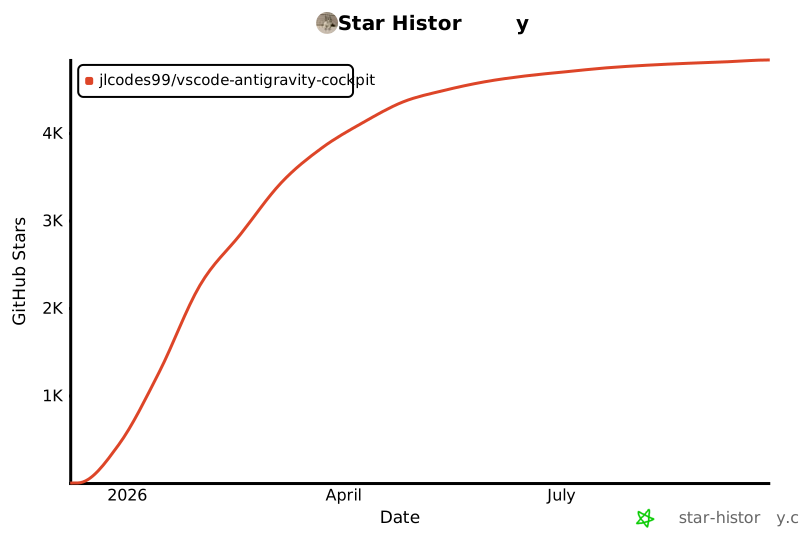
Star History
许可证
MIT
免责声明
本项目仅供个人学习和研究使用。使用本项目即表示您同意:
- 不将本项目用于任何商业用途
- 承担使用本项目的所有风险和责任
- 遵守相关服务条款和法律法规
项目作者对因使用本项目而产生的任何直接或间接损失不承担责任。

