navapi-vscode
Business Central environments, API routes, and entities in your sidebar — the buttons-for-humans face of navapi. Thin wrapper over @navapi/core; profiles are shared with the navapi CLI and MCP server. Includes native Data Braider support and built-in GitHub Copilot tools — see below.
What it does
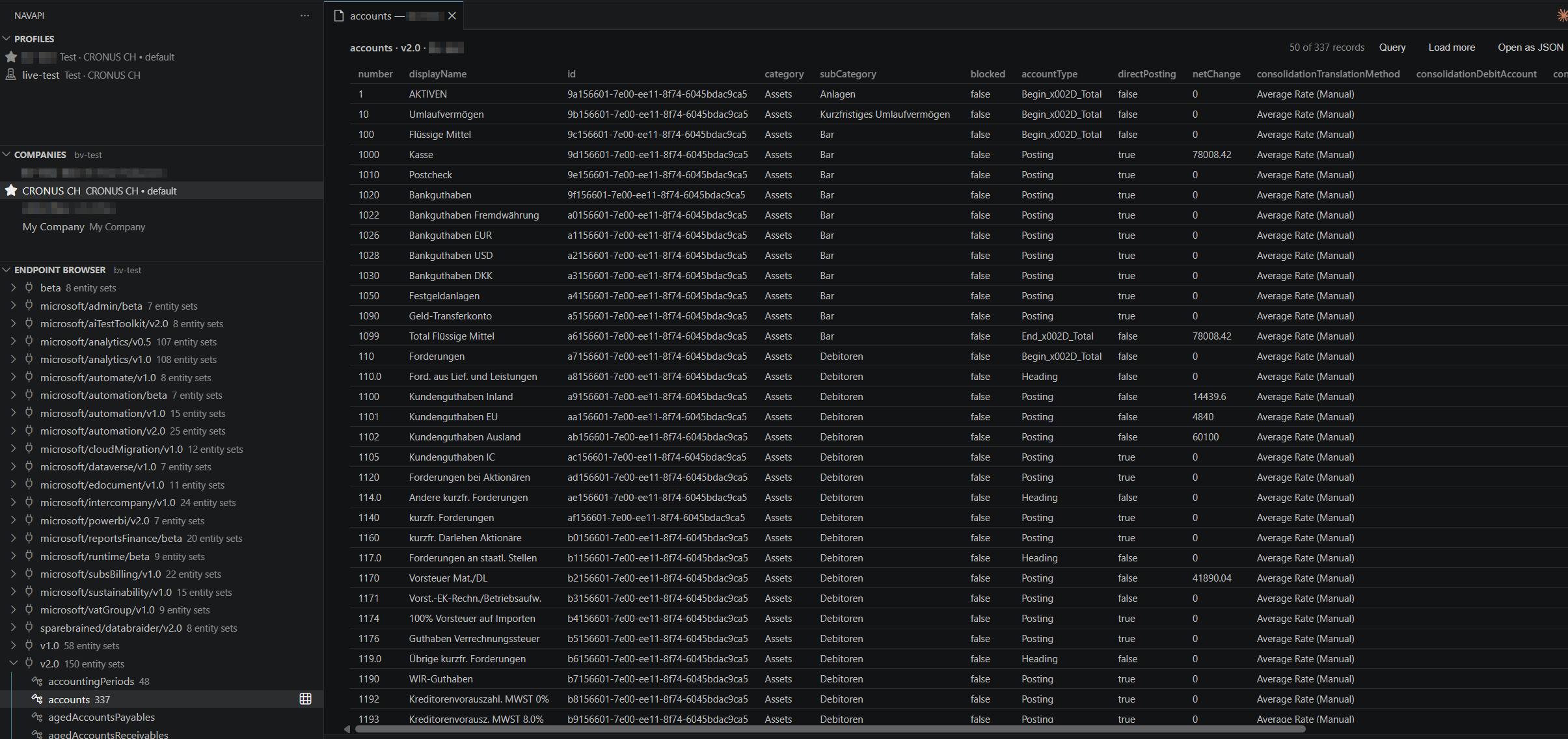
- Three sidebar sections — Profiles, Companies, and Endpoint Browser (API routes and published ODataV4 services → entity sets), all reading from on-disk caches. Click a profile to make it active; the Companies and Endpoints sections follow it (the active profile shows in their headers). Click a company to make it the default (★ marks the current one). Browsing needs no credentials; only Discover/Refresh talk to BC. The VS Code records experience is intentionally read-only; CLI and MCP support writes to APIs and writable ODataV4 pages.
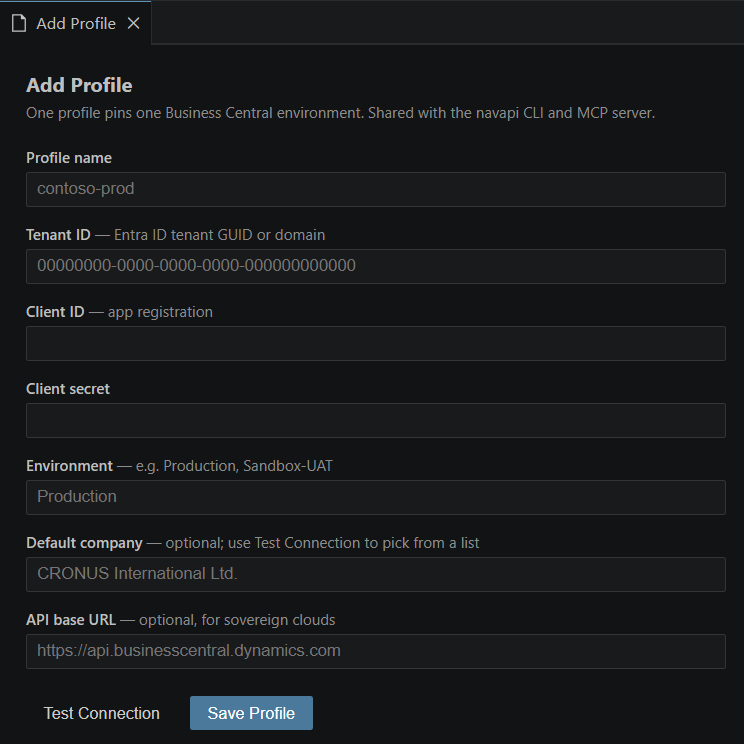
- Add/Edit Profile form — a real form in an editor tab (no popup chains): all fields visible, inline validation, masked secret, Test Connection before saving, and a default-company picker fed by the environment's actual company list.
- Discover — enumerates every route via the runtime API's
apiRoutes, ingests and caches $metadata per route (standard v2.0, microsoft/*, and custom publisher APIs), and caches the company list too.
- Search Endpoints — the magnifier in the Endpoint Browser toolbar opens a search box over every cached entity set. Type part of a name, a route, or an entity type (
Microsoft.NAV.customer) and press Enter to open the records grid — no expanding routes to find the one you want. The search itself reads the on-disk cache and needs no connection; opening the grid then fetches the first page, like clicking the entity set in the tree.
- Browse Records — click an entity set for a native-themed table: sortable columns (server-side
$orderby when only part of the data is loaded, instant local sort when you have it all), "Load more" paging, and expandable sub-tables for $expand sublists and nested objects. "Open as JSON" (or the Browse Records (JSON) context item) gives the raw view.
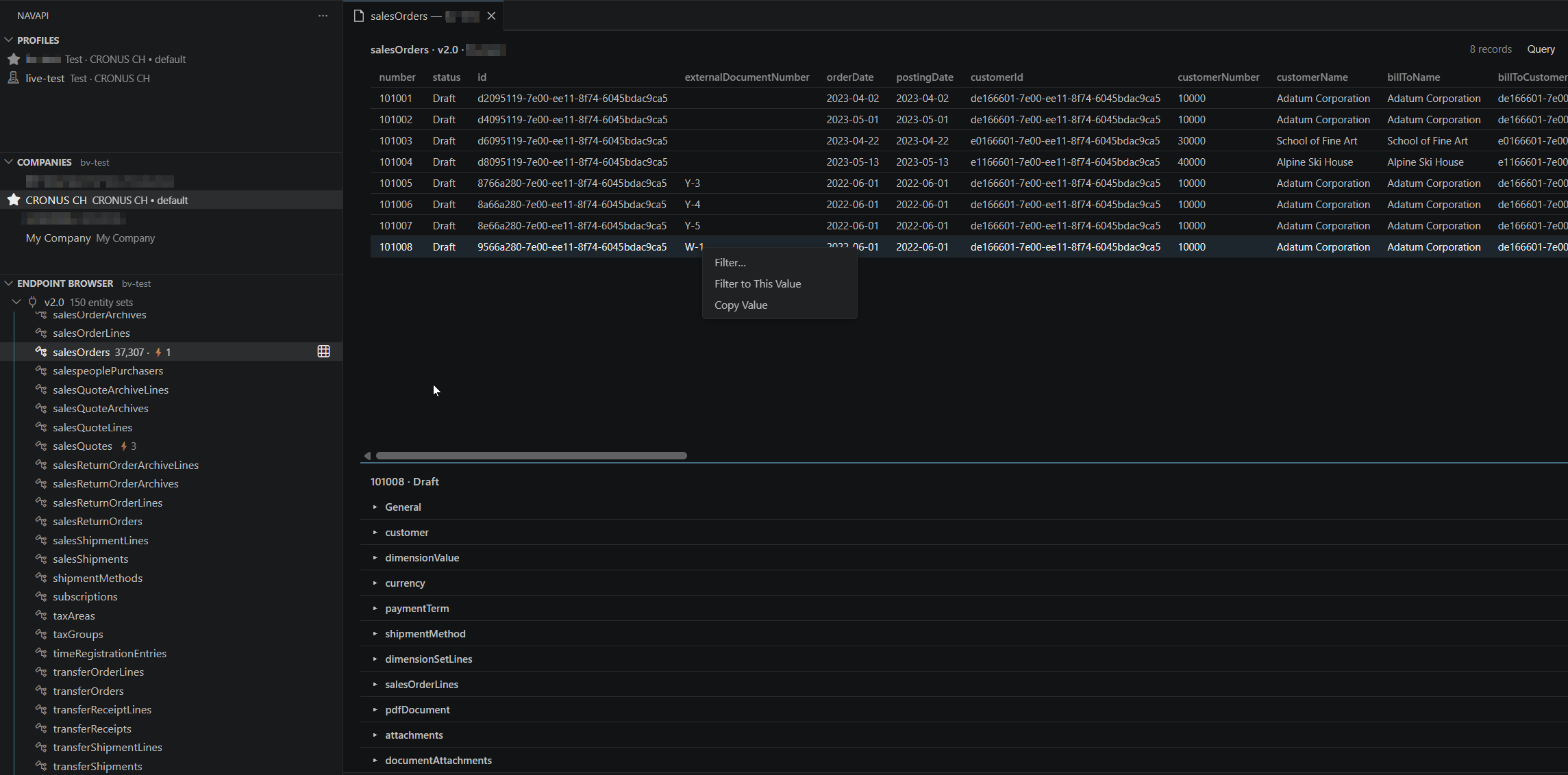
- FastTab detail pane — click a row and a BC-style detail pane opens below the grid: a General tab with every field of the record, plus one collapsible tab per navigation property (from
$metadata), lazy-loaded on expand — collections as mini-grids with counts (salesOrderLines (4)), single navs as field/value. Esc closes.
- Record counts in the tree — once a records panel learns an entity's unfiltered
$count, the Endpoint Browser remembers it: customers 1,203 · ⚡2.
- BC-style cell context menu — right-click any value: Filter… opens the query panel with that field pre-picked; Filter to This Value applies
field eq value server-side immediately. The record count gains a (filtered) tag while a filter is active.
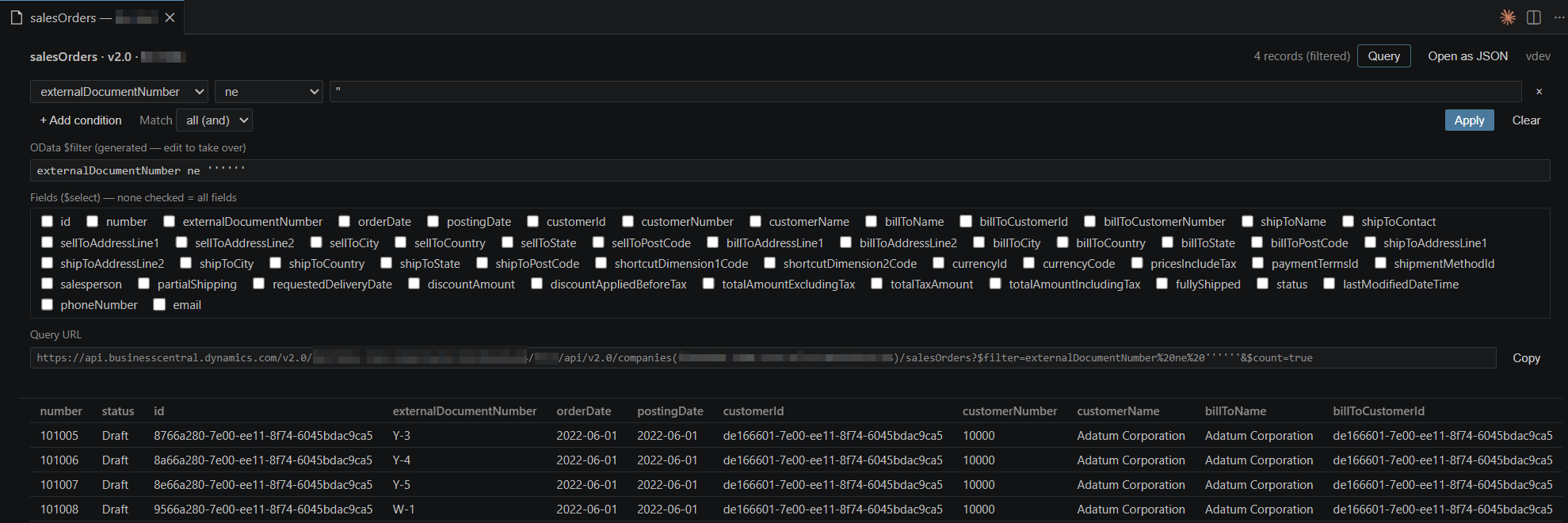
- Query builder — a panel that builds real server-side OData queries:
$filter conditions picked from the entity's schema with type-aware operators (contains/startswith for strings, gt/le for numbers and dates), AND/OR matching, and a live expression preview you can hand-edit; $select field checkboxes to fetch only the columns you care about; an always-on $count, so the toolbar reads "50 of 1,203 records"; and a read-only Query URL field with a Copy button — paste the exact request into a chat or doc when explaining something. Bad expressions surface BC's error inline.
- Show Schema — keys, properties with types/maxLength, navigation properties, bound actions.
- Profile management — add/edit via the form, set default, remove; the current company shows next to the environment in the tree.
Schema-driven query builder — pick $filter conditions and $select fields from the entity's own schema, hand-edit the generated OData, and copy the exact request URL:
FastTab detail panes & right-click filtering — click a row for a BC-style detail pane with a tab per navigation property; right-click any cell to filter to that value:
Profiles with Test Connection — one form, every field visible, validated and connection-tested before you save:
🧭 Data Braider
Data Braider is a free, community-maintained extension that turns Business Central data into configurable JSON API endpoints — no AL code required. When it's installed in your environment, navapi grows a dedicated Data Braider sidebar section so you can work with those endpoints as first-class objects:
- Endpoint browser — every configured endpoint, labelled by type (Read Only / Per Record / Batch / Delta Read) and output format.
- Read endpoint data in a grid using Data Braider's own filters (BC filter syntax) and paging — flat output as a table, hierarchical output as expandable nested tables. navapi transparently unwraps the double-encoded JSON payload, so you just see clean records.
- Write to endpoints — Insert / Update / Delete / Upsert.
- Schema — the exact
Table.Field shape of each endpoint.
- New Endpoint (Data Braider 2.4+) — author a complete endpoint from inside VS Code with searchable table and multi-select field pickers; you never hand-type a table or field number.
Older Data Braider installs get discovery, read, write, and inferred schemas today; the authoring flow and live schemas light up automatically once Data Braider's config API (2.4+) is present — no navapi update needed.
🤖 GitHub Copilot, built in
The extension registers navapi's Model Context Protocol server with VS Code, so Copilot agent mode gets navapi's tools out of the box — no mcp.json, no separate install. Ask Copilot to "list the customers changed this week" or "read the CUSTOMERS Data Braider endpoint" and it calls the real APIs through navapi:
- Every navapi tool is available: BC discovery, record CRUD,
$batch, bound actions, and the full Data Braider tool set (read, write, schema, endpoint authoring).
- The server is scoped to your active profile — click a different profile in the sidebar and Copilot follows, so it always talks to the environment you're looking at.
- Secrets stay in your OS keychain; the same profiles power the CLI and the sidebar.
Requires VS Code 1.101+ (for the MCP provider API).
This extension is one of five faces of navapi that share the same profiles and secrets (in ~/.navapi) — so anything you set up here works everywhere:
@navapi/cli — the navapi command: route discovery, record CRUD, $batch, bound actions, and Data Braider read/write/authoring, with stable --json output for scripts and agents. npm i -g @navapi/cli@navapi/mcp — a standalone Model Context Protocol server (navapi-mcp) for any MCP client, if you want navapi's tools outside VS Code. npm i -g @navapi/mcp (inside VS Code, Copilot already gets them — see above).navapi ui — a secure local browser interface for profiles, companies, endpoint discovery, schemas, and read-only record queries.
Source, the @navapi/core library, and full docs live in the repo: github.com/JeremyVyska/navapi.
Development
pnpm install && pnpm build
# then in VS Code: open packages/vscode and press F5 (Run Extension)
pnpm --filter navapi-vscode package             # host-only .vsix (local dev)
pnpm --filter navapi-vscode package:universal   # universal .vsix (all platforms)
| |

