Violet Hour
A violet color theme for Visual Studio 2022 and VS Code, in dark and light, tuned for
JavaScript, TypeScript, JSX/TSX and CSS.
Named for the half-hour after sunset. A violet field, cool sky colors carrying the structure of the
code, and the last warm light of the day on strings and numbers. Italic comments, keywords and
parameters. Contrast is deliberately held in a soft band — bright enough to read all day, never
sharp.
Original work. No color is taken or adapted from another theme, and every value was solved
against a contrast budget rather than picked by eye — the solvers are in scripts/, and the
build refuses to ship a palette that violates them.
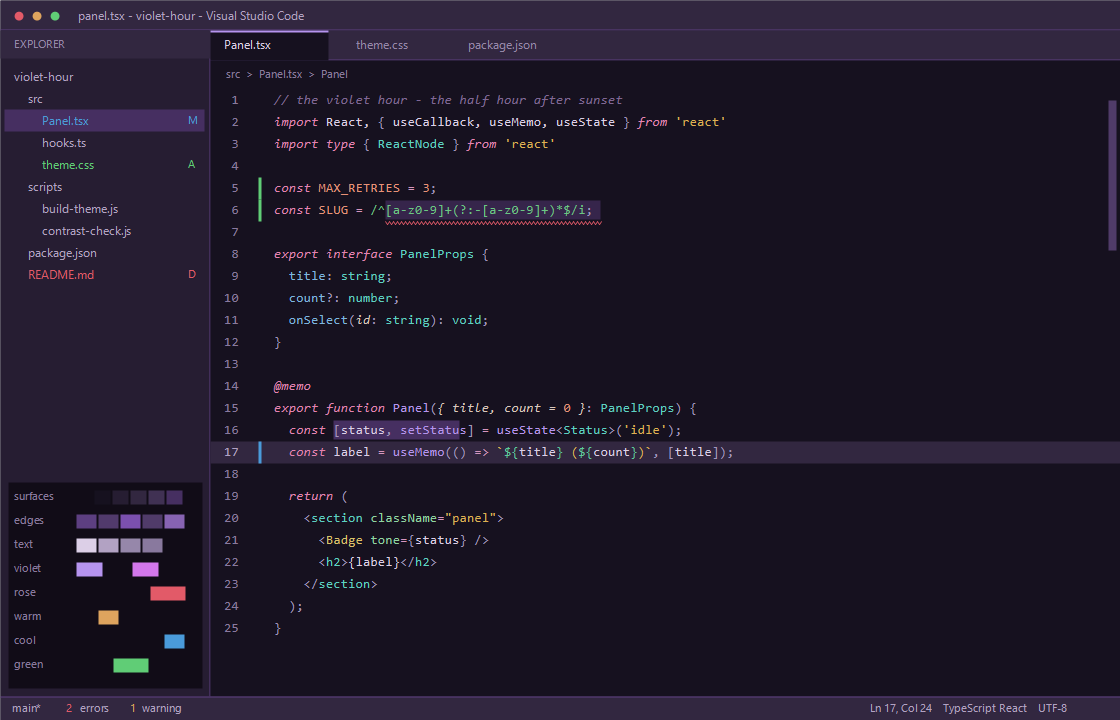
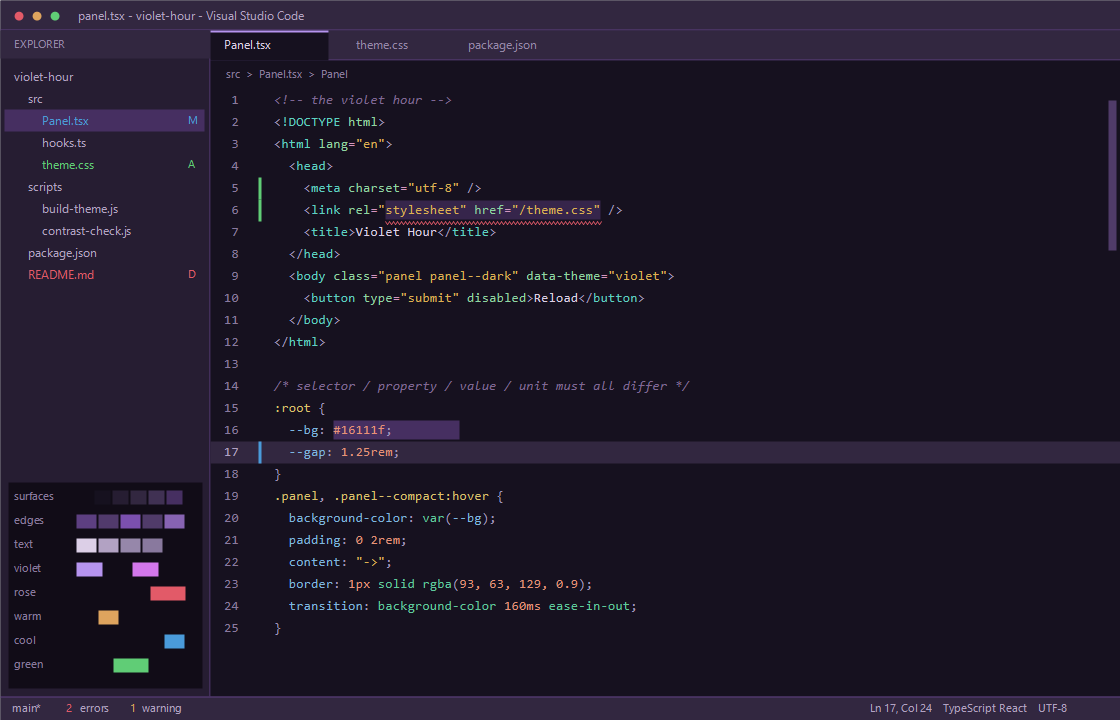
Violet Hour Light — the same hue plan solved against a bright ground:
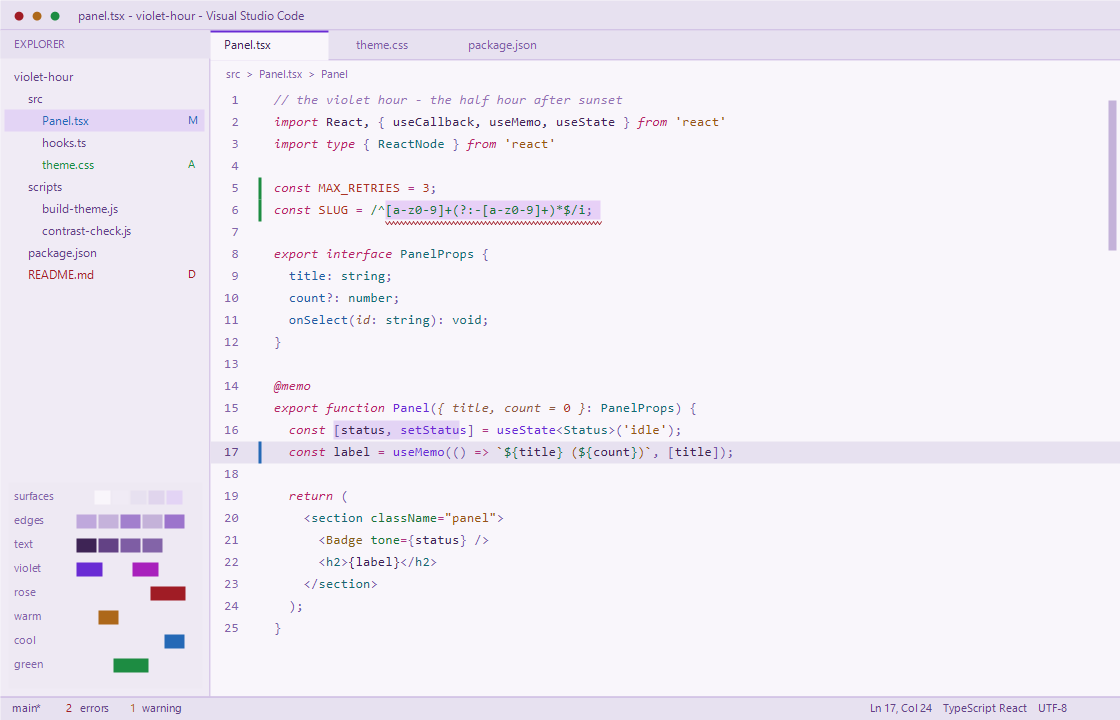
Regenerate with npm run preview (and npm run preview:markup). Both render straight from
palette.json through GDI+ with a real monospace face, so they cannot drift from what ships.
Install
Grab the latest from the Releases page:
| File |
For |
How |
VioletHour.vsix |
Visual Studio 2022 |
double-click, restart VS, then Tools → Theme → Violet Hour (or Violet Hour Light) |
VioletHour-VSCode.vsix |
VS Code |
code --install-extension VioletHour-VSCode.vsix, or Extensions → ... → Install from VSIX |
VioletHour.pkgdef |
VS 2022, manual |
drop straight into a VS install (see Without a VSIX) |
No toolchain, no build — same as any other theme you download.
Getting it into Extensions search
Installing a .vsix puts the theme under Installed in the Extensions pane. It does not make
it findable in search — search queries the VS Code Marketplace, so the extension has to be
published there. That needs a Microsoft account and a token, so it is something only you can do:
- Sign in at https://marketplace.visualstudio.com/manage and create a publisher. The ID you
pick is permanent and becomes half of the extension's identity (
<publisher>.violet-hour).
- If it is not
jeffreyhamilton, change publisher in vscode/package.json to match. A mismatch
is the single most common cause of a rejected publish.
- In Azure DevOps, mint a Personal Access Token with Marketplace → Manage scope
(https://dev.azure.com → User settings → Personal access tokens). Set Organization to
All accessible organizations, or the token will not work.
- Add it to this repo as the secret
VSCE_PAT
(Settings → Secrets and variables → Actions → New repository secret).
- Push a
v* tag. The publish-marketplace job picks it up.
The job is opt-in: with no VSCE_PAT it logs a notice and skips, so forks and pull requests never
try to publish. It refuses outright if publisher is still local.
To publish by hand instead:
npx @vscode/vsce login <your-publisher>
npx @vscode/vsce publish
Run that from a short, plain path. vsce globs the working directory and silently finds zero
files under long or unusual paths — it then reports the icon and LICENSE as missing, which looks
like a manifest error but is not.
Visual Studio 2022 has a separate marketplace. There is no equivalent CLI publish for the
.vsix in this repo; upload it through the web UI at
https://marketplace.visualstudio.com/manage/publishers under a Visual Studio publisher.
Until any of that happens, the .vsix files on the Releases page install exactly
the same theme — they just are not searchable.
The palettes
Two variants, one hue plan. theme/palette.dark.json and theme/palette.light.json are the only
places a literal hex lives.
The light variant is not the dark one inverted. Three constraints genuinely flip, and getting
any of them wrong is what makes most light themes feel washed out:
- The neutral ramp descends from the editor rather than climbing.
- Edges are solved against the darkest adjacent surface, not the lightest — a border that clears
1.66:1 against the light editor still vanishes on chrome.
- The luminance rule becomes a floor instead of a ceiling: nothing may be darker than the body
text, or it out-weights the prose.
The selection background is also the binding constraint on light, not the editor — every token has
to stay dark enough to clear 4.0:1 when selected. Both variants pass the same 113 assertions.
Dark
Neutrals — hue held at 267, saturation eased from 0.34 down to 0.25 as surfaces lighten so the
chrome never turns lurid. Never gray, never black.
| Role |
Hex |
|
| Deepest well |
#110C17 |
violet-black, not #000000 |
| Editor background |
#16111F |
|
| Tool windows, panels, terminal |
#261D32 |
|
| Title bar, inactive tabs, current line |
#322740 |
|
| Hover |
#403153 |
|
| Selection / inactive selection |
#462F61 / #332444 |
|
| Border |
#5D3F81 |
1.66:1 on chrome — visible only when looked for |
| Indent guide / active |
#513A6C / #7B50AF |
|
Foregrounds — #DCCFE7 primary, #B2A2C3 secondary, #89799E muted, #9687AA muted-on-chrome.
Syntax — the hue plan is the design. Violet carries identity, rose carries grammar, warm
carries literals, cool carries structure. The cool family is spaced 136 → 156 → 172 → 206 so no
two of its members blur together:
| Token |
Hex |
Hue |
|
| Comment |
#806795 |
273 |
italic, recessive |
| Keyword, storage, control flow |
#E582B1 |
332 |
italic — the "grammar" rose |
| Operator |
#D696BF |
322 |
|
| Function / method |
#B694EF |
262 |
the lavender identity color |
| Class, interface, type |
#5DD1C2 |
172 |
cool aqua — also intrinsic tags |
| Object property / key |
#7DB5E1 |
206 |
cool sky |
| String |
#DEB052 |
40 |
warm — the low sun |
| Number, boolean, constant |
#E99177 |
14 |
warm coral |
Template literal ${} |
#5ECA9B |
156 |
mint |
| Regex |
#6BC683 |
136 |
|
| JSX intrinsic tag |
#5DD1C2 |
172 |
deliberately the same as type |
| JSX component tag |
#DCC16A |
46 |
|
| Attribute name |
#8FD5A1 |
136 |
same hue as regex, split by lightness |
| Parameter |
#DBC8BC |
22 |
italic — a warm blush neutral, tied to the rose family |
| Punctuation |
#A295BE |
259 |
|
In CSS the four most frequent tokens are pulled deliberately far apart — selector #DCC16A (46°),
property #7DB5E1 (206°), value keyword #5ECA9B (156°), number/unit #E99177 (14°). Unquoted
value keywords (solid, ease-in-out) are constants, not strings, so they do not share the
string amber; a quoted string in CSS still does.
State — #B694EF accent, #D377EB caret, #E25A68 error, #DEA45E warning, #60CD76 added,
#4A9BDA modified. The four status colors were solved together: red and green collapse toward the
same hue under deuteranopia, so they are separated by simulated lightness rather than by hue. Git
"modified" is blue partly for that reason — blue survives deuteranopia, which lifts its separation
from "added" from 1.14 to 1.48.
Tweaking a color
- Edit the hex in
theme/palette.dark.json or theme/palette.light.json.
npm run build.- Read the report. A failed assertion names the exact pair and the floor it missed.
Roles are grouped so a change lands everywhere it should — editing state.accent moves the focus
border, active tab indicator, links, buttons, badges and function names in one go, because they
are all the same design decision. Derived tints (hover washes, merge bands, bright ANSI variants)
are computed from palette entries by mix() in build-theme.js.
Then npm run vscode to look at it, or push a v* tag to cut a release.
The contrast rules
scripts/contrast-check.js asserts this theme's own floors and ceilings, not standard WCAG AA.
Violet Hour sits below AA in places on purpose — that softness is the design — so the checker
constrains from both sides:
| Rule |
Bound |
| Primary editor text vs editor background |
10.0–14.0:1 (a ceiling, not just a floor) |
| Every syntax token vs editor background |
≥ 4.0:1 |
| Comments |
≥ 3.5:1 — recessive but readable |
| Secondary / muted UI text vs its own background |
≥ 3.5:1 |
| Borders, icons, indent guides vs adjacent surface |
≥ 1.6:1 |
| Surface tonal steps (panel vs chrome, line highlight) |
≥ 1.08:1 |
| Any token over the selection background |
≥ 4.0:1 |
| Error / warning / added / removed under deuteranopia |
separated by lightness, not hue |
| Token HSL saturation |
≤ 0.78 |
| Any foreground's relative luminance |
≤ that of #DCCFE7 |
#000000 / #FFFFFF |
banned outright |
113/113 assertions pass. The local build and the CI release both stop if that regresses.
Two scoping decisions, both deliberate:
- Error red is excluded from the find-match check. Holding
editor.findMatchBackground to
4.0:1 against error red would crush the highlight to near-invisibility against the editor. Error
red marks squiggled text; it never renders as the body of a match. For the same reason the
selection floor does not apply to the state colors — they mark squiggles, gutters and icons,
never text sitting on a selection. syntax.invalid is the one that does, and it is solved
separately and comes out lighter than state.error as a result.
- The tonal-step floor is 1.08, not 1.6. Background washes are not edges. Contrast ratio badly
understates perceptibility between two large adjacent fields, and the boundary is drawn by
panel.border (2.2:1 against the editor), not by the tonal step.
How it is built
VS 2022 loads themes from a compiled .pkgdef inside a VSIX. Nothing here hand-authors .vstheme
XML.
theme/palette.json          the one place colors are defined
        |  scripts/build-theme.js
        v
theme/VioletHour.json       complete VS Code theme JSON (561 keys, all explicit)
        |  scripts/contrast-check.js   <- verification gate, build stops on failure
        |  ThemeConverter -> scripts/finalize-pkgdef.js
        v
build/VioletHour.pkgdef
        |  MSBuild vsix/VioletHour.csproj
        v
VioletHour.vsix
Why the theme JSON is generated, not hand-written
ThemeConverter expects a fully expanded theme: every workbench color key present and explicitly
set. An omitted key does not fall back sensibly — it converts to a bad value, which is how converted
themes end up with black-on-black tool windows.
scripts/baseline-keys.json is ThemeConverter's own Complete_Dark.json fixture — the converter's
reference for what "complete" means. build-theme.js assigns a palette color to every key in it and
fails the build if even one is left unassigned. That is why the build prints
561 required, 0 extra.
Building it yourself
npm run build      # both variants + contrast report for each
npm run vsix       # full chain through to VioletHour.vsix  (needs .NET SDK + VS 2022)
npm run vscode     # package + install the VS Code extension
scripts/build-vsix.ps1 clones and builds ThemeConverter into .tools/ on first run and caches it.
For a fast iteration loop, ThemeConverter's -t flag patches a VS install in place and launches it:
.\scripts\build-vsix.ps1 -LaunchVS "C:\Program Files\Microsoft Visual Studio\2022\Community"
Releases are cut by .github/workflows/release.yml on a v* tag. It runs on windows-latest,
which ships VS 2022 Enterprise including the VSSDK build targets, so the .vsix is packaged by
the real Microsoft toolchain and nobody needs VS 2022 locally to publish:
git tag v2.0.1 && git push origin v2.0.1
ThemeConverter quirks the build works around
Three undocumented behaviours, all handled rather than left to be rediscovered:
- The display name comes from the input FILENAME, not the JSON's
name field
(Converter.cs: Path.GetFileNameWithoutExtension). The build stages a copy named
Violet Hour.json so it reads correctly under Tools → Theme.
- The theme GUID is
Guid.NewGuid() on every run (Converter.cs:116). Left alone, every
rebuild registers as a brand-new theme — duplicates piling up under Tools → Theme and the user's
selection resetting on each update. finalize-pkgdef.js pins it, which also makes builds
byte-identical.
- It resolves its mapping files against the working directory, not the assembly location, so it
must be invoked from its own output folder or it cannot find
TokenMappings.json.
One palette entry does nothing in VS: state.cursor. ThemeConverter maps
editorCursor.foreground to an empty VS token list, so the caret color is dropped — in VS the caret
follows Plain Text. It is correct and used in VS Code.
Without a VSIX
copy build\VioletHour.pkgdef "C:\Program Files\Microsoft Visual Studio\2022\Community\Common7\IDE\CommonExtensions\Platform\"
& "C:\Program Files\Microsoft Visual Studio\2022\Community\Common7\IDE\devenv.exe" /updateConfiguration
(Administrator — it writes under Program Files.)
Checking the rendering
samples/ has three files that between them exercise every token role:
| File |
What to look for |
sample.tsx |
italic comments, keywords and parameters; JSX intrinsic tags (aqua) vs component tags (gold); template-literal ${}; regex |
sample.css |
selector / property / value / unit each a different color |
package.json |
keys distinct from string values; numbers and booleans distinct again |
Nothing should render as unstyled default-foreground text.
Layout
violet-hour/
  theme/
    palette.dark.json     the one place dark colors are defined
    palette.light.json    ... and light
    VioletHour.json       generated - complete VS Code theme JSON
    VioletHour-Light.json generated
  scripts/
    build-theme.js        palette -> theme JSON, both variants (fails if any key is unassigned)
    contrast-check.js     verification + printed report
    finalize-pkgdef.js    pins the theme GUID, verifies the display name
    build-vsix.ps1        full chain: theme -> check -> pkgdef -> vsix
    install-vscode.ps1    packages + installs the VS Code extension
    make-vsix-zip.ps1     OPC-correct zip packer shared by script + CI
    make-icon.js          renders the icon from the palette
    baseline-keys.json    ThemeConverter's Complete_Dark.json - the required key set
  vsix/                   VS 2022 extension project
  vscode/                 VS Code extension manifest + icon
  samples/                .tsx / .css / package.json for eyeballing the result
  .github/workflows/      CI: build, verify, publish releases
theme/VioletHour.json is generated. Edit palette.json and rebuild rather than editing it
directly.
Uninstall
VS 2022, from the VSIX — Extensions → Manage Extensions → Installed → Violet Hour → Uninstall,
then restart. Switch to another theme under Tools → Theme first, or VS starts on a theme that no
longer exists.
VS 2022, manual pkgdef — delete it and refresh:
del "C:\Program Files\Microsoft Visual Studio\2022\Community\Common7\IDE\CommonExtensions\Platform\VioletHour.pkgdef"
& "C:\Program Files\Microsoft Visual Studio\2022\Community\Common7\IDE\devenv.exe" /updateConfiguration
VS Code — npm run vscode:uninstall, or uninstall from the Extensions pane.
Adjust Community to Professional or Enterprise to match your install.
License
MIT — see LICENSE.txt.
The palette is original work. The only third-party file in this repository is
scripts/baseline-keys.json, a verbatim copy of Complete_Dark.json from Microsoft's
theme-converter-for-vs (MIT), used purely as
the authoritative list of color keys a complete theme must define. Its license is reproduced in
LICENSE.txt. ThemeConverter itself is a build-time tool, fetched during the build and not
redistributed.

