Skip to content
| Marketplace
Sign in
Visual Studio Code>Visualization>WandererNew to Visual Studio Code? Get it now.
Wanderer

Wanderer

jean_tinland

|
1 install
| (0) | Free
Spatial, infinite-canvas code navigation for VS Code, inspired by Haystack.
Installation
Launch VS Code Quick Open (Ctrl+P), paste the following command, and press enter.
Copied to clipboard
More Info

Wanderer

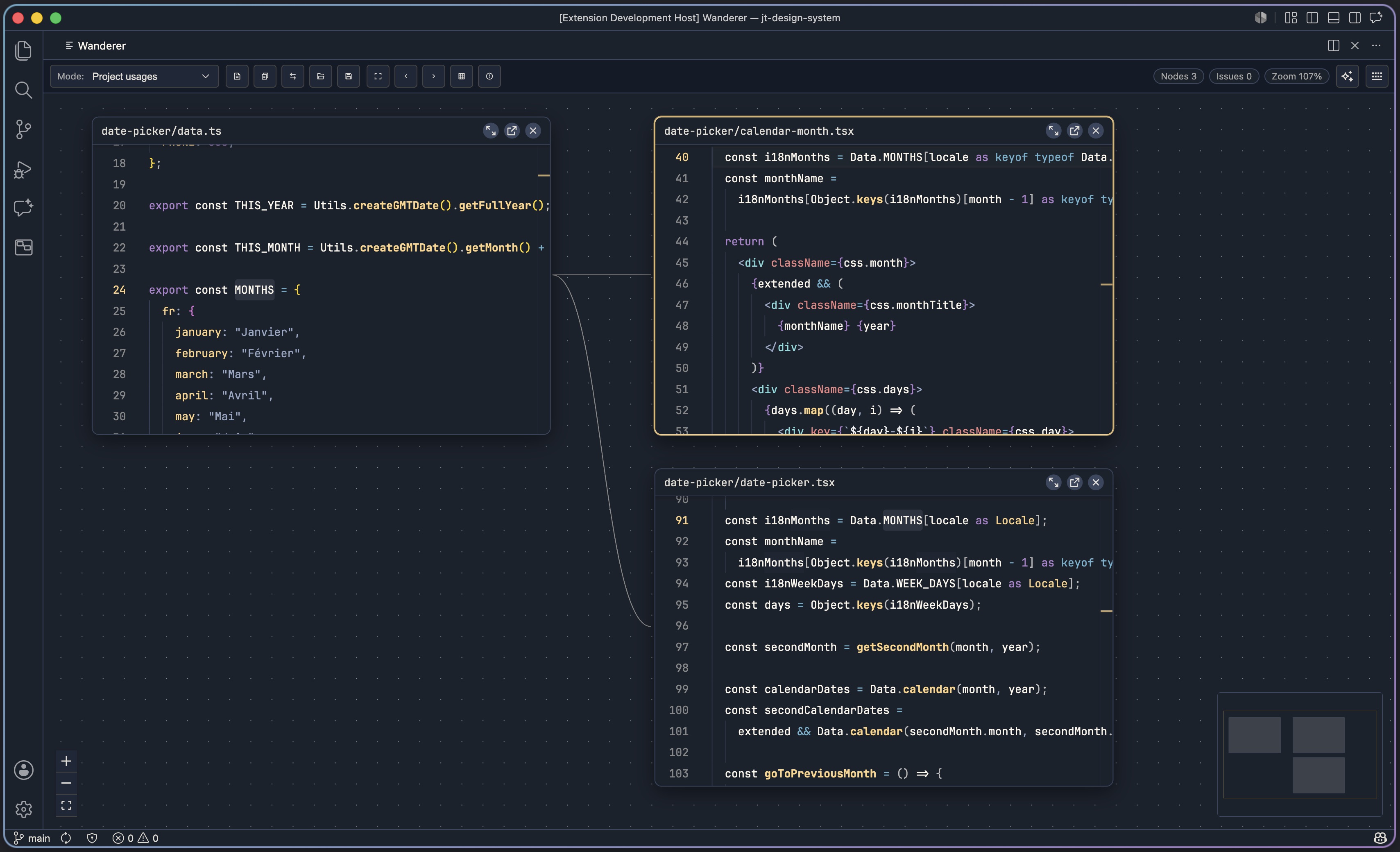
Wanderer is a VS Code extension for spatial code navigation on an infinite canvas. Open files as draggable Monaco editor cards, move around freely, and follow definitions or project usages without losing context.

Inspired by Haystack.

Why Wanderer

Traditional tab-based navigation is fast for one jump, but hard to reason about when you need to compare many related files. Wanderer keeps those relationships visible by turning your codebase into a navigable workspace.

Feature Overview

Area What you get
Spatial canvas Infinite canvas with drag-to-move editor nodes, minimap, viewport controls, zoom, and pan.
Fast opening Open current file, open one file, or open many files at once from a path-first picker with recent-file ranking.
Definition and usage navigation Cmd/Ctrl-click inside Monaco to follow definition or switch mode to open project usages per file.
Node operations Focus next/previous node, quick node switcher, open focused node in native side editor, close node, toggle expanded node size.
Editing in place Monaco editors inside nodes with incremental host sync, dirty-state tracking, and Cmd/Ctrl+S save support.
Diagnostics Monaco markers, per-node severity badges, and a Problems panel with counts and click-to-focus entries.
Layout persistence Debounced autosave of nodes/edges/camera and named layouts with save/load/rename/duplicate/pin/delete.
Guidance and discoverability Onboarding tips, keyboard cheatsheet, and toolbar status chips for node count, selection, issue count, and zoom.
AI-assisted coding Inline Copilot completions and inline chat (Cmd/Ctrl+I), with timeout notices and retry actions.
VS Code integration Theme sync, editor settings sync, activity bar launcher view, and a Saved Layouts tree view.

Quick Start

Prerequisites

  • VS Code 1.90+

Run locally

npm install
npm run build
  1. Press F5 in VS Code (Extension Development Host).
  2. Run Wanderer: Open Canvas from the command palette.
  3. Add files with Wanderer: Open Current File on Canvas or the canvas toolbar.
  4. Cmd/Ctrl-click symbols to traverse definitions or project usages.

If the panel shows the fallback page, rebuild first with npm run build.

Commands

Main commands

Command Description
Wanderer: Open Canvas Open the main infinite-canvas panel.
Wanderer: Open Current File on Canvas Add the active editor file as a node.
Wanderer: Reveal Definition on Canvas Resolve definition at cursor and open target(s) on canvas.
Wanderer: Zoom to Fit Fit all visible nodes in view.
Wanderer: Save Layout Save the current graph as a named layout.
Wanderer: Reset Layout Clear the auto-saved workspace layout.

Canvas commands

Command Description
Wanderer: Canvas Open File Open a single file picker from canvas context.
Wanderer: Canvas Open Multiple Files Open multiple files in one action.
Wanderer: Canvas Open Node Switcher Search and jump across currently open nodes.
Wanderer: Canvas Focus Previous Node Cycle focus backward through nodes.
Wanderer: Canvas Focus Next Node Cycle focus forward through nodes.
Wanderer: Canvas Open Focused Node in Side Editor Open focused node file in native side editor.
Wanderer: Canvas Close Focused Node Close focused node.
Wanderer: Canvas Toggle Focused Node Size Expand or restore focused node size.
Wanderer: Canvas Toggle Snap to Grid Toggle grid snapping for node movement.
Wanderer: Canvas Toggle Reference Click Mode Toggle Cmd/Ctrl-click behavior between definition and project usages.
Wanderer: Canvas Toggle Problems Panel Show or hide aggregated diagnostics panel.
Wanderer: Canvas Toggle Keyboard Cheatsheet Show or hide shortcuts modal.

Saved layout actions

Command Description
Load Layout Load a named layout from the Saved Layouts view.
Rename Layout Rename a saved layout.
Duplicate Layout Clone a saved layout.
Toggle Layout Pin Pin or unpin a layout for visibility.
Delete Layout Remove a saved layout.

Keyboard Shortcuts

Action macOS Windows/Linux
Open canvas Cmd+Alt+W Ctrl+Alt+W
Open current file on canvas (editor) Cmd+Alt+Shift+O Ctrl+Alt+Shift+O
Reveal definition on canvas (editor) Cmd+Alt+Shift+D Ctrl+Alt+Shift+D
Open file on canvas Cmd+Alt+O Ctrl+Alt+O
Open many files Cmd+Alt+Shift+O Ctrl+Alt+Shift+O
Open node switcher Cmd+Ctrl+K or Cmd+Ctrl+J Ctrl+Alt+K or Ctrl+Alt+J
Save named layout Cmd+Alt+S Ctrl+Alt+S
Load named layout Cmd+Alt+L Ctrl+Alt+L
Focus previous node Cmd+Alt+P Ctrl+Alt+P
Focus next node Cmd+Alt+N Ctrl+Alt+N
Open focused node in side editor Cmd+Alt+E Ctrl+Alt+E
Close focused node Cmd+Alt+X Ctrl+Alt+X
Toggle focused node size Cmd+Alt+B Ctrl+Alt+B
Zoom to fit Cmd+Alt+0 Ctrl+Alt+0
Toggle snap to grid Cmd+Alt+G Ctrl+Alt+G
Toggle reference click mode Cmd+Alt+R Ctrl+Alt+R
Toggle problems panel Cmd+Alt+M Ctrl+Alt+M
Toggle keyboard cheatsheet Cmd+Alt+/ Ctrl+Alt+/
Inline chat in editor node Cmd+I Ctrl+I

Interaction Model

Input Result
Drag node header Move node
Mouse wheel/pinch Zoom
Middle-click drag Pan canvas
Drag selection on background Multi-select nodes
Cmd/Ctrl-click symbol Follow definition or open project usages (toolbar mode)
Node header actions Expand/restore, open in side editor, close
Escape Clear focus or close active modal/panel

Views

  • Activity bar view container: Wanderer
  • Sidebar launcher view: open canvas, open current file on canvas
  • Saved Layouts tree view: load, rename, duplicate, pin, and delete layouts

Configuration

Setting Default Description
wanderer.spatial.horizontalGap 120 Horizontal gap in pixels when placing definition/reference targets next to source nodes.
wanderer.spatial.verticalStack 40 Vertical offset in pixels for stacked target placement.
wanderer.node.defaultWidth 520 Default node width in pixels.
wanderer.node.defaultHeight 360 Default node height in pixels.

Architecture

extension/   VS Code extension host (Node, esbuild bundle)
  src/
    extension.ts            activation + command registration
    canvasPanel.ts          webview panel lifecycle + message dispatch
    services/
      languageProxy.ts      definitions/references/hover/completion/format
      documentSync.ts       applies edits and forwards document changes
      copilotService.ts     inline completion + inline chat proxy
      themeService.ts       VS Code theme forwarding
    persistence/
      layoutStore.ts        autosave and named layout storage

webview/     Canvas UI (React + Vite + React Flow + Monaco)
  src/
    App.tsx                 shell, toolbar, overlays, autosave orchestration
    canvas/Canvas.tsx       React Flow surface, minimap, controls, pan/zoom
    nodes/EditorNode.tsx    Monaco-backed card + symbol navigation behavior
    components/             toolbar, node switcher, onboarding, problems panel
    monaco/                 workers, models, diagnostics, language providers
    state/                  graph, viewport, interaction, diagnostics stores
    bridge/vscode.ts        typed postMessage bridge
    graph/placement.ts      spatial placement algorithm

shared/protocol.ts          shared message and payload types

The webview is the primary runtime. The extension host acts as a backend that bridges VS Code language services and workspace data over a typed protocol.

Development

npm install
npm run build

Watch mode:

npm run watch:webview
npm run watch:extension

Type checking:

npm run typecheck

Code Quality

npm run format
npm run format:check
npm run lint
npm run lint:fix
npm run knip
npm run knip:strict
  • Contact us
  • Jobs
  • Privacy
  • Manage cookies
  • Terms of use
  • Trademarks
© 2026 Microsoft