Skip to content
| Marketplace
Sign in
Visual Studio Code>Visualization>data2ui visualizerNew to Visual Studio Code? Get it now.
data2ui visualizer

data2ui visualizer

Preview

Jorge Arraga

|
4 installs
| (1) | Free
Turn any JSON into a clear, navigable UI
Installation
Launch VS Code Quick Open (Ctrl+P), paste the following command, and press enter.
Copied to clipboard
More Info

data2ui visualizer

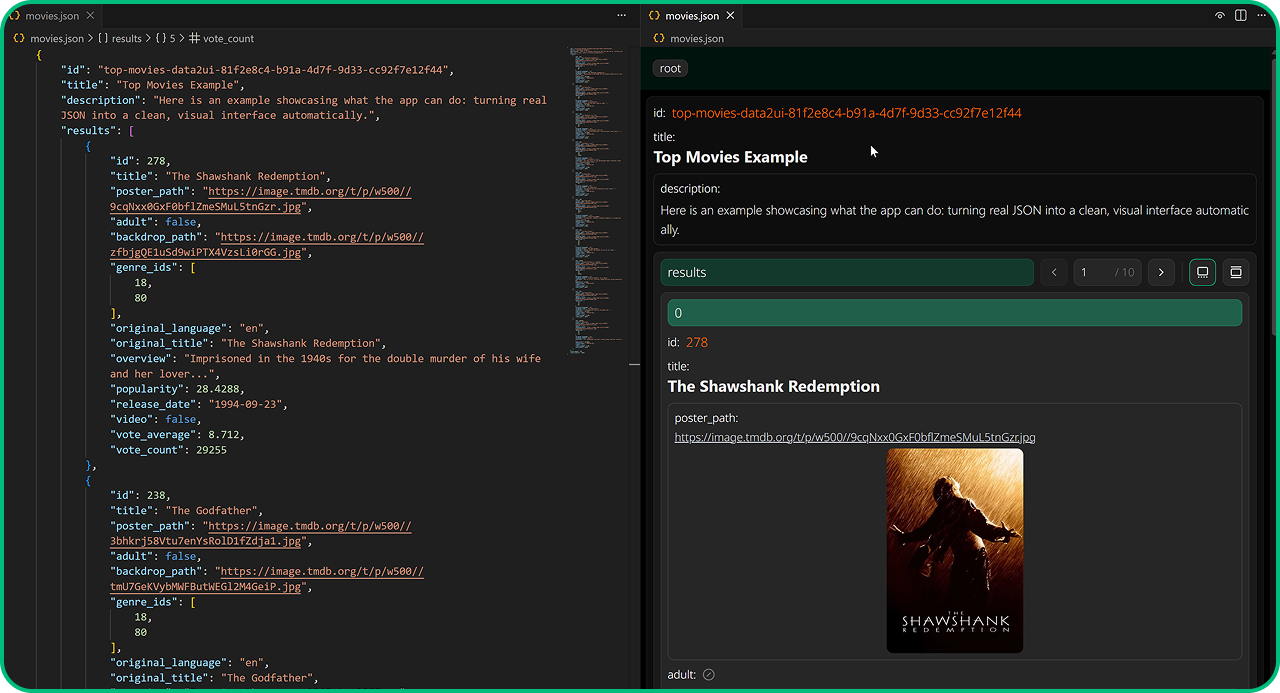
Instant live preview of any JSON file — right inside VS Code.

visualizer

How to use

Option 1 – Context menu

  1. In the Explorer, right-click any .json file
  2. Choose Preview with data2ui
    → JSON opens on the left, beautiful UI appears on the right

Option 2 – The eye icon (when a JSON is open)

  1. Open your .json file normally
  2. Click the eye icon in the top-right corner of the editor
    → Preview instantly opens on the right

✨ That’s it. Edit your JSON → the preview updates in real time. Close the preview tab whenever you want.

Want to try it outside VS Code?

→ data2ui.jarraga.dev – just paste your JSON and play!

made with 💚 by JA

  • Contact us
  • Jobs
  • Privacy
  • Manage cookies
  • Terms of use
  • Trademarks
© 2025 Microsoft