BuildNum
Azure Pipelines task that:
- Finds
BuildNum.xml
- Reads the
BuildNum element
- Stores it in the
$(BuildNum) variable
It has no parameters, only the output $(BuildNum) variable, so you can just drop it in and use it.
Intended for use with the JJ.AutoIncrementVersion nuget package for auto-incremental version numbers in .NET.
Goal
You could use $(BuildNum) at your own whim.
But the main thing this Task solves, is to keep $(BuildNum) constant during the solution build. MSBuild might start incrementing BuildNum multiple times, as multiple projects build one by one or even in parallel.
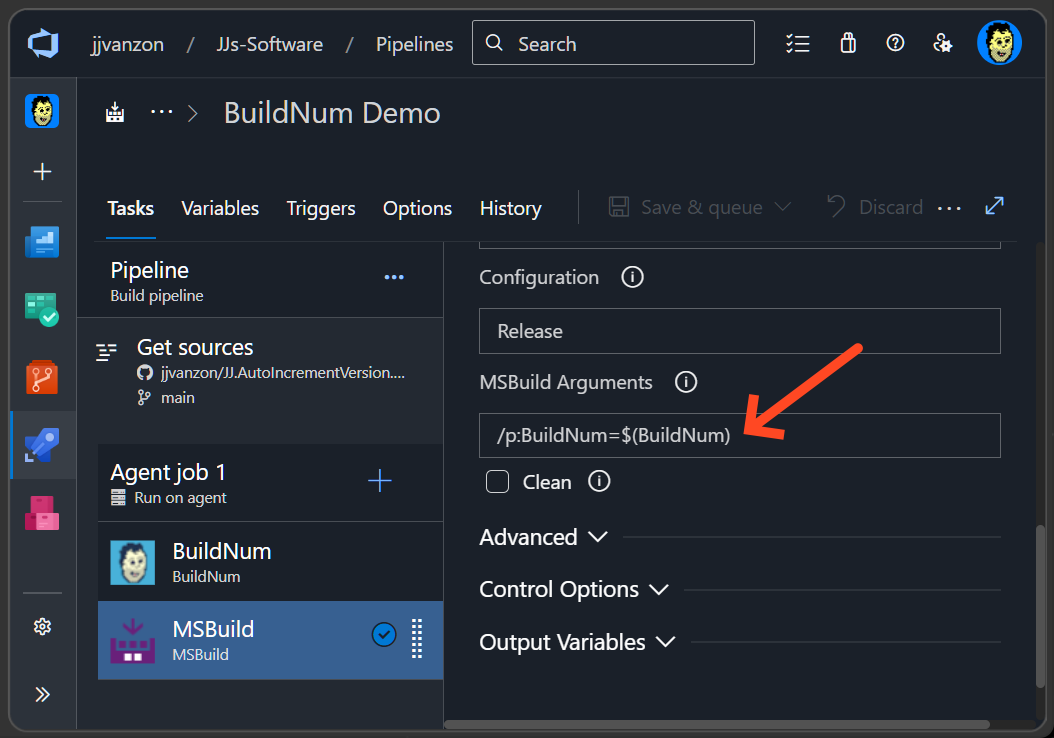
By passing $(BuildNum) to the MSBuild Task you can mitigate the problem. Fill this out under MSBuild Arguments:
/p:BuildNum=$(BuildNum)
This prevents the build from incrementing BuildNum multiple times.
Alternative
If you need something more specific, I recommend the Set variable with value from XML task by Yod Labs. Using these parameters accomplishes something similar:
Variable Name    : BuildNum
XPath expression : //BuildNum
XML file path    : BuildNum.xml
Set variable with value from XML might not recursively search for the BuildNum.xml but uses a literal path. BuildNum searches recursively and has no parameterization burden, working out of the box with the JJ.AutoIncrementVersion nuget package.

