FLISP Assembly for VS Code
Syntax highlighting and assembling for the assembly language of the FLISP processor (FLexible Instruction Set Processor), as used in the Grudat labs with DigiFlisp.
This extension is not affiliated with or endorsed by GMV (Göteborgs MikroVaror), the maker of DigiFlisp and qaflisp. The bundled qaflisp.exe and the DigiFlisp icon are used under the DigiFlisp software license — see THIRD-PARTY-NOTICES.md.
The grammar follows the FLISP-Handbok and the qaflisp assembler.
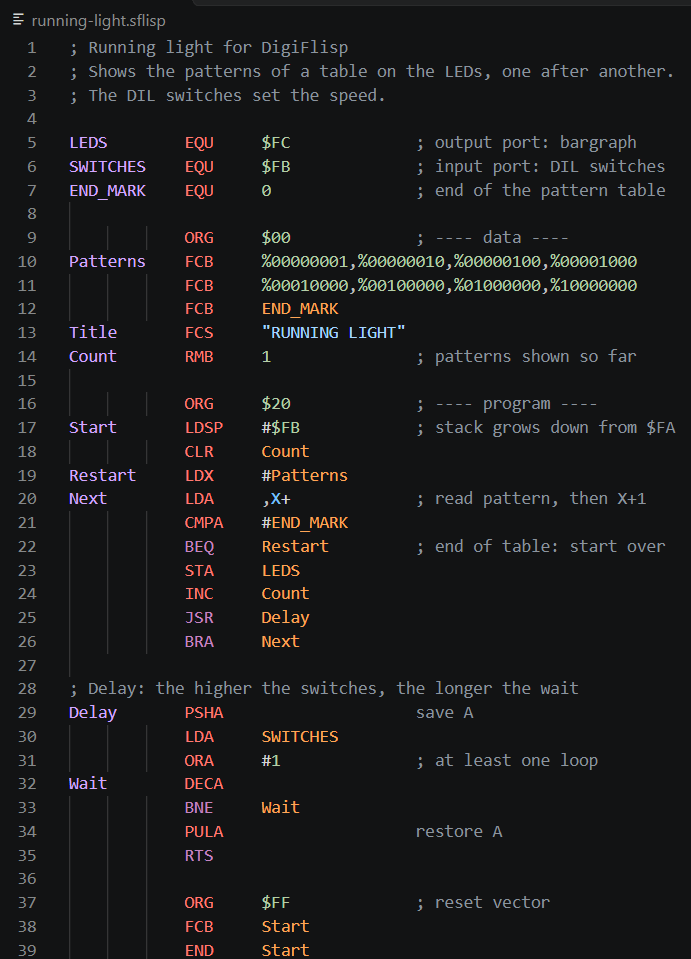
What gets highlighted
.sflisp (source code)
| Element |
Example |
| Comments |
; text to end of line and everything after the operand |
| Labels |
name in column 1, optionally followed by : |
| Symbols |
labels and EQU constants used in an operand, e.g. BRA Loop, STA LEDS |
| Assembler directives |
ORG, EQU, FCB, FCS, RMB, END |
| Flow-control instructions |
JMP, JSR, BSR, BRA, RTS, RTI, all B… branches |
| Other instructions |
from the FLISP handbook, plus aliases ASLA/ASL, PSHCC, PULCC |
| Lab instructions |
MOVE, CMJEQ — own scope, italic and underlined |
| Numbers |
$3F hex, %01000000 binary, 42 decimal, 'A' character |
| Immediate |
# |
| Registers |
A, X, Y, SP, PC, CC |
| Indexed addressing |
n,SP · n,X · A,Y · ,X+ · ,X- · ,+Y · ,-Y |
| Strings |
"TEXT" for FCS |
| Errors |
a mnemonic in column 1 (qaflisp reads it as a label: Illegal mnemonic) |
.fmem (memory image) — #setMemory directives with address and value;
# ClearAllMemory and # ClearAllRegisters with their own highlighting (scope keyword.control.reset); the header lines are shown as comments.
qaflisp reads every line as [Label] Mnemonic [Operand] [Comment]:
- Column 1 is always a label. An instruction must be indented.
- The operand ends at the first space (except inside a string). Everything after it is a comment, even without
;.
- For instructions without an operand (
NOP, PSHA, RTS, INCA …), everything after the mnemonic is a comment.
END takes an optional operand: the start symbol, e.g. END Start. It sets the start address in the .s19 file (S9 record). Text after END is therefore not a comment unless it starts with ; — END Rest of line makes qaflisp look for a symbol Rest and warn start symbol 'Rest' is defined (meaning: not defined).
The grammar does the same. This has a practical consequence: LDA #K + 1 loads K, not K+1 — the + 1 is a comment and is shown in grey. Write LDA #K+1 instead.
Lab instructions
MOVE and CMJEQ are not standard instructions; neither the handbook nor qaflisp knows them. They get the scope entity.name.type.instruction.custom.flisp, which the extension renders italic and underlined by default so they stand out in every theme.
Assembling
The extension runs the qaflisp assembler on the current file and shows its errors directly in the editor. qaflisp comes with DigiFlisp. The extension finds the qaflisp of an installed DigiFlisp automatically. On Windows it also works without DigiFlisp: a copy of qaflisp.exe is bundled with the extension.
| Platform |
Status |
| Windows |
tested |
| Linux x64 |
qaflisp from DigiFlisp 2.08 checked: same messages and same output files as on Windows; the extension itself not yet tested on Linux |
| macOS |
install location and message format checked in the DigiFlisp 2.08 packages; not tested on a Mac |
Feedback from Linux and macOS users is welcome — please open an issue.
- Run it: the ▶ button in the editor title bar,
F7, FLISP: Assemble in the command palette, or right-click a .sflisp file in the Explorer. Unsaved changes are saved first.
- Errors and warnings are underlined in the source and listed in the Problems panel. The full qaflisp output is in the FLISP output channel.
- Output files (
.s19, .lst, .fmem) are written next to the source file. Load the .fmem into DigiFlisp.
Settings
| Setting |
Default |
Meaning |
flisp.qaflispPath |
empty |
path to qaflisp.exe |
flisp.assembleOnSave |
false |
assemble automatically on every save |
flisp.listFile |
true |
create a .lst list file (-L) |
flisp.warnings |
true |
report warnings (-w) |
flisp.debugInfo |
false |
generate source-level debug information (-g) |
Assembling runs an external program and is therefore disabled in untrusted workspaces; highlighting works everywhere.
Installation
From the Marketplace — in VS Code open the Extensions view (Ctrl+Shift+X), search for FLISP Assembly and click Install.
As a .vsix — in VS Code press Ctrl+Shift+P → Extensions: Install from VSIX… → select the file.
As a folder — copy the flisp-asm-src folder here and restart VS Code:
- Windows:
%USERPROFILE%\.vscode\extensions\
- macOS/Linux:
~/.vscode/extensions/
Requires VS Code 1.63 or later.
Where qaflisp is looked for
- the path in the
flisp.qaflispPath setting — if set, nothing else is tried;
- the source file's folder and its parent folders, up to the workspace folder;
- the workspace folders;
- the
PATH;
- the DigiFlisp installation folder:
- Windows:
Program Files (x86)\GMV\DigiFlisp* or Program Files\GMV\DigiFlisp*
- Linux:
/usr/share/digiflisp (the .deb package); the .tar.gz instructions install to /usr/bin, which is on the PATH
- macOS:
/Applications/Digiflisp.app/Contents/MacOS or ~/Applications/Digiflisp.app/Contents/MacOS
- on Windows, the copy bundled with the extension (qaflisp 1.3).
So a newer qaflisp in your workspace, on the PATH or next to DigiFlisp always takes precedence over the bundled one. The FLISP output channel shows which qaflisp.exe was used. If none is found, a message offers to pick it with a file dialog.
Limitations
No autocompletion and no debugger. Errors are only checked when you assemble, not while you type. On Linux and macOS, assembling needs an installed DigiFlisp (or another qaflisp). Use DigiFlisp to run and debug the program.
License
The extension's own files are MIT-licensed, © 2026 Jan Ebert — see LICENSE. The bundled qaflisp.exe and the DigiFlisp icon belong to GMV and are distributed under the DigiFlisp software license — see THIRD-PARTY-NOTICES.md.

