Relative Path Extension for VS Code
Get the relative path to any file in your workspace
Press Ctrl+Shift+H (Mac: Cmd+Shift+H) and start typing the file you want.
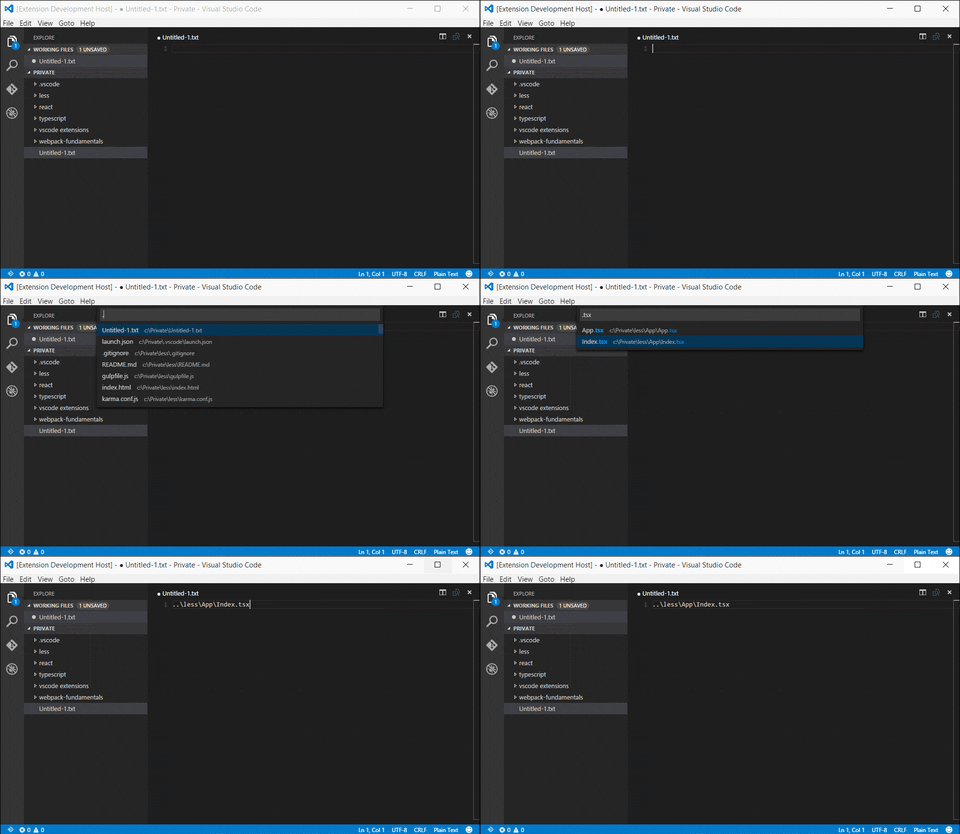
How to use
- Install the extension
- Press
Ctrl+Shift+H (Mac: Cmd+Shift+H) and start typing the file you want.
- The file you want will appear as you type
- 🪄 Select your file from the dropdown!
Options
The following settings are customizable. You likely do not need these, but if you do, here are your options
They can be set in user preferences (ctrl+, or cmd+,) or workspace settings (.vscode/settings.json).
// A glob by which to filter results
"relativePath.includeGlob": "/**/*.*",

// An array of glob keys to ignore when searching.
"relativePath.ignore": [
	"**/.git/**",
	"**/node_modules/**",
	"**/.husky/**",
	"**/.next/**",
	"**/dist/**",
	"**/build/**",
	"**/coverage/**",
	"**/.turbo/**",
	"**/.cache/**",
	"**/.venv/**",
	"**/__pycache__/**",
	"**/*.dll",
	"**/*.swp",
	"**/*.un~",
	"**/obj/**",
	"**/objd/**"
],

// Also hide files matched by VS Code's built-in `search.exclude`, so you don't
// have to duplicate those globs in `relativePath.ignore`. (`files.exclude` is
// always respected -- VS Code applies it to the file scan regardless.) Set to
// false to use only `relativePath.ignore` plus `files.exclude`.
"relativePath.respectSearchExclude": true,

// Excludes the extension from the relative path url (Useful for systemjs imports).
"relativePath.removeExtension": false,

// An array of extensions to exclude from the relative path url (Useful for used with Webpack or when importing files of mixed types)
"relativePath.excludedExtensions": [
	".js",
	".ts"
],

// Max number of files shown directly in the quick filter picker.
// Above this, a search box is shown first to narrow results.
"relativePath.searchCountLimit": 10000,

// Max number of files scanned and cached from the workspace. Bounds memory and
// scan time on very large workspaces; the picker indicates when results were
// truncated. Set to 0 for no limit.
"relativePath.maxFilesCached": 100000,

// Show a 'recently used' section with your last picked paths at the top of
// the file picker.
"relativePath.showRecentlyUsed": true,

// Removes the leading ./ character when the path is pointing to a parent folder.
"relativePath.removeLeadingDot": true,

//  "Omit path parts by matched Regular Expressions
"relativePath.omitParts": [
	"\\/index$"
],
In Multi root workspaces:
Everytime you switch to a file from a different folder the files in that folder are indexed and
cached to improve search performance. If you have multiple large folders part of a workspace
frequent switches between folders might slow you down.
In Single project workspace:
The caching of the filelist in the project happens only once. If your workspace contains a lot of files
please wait for the initial file list to be created.
Building the VSIX
To build an installable .vsix yourself:
npm install
npm run package
This compiles the extension and writes RelativePath-<version>.vsix to the project root. Install it with:
code --install-extension RelativePath-<version>.vsix
(Or in VS Code: Extensions view → ... menu → Install from VSIX.)
Bugs
Report them here.
Licence
MIT

