AIWorkHub for VS Code
One manager AI routes work to worker AIs through task cards, independent review and measured acceptance.
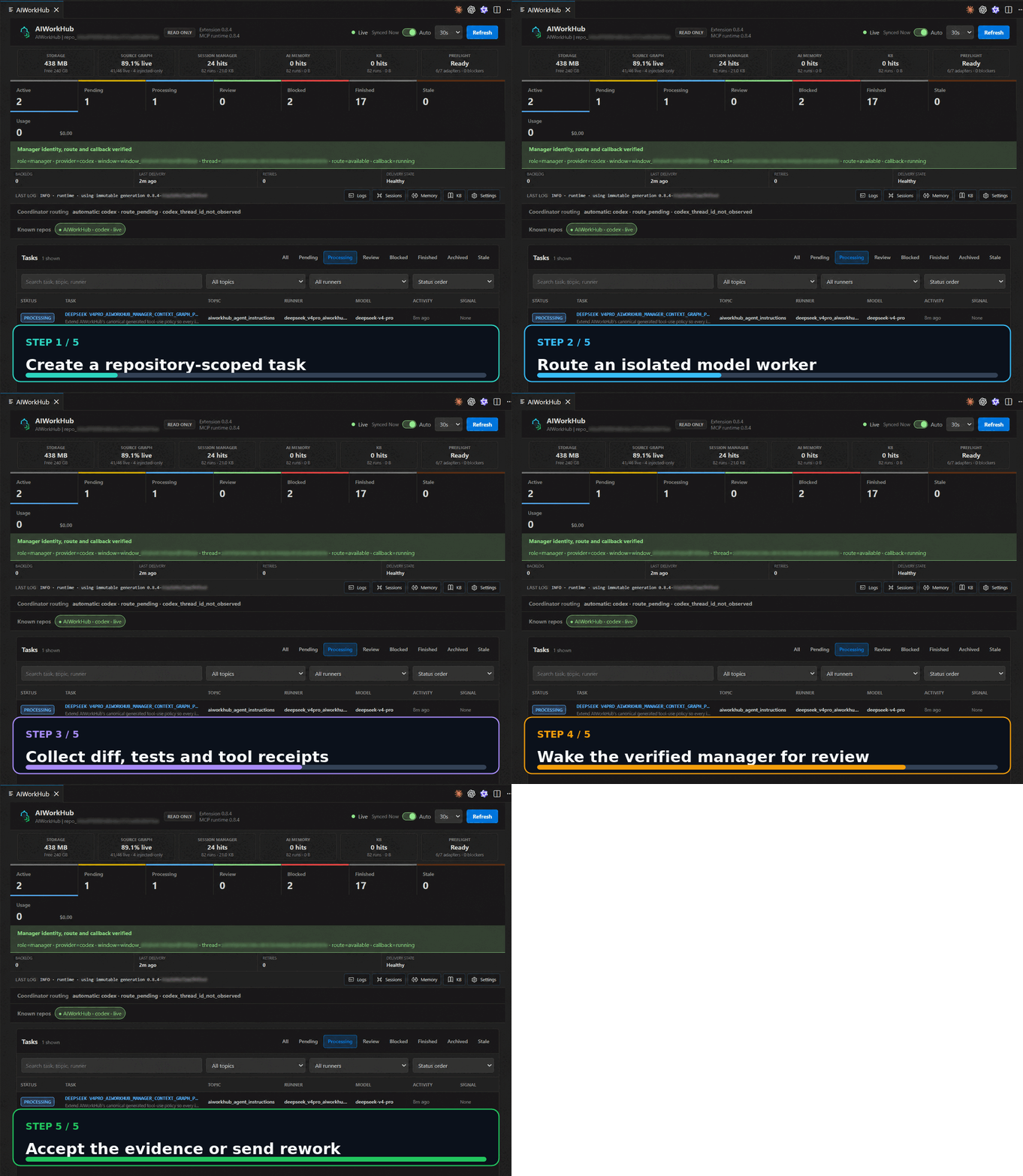 Create a bounded task, launch a model worker, inspect its evidence and accept or rework it.
What AIWorkHub is
AIWorkHub is a VS Code extension and MCP server. You talk to one manager AI.
It splits your goal into task cards and hands each card to a worker AI
(Codex, Claude, Copilot-hosted models, DeepSeek, GLM and others). Nothing lands
in your tree until independent review and measured validation accept it.
The extension opens as a retained editor tab and runs one repository-scoped MCP
stdio runtime on the workspace host. It needs no AIWorkHub cloud account, binds
no port and exposes no LAN service unless you start the opt-in WorkHub Mail
listener on a host and port you name.
How it works
- Card. The manager writes a bounded card: objective, acceptance criteria,
dependencies, allowed writes and validation.
- Isolated worker worktree. A worker runs the exact card in its own
worktree with repository-scoped Source Graph, Session, Memory and KB context.
- Validation gates. Mechanical checks and the card's declared tests run
first.
- Reviewer lenses. Independent correctness, security and code-quality
reviewers read the candidate; one aggregate decision packet reaches the
manager. Review automation never accepts or rejects on its own.
- Accept or reject. The manager promotes verified work, or rejects it with
exact residual work.
- NeedFix ledger. Findings are tracked as NeedFix records until a verified
fix resolves them.
Review automation
Automatic quality-review launch moves worker completion through a
system-owned correctness, security, and code-quality chain without
prematurely waking the manager. After every required lens passes, one
authenticated aggregate binds the candidate and reviewer evidence and emits
exactly one manager callback. Review automation never accepts or rejects the
implementation target; the verified manager receives only the completed
decision packet. Legacy review receipts remain compatible without blocking
later chains.
Architecture at a glance
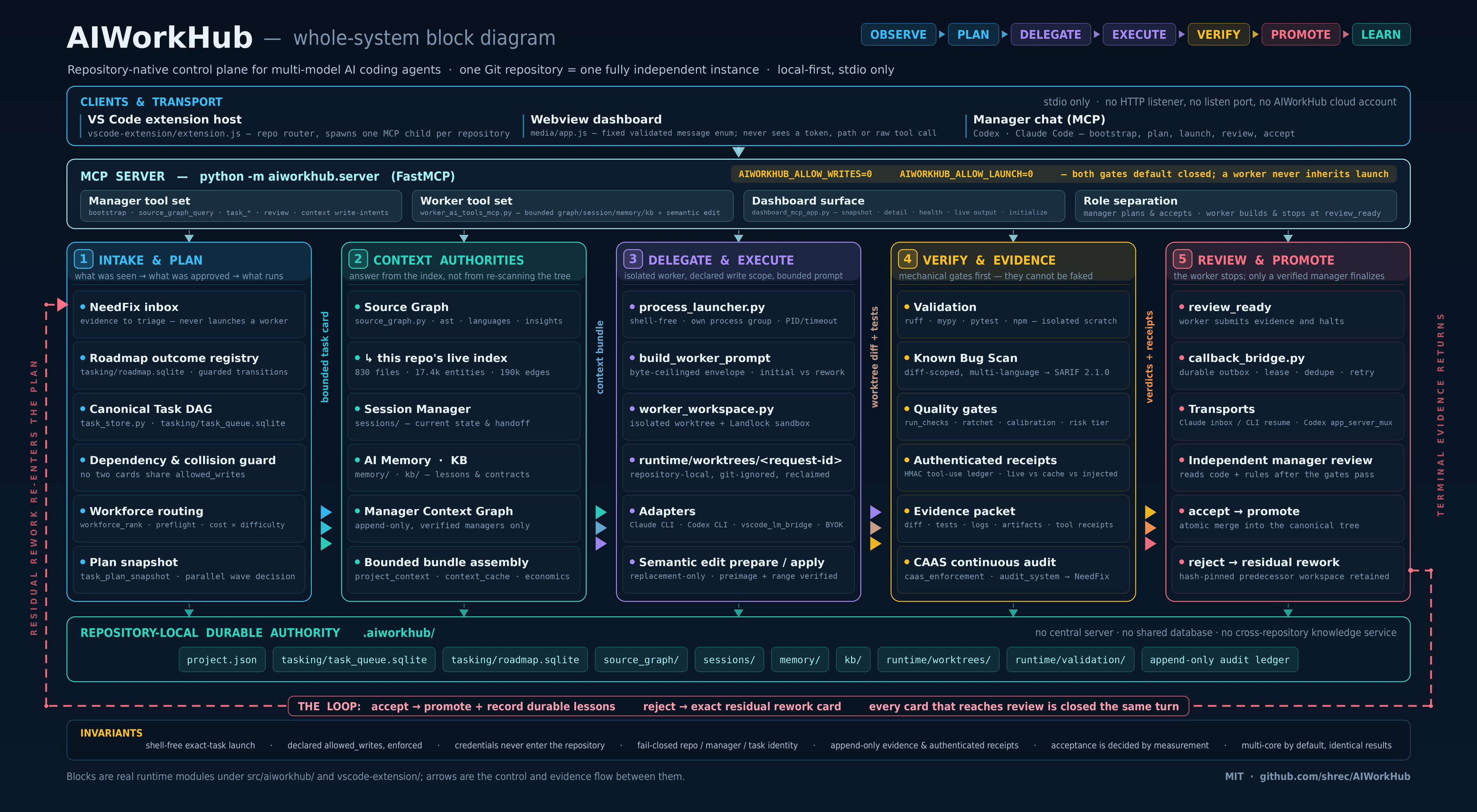 The complete AIWorkHub control plane, execution, evidence and improvement loop.
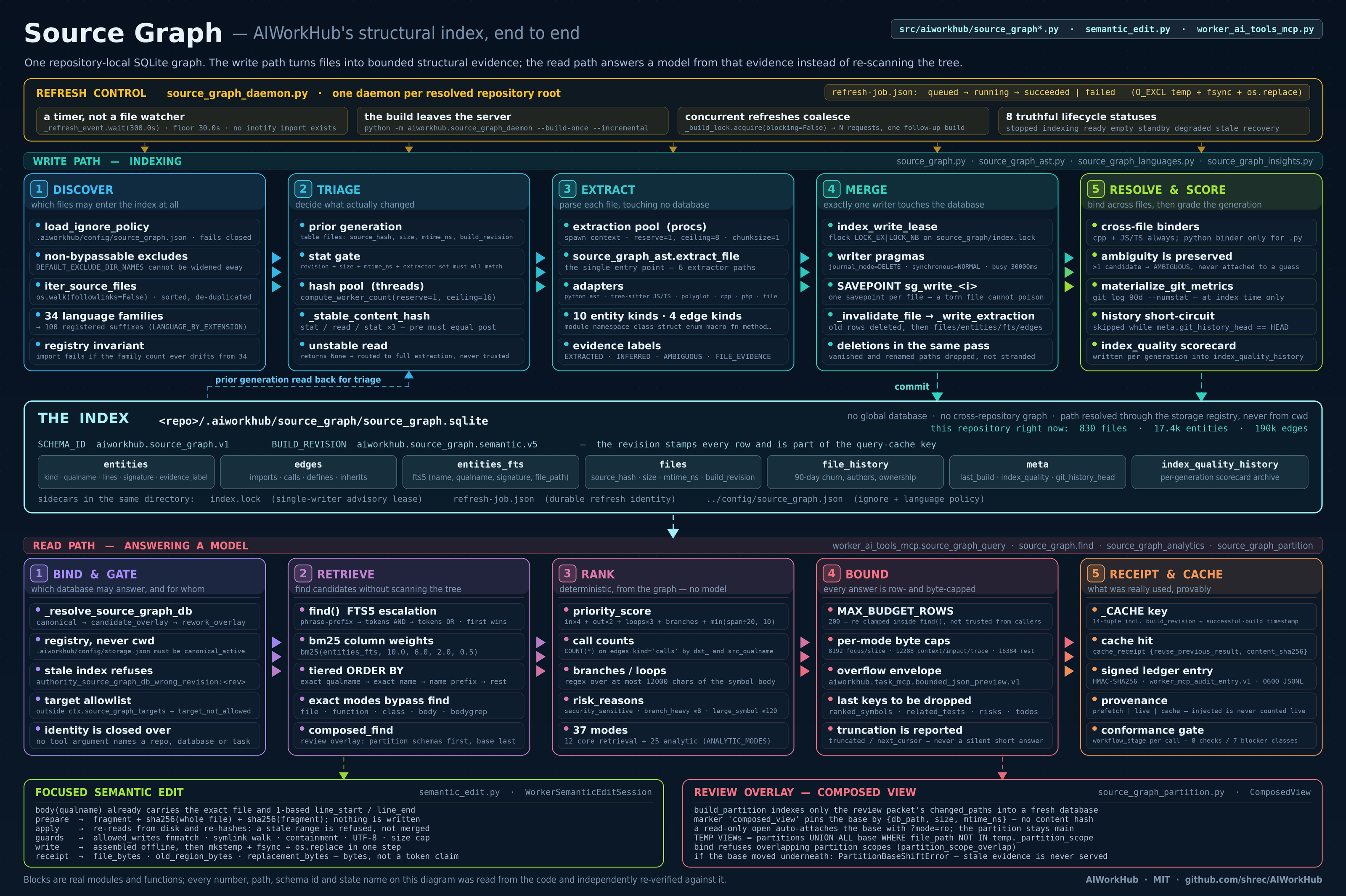 Incremental Source Graph refresh, index, query, semantic-edit and review-overlay paths.
Highlights
- Multi-provider workforce routing. Cards go to models by cost and observed
outcome, not by habit.
- Source Graph. A repository-local code index (including Dart) covering
exactly 34 language/file families, with
exactly 37 currently exposed bounded Source Graph query modes.
Workers change hash-verified line ranges through semantic edit instead of
rewriting whole files.
- Sandboxed workers. Worker processes run in a Windows AppContainer or a
Linux Landlock sandbox with explicit write scopes.
- NeedFix on the dashboard. Records are grouped by work state.
- Callback loop. A durable callback wakes the verified manager chat when a
worker reaches review. A callback is a wake-up, not an approval.
- Release cut. One ordered, fail-fast run takes a release from checks to a
tagged build.
Operational dashboard
The retained dashboard combines the task DAG, live worker output, Review
Inbox, callback health, model readiness, NeedFix records grouped by work state,
Source Graph coverage and bounded viewers for logs, sessions, AI Memory and KB.
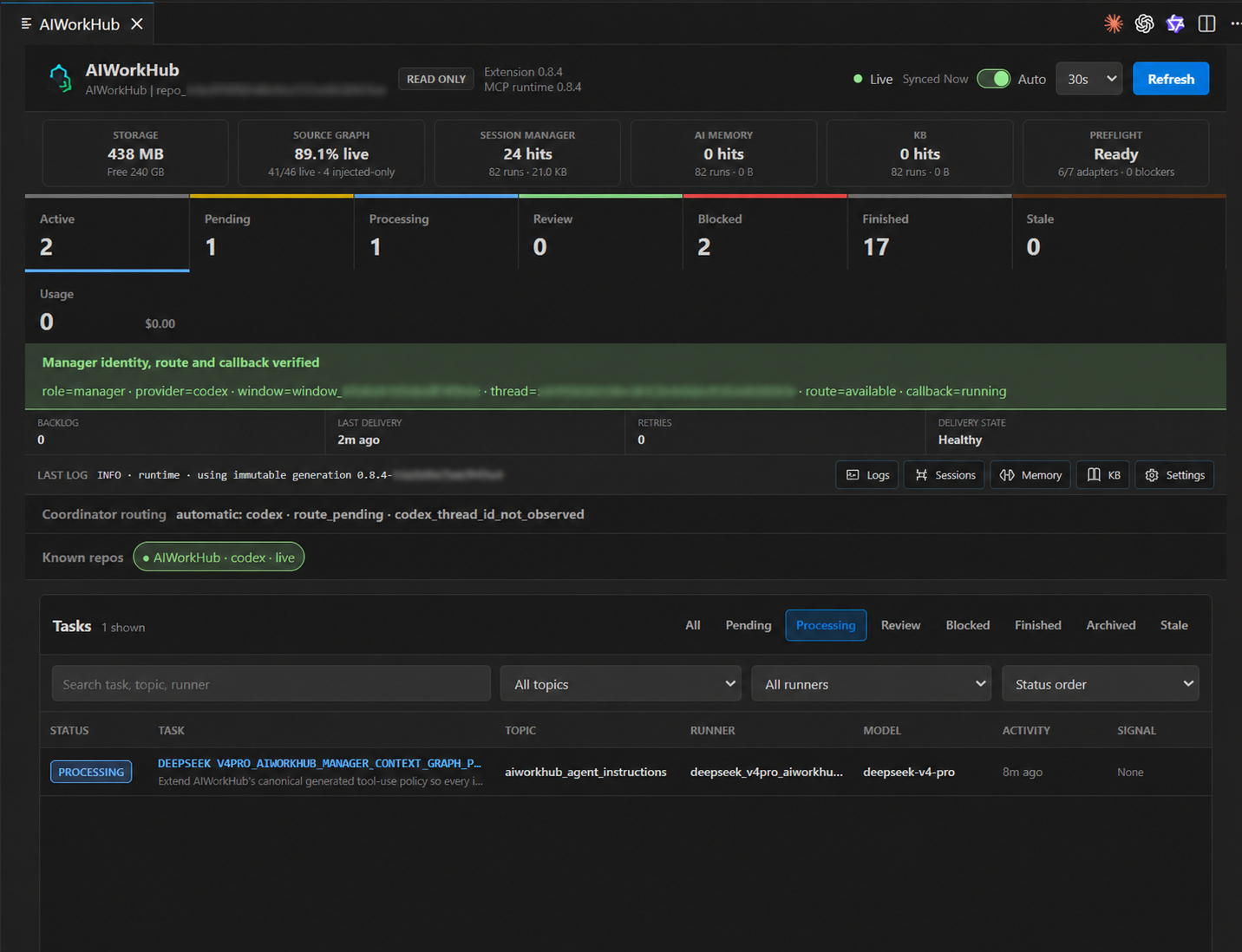 Tasks, callback health, source coverage, context stores, preflight and evidence in one retained editor tab.
What's new in 0.13.14
- Manager Chat panel: no wake for an already-terminal card and no redelivered wake; rotation before the provider's auto-compaction point; turn teardown stops the worker supervisors it launched; a Claude turn no longer ends early on an injected task notification.
- Callbacks for cards created by a Claude or Codex session stay on that session instead of moving to the Manager Chat panel.
- Terminal task worktrees, worker logs and earlier releases' test scratch are reclaimed; worker workspaces refuse a path that is not a git toplevel.
- Review and accept fixes: no replay of a reviewer whose receipt is gone, per-finding diff context, neighbour tests never silently cut, per-sub-phase accept timing.
Get started
- Install from the Marketplace (or install a release VSIX) and open a Git
repository in VS Code.
- Run AIWorkHub: Open Dashboard. In a multi-root workspace, select the
repository first.
- Choose Initialize AIWorkHub once. Initialization is explicit and
idempotent; it creates state only under
.aiworkhub/ and starts the first
Source Graph index in the background.
- Open a new Codex, Claude or MCP-capable chat afterwards so it discovers
the runtime tools. For Claude Code, initialization also maintains the
repository-local
.mcp.json registration and the AIWorkHub block in
CLAUDE.md.
- For automatic callbacks use the built-in Manager chat (any backend) or
Claude Code. A Codex sidebar chat is inbox-only and polls the review queue
itself; see
Callback delivery.
- Describe the outcome you want. The manager creates cards and launches
independent, dependency-ready work; inspect the result in Review and
accept or reject it.
Run your first task
Start a new chat after initialization or upgrade and paste:
Use AIWorkHub as manager for the currently bound repository. Call
aiworkhub_manager_bootstrap first; verify repository identity, manager route,
callback, Source Graph and preflight. Do not edit or launch yet. Report what is
ready and what is degraded.
Then describe the outcome normally. Creating a task leaves it pending; exact
claim plus launch makes it processing; workers stop at review_ready;
callbacks wake the current verified manager; and only that manager accepts or
rejects verified evidence.
Commands
- AIWorkHub: Open Dashboard — open or reveal the retained editor tab.
- AIWorkHub: Select Repository — bind the dashboard in a multi-root window.
- AIWorkHub: Refresh Dashboard — refresh the current repository snapshot.
- AIWorkHub: Restart MCP Connection — replace only AIWorkHub's selected
repository MCP child.
Models and authentication
AIWorkHub does not proxy credentials. It uses models already authenticated in
the editor or CLI; Preflight reports which routes are ready in this window.
| Runner |
Typical adapter |
Requirement |
| Codex |
Codex CLI or VS Code Language Model |
Existing Codex login or one-time VS Code consent |
| Claude |
Claude Code CLI or VS Code Language Model |
Existing Claude login or one-time VS Code consent |
| Copilot-hosted models |
VS Code Language Model |
GitHub sign-in and one-time model consent |
| DeepSeek |
VS Code Language Model or Copilot CLI fallback |
Provider visible in VS Code, or its own stored credential |
| GLM 5.3 |
VS Code Language Model or Copilot CLI fallback |
Provider visible in VS Code, or its own stored credential |
| Grok |
Observed Kilo/Grok worker route |
Existing provider login |
Source Graph and context
Source Graph is an incrementally refreshed structural repository index, not a
remote Sourcegraph service. Managers and workers start with low-token focus
and slice queries and widen to calls, impact or test mapping only when the
task needs it.
Session Manager stores current state and handoffs; AI Memory stores durable
lessons; KB stores curated project facts. All are repository-local and have
bounded viewers in the dashboard.
Requirements
- VS Code 1.93 or newer; the Python runtime is packaged with the extension.
- At least one authenticated model route (see above).
- Linux, macOS, native Windows, WSL and Remote-SSH.
- Remote development: AIWorkHub is a workspace extension. In Remote-SSH,
install it on the remote extension host; its packaged Python runtime, MCP
child and repository state run beside the remote checkout. No port
forwarding is required.
If the dashboard is not ready
- Connecting: run AIWorkHub: Restart MCP Connection once and check the
last-log row.
- A model is unavailable: open Preflight and grant the one-time model
consent when prompted.
- Source Graph is empty: initialize the repository and run a refresh.
- A chat cannot see tools: open a new chat after installation or upgrade.
Trust and privacy
- Local stdio transport; no AIWorkHub network listener.
- Read-only and launch-disabled by default.
- Repository-specific state, route identity and audit trail.
- No AIWorkHub telemetry upload of prompts, source, credentials or memories.
Documentation
Getting Started ·
Architecture ·
Source Graph ·
Security Policy ·
Changelog
AIWorkHub is open source under the
MIT License.