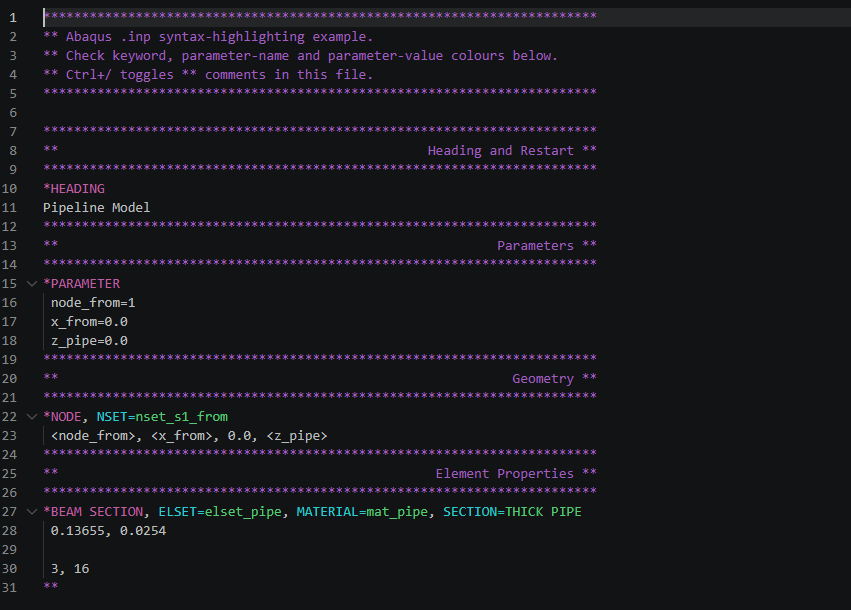
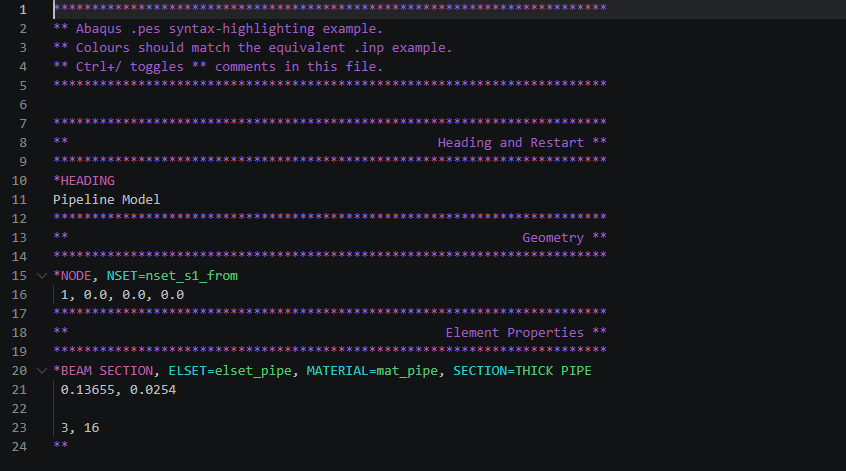
This Visual Studio Code extension provides syntax highlighting for Abaqus input files (.inp and .pes), including keywords, comments, parameters, and data lines.
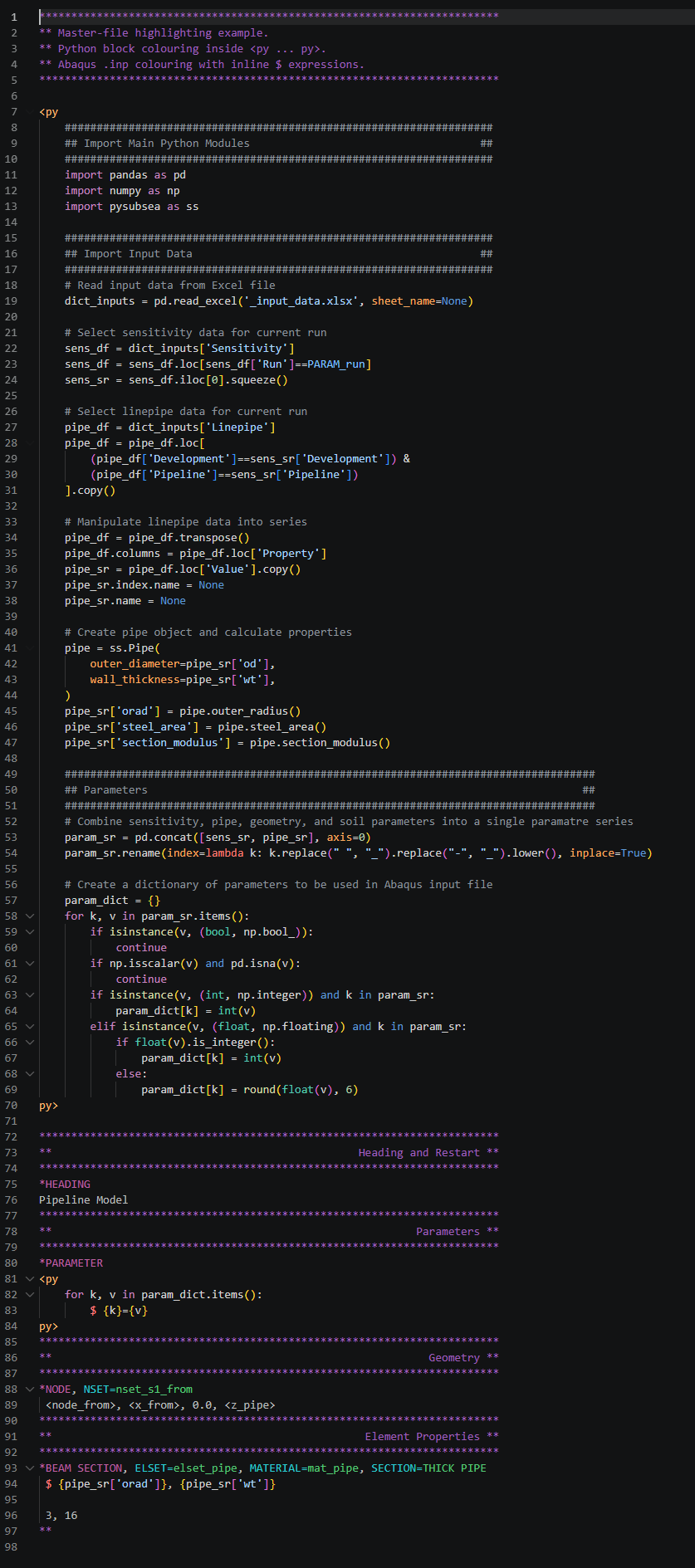
In addition to standard Abaqus syntax, the extension supports AbaqusPy syntax, including embedded Python blocks (<py ... py>) and $ output markers. AbaqusPy is optional; standard Abaqus syntax highlighting works independently of AbaqusPy and Pysubsea.
The extension is designed to improve readability and editing of Abaqus input files, particularly in automation and parametric modelling workflows.
Preview
Abaqus Parameter File (.pes):
AbaqusPy: Embedded Python and Output Markers
Features
- Abaqus keywords: Syntax highlighting for Abaqus keywords and directives (e.g.
*NODE, *ELEMENT, etc.).
- Parameters: Case-insentive highliting of parameter names, including standalone parameters and parameters on continued keyword lines.
- Embedded Python: Python syntax highlighting within AbaqusPy
<py and py> blocks, using VS Code's built-in Python grammar.
- Output markers: Syntax highlighting for AbaqusPy
$ output markers and the Abaqus syntax following them, both inside and outside <py ... py> blocks.
- Python expressions: Consistent highlighting of Python
{...} expressions consistently in output lines and parameter values, such as surf_sleeper_{i+1}.
- Comment toggling: Supports
Ctrl+/ to toggle Python # comments inside <py ... py> blocks and Abaqus ** comments outside them in .inp and .pes files.
- Light and dark themes: Syntax highlighting adapts to both light and dark VS Code themes.
- Automation workflows: Improves readability of complex
.inp and .pes files used in automation and parametric modelling workflows.
AbaqusPy and PySubsea
AbaqusPy is a Python preprocessor for Abaqus input files that allows users to embed Python code directly within their .inp files. It processes these files by executing the embedded Python code and generating standard Abaqus input files ready for execution.
This approach combines the flexibility of Python with the familiar structure of Abaqus input files, enabling parametric model generation, automated calculations, loops, conditional logic and dynamic input definitions.
AbaqusPy is part of PySubsea, an open-source Python framework developed to support automation and parametric workflows in subsea engineering. PySubsea provides a broader collection of tools and capabilities for subsea engineering applications, with AbaqusPy providing the functionality for Python-based Abaqus input-file processing.
This VS Code extension complements AbaqusPy by providing syntax highlighting for both standard Abaqus input syntax and its additional embedded Python syntax. The extension is independent and does not require PySubsea, AbaqusPy or a Python interpreter to provide syntax highlighting.
AbaqusPy Syntax
AbaqusPy extends conventional Abaqus .inp files with additional syntax for embedding Python code and generating Abaqus input data:
<py and py> blocks: Delimit embedded Python code, allowing variables, calculations, loops, conditional statements and other Python logic to be included directly in Abaqus input files.$ output markers: Identify Python-generated content that is inserted into the resulting Abaqus input file during preprocessing.
The generated file is a conventional Abaqus .inp file and can be executed using standard Abaqus tools.
For further information about AbaqusPy and the PySubsea framework, visit the following resources:
Security and Privacy
This extension provides syntax highlighting only and does not execute or process Abaqus input files.
- It does not execute scripts or run code contained in your files.
- It does not collect telemetry or usage data.
- It does not make network requests.
- All syntax highlighting is performed locally within Visual Studio Code.
Publisher and License
Developed and maintained by Subsea Energies.
This extension is licensed under the MIT License. See LICENSE for details.
Trademark Notice
This extension is an independent open-source project and is not affiliated with, endorsed by, or sponsored by Dassault Systèmes. Abaqus is a trademark of Dassault Systèmes.
Future Development
The extension currently focuses on syntax highlighting for Abaqus input files and AbaqusPy syntax. Potential areas for future development include:
- Context-aware completion: Suggest Abaqus keywords after
*, followed by relevant parameters and values for the selected keyword.
- Diagnostics and validation: Identify malformed keyword lines, missing required parameters and mismatched AbaqusPy
<py / py> tags. A keyword catalog could also enable version-aware validation.
- Code folding and navigation: Support folding of Abaqus sections such as parts, materials and steps, as well as embedded Python blocks. Provide document symbols for navigating between these sections.
- Hover documentation: Display concise descriptions of Abaqus keywords and parameters, optionally linking to the relevant Abaqus documentation.
- Code snippets: Provide templates for commonly used Abaqus keywords and blocks, such as
*NODE, *ELEMENT, *MATERIAL, and AbaqusPy loops.
- Formatting: Provide consistent formatting of keyword lines and parameter definitions while preserving data lines and numerical content.
- AbaqusPy integration: Explore optional integration with AbaqusPy to preprocess input files directly from VS Code and report processing errors. This would be provided as an explicit user-triggered operation, separate from the default syntax highlighting functionality.
These are potential development directions rather than currently supported features. Suggestions and contributions are welcome.

